
| Udvikler: | Jiulong Zhao (80) | ||
| Pris: | $4.99 | ||
| Rangeringer: | 0 | ||
| Anmeldelser: | 0 Skriv en anmeldelse | ||
| Kommentarer: | 0 Skriv kommentar | ||
| Lister: | 0 + 1 | ||
| Point: | 2 + 0 ¡ | ||
| Mac App Store | |||
Beskrivelse

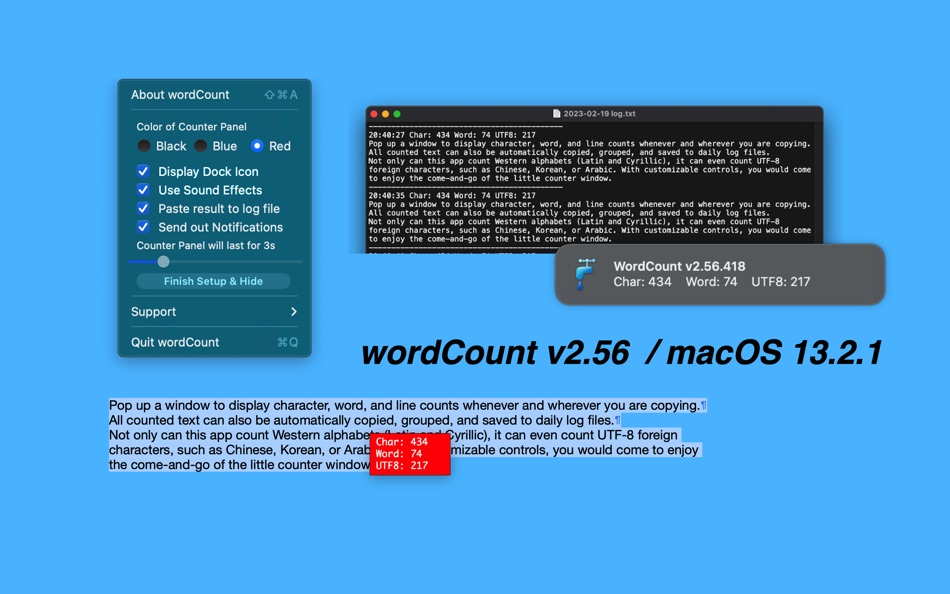
All counted text can also be automatically copied, grouped and saved to daily log files.
Not only can this app count Western alphabets (Latin and Cyrillic), it can even count UTF-8 foreign characters, such as Chinese, Korean or Arabic. With customizable controls, you would come enjoy the come and go of the little counter window.
Yes, it works with all browsers, apps, and even PDF files. Actually, it works anywhere as long you can select and copy!
Features: v1.21 -> v2.00 -> v2.02 see readme for detail as description limitation reached
v2.02 - v2.10
- Any Mac (Apple Silicon, Intel) version for macOS Big Sur
- interface fine-tuning for dark mode
- control interface modified
- count sound effect option added
- size of count window changed
- font of count changed to Monospaced font Monaco
- cancel displaying of seldom used line count, display UTF8 count and word count together
- sensitivity of count triggering adjusted
- support menu modified
- all deprecated functions rewritten
v2.10 -> v2.20
- count results can be sent to and displayed in the notification center
- count not only western alphabets, words and lines, but also UTF8 characters
- tiny, non-distracting pop-up counter window that fades out automatically
- pop-up counter window will display in front of all windows at the position of your mouse pointer
- pop-up counter window can be set to disappear after 1 to 15 seconds
- pop-up counter window will fade out instantly when clicked by mouse
- black, blue and red backgrounds
- dock menu icon can be hidden
- toggle-able sound effects
v2.20 ->v2.25
- upgrade version for the latest macOS Sierra
- improve button's visibility
- status menu bar icon changed
- hide / display dock icon option upgraded
- tip added for 'auto open at login' (auto start)
- user friendly log file saving folder under sandbox updated
- option added for simply changing or keeping the saved folder
- more by dragonBTV updated
v2.25 -> 2.30
- incorrect tip picture replaced
- fix dock icon displaying issue
- faster response upon triggering
- app size dramatically reduced
- menu re-arranged for simplification
- more by dragonBTV simplified
- performance improvements for macOS 10.13 High Sierra
v2.30 -> v2.50
- Any Mac (Apple Silicon, Intel) version for macOS Big Sur
- interface fine-tuning for dark mode
- control interface modified
- size of count window changed
- font of count changed to Monospaced font Monaco
- cancel displaying of seldom used line count, display UTF8 count and word count together
- sensitivity of count triggering adjusted
- support menu modified
- all deprecated functions rewritten
v2.50 -> v2.56
- user notification updated, all deprecated code rewritten
- turn on notification alert added
- status menu bar icon changed
- dark mode supported
- new version release note added
- status menu bar icon not only matches macOS dark mode but also the wallpaper light/dark setting
- display control panel added to dock menu and main menu
- More by dragonBTV menu updated
Ad
Skærmbilleder


Nyheder
- Version: v2.56
- Opdateret:
- v2.50 -> v2.56
- user notification updated, all deprecated code rewritten
- turn on notification alert added
- status menu bar icon changed
- dark mode supported
- new version release note added
- status menu bar icon not only matches macOS dark mode but also the wallpaper light/dark setting
- display control panel added to dock menu and main menu
- More by dragonBTV menu updated
Prishistorie
- I dag: $4.99
- Minimum: Gratis
- Maksimalt: $4.99
Overvåg priser
Ad
Udvikler
- Jiulong Zhao
- Platforme: iOS Apps (6) macOS Apps (74)
- Lister: 2 + 1
- Point: 201 + 7 ¡
- Rangeringer: 1 (1)
- Anmeldelser: 0
- Kommentarer: 0
- Rabatter: 0
- Videoer: 0
- RSS: Abonner
Point (2)
-

- 115 Денис
- +1
-
- 11,039 Simon Chan
- +1


Rangeringer (0)
0 ☹️
Lister (0)
0 ☹️
- wordCount
Anmeldelser (0)
Vær den første til at gennemgå 🌟
Kommentarer (0)
Vær den første til at kommentere 🌟
Yderligere oplysninger
- Version: v2.56
- Kategori:
macOS Apps›Virksomhed - Operativsystem:
macOS,macOS 11.0 eller nyere - Størrelse:
1 Mb - Understøttet sprog:
English - Indholdsklassificering:
4+ - Mac App Store Bedømmelse:
0 - Opdateret:
- Udgivelsesdato:
Kontaktpersoner
- Websted:
 http://tinyurl.com/iRest108
«wordCount». Platform: macOS. Kategori: Virksomhed. Udvikler: «Jiulong Zhao». Første udgivelse: . Sidste opdatering: . Nuværende pris: $4.99. Laveste registrerede pris: $0.00 (). Højeste registrerede pris: $4.99 (). Denne titel har endnu ikke modtaget vurderinger eller anmeldelser på AppAgg. Sporede punkter: bekræftede 2, indirekte 0. Tilgængelige sprog: English. AppAgg sporer prishistorik, vurderinger og brugerfeedback for «wordCount». Følg fremtidige rabatter og opdateringer via RSS. AppAgg hoster ikke applikationer eller distribuerer software. Alle varemærker, logoer og skærmbilleder tilhører deres respektive ejere.
wordCount Kort webadresse: Kopieret!- 🌟 Del
- Mac App Store
Du vil måske også kunne lide
-
- Word Count Popup
- macOS Apps: Virksomhed Ved: Jiulong Zhao
- $4.99
- Lister: 0 + 1 Rangeringer: 0 Anmeldelser: 0
- Point: 2 + 0 Kommentarer: 0 Version: v2.55 Pop up a window to display character, word, and line counts whenever and wherever you are copying. All counted text can also be automatically copied, grouped, and saved to daily log ... ⥯
-
- Word Writer - Word processor
- macOS Apps: Virksomhed Ved: GoodPDF Limited
- Gratis
- Lister: 0 + 0 Rangeringer: 0 Anmeldelser: 0
- Point: 0 + 0 Kommentarer: 0 Version: 1.5 Word Writer is a word processor that can make the writing and the picture have perfect layout, support Retina resolutions and export all the common formats: .pdf, .rtf, .docx and more ... ⥯
-
- Word to PDF | File Converter
- macOS Apps: Virksomhed Ved: Muhammad Afzal Noor Muhammad
- Gratis
- Lister: 0 + 0 Rangeringer: 0 Anmeldelser: 0
- Point: 1 + 0 Kommentarer: 0 Version: 3.3 PDF World Reader is a powerful PDF solution for your iPhone, iPad, and Mac. Any PDF expert or manager can use PDF Reader to annotate, edit, combine, convert, encrypt, PDF documents, ... ⥯
-
- PDF To Word - File Converter '
- macOS Apps: Virksomhed Ved: Faria Sajjad
- Gratis
- Lister: 0 + 1 Rangeringer: 0 Anmeldelser: 0
- Point: 6 + 0 Kommentarer: 0 Version: 1.8 PDF To Word Converter is an easy to use Tool. The simplicity of this app makes it an ultimate PDF TO WORD Converter for your device. PDF To Word Converter is a document converter that ... ⥯
-
- PDF to Word: DOC Converter
- macOS Apps: Virksomhed Ved: Waseem Shezad
- Gratis
- Lister: 0 + 0 Rangeringer: 0 Anmeldelser: 0
- Point: 0 + 0 Kommentarer: 0 Version: 2.3 PDF to Word converter helps you to quickly convert your PDF document into Word format or Word document into PDF format.The best thing about this application is no internet is required ... ⥯
-
- PDF to Word, File Converter
- macOS Apps: Virksomhed Ved: Muhammad Younas
- Gratis
- Lister: 0 + 0 Rangeringer: 0 Anmeldelser: 0
- Point: 0 + 0 Kommentarer: 0 Version: 1.6 PDF To Word Converter & Editor allows you to convert PDF files into word, doc, or Docx and vice versa in a few seconds. A user friendly application that takes less than 1 minute to ... ⥯
-
- iPDF - PDF to Word Converter
- macOS Apps: Virksomhed Ved: Tausif Akram
- Gratis
- Lister: 0 + 0 Rangeringer: 0 Anmeldelser: 0
- Point: 0 + 0 Kommentarer: 0 Version: 1.8 iPDF allows you to convert PDF files into word, doc, or Docx and vice versa in a few seconds. A user-friendly app that takes less than 1 minute to convert your file in the desired ... ⥯
-
- Document Writer Word Processor
- macOS Apps: Virksomhed Ved: Appgrammers LLC
- Gratis
- Lister: 0 + 1 Rangeringer: 0 Anmeldelser: 0
- Point: 1 + 0 Kommentarer: 0 Version: 2.0 Advanced, powerful and beautiful word processor. Create/Open/Edit/Save as a variety of formats including: .doc (Upgrade to Pro) .docx (Upgrade to Pro) .rtf .rtfd .html .txt .odt .pdf ... ⥯
-
- PDF to Word - Flyingbee
- macOS Apps: Virksomhed Ved: Flyingbee Software Co., Ltd.
- * Gratis
- Lister: 0 + 0 Rangeringer: 0 Anmeldelser: 0
- Point: 0 + 0 Kommentarer: 0 Version: 10.0.6 As everyone knows, converting PDFs to MS Office formats is extremely challenging, but we provide unparalleled accuracy in formatting and content preservation! Offline conversion, No ... ⥯
-
- PDF to Word ++
- macOS Apps: Virksomhed Ved: 科 姚
- * $12.99
- Lister: 0 + 0 Rangeringer: 0 Anmeldelser: 0
- Point: 0 + 0 Kommentarer: 0 Version: 6.0 PDF to Word ++ is an easy-to-use PDF Converter with OCR ability, which can convert both electronic and scanned PDF documents into editable and well-formatted Word document (.docx,.doc) ⥯
-
- PDF to Word Pro for Adobe PDFs
- macOS Apps: Virksomhed Ved: PDF Technologies, Inc.
- $9.99
- Lister: 1 + 0 Rangeringer: 0 Anmeldelser: 0
- Point: 0 + 0 Kommentarer: 0 Version: 1.4 Fully compatible with macOS Monterey 12.0.1 and Microsoft Office Word 2020, PDF to Word Pro Edition is the best PDF to Word converter on Mac, exporting PDF files to fully-formatted and ⥯
-
- PDF to Word Converter - Fast
- macOS Apps: Virksomhed Ved: 庭法 符
- * Gratis
- Lister: 0 + 0 Rangeringer: 0 Anmeldelser: 0
- Point: 0 + 0 Kommentarer: 0 Version: 2.3.0 Convert any Acrobat PDF files to Word, Text, HTML, RTF format files with super fast speed. No need to copy-paste, No need to upload, 100% process document conversion on your device, so ⥯
-
- Pdf to Word • Pdf Converter
- macOS Apps: Virksomhed Ved: Javeria Jabeen
- Gratis
- Lister: 0 + 0 Rangeringer: 0 Anmeldelser: 0
- Point: 1 + 0 Kommentarer: 0 Version: 1.0.5 The most accurate and easy PDF to Word Converter is now available on AppStore. Get the latest Photo to PDF converter app to convert all of your documents easily from one format to ... ⥯
-
- Go Word - for Microsoft Word Edition & Open Office Format
- macOS Apps: Virksomhed Ved: Global Executive Consultants (Shanghai) Ltd
- $9.99
- Lister: 0 + 0 Rangeringer: 0 Anmeldelser: 0
- Point: 0 + 0 Kommentarer: 0 Version: 1.2.6 70% cut off until October 5th, seize your day! Go Word is the powerful word processor for OS X. An intuitive interface, powerful writing tools, and unmatched compatibility make Go Word ⥯