
| ผู้พัฒนา: | Space In Box (7) | ||
| ราคา: | ฟรี | ||
| การจัดอันดับ: | 0 | ||
| ความเห็น: | 0 เขียนความเห็น | ||
| ความเห็น: | 0 โพสต์ความคิดเห็น | ||
| รายการ: | 0 + 0 | ||
| แต้มแล: | 0 + 0 ¡ | ||
| Mac App Store | |||
คำอธิบาย

Key features
- Browse your GitHub repositories and view Actions workflows and recent runs quickly.
- Inspect run status (success, failure, queued, in progress) with clear badges and counts.
- View job logs: download and preview run logs for quick troubleshooting.
- Dispatch workflows, cancel running workflows, and re-run failed runs directly from the app.
- Favorites and quick search let you focus on the repositories and workflows that matter most.
- Desktop notifications for run completions and failures so you never miss important results.
- In-memory caching and efficient refresh make the app responsive while respecting GitHub rate limits.
- Secure authentication using OAuth (PKCE); tokens are stored securely in the macOS Keychain.
Privacy & security
We only request minimum GitHub scopes required for the features you use. Authentication uses OAuth PKCE and tokens are stored in the macOS Keychain. We do not send your logs or tokens to third-party servers without your explicit consent. See the app’s Privacy Policy for details.
Getting started
Sign in with your GitHub account (OAuth), grant the requested scopes, and the app will list your repositories and workflows. For CI/CD administrators and individual developers alike, Actioneer makes monitoring and simple management of GitHub Actions fast and convenient.
Ad
ภาพหน้าจอ



มีอะไรใหม่
- เวอร์ชัน: 1.2
- อัปเดต:
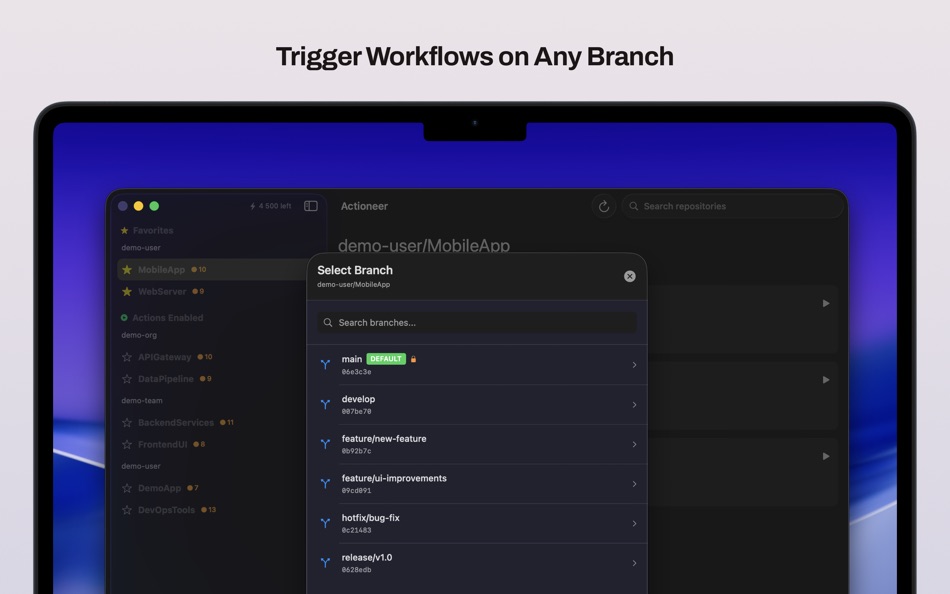
- - Trigger workflows on any branch: pick a branch from a searchable branch selector when starting a workflow.
- Reduced API usage: background refresh and ETag caching minimize calls to GitHub so you hit rate limits less often.
- Better run/job badges and clearer status indicators so you can spot failing or running workflows at a glance.
- Various reliability fixes and small performance improvements.
If you rely on automation or CI, Actioneer now keeps a smaller, focused view of runs while still retaining the full data under the hood.
ราคา
- วันนี้: ฟรี
- ต่ำสุด: ฟรี
- มากที่สุด: ฟรี
ติดตามราคา
Ad
ผู้พัฒนา
แต้มแล (0)
0 ☹️
การจัดอันดับ (0)
0 ☹️
รายการ (0)
0 ☹️
- Actioneer - Command your CI
ความเห็น (0)
แสดงรีวิวเป็นคนแรกเลย 🌟
ความเห็น (0)
เป็นคนแรกที่แสดงความเห็น 🌟
ข้อมูลเพิ่มเติม
- เวอร์ชัน: 1.2
- หมวดหมู่:
macOS แอป›เครื่องมือ - ระบบปฏิบัติการ:
macOS,macOS 14.6 และสูงกว่า - ขนาด:
4 Mb - ภาษาที่สนับสนุน:
English - การจัดประเภทเนื้อหา:
4+ - Mac App Store คะแนนโดย:
0 - อัปเดต:
- วันที่วางจำหน่าย:
รายชื่อติดต่อ
- เว็บไซท์:
 https://spaceinbox.me/actioneer
Actioneer - Command your CI URL แบบสั้น: คัดลอกแล้ว!- 🌟 แชร์
- Mac App Store
คุณอาจชอบ
-
- CI Demon
- macOS แอป: เครื่องมือ โดย: Oscar Franco
- ฟรี
- รายการ: 0 + 2 การจัดอันดับ: 0 ความเห็น: 0
- แต้มแล: 6 + 0 ความเห็น: 0 เวอร์ชัน: 3.0.27 CI Demon is macOS menu bar app that aggregates information and notifies you when your CI builds or deployments are broken (or restored), it shows you all the relevant information in a ... ⥯
-
- Command Helper
- macOS แอป: เครื่องมือ โดย: 鹏 张
- * ฟรี
- รายการ: 0 + 0 การจัดอันดับ: 0 ความเห็น: 0
- แต้มแล: 0 + 0 ความเห็น: 0 เวอร์ชัน: 1.0.14 Command Helper is your all-in-one solution for managing, organizing, and executing shell commands on macOS. Whether you re a developer, system administrator, or power user, Command ... ⥯
-
- Houston - App Command Center
- macOS แอป: เครื่องมือ โดย: Brandon Smuin
- ฟรี
- รายการ: 0 + 0 การจัดอันดับ: 0 ความเห็น: 0
- แต้มแล: 0 + 0 ความเห็น: 0 เวอร์ชัน: 1.0 Houston is a deployment dashboard for monitoring applications on Heroku and Render from a single interface. Features View deployment status, commit info, and build history for all ... ⥯
-
- DropDMG
- macOS แอป: เครื่องมือ โดย: C-Command Software, LLC
- $24.99
- รายการ: 1 + 0 การจัดอันดับ: 0 ความเห็น: 0
- แต้มแล: 2 + 0 ความเห็น: 0 เวอร์ชัน: 3.7.1 DropDMG is the easiest way to create macOS disk images, as well as cross-platform archives. Just drag and drop a folder or file and you re done. Or, you can drag an existing disk image ⥯
-
- Telescopo: Markdown & Diagrams
- macOS แอป: เครื่องมือ โดย: Bad Command AI
- * ฟรี
- รายการ: 0 + 2 การจัดอันดับ: 0 ความเห็น: 0
- แต้มแล: 6 + 0 ความเห็น: 0 เวอร์ชัน: 5.1.0 Telescopo is the fastest, most beautiful Markdown and diagram viewer on macOS. Start free with a powerful native Markdown viewer, clean rendering, local and remote images, light and ... ⥯
-
- Modbus RTU to TCP
- macOS แอป: เครื่องมือ โดย: Nor Ci
- ฟรี
- รายการ: 0 + 0 การจัดอันดับ: 0 ความเห็น: 0
- แต้มแล: 0 + 0 ความเห็น: 0 เวอร์ชัน: 1.0 This application reads Modbus RTU/Serial device data and publishes it as Modbus TCP Server. ⥯
-
- System Color Picker
- macOS แอป: เครื่องมือ โดย: Sindre Sorhus
- ฟรี
- รายการ: 1 + 3 การจัดอันดับ: 0 ความเห็น: 0
- แต้มแล: 6 + 0 ความเห็น: 0 เวอร์ชัน: 2.2.1 Pick colors from anywhere using the built-in color picker. Note: On macOS 26, a system bug causes the color sampler to sometimes pick the wrong color. The app relies on macOS's color ... ⥯
-
- Dush ( coding utilities )
- macOS แอป: เครื่องมือ โดย: 伟胜 林
- $0.99
- รายการ: 0 + 2 การจัดอันดับ: 0 ความเห็น: 0
- แต้มแล: 11 + 0 ความเห็น: 0 เวอร์ชัน: 3.2 Dush provide Instant search and offline access tool for custom help file , provide toolset in Xcode editor. Features : 1.Quick search from Xcode editor and do not need to select text ... ⥯
-
- Termius: SSH Client & Terminal
- macOS แอป: เครื่องมือ โดย: Termius Corporation
- * ฟรี
- รายการ: 2 + 2 การจัดอันดับ: 0 ความเห็น: 0
- แต้มแล: 6 + 0 ความเห็น: 0 เวอร์ชัน: 9.37.2 Termius is a modern SSH client designed for productivity and collaboration. Connect with one click from desktop and mobile no re-entering IP addresses, ports, and passwords. With a ... ⥯
-
- Gitfox
- macOS แอป: เครื่องมือ โดย: Erik Aigner
- * ฟรี
- รายการ: 0 + 3 การจัดอันดับ: 0 ความเห็น: 0
- แต้มแล: 6 + 0 ความเห็น: 0 เวอร์ชัน: 4.1.0 REPOSITORY MANAGER Quickly see all your repositories at a glance and if they have uncommitted changes. If your repository has a Markdown README, it is automatically rendered. Have your ⥯
-
- Medis 2 - GUI for Redis
- macOS แอป: เครื่องมือ โดย: 子骅 李
- * ฟรี
- รายการ: 1 + 1 การจัดอันดับ: 0 ความเห็น: 0
- แต้มแล: 8 + 0 ความเห็น: 0 เวอร์ชัน: 2.16.1 Medis is a modern, delightful, and professional Redis GUI. It's designed and developed by Redis experts, making it trustworthy even in critical situations. Notable Features: Support ... ⥯
-
- RemoteTV
- macOS แอป: เครื่องมือ โดย: 利志 侯
- $0.99
- รายการ: 0 + 1 การจัดอันดับ: 0 ความเห็น: 0
- แต้มแล: 7 + 0 ความเห็น: 0 เวอร์ชัน: 1.6 - 使用方法 TV 设备开启ADB调试,Mac 链接到同一局域网,输入对应 TV设备IP链接控制,使用快捷键 Command+Y 打开遥控 - 功能 - 遥控方向以及确认返回返回主页 可以使用键盘上 下 左 右 回车 删除返回 按键快捷控制 - 音量调节( Command +/- ) - 安装APK ( Command + I ) - 发送文本到远程输入框 ⥯
-
- iXLIFF
- macOS แอป: เครื่องมือ โดย: VDS SRL
- ฟรี
- รายการ: 1 + 1 การจัดอันดับ: 0 ความเห็น: 0
- แต้มแล: 7 + 0 ความเห็น: 0 เวอร์ชัน: 1.6.3 This app allows easy opening and editing of XLIFF files. If you are a translator, this app is the easiest way to edit the XLIFF files without having to make sure the file structure ... ⥯
-
- SQLiteFlow - SQLite Editor
- macOS แอป: เครื่องมือ โดย: 晨亮 贾
- * ฟรี
- รายการ: 1 + 0 การจัดอันดับ: 0 ความเห็น: 0
- แต้มแล: 6 + 0 ความเห็น: 0 เวอร์ชัน: 6.8.0 Two-week free trial! So you can purchase SQLiteFlow after you know you like it! SQLiteFlow is an SQLite editor for Mac & iOS which is intuitive, stable and reliable to use. It includes ⥯