
Uložené
Zvolte název, který se bude zobrazovat v nabídce Uložené.
Hotovo!
| Vývojář: | Lumary Labs LLC (2) | ||
| Cena: | $14.99 | ||
| Hodnocení: | 0 | ||
| Komentáře: | 0 Přidat komentář | ||
| Seznamy: | 0 + 0 | ||
| Body: | 0 + 0 ¡ | ||
| Mac App Store | |||
Popis

ScreenAnnotations is a native macOS menu bar app for screen annotation, whiteboarding, presentations, and AI-assisted diagramming. It gives you a transparent overlay on top of any app plus a dedicated whiteboard workspace for diagrams, notes, teaching, demos, and visual explanations.
NEW IN 1.2
- import saved `.screenannotation` files directly into the All Boards gallery
- drag and drop saved board files into the gallery
- branded Finder icon plus direct open from Finder for saved board files
- new layout tools: align, distribute, row, column, flow, and tree
- scene-based presentation with a dedicated Scene Manager
- scene thumbnails, drag reorder, duplicate, multi-delete, and animated transitions
- new board history with snapshots, restore, and duplicate-as-board
- expanded local MCP support for boards, scenes, presentation control, and snapshots
- clearer settings organization and stronger whiteboard workflow polish
DRAW ON YOUR SCREEN
Use Screen Overlay mode to draw directly on top of your desktop, browser, design tool, IDE, or presentation:
- Pen, Highlighter, Arrow, Line, Shape, Text, Formula, Image, Eraser, Laser Pointer, Select, and Hand
- keyboard shortcuts for fast tool switching
- color, width, stroke, and fill controls
- straight, curved, and elbow arrows
WHITEBOARD WORKSPACE
Switch to fullscreen or windowed whiteboard mode when you want a clean canvas:
- infinite pan and zoom
- multiple boards with an All Boards gallery
- save, rename, organize, import, and reopen boards
- 4 background patterns: Blank, Dots, Grid, and Lines
WHITEBOARD CONTENT
Whiteboard mode supports more than freehand drawing:
- sticky notes with editable text and colors
- editable tables with add row/add column, autogrow, fill, and text color
- rich link cards with preview image, icon, title, and host
DIAGRAMS, STEM, AND TEACHING
ScreenAnnotations includes 135+ shapes across 20 categories, including:
- general drawing and flowchart symbols
- architecture and computer science shapes
- science and lab shapes
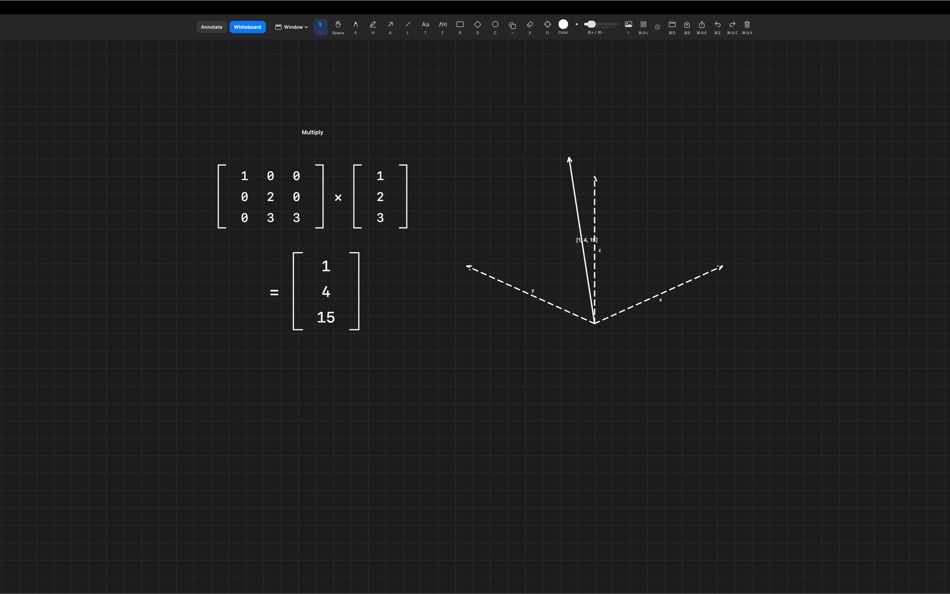
- math, physics, electronics, vectors, matrices, and graphing tools
- LaTeX-style formula rendering
LAYOUT TOOLS
Clean up diagrams faster:
- align left, center, right, top, middle, bottom
- distribute horizontally or vertically
- arrange items into rows or columns
- graph-aware flow and tree layouts
- connected arrows stay attached as nodes move
PRESENTATION MODE
Build and present scene-based whiteboards:
- create scenes from the current view or selection
- manage scenes in a dedicated Scene Manager
- rename, duplicate, reorder, update, switch, and delete scenes
- use scene thumbnails and multi-select cleanup
- animate transitions between scenes, including Fade and Dip to Black
BOARD HISTORY
Whiteboards now include local history tools:
- save manual snapshots
- automatic snapshots while you work
- restore an earlier board state
- duplicate a snapshot as a new board
- configure snapshot retention
LOCAL AI / MCP
ScreenAnnotations includes local MCP support for AI-assisted whiteboard and screen drawing:
- draw shapes, arrows, formulas, text, academic objects, and full diagrams
- create and manage boards
- create, reorder, present, and transition scenes
- save, list, restore, and duplicate snapshots
SAVE, EXPORT, AND WORK LOCALLY
- save as `.screenannotation` files
- export transparent PNGs
- multi-display support
- configurable global hotkeys
- menu bar app with no dock icon
- no cloud, no analytics, no tracking, no account
macOS 15.0 or later.
Ad
Snímky obrazovky




Historie cen
- Aktuální cena: $14.99
- Minimální: $14.99
- Maximální: $14.99
Sledovat ceny
Další informace
- Datum vydání:
- Kategorie:
macOS Aplikace›Nástroje - OS:
macOS,macOS 15.0 a vyšší - Velikost:
12 Mb - Podporovaný jazyk:
English - Hodnocení obsahu:
4+ - Mac App Store Hodnocení:
0
 https://screenannotations.com/
Novinky
- Verze: 1.2
- Aktualizováno:
- ScreenAnnotations 1.2
What’s new in this release:
- Import saved `.screenannotation` files directly into the All Boards gallery
- Drag and drop saved board files into the gallery
- Saved board files now use a branded Finder icon and open directly in ScreenAnnotations from Finder
- New whiteboard layout tools: align, distribute, row, column, flow, and tree
- Connected arrows stay attached when nodes move through layout actions
- New scene-based presentation workflow for whiteboards
- Create scenes from the current view or current selection
- Dedicated Scene Manager window for adding, renaming, duplicating, reordering, updating, switching, and deleting scenes
- Scene Manager shows scene thumbnails and supports multi-select deletion
- Animated scene transitions with multiple styles, including Fade and Dip to Black
- New board history with automatic and manual snapshots
- Restore snapshots, delete snapshots, or duplicate a snapshot as a new board
- Configurable snapshot retention limit
- Expanded Settings window with a dedicated Whiteboard tab, more defaults, and clearer previews
- MCP support now includes boards, scenes, presentation controls, and snapshots
- New empty-space right-click action: `Fit Nearby in View`
- Whiteboard label editing, text placement, and tool switching are more stable and predictable
- Shape picker recents now show as a flat recent-use section instead of regrouping by category
This file is still a working draft and should be updated again if additional `1.2` work is finalized.
Vývojář
- Lumary Labs LLC
- Platformy: macOS Aplikace (2)
- Seznamy: 0 + 0
- Body: 1 + 0 ¡
- Hodnocení: 0
- Komentáře: 0
- Slevy: 0
- Videa: 0
- RSS: Odebírat
Seznamy (0)
0 ☹️
- Annotate Screen
Body (0)
0 ☹️
Hodnocení (0)
0 ☹️
Komentáře (0)
Buďte první, kdo okomentuje 🌟
«Annotate Screen». Platforma: macOS. Kategorie: Nástroje. Vývojář: «Lumary Labs LLC». První vydání: . Poslední aktualizace: . Aktuální cena: $14.99. Nejnižší zaznamenaná cena: $14.99. Nejvyšší zaznamenaná cena: $14.99. Tento titul zatím na AppAgg nezískal hodnocení ani recenze. Dostupné jazyky: English. AppAgg sleduje historii cen, hodnocení a zpětnou vazbu od uživatelů «Annotate Screen». Sledujte budoucí slevy a aktualizace prostřednictvím RSS. AppAgg nehostuje aplikace ani nedistribuuje software. Všechny ochranné známky, loga a snímky obrazovky patří jejich příslušným vlastníkům.
Annotate Screen Krátká adresa URL: Zkopírováno!- 🌟 Sdílet
- Mac App Store
Podobné
-
- Mirror Phone Screen
- macOS Aplikace: Nástroje Podle: Rodrigo Velazquez Tapia
- $5.99
- Seznamy: 0 0 0
- Body: 0 Verze: 1.02 Transform your Mac into a powerful hub for your iOS devices. Mirror Phone Screen is a professional, lightweight utility designed to mirror, capture, and record video feeds from ... ⥯
-
- Echo: Easy Screen Mirroring
- macOS Aplikace: Nástroje Podle: Alexis Rondeau
- Zdarma
- Seznamy: 0 0 0
- Body: 0 Verze: 1.6.1 Tired of configuring your external displays every time? Echo makes it effortless instantly sync all your displays with just one click. - One-Click Mirroring: Mirror the largest, ... ⥯
-
- Biaoji
- macOS Aplikace: Nástroje Podle: Yee Pin New
- Zdarma
- Seznamy: 0 0 0
- Body: 0 Verze: 2.0.0 Vision and Language Annotation Tool - Streamline Your ML Dataset Labeling Efficiently build high-quality machine learning datasets with our advanced Annotation Tool. Designed for data ... ⥯
-
- Klipped
- macOS Aplikace: Nástroje Podle: Andrew Drake
- Zdarma
- Seznamy: 0 + 2 0 0
- Body: 19 Verze: 3.0.2 Beauty in simplicity. Klipped is a minimalist scratch pad that is a buddy for all your other apps. Write ideas down. Paste text and use as a clipboard; delete when you re done. No ... ⥯
-
- RocketSim for Xcode Simulator
- macOS Aplikace: Nástroje Podle: SwiftLee
- * Zdarma
- Seznamy: 1 + 3 0 0
- Body: 9 Verze: 15.1.0 RocketSim enhances the Xcode Simulator for iOS and iPadOS development: boost productivity and streamline your workflow with capture, networking, build insights, and quick actions ... ⥯
-
- xScope 4
- macOS Aplikace: Nástroje Podle: The Iconfactory
- $49.99
- Seznamy: 3 + 3 0 0
- Body: 0 Verze: 4.7.2 Created specifically for designers & developers, xScope is a powerful set of tools that are ideal for measuring, inspecting & testing on-screen graphics and layouts. xScope s tools ... ⥯
-
- Color Picker - Pikka
- macOS Aplikace: Nástroje Podle: Ruslan Sayfutdinov
- * Zdarma
- Seznamy: 2 + 1 0 0
- Body: 6 Verze: 4.0.4 ** Apple's pick for Apps And Games We Love Right Now ** Pikka - Color Picker is an easy-to-use color picker and palette generator for developers and designers that works well with ... ⥯
-
- Expressions
- macOS Aplikace: Nástroje Podle: Apptorium
- $7.99
- Seznamy: 2 + 3 0 1 (1)
- Body: 1 Verze: 1.3.9 Expressions allows to play with regular expressions*. Just type your pattern and some text to test it. All the changes are updated while you're typing text or pattern. App highlights ... ⥯
-
- Vulcan: generator for SwiftUI
- macOS Aplikace: Nástroje Podle: Pure Creek
- * Zdarma
- Seznamy: 0 + 2 0 0
- Body: 7 Verze: 2.14 Vulcan allows developers to generate the SwiftUI code for an entire iOS app in minutes. Vulcan is not a design tool. It's objective is to generate all the tedious bolierplate for the ... ⥯
-
- AnnotationCreater
- macOS Aplikace: Nástroje Podle: Weida Fan
- Zdarma
- Seznamy: 0 0 0
- Body: 1 Verze: 1.8 Generate createML annotations which can be trained by createML. Feature: Annotate based on a trained model Go to Annotate > based on model... and drop a trained model. (.mlmodel or ... ⥯
-
- devPad
- macOS Aplikace: Nástroje Podle: John Taverna
- $7.99
- Seznamy: 1 0 5 (1)
- Body: 1 Verze: 1.9 devPad is a slide-out utility panel for macOS that gives you instant access to a browser, code editor, AI assistant, and developer tools-all triggered by moving your cursor to the ... ⥯
-
- Frame Array: Video to AI
- macOS Aplikace: Nástroje Podle: Jose Manuel Jacas Saez-Merino
- $9.99
- Seznamy: 0 0 0
- Body: 0 Verze: 1.0 Launch Special 50% OFF for a limited time! Frame Array helps you turn any video into a structured, easy-to-read contact sheet. Perfect for giving visual context to tools that can t ... ⥯
- -100%
- ExactShot
- macOS Aplikace: Nástroje Podle: Konstantin Kolomeitsev
- ▼ Zdarma
$1.99-100% - Seznamy: 0 + 1 0 0
- Body: 5 Verze: 1.0.0 ExactShot Editable Screenshots for macOS Capture screenshots you can clean up and adjust after the shot. Remove distractions, move UI elements, and export layered PSD files. A normal ... ⥯