
| ผู้พัฒนา: | Beijing Tapfeng Technology Co., Ltd (6) | ||
| ราคา: | * ฟรี | ||
| การจัดอันดับ: | 0 | ||
| ความเห็น: | 0 เขียนความเห็น | ||
| รายการ: | 0 + 1 | ||
| แต้มแล: | 0 + 0 ¡ | ||
| Mac App Store | |||
คำอธิบาย

1. Multi-platform support: iOS, Mac, Apple Watch, Apple TV, Android, custom sizes, easily create screenshots for various platforms with just one click.
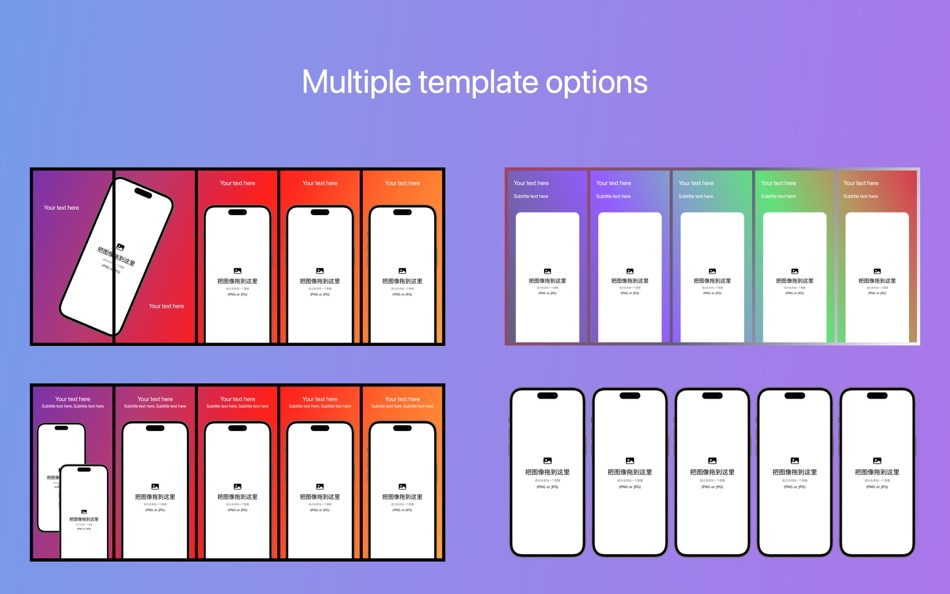
2. Multiple templates: built-in multiple screenshot templates, fill in text and images to quickly generate compliant screenshots.
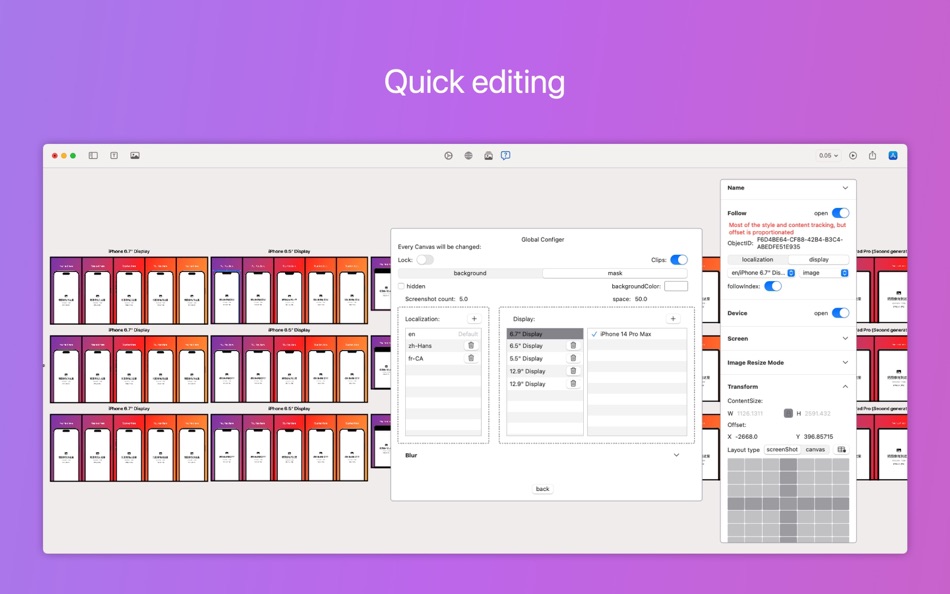
3. Multi-view editing: supports editing views of different sizes and languages simultaneously.
4. Quick editing:
a. Only need to edit one size image, other size images automatically generate relative layout;
b. Unique follow mode, only need to edit one size, other size styles will automatically follow the update.
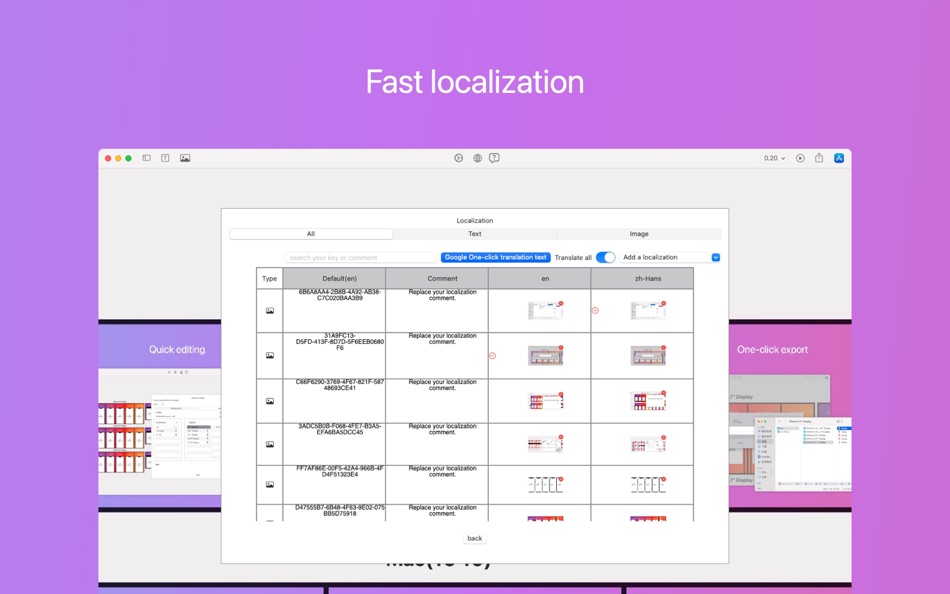
5. Localization support: text and images can be automatically localized according to different languages.
6. Quick screenshots (upcoming version): one-click automation to take screenshots of your developed app, which can be used as content input into aPreview for promotion.
7. Preview support: preview the display effect before and after online publishing and installation.
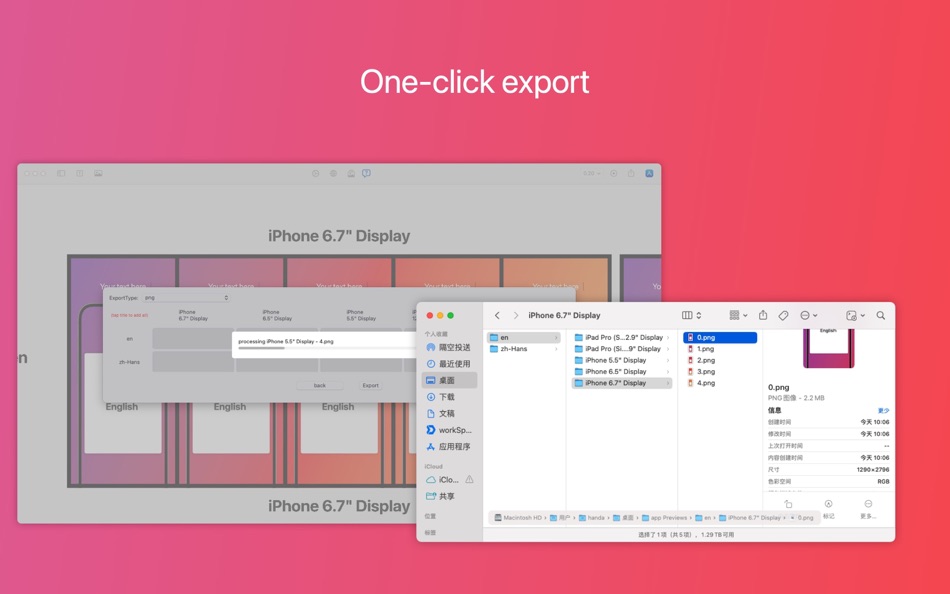
8. One-click output: one-click export png and jpg images of different platforms and sizes (supporting different compression ratios).
9. Re-editing: editing can be saved as a file for easy sharing and re-editing.
aPreview is your powerful app screencast assistant, making your app launch more efficient and standardized. Download aPreview to make your app look even better in the App Store!
# Plus function introduction:
With the Plus feature, you will be able to take your productivity to the next level. Here are some of the benefits you'll enjoy:
1. Unlimited Exports: With Plus, you don't have to worry about the limit on the number of exports. You can export as much content as you need, when and where you need it.
2. Unlimited Localization: Plus also provides you with unlimited powerful localization tools. You can translate and adapt your content to any language, culture, or audience without worrying about any usage restrictions or restrictions.
3. Global Configuration: Plus users also have access to global configuration settings for unlimited use of localization and screen size customization. You'll have full control and flexibility over your content.
With Plus, you can optimize your workflow and complete tasks more efficiently. Moreover, you can also create better content with exclusive features. Try Plus now and experience the power of our app!
# Subscribe to content
- Premium - Monthly (monthly, auto-renewing subscriptions)
- Premium - Annual (annual, auto-renewal subscription)
Payment: The user confirms the purchase and payment is credited to the lTunes account. Users can manage their subscriptions and automatic updates through their account settings.
Cancel Renewal: To cancel your renewal, manually turn off auto-renewal in iTunes/Apple ID Settings Management 24 hours before the current subscription cycle expires.
Renewal: The member's own top-up account or Apple iTunes account will be charged within 24 hours before expiration, and the subscription cycle will be extended by one subscription period after the deduction is successful.
Terms & Conditions: https://tapfeng.com/user-agreement/
Privacy Policy:https://tapfeng.com/privacy-policy/
# Permanently unlocked
- Premium version - permanent (permanently unlocked)
After confirming the purchase, the user will use the Apple iTunes account to pay immediately.
Ad
ภาพหน้าจอ

มีอะไรใหม่
- เวอร์ชัน: 1.5.1
- อัปเดต:
- 1. New Features:
- Window components, hold W to drag and draw
- Window grouping
- Window docking
2. User Experience Improvements
3. Bug Fixes and Performance Optimization
ราคา
-
* การซื้อภายในแอพ - วันนี้: ฟรี
- ต่ำสุด: ฟรี
- มากที่สุด: ฟรี
ติดตามราคา
Ad
ผู้พัฒนา
- Beijing Tapfeng Technology Co., Ltd.
- แพลตฟอร์ม: iOS แอป (4) macOS แอป (2)
- รายการ: 0 + 1
- แต้มแล: 0 + 0 ¡
- การจัดอันดับ: 0
- ความเห็น: 0
- ลดราคา: 0
- วิดีโอ: 0
- RSS: ติดตาม
แต้มแล
0 ☹️
การจัดอันดับ
0 ☹️
รายการ
0 ☹️
- aPreview
ความเห็น
แสดงรีวิวเป็นคนแรกเลย 🌟
ข้อมูลเพิ่มเติม
aPreview URL แบบสั้น: คัดลอกแล้ว!- 🌟 แชร์
- Mac App Store
คุณอาจชอบ
-
- Sitemap Plus
- macOS แอป: เครื่องมือ โดย: OurBigAdventure, LLC
- ฟรี
- รายการ: 1 + 1 การจัดอันดับ: 0 ความเห็น: 0
- แต้มแล: 26 + 0 เวอร์ชัน: 2.2.3 Sitemap Plus is designed for web developers, to build a list of pages on their sites, the server status at the time of the crawl and the download time for each page. Sitemap Plus also ... ⥯
-
- DevTools - Smarter coding
- macOS แอป: เครื่องมือ โดย: Anh Nguyen
- * ฟรี
- รายการ: 2 + 3 การจัดอันดับ: 0 ความเห็น: 0
- แต้มแล: 22 + 0 เวอร์ชัน: 1.2.3 DevTools is an all-in-one offline application that provides developers with essential tools for daily tasks and ensures data security. The app has been trusted by over 15,000 ... ⥯
-
- Klipped
- macOS แอป: เครื่องมือ โดย: Andrew Drake
- ฟรี
- รายการ: 0 + 2 การจัดอันดับ: 0 ความเห็น: 0
- แต้มแล: 19 + 0 เวอร์ชัน: 3.0.2 Beauty in simplicity. Klipped is a minimalist scratch pad that is a buddy for all your other apps. Write ideas down. Paste text and use as a clipboard; delete when you re done. No ... ⥯
-
- 18 Strings
- macOS แอป: เครื่องมือ โดย: Remote Sunrise LTD
- ฟรี
- รายการ: 0 + 1 การจัดอันดับ: 0 ความเห็น: 0
- แต้มแล: 17 + 0 เวอร์ชัน: 2022.6 Hate doing localization for your project? Now you can hate it a little less: Save tons of money by doing automatic translation using strings from your other projects you have already ... ⥯
- -100%
- Base64 Coder
- macOS แอป: เครื่องมือ โดย: Pavel Kosykh
- ▼ ฟรี
$1.79-100% - รายการ: 0 + 2 การจัดอันดับ: 0 ความเห็น: 0
- แต้มแล: 14 + 0 เวอร์ชัน: 2.1.0 Base64 Coder is a fast and easy converter files to a Base64 format. Features: Fast work; Automatically string copy; Drag & Drop; MIME prefix support; Save result to file; Result ... ⥯
-
- SnippetsLab
- macOS แอป: เครื่องมือ โดย: Renfei Song
- ฟรี
- รายการ: 6 + 8 การจัดอันดับ: 5 (1) ความเห็น: 0
- แต้มแล: 13 + 0 เวอร์ชัน: 2.6.4 Mac App Store Best of 2015 Featured in App Store editorial All Your Code, Brilliantly Organized , Keep Your Code at Your Fingertips and Welcome to the Mac App Store! Featured app in ... ⥯
-
- Xcode
- macOS แอป: เครื่องมือ โดย: Apple
- ฟรี
- รายการ: 22 + 8 การจัดอันดับ: 5 (1) ความเห็น: 0
- แต้มแล: 11 + 0 เวอร์ชัน: 26.3 Xcode offers the tools you need to develop, test, and distribute apps for Apple platforms, including predictive code completion, generative intelligence powered by the best coding ... ⥯
-
- Network Debugger
- macOS แอป: เครื่องมือ โดย: 志健 袁
- * ฟรี
- รายการ: 0 + 1 การจัดอันดับ: 0 ความเห็น: 0
- แต้มแล: 10 + 0 เวอร์ชัน: 1.2.0 Professional network debugging tool for macOS Network Debugger helps developers and testers quickly build TCP and UDP connections, send and inspect messages, and automate repetitive ... ⥯
-
- Anycode: Code Snippet to Image
- macOS แอป: เครื่องมือ โดย: 宏旭 朱
- ฟรี
- รายการ: 0 + 2 การจัดอันดับ: 0 ความเห็น: 0
- แต้มแล: 10 + 0 เวอร์ชัน: 0.7.0 Anycode is a document-based app that helps you manage your code snippets. - Supports syntax highlighting for Bash, C, C++, C#, Clojure, Dart, Go, Java, JavaScript, JSON, Kotlin, ... ⥯
-
- Eplist - convert data to plist
- macOS แอป: เครื่องมือ โดย: HuMinghua
- * ฟรี
- รายการ: 1 + 2 การจัดอันดับ: 0 ความเห็น: 0
- แต้มแล: 10 + 0 เวอร์ชัน: 2.0.1 Eplist for Excel is a lightweight conversion tool to help developers to improve development efficiency. You can convert your datas or configuration from excel(.xls and .xlsx) document ... ⥯
-
- KeyPad - Keyboard and Remote
- macOS แอป: เครื่องมือ โดย: Toolbunch LLC
- * ฟรี
- รายการ: 0 + 0 การจัดอันดับ: 0 ความเห็น: 0
- แต้มแล: 9 + 0 เวอร์ชัน: 1.99.15 Use your Mac keyboard to control all your devices. From smartphones and tablets to TVs and even the raspberry pi, KeyPad turns your Mac into a powerful universal Bluetooth keyboard, ... ⥯
-
- Application Localizer
- macOS แอป: เครื่องมือ โดย: Serhii Tal
- ฟรี
- รายการ: 0 + 1 การจัดอันดับ: 0 ความเห็น: 0
- แต้มแล: 9 + 0 เวอร์ชัน: 2.0.1 What this app does? It's a powerful tool for macOS designed to help developers easily localize their apps. So you can translate your SwiftUI app's text strings into any language using ... ⥯
-
- RocketSim for Xcode Simulator
- macOS แอป: เครื่องมือ โดย: SwiftLee
- * ฟรี
- รายการ: 1 + 3 การจัดอันดับ: 0 ความเห็น: 0
- แต้มแล: 9 + 0 เวอร์ชัน: 14.5.0 Join thousands of iOS developers who build, test, and debug apps up to 2x faster with RocketSim. Supercharge your Xcode Simulator with 30+ powerful tools designed to boost ... ⥯
-
- FrameBuddy - Screenshot Frames
- macOS แอป: เครื่องมือ โดย: Florian Schweizer
- ฟรี
- รายการ: 0 + 4 การจัดอันดับ: 0 ความเห็น: 0
- แต้มแล: 9 + 0 เวอร์ชัน: 1.3 Quickly add a device frame to your screenshots. FrameBuddy is a super simple utility that automatically adds iPhone frames to your (Simulator) screenshots. Iphone icon created by ... ⥯