
| ผู้พัฒนา: | Thales Pereira (2) | ||
| ราคา: | ฟรี | ||
| การจัดอันดับ: | 0 | ||
| ความเห็น: | 0 เขียนความเห็น | ||
| รายการ: | 0 + 0 | ||
| แต้มแล: | 0 + 0 ¡ | ||
| Mac App Store | |||
Ad
คำอธิบาย

POWERFUL QUEUE MONITORING
• View all your job queues at a glance with real-time statistics
• Monitor queue health with intelligent status indicators
• Track job states: created, active, retry, completed, failed, and cancelled
• Auto-refresh at configurable intervals (2s to 60s) or manually on demand
• Support for all pg-boss schema versions with automatic detection
COMPREHENSIVE DASHBOARD
• Real-time health cards showing queue status and estimated completion times
• Historical statistics with flexible time ranges (1h, 6h, 24h, 7d, 30d)
• Interactive throughput charts visualizing completed and failed jobs over time
• Performance metrics including average processing, wait, and end-to-end times
• Understand your queue performance at a glance
DETAILED JOB INSPECTION
• Browse and search through thousands of jobs with advanced filtering
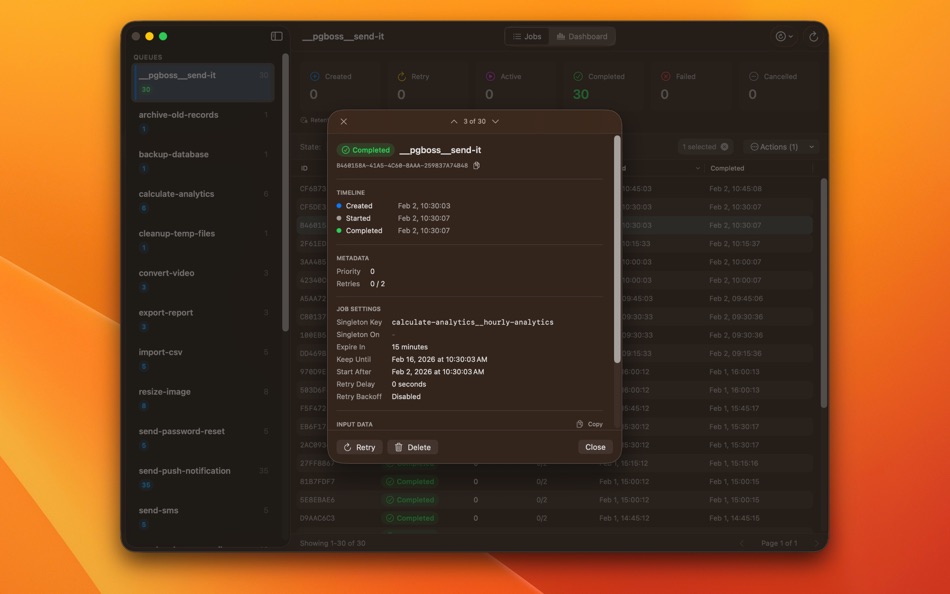
• View complete job details including metadata, timeline, and payload data
• Syntax-highlighted JSON viewer for job data
• Track job lifecycle from creation to completion or failure
• Identify and diagnose issues quickly with comprehensive job information
SCHEDULE MANAGEMENT
• View and manage scheduled jobs (cron-based)
• Inspect schedule configurations and timings
• Monitor schedule execution history
• Understand when jobs will run next
BULK OPERATIONS
• Perform actions on multiple jobs simultaneously
• Save time with powerful batch operations
• Streamline queue management workflows
MULTIPLE CONNECTIONS
• Manage connections to multiple PostgreSQL databases
• Switch between environments effortlessly
• Secure connection storage with Keychain integration
• Test connections before saving
BEAUTIFUL INTERFACE
• Fast and responsive SwiftUI design
• Full support for Dark Mode and Light Mode
• Optimized for Apple Silicon and Intel processors
• Sandboxed and hardened for maximum security
• Keyboard shortcuts for power users
WHO IS BOSSDESK FOR?
• Backend developers using pg-boss for job processing
• DevOps engineers monitoring production queues
• System administrators managing background tasks
• Teams running distributed task systems
• Anyone using PostgreSQL as a job queue
WHY BOSSDESK?
Unlike web-based tools or terminal commands, BossDesk provides a dedicated experience that's always just a click away. No browser tabs to manage, no server to deploy—just pure performance and elegance.
Whether you're debugging a failed job, monitoring queue throughput, or managing scheduled tasks, BossDesk gives you the tools you need in a polished, professional interface.
REQUIREMENTS
• Access to a PostgreSQL database with pg-boss installed
• Network access to your PostgreSQL server
Download BossDesk today and take control of your job queues.
ภาพหน้าจอ
มีอะไรใหม่
- เวอร์ชัน: 1.0
- อัปเดต:
ราคา
- วันนี้: ฟรี
- ต่ำสุด: ฟรี
- มากที่สุด: ฟรี
ติดตามราคา
ผู้พัฒนา
- Thales Pereira
- แพลตฟอร์ม: iOS แอป (1) macOS แอป (1)
- รายการ: 0 + 0
- แต้มแล: 0 + 1 ¡
- การจัดอันดับ: 0
- ความเห็น: 0
- ลดราคา: 0
- วิดีโอ: 0
- RSS: ติดตาม
แต้มแล
0 ☹️
การจัดอันดับ
0 ☹️
รายการ
0 ☹️
- BossDesk
ความเห็น
แสดงรีวิวเป็นคนแรกเลย 🌟
ข้อมูลเพิ่มเติม
- เวอร์ชัน: 1.0
- หมวดหมู่:
macOS แอป›เครื่องมือ - ระบบปฏิบัติการ:
macOS,macOS 26.0 และสูงกว่า - ขนาด:
4 Mb - ภาษาที่สนับสนุน:
English - การจัดประเภทเนื้อหา:
4+ - Mac App Store คะแนนโดย:
0 - อัปเดต:
- วันที่วางจำหน่าย:
BossDesk URL แบบสั้น: คัดลอกแล้ว!- 🌟 แชร์
- Mac App Store
คุณอาจชอบ
- ใหม่
- Desk Invoice
- macOS แอป: ธุรกิจ โดย: kassem ali
- $9.99
- รายการ: 0 + 0 การจัดอันดับ: 0 ความเห็น: 0
- แต้มแล: 0 + 0 เวอร์ชัน: 1.0 Desk Invoice is the dedicated macOS tool built for freelancers and small teams who value efficiency over complexity. Manage your entire billing cycle from your desktop without the need ⥯
-
- BOSS AI Client
- macOS แอป: ธุรกิจ โดย: Deep Insight Solutions, Inc.
- ฟรี
- รายการ: 0 + 0 การจัดอันดับ: 0 ความเห็น: 0
- แต้มแล: 0 + 0 เวอร์ชัน: 7.1.71876 BOSS AI is an Enterprise AI/ML development platform that allows organizations in a range of industries to put their data to work no matter where it resides, with the only commercially ... ⥯
- -100%
- Boss Radar
- macOS แอป: สังคม โดย: Jiulong Zhao
- ▼ ฟรี
$9.99-100% - รายการ: 0 + 1 การจัดอันดับ: 0 ความเห็น: 0
- แต้มแล: 13 + 0 เวอร์ชัน: v3.05 A brand new version with Bluetooth Low Energy devices(they are almost in this mode nowadays) support. All Sandbox-restricted actions (e.g. start/terminate other apps) were removed... ... ⥯
-
- Desk Shots 4
- macOS แอป: กราฟิกและการออกแบบ โดย: Tomoyuki Okawa
- ฟรี
- รายการ: 0 + 0 การจัดอันดับ: 0 ความเห็น: 0
- แต้มแล: 0 + 0 เวอร์ชัน: 4.0.4 - Take Desktop Screenshots With Many Options - Taking a desktop screenshot is something that I always do when I get ready to release a new software title. I don't use the entire ... ⥯
-
- Desk Note
- macOS แอป: ยูทิลิตี้ โดย: MIKHAIL CHEPELEV
- $0.99
- รายการ: 0 + 0 การจัดอันดับ: 0 ความเห็น: 0
- แต้มแล: 0 + 0 เวอร์ชัน: 2.1 Convenient notes that are always at hand. Manage your notes in the pop-up window from the menu bar. Use hotkeys to open and close, use auto-hide or disable them if not needed. Terms of ⥯
- ใหม่
- Desk Remote Server
- macOS แอป: ยูทิลิตี้ โดย: Daniil Nuzhdin
- ฟรี
- รายการ: 0 + 0 การจัดอันดับ: 0 ความเห็น: 0
- แต้มแล: 0 + 0 เวอร์ชัน: 1.0 DeskRemote Server turns your Mac into a remotely controllable workstation right from your iPhone. Install the server on your Mac, open DeskRemote on your iPhone, and you're connected. ... ⥯
-
- Select Like A Boss For Safari
- macOS แอป: ยูทิลิตี้ โดย: Space In Box
- ฟรี
- รายการ: 1 + 0 การจัดอันดับ: 0 ความเห็น: 0
- แต้มแล: 3 + 0 เวอร์ชัน: 1.2 Select Like A Boss is extension for Safari browser that allows you select text inside links. - when you want to select link or part of link just select it like a regular text; - when ... ⥯
- -100%
- Analog Desk Clock Widget
- macOS แอป: ประสิทธิภาพการผลิต โดย: Amit Verma
- ▼ * ฟรี
$0.99-100% - รายการ: 0 + 1 การจัดอันดับ: 0 ความเห็น: 0
- แต้มแล: 8 + 0 เวอร์ชัน: 1.6 Analog Clock is beautiful desk clock with over 100+ watch faces and widget style. Decorate your Home Screen with Desk Clock Widget Best for getting Aesthetic Look to your Home Screen. ... ⥯
-
- Nitpic Desk - Rapid photo sort
- macOS แอป: การถ่ายภาพ โดย: William Yelvington
- ฟรี
- รายการ: 0 + 0 การจัดอันดับ: 0 ความเห็น: 0
- แต้มแล: 0 + 0 เวอร์ชัน: 1.0.03 Nitpic is the exciting new tool for pro-photographers and hobbyists alike. DSLR owners know the frustration of sorting through thousands of images after a photoshoot. It's boring. It's ⥯
-
- Bill Boss
- macOS แอป: การเงิน โดย: Tunabelly Software Inc.
- $4.99
- รายการ: 0 + 0 การจัดอันดับ: 0 ความเห็น: 0
- แต้มแล: 0 + 0 เวอร์ชัน: 1.3.3 Bill Boss makes it easy to track your bills, payment history, and due dates so you never miss a payment again. Stay on top of your finances with a simple yet powerful tool designed for ⥯
-
- Yam Air Desk - Second Display
- macOS แอป: ประสิทธิภาพการผลิต โดย: Yamstu Inc.
- * ฟรี
- รายการ: 0 + 0 การจัดอันดับ: 0 ความเห็น: 0
- แต้มแล: 1 + 0 เวอร์ชัน: 2.1 # Mac as a second display for another Mac # # Mac-To-Mac mode of Yam Air # Yam Air Desk turns your spare Mac into a wireless second display for your main Mac. You can extend or mirror ... ⥯
-
- GS autoID Printer Utility-desk
- macOS แอป: ยูทิลิตี้ โดย: YoctoTech
- ฟรี
- รายการ: 0 + 0 การจัดอันดับ: 0 ความเห็น: 0
- แต้มแล: 2 + 0 เวอร์ชัน: 1.1.5 GS autoID Printer Utility-desk 專為 Gainscha 標籤印表機搭配使用而設計。 透過無線網路 / 藍牙方式連線印表機 即可對印表機進行設定。 主要功能 印表機狀態讀取 列印設置-標籤紙類型、標籤高度、標籤寬度、列印速度、列印熱度等 系統設定-兼容 TSPL, EPL, ZPL, DPL (依印表機機型而定) 無線網路/藍牙連線設定 ... ⥯
-
- UpStanding: Desk Companion
- macOS แอป: ไลฟ์สไตล์ โดย: EZish Solutions LLC
- $2.99
- รายการ: 0 + 0 การจัดอันดับ: 0 ความเห็น: 0
- แต้มแล: 0 + 0 เวอร์ชัน: 1.4.0 Most standing desks go unused not because they don t work, but because we forget to move. UpStanding helps you build healthier desk habits using the 20-8-2 method: - 20 minutes sitting ⥯
-
- Vault Desk
- macOS แอป: ประสิทธิภาพการผลิต โดย: MUSTAFA KARAKUS
- * ฟรี
- รายการ: 0 + 0 การจัดอันดับ: 0 ความเห็น: 0
- แต้มแล: 0 + 0 เวอร์ชัน: 1.0.1 Vault Desk is your all-in-one productivity companion that lives quietly in your Mac's menu bar. Organize files, track spending, and focus deeply - all from one elegant interface. SMART ⥯