
Saved
Choose the name that will be shown in your Saved menu.
Done!
| Developer: | Tomoyuki Okawa (74) | ||
| Price: | * Free | ||
| Score: | 1,310 Gold | ||
| Rankings: | 0 | ||
| Comments: | 0 Add a comment | ||
| Lists: | 0 + 0 | ||
| Points: | 0 + 0 ¡ | ||
| +1 Points | |||
Description

- What's new? -
1. CodeBlue automatically generates a unique identifier code for each code snippet record so that you can track down the original software project with it.
2. CodeBlue now comes with a separate window so that the user can view each image attachment at a large scale.
3. CodeBlue lets you compare two sets of code side by side to see differences.
4. History shows a list of all code snippet records you have lately visited.
5. Select one of three options (Find, Scroll for Key, Scroll for Letter) in running a title search.
6. Tap twice (or three times, optionally) to change the value of the title field among title, creation date, reference ID.
7. Show group statistics in terms of the number of code snippet records.
8. Share a complete snippet dataset including attachments with your peer or the iPad version. (Version 6.3.0)
- Features -
1. Store thousands of code snippet records across different groups. Switch between groups easily with a drop-down menu.
2. Create a code snippet record with reference URLs. Select a code snippet record and click on Go to see the selected reference URL with your default web browser.
3. Make one or more image attachments to a code snippet record.
4. Click on the Find tab at the bottom to run a content search within the current group.
5. Click on the Global-find toolbar button to run a search across all groups.
6. Merge one group into another.
7. Reorder groups.
8. Rate the quality of a code snippet record by highlighting its title with five levels of importance.
9. Move the selected code snippet record to a different group or move a selected group of snippet records to another group at a time.
10.Filter code snippet titles with a version number of your selection
11.Filter code snippet titles with a keyword.
12.Syntax-highlight phrases with tags that are set in the group.
13.Export a code snippet record so that you can email to a remote location to use it.
14.Export an entire group so that you can email to a remote location to use it.
15.Make a backup data file with a click of a button. Recover data from a backup data file.
16.Let the application automatically generate a unique identifier code for each code snippet record so that you can track down the original software project with it.
17.View an image attachment with a separate window at a large scale.
18.Compare two sets of code side by side to see differences.
19.See a list of all code snippet records you have lately visited.
20.Select one of three options (Find, Scroll for Key, Scroll for Letter) in running a title search.
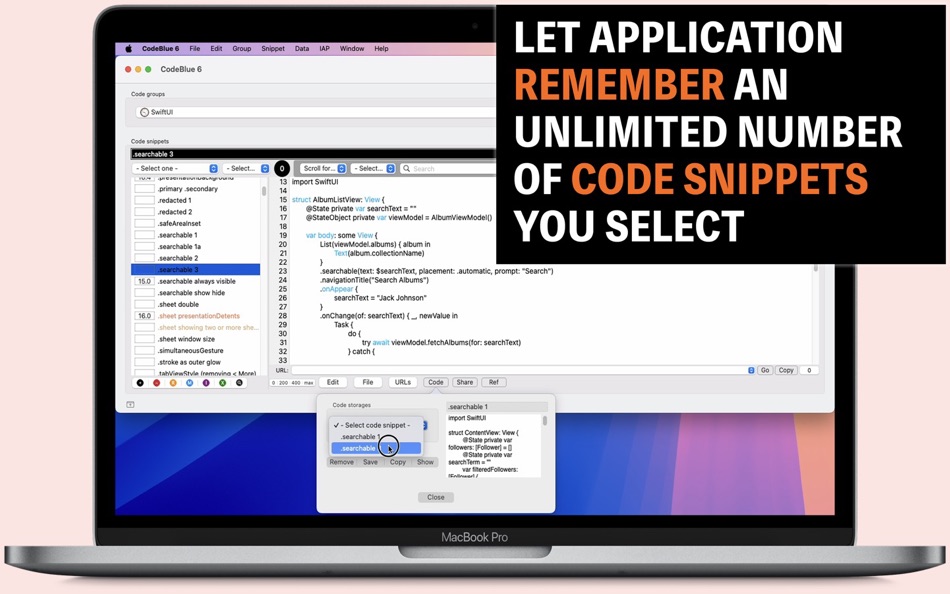
21.Save code in two separate storage containers and retrieve them with a click of a button.
22.Show group statistics in terms of the number of code snippet records.
23.Share a complete snippet dataset including attachments with your peer or the iPad version. (Version 6.3.0)
24.The application supports the dark mode.
25.The fullScreen mode is supported.
26.The application supports the retina screen.
27.Languages: English only.
28.Application file size: 38.1 MB.
29.The application comes with a built-in 36-page user guide. Click on the menu button at the bottom-left corner of the screen and click on Guide.
- System requirements -
1. Performance checked with macOS Ventura 13.6 (Intel), macOS Sonoma 14.2 (Apple M2)
- Limitations -
1. After the first week of a trial period, the user can still use the application to browse and read existing code snippets they have already created. However, the user will not be able to create a new group or create new code snippets under an existing group without the in-app purchase.
Screenshots



Ad
Price History
-
* In-App Purchases - Current price: Free
- Minimum: Free
- Maximum: Free
Track prices
AppAgg Score
1,310
Estimated AppAgg Score for
CodeBlue 6
1,310 Gold
Higher scores usually mean stronger signals on AppAgg.
Based on: popularity · ratings · freshness · deals · store data · community signals
Recalculated daily using fresh AppAgg data.
Short URL: Copied!
What's new
- Version: 6.4.13
- Last Updated:
- 1. Fix: When the user moved the horizontal split divider all the way to the top in creating a group, the user interface could break with disappearing text fields.
2. The title table selection wil now show the creation date of the code snippet record.
Additional Information
- Release Date:
- Category:
macOS Apps›Developer Tools - OS:
macOS,macOS 13.0 and up - Size:
21 Mb - Supported Languages:
English - Content Rating:
4+ - Mac App Store Rating:
0
Developer
- Tomoyuki Okawa
- Platforms: iOS Apps (27) macOS Apps (45) macOS Games (2)
- Lists: 1 + 1
- Points: 6 + 12 ¡
- Rankings: 0
- Comments: 0
- Deals: 0
- Videos: 0
- RSS: Subscribe
Lists (0)
0
- CodeBlue 6
Points (0)
0
Rankings (0)
0
Comments (0)
Be the first to comment
Summary
CodeBlue 6 Short URL: Copied!- Share
- Mac App Store
«CodeBlue 6» is a Developer Tools app for macOS, developed by «Tomoyuki Okawa». It was first released on and last updated on . This app is currently free. This app has not yet received any ratings on AppAgg. Available languages: English. AppAgg continuously tracks the price history, ratings, and user feedback for «CodeBlue 6». AppAgg does not host applications or distribute software. All trademarks, logos and screenshots belong to their respective owners. Subscribe to this app or follow its RSS feed to get notified about future deals or updates.
Similar
-
- Code Runner for Python
- macOS Apps: Developer Tools By: Omer UCEL
- $0.99
- Lists: 0 + 1 0 0
- Points: 3 + 0 1K · Gold Version: 4.0 Code Runner for Python is your personal Python sandbox, perfect for learning, experimenting, and quickly testing code snippets wherever you are. Ditch the complex server setup for ...
-
- Code Meter: Claude Codex Usage
- macOS Apps: Developer Tools By: StreetCoding Ltd
- * Free
- Lists: 0 0 0
- Points: 0 + 0 930 · Silver Version: 1.6 You're deep in a session, things are flowing, then your requests start failing: quota refreshes in a few hours. Again. Code Meter lives in your menu bar and tracks your AI coding quota
-
- Code Cleaner
- macOS Apps: Developer Tools By: Andre Yonadam
- $1.99
- Lists: 0 0 0
- Points: 0 + 0 600 · Silver Version: 1.0 Clean your HTML, CSS and Javascript files with Code Cleaner! Also great for making minified HTML, CSS and Javascript files easier to read again! Clean your code at your command within ...
-
- Code Replay
- macOS Apps: Developer Tools By: Aryaman Sharda
- Free
- Lists: 0 + 2 0 0
- Points: 3 + 0 910 · Silver Version: 1.0 Code Replay is an innovative and powerful tool designed specifically for developers, presenters, and teachers. It enables you to record your coding session in Xcode for playback later.
-
- Code Peek+
- macOS Apps: Developer Tools By: Onder Kadagan
- * Free
- Lists: 0 0 0
- Points: 0 + 0 590 · Bronze Version: 1.0.3 Code Peek+ adds syntax-aware Quick Look previews for developer files on macOS. Preview source files, Markdown, Jupyter notebooks, and tabular text directly in Finder without opening an
-
- Code for SQLite3
- macOS Apps: Developer Tools By: ZeeZide GmbH
- $13.99
- Lists: 0 0 0
- Points: 1 + 0 730 · Silver Version: 1.0.4 Code for SQLite3 is a little macOS application that accepts either SQLite3 database files or SQL source code, and generates Swift source code for them. This is done for two main use ...
-
- Code Signing
- macOS Apps: Developer Tools By: Sergii Kryvoblotskyi
- $1.99
- Lists: 0 0 0
- Points: 1 + 0 1K · Gold Version: 1.0.7 Code Signing is a developer tool that reads files' signing information and validates the signature. There is no more need to use command-line tools, parse the results, or read the ...
-
- Code Architect
- macOS Apps: Developer Tools By: KeoGlobal
- Free
- Lists: 0 0 0
- Points: 0 + 0 550 · Bronze Version: 1.1 Code Architect is a Swift code navigation tool that helps developers understand and modify their codebase by providing a structured view of Swift files. It parses and displays the ...
-
- Blue Van Clef
- macOS Apps: Developer Tools By: Rift Valley Software, Inc.
- Free
- Lists: 0 + 1 0 0
- Points: 1 + 0 700 · Silver Version: 1.5.4 Once connected to a device, you can do a "drill-down" discovery of the device's services, characteristics, and descriptors. The app is designed to respect Accessibility (VoiceOver and ...
-
- Big Blue VMSphere
- macOS Apps: Developer Tools By: BIG BLUE VMSPHERE (PTE.) LTD.
- * Free
- Lists: 0 0 0
- Points: 0 + 0 940 · Silver Version: 1.0 Big Blue VMSphere is the new standard set for Virtual Machines. Virtualisation and management of your environment fitting into your development environment and scalable to your ...
-
- Code Merger AI Assistant
- macOS Apps: Developer Tools By: TidalAurum, LLC
- Free
- Lists: 0 0 0
- Points: 0 + 0 570 · Bronze Version: 1.03 Swift File Merger - Streamline Your Code Organization Effortlessly combine multiple Swift files into a single, organized document for enhanced code review, sharing, and analysis. Key ...
-
- Clone in VS Code
- macOS Apps: Developer Tools By: Ahnaf Mahmud
- Free
- Lists: 0 + 1 0 0
- Points: 4 + 0 1K · Silver Version: 1.4.1 A Safari extension to clone any GitHub, GitLab or Bitbucket repository in Visual Studio Code with just one click. All you need is Visual Studio Code installed on your Mac for this ...
-
- CodeX: Code AI for Xcode
- macOS Apps: Developer Tools By: Ayesha Javeed
- * Free
- Lists: 0 0 0
- Points: 0 + 0 590 · Bronze Version: 1.3 Your AI-Powered Xcode Companion This is a macOS app that supercharges Xcode with AI, featuring a Xcode Source Editor extension called code.ai and a desktop app with an AI assistant, ...
-
- Add Analytics Code
- macOS Apps: Developer Tools By: Rene Rosendahl
- $2.99
- Lists: 0 0 0
- Points: 0 + 0 550 · Bronze Version: 1.2 Need to add analytics tracking, e.g. for Google Analytics, to a bunch of html files? We hear you! With this app, you can select files and then process them by adding a code snippet in ...