
| 개발자: | Sebastian Fichtner (3) | ||
| 가격: | 무료 | ||
| 순위: | 0 | ||
| 리뷰: | 0 리뷰 작성 | ||
| 댓글: | 0 댓글 게시 | ||
| 목록: | 0 + 1 | ||
| 포인트: | 2 + 0 ¡ | ||
| Mac App Store | |||
기술

See the architecture of any codebase!
Codeface visualizes the internal composition, dependencies and quality metrics of code to help you understand, improve and monitor it.
IMPORTANT: If you have trouble with the setup, you may write to hello@codeface.io to get personal support.
This version is still an early and minimal stage of a grand future vision. It allows you to:
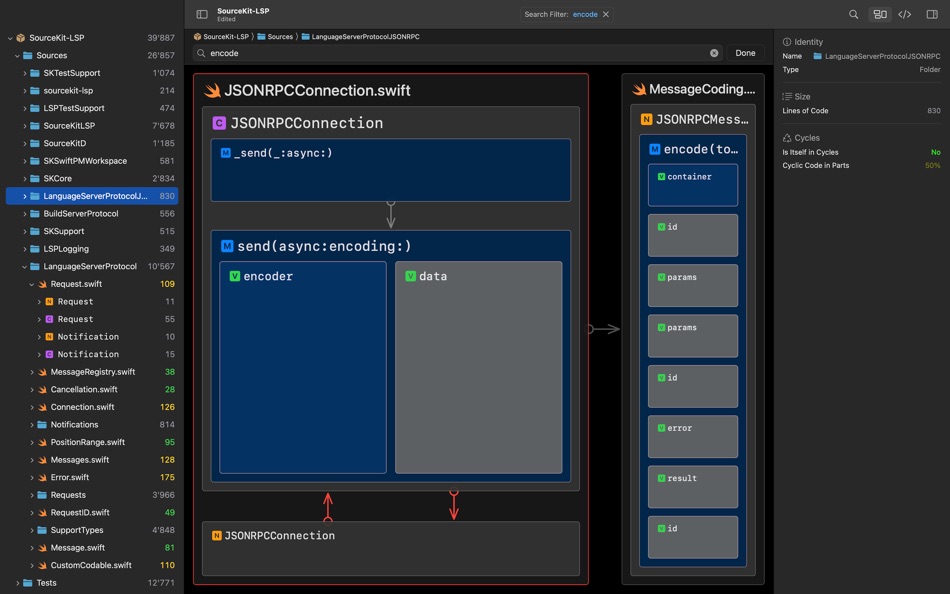
* See the hierarchical composition of any scope within your codebase
* See the essential dependencies between structural elements on every level: folders, files and code symbols
* See cyclic dependencies (in red) and where they are (artifacts with red borders)
* See the size (lines of code) of each structural element – by visual size as well as by number
* Inspect scopes at all levels – from folders down to properties (thanks to semantic zoom)
* Read the whole codebase along its control flow – from big picture to details (thanks to topological order, dependencies go mostly downwards and to the right)
* Filter all visualizations by a search term
* Save, open and share codebase files. You can load them quickly without an LSP server and even send them to people who have neither the project nor any LSP servers nor technical skills.
* Add support for languages beyond Swift by proving an LSP server
* Support the development of Codeface via an early bird subscription offer
WHY?
* Being able to switch from reading code to seeing architecture helps making better software faster.
* You understand legacy code, notice red flags, accelerate onboarding, automate documentation, anchor discussions and simply have fun.
* We love software architecture since 1993 and know how communication and quality require visualisation.
THE FUTURE:
* This journey is just beginning. There are loads of ideas and development directions to evolve Codeface.
* Imagine architectural suggestions, more layouts and metrics, real-time updates, a web dashboard, animated navigation and more.
* Be part of the journey and shape Codeface with your own big ideas and feedback: hello@codeface.io
Terms of Use: https://www.apple.com/legal/macapps/stdeula
Ad
스크린샷



새로운 기능
- 버전: 1.5.7
- 업데이트:
- Improved:
* The menu options to import codebases into the currently focused codebase file have moved to the File menu.
* The order in which code artifacts in cycles are laid out is better: more dependencies go in reading direction.
* The order of code symbol artifacts is better: When no better criteria applies, order reflects position in file.
* The order in which code artifacts are laid out is less random (varies less).
* The visualization layout is more balanced in certain parts.
(Technically speaking: Tree map splits around components and strongly connected components are now actually centered.)
Fixed:
* The hint when nothing matches the search filter did not appear immediately when it applied. This is fixed.
* The visualization sometimes blacked out and showed a loading spinner (due to a SwiftUI bug). This is fixed.
가격 내역
- 오늘: 무료
- 최소: 무료
- 최대: 무료
가격 추적
Ad
개발자


순위 (0)
0 ☹️
목록 (0)
0 ☹️
- Codeface
리뷰 (0)
첫 번째 리뷰를 남겨보세요 🌟
댓글 (0)
가장 먼저 댓글을 남겨주세요 🌟
추가 정보
주소록
- 웹사이트:
 https://codeface.io
«Codeface». 플랫폼: macOS. 카테고리: 개발자 도구. 개발자: «Sebastian Fichtner». 첫 번째 릴리스: . 마지막 업데이트: . 현재 가격: 무료. 이 타이틀은 아직 AppAgg에서 평가나 리뷰를 받지 못했습니다. 추적된 포인트: 확인됨: 2, 간접: 0. 사용 가능한 언어: English. AppAgg는 «Codeface»의 가격 기록, 평점 및 사용자 피드백을 추적합니다. 향후 할인 및 업데이트 받기: RSS에서 확인할 수 있습니다. AppAgg는 애플리케이션을 호스팅하거나 소프트웨어를 배포하지 않습니다. 모든 상표, 로고 및 스크린샷은 해당 소유자의 자산입니다.
Codeface 단축 URL: 복사됨!- 🌟 공유하기
- Mac App Store
당신은 또한 같은 수 있습니다
-
- Sitemap Plus
- macOS 앱: 개발자 도구 게시자: OurBigAdventure, LLC
- 무료
- 목록: 1 + 1 순위: 0 리뷰: 0
- 포인트: 26 + 0 댓글: 0 버전: 2.3 Sitemap Plus is designed for web developers, to build a list of pages on websites that they own, the server status at the time of the crawl and the download time for each page. Sitemap ⥯
-
- DevTools - Smarter coding
- macOS 앱: 개발자 도구 게시자: Anh Nguyen
- * 무료
- 목록: 2 + 3 순위: 0 리뷰: 0
- 포인트: 22 + 0 댓글: 0 버전: 1.2.3 DevTools is an all-in-one offline application that provides developers with essential tools for daily tasks and ensures data security. The app has been trusted by over 15,000 ... ⥯
-
- Klipped
- macOS 앱: 개발자 도구 게시자: Andrew Drake
- 무료
- 목록: 0 + 2 순위: 0 리뷰: 0
- 포인트: 19 + 0 댓글: 0 버전: 3.0.2 Beauty in simplicity. Klipped is a minimalist scratch pad that is a buddy for all your other apps. Write ideas down. Paste text and use as a clipboard; delete when you re done. No ... ⥯
-
- 18 Strings
- macOS 앱: 개발자 도구 게시자: Remote Sunrise LTD
- 무료
- 목록: 0 + 1 순위: 0 리뷰: 0
- 포인트: 17 + 0 댓글: 0 버전: 2022.6 Hate doing localization for your project? Now you can hate it a little less: Save tons of money by doing automatic translation using strings from your other projects you have already ... ⥯
- -100%
- Base64 Coder
- macOS 앱: 개발자 도구 게시자: Pavel Kosykh
- ▼ 무료
$1.79-100% - 목록: 0 + 2 순위: 0 리뷰: 0
- 포인트: 14 + 0 댓글: 0 버전: 2.1.0 Base64 Coder is a fast and easy converter files to a Base64 format. Features: Fast work; Automatically string copy; Drag & Drop; MIME prefix support; Save result to file; Result ... ⥯
-
- SnippetsLab
- macOS 앱: 개발자 도구 게시자: Renfei Song
- 무료
- 목록: 6 + 8 순위: 5 (1) 리뷰: 0
- 포인트: 13 + 0 댓글: 0 버전: 2.6.4 Mac App Store Best of 2015 Featured in App Store editorial All Your Code, Brilliantly Organized , Keep Your Code at Your Fingertips and Welcome to the Mac App Store! Featured app in ... ⥯
-
- Network Debugger
- macOS 앱: 개발자 도구 게시자: 志健 袁
- * 무료
- 목록: 0 + 1 순위: 0 리뷰: 0
- 포인트: 10 + 0 댓글: 0 버전: 1.2.0 Professional network debugging tool for macOS Network Debugger helps developers and testers quickly build TCP and UDP connections, send and inspect messages, and automate repetitive ... ⥯
-
- Anycode: Code Snippet to Image
- macOS 앱: 개발자 도구 게시자: 宏旭 朱
- 무료
- 목록: 0 + 2 순위: 0 리뷰: 0
- 포인트: 10 + 0 댓글: 0 버전: 0.7.0 Anycode is a document-based app that helps you manage your code snippets. - Supports syntax highlighting for Bash, C, C++, C#, Clojure, Dart, Go, Java, JavaScript, JSON, Kotlin, ... ⥯
-
- Eplist - convert data to plist
- macOS 앱: 개발자 도구 게시자: HuMinghua
- * 무료
- 목록: 1 + 2 순위: 0 리뷰: 0
- 포인트: 10 + 0 댓글: 0 버전: 2.0.1 Eplist for Excel is a lightweight conversion tool to help developers to improve development efficiency. You can convert your datas or configuration from excel(.xls and .xlsx) document ... ⥯
-
- KeyPad - Keyboard and Remote
- macOS 앱: 개발자 도구 게시자: Toolbunch LLC
- * 무료
- 목록: 0 + 0 순위: 0 리뷰: 0
- 포인트: 9 + 0 댓글: 0 버전: 1.99.15 Use your Mac keyboard to control all your devices. From smartphones and tablets to TVs and even the raspberry pi, KeyPad turns your Mac into a powerful universal Bluetooth keyboard, ... ⥯
-
- Application Localizer
- macOS 앱: 개발자 도구 게시자: Serhii Tal
- 무료
- 목록: 0 + 1 순위: 0 리뷰: 0
- 포인트: 9 + 0 댓글: 0 버전: 2.0.1 What this app does? It's a powerful tool for macOS designed to help developers easily localize their apps. So you can translate your SwiftUI app's text strings into any language using ... ⥯
-
- RocketSim for Xcode Simulator
- macOS 앱: 개발자 도구 게시자: SwiftLee
- * 무료
- 목록: 1 + 3 순위: 0 리뷰: 0
- 포인트: 9 + 0 댓글: 0 버전: 14.5.0 Join thousands of iOS developers who build, test, and debug apps up to 2x faster with RocketSim. Supercharge your Xcode Simulator with 30+ powerful tools designed to boost ... ⥯
-
- FrameBuddy - Screenshot Frames
- macOS 앱: 개발자 도구 게시자: Florian Schweizer
- 무료
- 목록: 0 + 4 순위: 0 리뷰: 0
- 포인트: 9 + 0 댓글: 0 버전: 1.3 Quickly add a device frame to your screenshots. FrameBuddy is a super simple utility that automatically adds iPhone frames to your (Simulator) screenshots. Iphone icon created by ... ⥯