
| Разработчик: | Eric Kampman (5) | ||
| Цена: | $2.99 | ||
| Рейтинги: | 0 | ||
| Отзывы: | 0 Написать отзыв | ||
| Списки: | 0 + 0 | ||
| Очки: | 0 + 0 ¡ | ||
| Mac App Store | |||
Описание

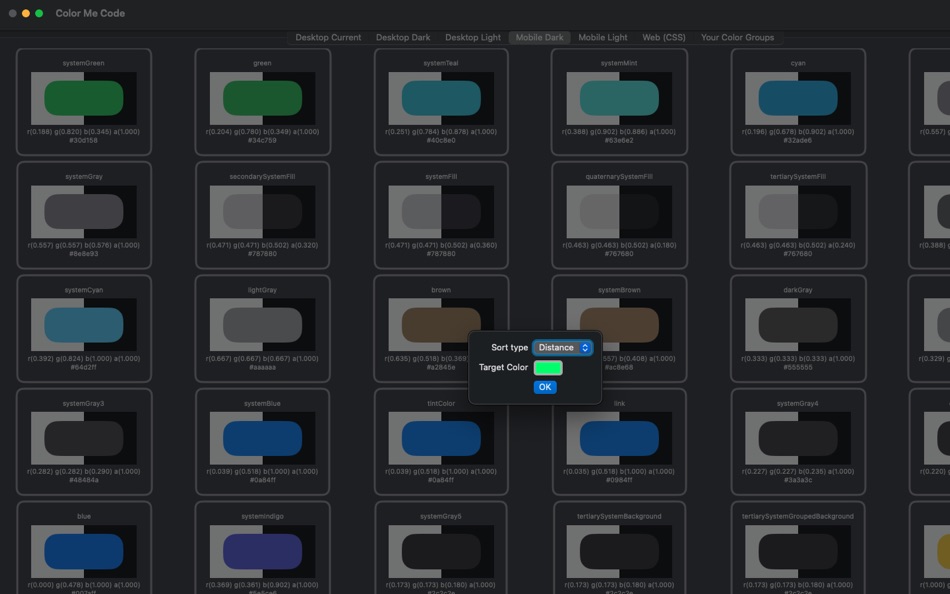
• Lists all of the available named colors
- for macOS (light and dark mode),
- iOS (light and dark mode)
- CSS
• Extract info (such as the hex text representation) via a context menu.
• Sort via name and by “distance from” a specified color
• Filter via name and by “distance from” a specified color and a maximum distance (0 - 1)
• Create and save sets of colors
Ad
Скриншоты



Что нового
- Версия: 1.0
- Обновлено:
Цена
- Сегодня: $2.99
- Минимум: $2.99
- Максимум: $2.99
Отслеживайте цены
Ad
Разработчик
- Eric Kampman
- Платформы: iOS Приложения (2) macOS Приложения (3)
- Списки: 0 + 0
- Очки: 2 + 1 ¡
- Рейтинги: 0
- Отзывы: 0
- Скидки: 0
- Видео: 0
- RSS: Подписаться
Очки
0 ☹️
Рейтинги
0 ☹️
Списки
0 ☹️
- ColorMeCode
Отзывы
Ваш отзыв будет первым 🌟
Дополнительная информация
- Версия: 1.0
- Категория:
macOS Приложения›Инструменты разработчика - Операционные системы:
macOS,macOS 14.5 и выше - Размер:
2 Mb - Поддерживаемые языки:
English - Возрастные ограничения:
4+ - Mac App Store Рейтинг:
0 - Обновлено:
- Дата выпуска:
Контакты
 https://www.unlikelyware.comColorMeCode Короткий URL: Скопировано!
- 🌟 Поделиться
- Mac App Store
Вам также могут понравиться
-
- Color Picker
- macOS Приложения: Инструменты разработчика От: Patrik Tomas Chamelo
- $2.99
- Списки: 1 + 0 Рейтинги: 0 Отзывы: 0
- Очки: 1 + 0 Версия: 1.6.5 Color Picker, the utility application, designed for all Cocoa developers and application designers. An efficient color picker, for professionals, who care about optimizing their ... ⥯
-
- Code Runner for Python
- macOS Приложения: Инструменты разработчика От: Omer UCEL
- $0.99
- Списки: 0 + 1 Рейтинги: 0 Отзывы: 0
- Очки: 3 + 0 Версия: 4.0 Code Runner for Python is your personal Python sandbox, perfect for learning, experimenting, and quickly testing code snippets wherever you are. Ditch the complex server setup for ... ⥯
-
- Color Contrast Inspector
- macOS Приложения: Инструменты разработчика От: Östling IT
- Бесплатно
- Списки: 0 + 0 Рейтинги: 0 Отзывы: 0
- Очки: 0 + 0 Версия: 1.1 Color Contrast Inspector helps you verify whether your color combinations meet WCAG 2.1 accessibility requirements. Features: Real-time contrast ratio calculation Support for WCAG ... ⥯
-
- Color Clipboard Converter
- macOS Приложения: Инструменты разработчика От: Whatever Apps
- $0.99
- Списки: 0 + 0 Рейтинги: 0 Отзывы: 0
- Очки: 0 + 0 Версия: 1.1 Copy a color in any supported format and paste it already converted to the one you need. The app automatically converts colors directly in your clipboard. This app is a powerful color ... ⥯
-
- Code Cleaner
- macOS Приложения: Инструменты разработчика От: Andre Yonadam
- $1.99
- Списки: 0 + 0 Рейтинги: 0 Отзывы: 0
- Очки: 0 + 0 Версия: 1.0 Clean your HTML, CSS and Javascript files with Code Cleaner! Also great for making minified HTML, CSS and Javascript files easier to read again! Clean your code at your command within ... ⥯
-
- Code Replay
- macOS Приложения: Инструменты разработчика От: Aryaman Sharda
- Бесплатно
- Списки: 0 + 2 Рейтинги: 0 Отзывы: 0
- Очки: 3 + 0 Версия: 1.0 Code Replay is an innovative and powerful tool designed specifically for developers, presenters, and teachers. It enables you to record your coding session in Xcode for playback later. ⥯
-
- Color Code Copy
- macOS Приложения: Инструменты разработчика От: Albert Parti
- $1.99
- Списки: 1 + 0 Рейтинги: 0 Отзывы: 0
- Очки: 3 + 0 Версия: 2.0 Color Code Copy is a sleek and modern macOS utility that lets developers quickly generate and copy color codes for a wide range of programming languages and frameworks. Simply pick a ... ⥯
-
- Color Picker Plus
- macOS Приложения: Инструменты разработчика От: 万林 彭
- Бесплатно
- Списки: 2 + 1 Рейтинги: 0 Отзывы: 0
- Очки: 5 + 0 Версия: 1.8 Color Picker Plus is a simple tool to pick up color for users, which can optimize their workflow and process. Pick HEX, RGB, HSL Main functions Zoom pick up a pixel color Support dark ... ⥯
-
- Color Picker For Xcode
- macOS Приложения: Инструменты разработчика От: Kais Karim
- Бесплатно
- Списки: 0 + 1 Рейтинги: 0 Отзывы: 0
- Очки: 3 + 0 Версия: 2.0 Color Picker for Swift is a simple but powerful tool that generates a SwiftUI, UIKit, and Cocoa color code for you. Simply pick your colors, save them, and click to see the code. ⥯
-
- Color Picker & Library
- macOS Приложения: Инструменты разработчика От: Dan Merlea
- $3.99
- Списки: 0 + 0 Рейтинги: 0 Отзывы: 0
- Очки: 0 + 0 Версия: 2.0.2 Color Picker & Library is a handy tool for our community of makers. Great for designers and developers. Easy to keep your colors organized by project and share it between team members. ⥯
-
- Color Peeker
- macOS Приложения: Инструменты разработчика От: Tongfan Dai
- Бесплатно
- Списки: 1 + 1 Рейтинги: 0 Отзывы: 0
- Очки: 2 + 0 Версия: 2 Color Peeker is a realtime digital color meter that sits quietly in your menu bar. It can show the hex value, the precise name, and/or an enlarged display of the color under your mouse ⥯
-
- Color Picker - Palette Manager
- macOS Приложения: Инструменты разработчика От: Elisa Valeria Distefano
- $1.99
- Списки: 0 + 0 Рейтинги: 0 Отзывы: 0
- Очки: 0 + 0 Версия: 3.0.0 Color Picker is designed for all macOS, iOS and web developers. Simple and extreme easy to use color picker for pro users who care about a fast workflow to speed up their works. Color ... ⥯
-
- Code for SQLite3
- macOS Приложения: Инструменты разработчика От: ZeeZide GmbH
- $13.99
- Списки: 0 + 0 Рейтинги: 0 Отзывы: 0
- Очки: 1 + 0 Версия: 1.0.4 Code for SQLite3 is a little macOS application that accepts either SQLite3 database files or SQL source code, and generates Swift source code for them. This is done for two main use ... ⥯
-
- Code Signing
- macOS Приложения: Инструменты разработчика От: Sergii Kryvoblotskyi
- $1.99
- Списки: 0 + 0 Рейтинги: 0 Отзывы: 0
- Очки: 1 + 0 Версия: 1.0.7 Code Signing is a developer tool that reads files' signing information and validates the signature. There is no more need to use command-line tools, parse the results, or read the ... ⥯