
| デベロッパー: | Momentarium LLC (11) | ||
| 価格: | $4.99 | ||
| ランキング: | 0 | ||
| レビュー: | 0 レビューを書く | ||
| リスト: | 0 + 0 | ||
| ポイント: | 0 + 0 ¡ | ||
| Mac App Store | |||
説明

CoreData Studio is a professional SQLite viewer, editor, and database inspector built specifically for Apple developers. Stop digging through hidden system folders or struggling with command-line tools. Master your application’s local storage with an intuitive, powerful, and native GUI designed to accelerate your debugging workflow.
#### Professional Navigation & Discovery
Forget searching for your database path manually. CoreData Studio does the heavy lifting for you:
- **Visual Simulator Browser**: Browse all iOS simulators, see installed apps with their original icons, and open their databases in one click.
- **macOS Container Support**: Automatically scan Library/Containers to find your local development databases.
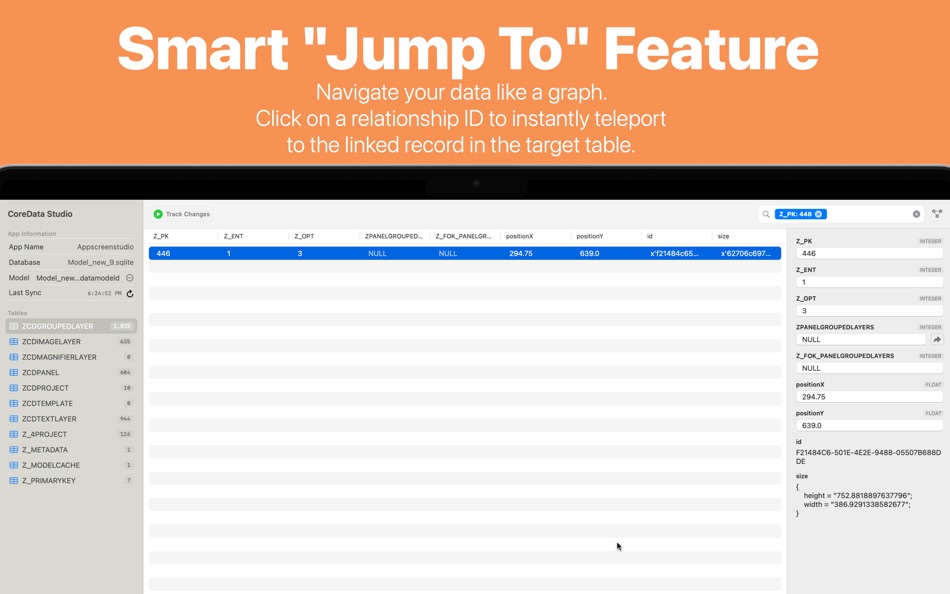
- **Smart Jump To**: Navigate your data like a graph. Click on a relationship ID to instantly teleport to the linked record in the target table.
#### Powerful Features to Supercharge Your Workflow
CoreData Studio is packed with tools to make data management effortless:
- **Interactive ER Diagram**: Visualize your entire schema. Understand complex entity relationships through an intuitive, zoomable graph view.
- **Real-Time Change Tracking**: Monitor database modifications as they happen. See a visual "Before & After" diff for every update, insert, or delete operation.
- **Human-Readable Properties**: Link your .xcdatamodeld to resolve raw SQL column names into the property names you use in Xcode.
- **Advanced Search & Filter**: Find records instantly by content or filter by specific Primary Keys.
- **Live Editing**: Update records directly in the GUI and save changes securely to the SQLite file.
- **Blob & Image Support**: View large binary data, images, and colors stored in your database without performance lag.
- **Export Data**: Right-click to export records to JSON or CSV for testing or reporting.
#### Your Essential Debugging & Optimization Partner
CoreData Studio goes beyond simple data viewing. It is designed to tackle the complex challenges of modern app development:
- **Pinpoint Crashes**: Locate records causing data-dependency crashes or unexpected NULL values.
- **Validate Migrations**: Use the Model Diff capabilities to trace how your data evolves across different model versions.
- **Optimize Performance**: Identify heavy tables and inefficient schemas using the visual ER Diagram.
- **Team Friendly**: Prevent merge conflicts by analyzing model changes before they hit your repository.
#### Privacy by Design
All operations are performed locally on your Mac. Your database files and app data never leave your machine. No analytics, no cloud tracking—just a pure local tool for your private data.
#### Who is it for?
- **Swift & SwiftUI Developers**: Perfect for those using CoreData or the new SwiftData framework.
- **QA Engineers**: Validate data integrity during testing cycles on simulators or local builds.
- **Data Analysts**: Easily extract and analyze application datasets with a clean interface.
#### Compatibility
Supports databases from iOS 10 to the latest versions, and all modern macOS applications. Fully optimized for Apple Silicon and Intel Macs.
Take control of your data today. Download CoreData Studio and stop wasting time on manual database lookups!
#### Support
We are committed to building the best data tool for the Apple ecosystem.
- **Email**: llc.momentarium@gmail.com
- **X (Twitter)**: @CoreDataStudio
- **Feature Requests**: https://coredatastudio.features.vote/board
スクリーンショット



新機能
- バージョン: 2.0
- アップデート:
- This version of CoreData Studio brings a major overhaul to the user interface, making it a truly professional tool for developers. We have focused on performance, accessibility, and a seamless workflow for both iOS and macOS developers.
Here is what’s new:
All-New Dashboard
We’ve replaced the old setup wizard with a powerful, unified Dashboard.
Persistent Access: Using Security-Scoped Bookmarks, the app now remembers your Simulator and macOS Container folders. Grant access once, and you’re set for life.
Visual Simulator Browser: Browse devices by name and iOS version. We automatically find all apps and their specific .sqlite files for you.
macOS Container Browser: No more digging through DerivedData. We scan your local Library for Sandboxed apps and show their databases instantly.
Custom Locations: Easily add and manage custom folders for non-sandboxed SQLite files.
Smart Drag & Drop: Drop any .app folder or .sqlite file directly onto the dashboard to start inspecting.
"Jump To" Navigation
Navigate your database like a pro.
Relationship Discovery: If you link your .xcdatamodeld, CoreData Studio now identifies foreign keys.
One-Click Teleport: Click the arrow icon next to any relationship ID to instantly jump to the related record in the target table.
Filtered View: Jumping to a record automatically applies a specific Z_PK filter, showing you exactly what you need.
Professional ER Diagrams
The Model Diagram is now a first-class citizen.
Modern Design: Sleek, Bento-style cards with data types and attribute icons.
Smart Routing: Connection lines now intelligently route from the top, bottom, or sides to minimize crossovers and "spaghetti" lines.
Interactive Canvas: Fully support for Panning and Pinch-to-Zoom (Trackpad gestures).
Vector Printing: Export your entire schema as a high-quality PDF or print it directly for documentation.
Advanced Change Tracking
Real-time monitoring is now more informative than ever.
Visual Diffing: See exactly what changed with a "Before & After" grid view. Updated values are highlighted and strikethrough.
Table-Level Badges: The sidebar now displays color-coded badges (+ for inserts, for updates, - for deletes) next to each table name.
Deep Log Search: Search through your change history by key name, old value, or new value.
UI & Performance Improvements
3-Pane Layout: A native macOS NavigationSplitView structure (Sidebar | Content | Inspector).
Large BLOB Support: Improved asynchronous loading for huge data fields (up to 30MB+ images/data) without freezing the UI.
Better Exporting: Right-click any row to export it immediately as JSON or CSV.
Smart Sidebars: Use the new toolbar buttons to toggle the Sidebar or the Inspector, allowing the data table or ER Diagram to take center stage.
Refined Empty States: Beautifully centered layouts and helpful tips when no data or model is selected.
Bug Fixes
Fixed the "Authorization Denied (code 23)" error when opening SQLite files manually from protected folders.
Resolved a crash when switching between tables with different column configurations.
Fixed a bug where BLOB fields would occasionally show as "null" despite containing data.
Corrected the pagination logic to ensure "Next" and "Previous" buttons are always accurate.
価格
- 今日: $4.99
- 最小値: $4.79
- 最大: $4.99
料金のチェック
デベロッパー
ポイント
0 ☹️
ランキング
0 ☹️
リスト
0 ☹️
- CoreData Studio: SQLite Editor
レビュー
最初のクチコミを書こう 🌟
情報
連絡先
- ウェブサイト:
 https://x.com/CoreDataStudio
CoreData Studio: SQLite Editor 短縮 URL: コピーしました!- 🌟 シェア
- Mac App Store
あなたも好きかも
-
- Core Data Lab
- macOS アプリ: 開発ツール 作者: Ron Elemans
- $19.99
- リスト: 1 + 1 ランキング: 0 レビュー: 0
- ポイント: 1 + 0 バージョン: 2.4.7 Core Data Lab lets you easily view, edit and analyse data of SQLite based Core Data and SwiftData apps. View, track and explore what s inside your Core Data database, including all ... ⥯
-
- SQLiteFlow - SQLite Editor
- macOS アプリ: 開発ツール 作者: 晨亮 贾
- * フリー
- リスト: 1 + 0 ランキング: 0 レビュー: 0
- ポイント: 6 + 0 バージョン: 6.7.9 Two-week free trial! So you can purchase SQLiteFlow after you know you like it! SQLiteFlow is an SQLite editor for Mac & iOS which is intuitive, stable and reliable to use. It includes ⥯
-
- Base - SQLite Editor
- macOS アプリ: 開発ツール 作者: Menial
- * フリー
- リスト: 0 + 1 ランキング: 0 レビュー: 0
- ポイント: 0 + 0 バージョン: 3.2.1 Base is for creating, designing, editing and browsing SQLite 3 database files. It's small, powerful and comfortable - a proper macOS application that's fast to launch and quick to get ... ⥯
- -60% 新着
- Strix SQLite Editor
- macOS アプリ: 開発ツール 作者: Robert Laabs
- ▼ $9.99
$24.99-60% - リスト: 0 + 0 ランキング: 0 レビュー: 0
- ポイント: 0 + 0 バージョン: 1.1.0 SQLiteBrowser is a powerful native macOS app for viewing, querying, and editing SQLite databases. Built with SwiftUI for blazing-fast performance. KEY FEATURES SAFE BY DEFAULT Your ... ⥯
-
- data~more
- macOS アプリ: 開発ツール 作者: Wyesoftware
- フリー
- リスト: 0 + 0 ランキング: 0 レビュー: 0
- ポイント: 0 + 0 バージョン: 0.5 data~more is a browser extension that allows you to make HTTP/HTTPS requests from your browser. Postman alternative. ⥯
-
- SQLite Client by SQLPro
- macOS アプリ: 開発ツール 作者: Hankinsoft Development Inc
- $49.99
- リスト: 2 + 0 ランキング: 0 レビュー: 0
- ポイント: 0 + 0 バージョン: 2025.77 SQLPro for SQLite is an advanced sqlite editor. It has an easy to navigate interface, with the ability to perform the most basic to advanced tasks. Features include: + Syntax ... ⥯
-
- Data OSC
- macOS アプリ: 開発ツール 作者: Anton Heestand
- フリー
- リスト: 1 + 0 ランキング: 0 レビュー: 0
- ポイント: 1 + 7 (4.4) バージョン: 2.1.0 This app contains a set of modules for sending OSC from various data sources including: - Motion - Location - Compass - Microphone - Game Controller - Face Tracking - Body Tracking ... ⥯
-
- SQLite Diff
- macOS アプリ: 開発ツール 作者: .com Solutions Inc.
- $9.99
- リスト: 0 + 0 ランキング: 0 レビュー: 0
- ポイント: 0 + 0 バージョン: 1.31.0 SQLite Diff is a graphical comparison tool for SQLite database files, comparing both the schema and the data. Schema results include comparisons of tables/columns, triggers, indexes ... ⥯
-
- Data Modeler
- macOS アプリ: 開発ツール 作者: Rahul Katariya
- フリー
- リスト: 1 + 1 ランキング: 0 レビュー: 0
- ポイント: 2 + 5 (4.4) バージョン: 2.4.10 Data Modeler: Create, Export, and Visualize Your Data Models With Data Modeler, you can effortlessly create complex data models for your app, website, or database project. Create ... ⥯
-
- Core Shell
- macOS アプリ: 開発ツール 作者: Codinn Technologies
- フリー
- リスト: 1 + 0 ランキング: 0 レビュー: 0
- ポイント: 5 + 1 (5.0) バージョン: 4.0 A full featured terminal with built-in OpenSSH support, it s focused on managing and login to hosts efficiently. Don't waste your time; be productive. ## Features Full-featured ... ⥯
-
- SQLite Names Extractor
- macOS アプリ: 開発ツール 作者: 春雷 杨
- フリー
- リスト: 0 + 0 ランキング: 0 レビュー: 0
- ポイント: 0 + 0 バージョン: 1.1.5 This is a small tool for developers. It extracts SQLite table and field names and generates C/C++/Objective-C #define constants. This will save much of tedious and repetitive keyboard ... ⥯
-
- Editor Usage for Cursor AI
- macOS アプリ: 開発ツール 作者: Inside Internet
- $3.99
- リスト: 0 + 0 ランキング: 0 レビュー: 0
- ポイント: 0 + 0 バージョン: 1.3.2 Effortlessly track your Cursor AI editor usage with our powerful menubar app, designed to keep you informed and in control of your requests. Whether you re a heavy user or just want to ⥯
-
- Core Image Filters
- macOS アプリ: 開発ツール 作者: Denis Popov
- フリー
- リスト: 0 + 0 ランキング: 0 レビュー: 0
- ポイント: 0 + 0 バージョン: 1.0 Created by developers and for developers. You can experiment with Core Image Filters and parameters. You can export filters parameters for use in your apps on macOS, iOS and tvOS. ⥯
-
- Valentina Studio
- macOS アプリ: 開発ツール 作者: Paradigma Software
- * フリー
- リスト: 0 + 1 ランキング: 0 レビュー: 0
- ポイント: 2 + 0 バージョン: 16.5 100% Free - The Best Database Management GUI for DuckDB, SQLite, MS SQL Server, MariaDB, MongoDB, MySQL, PostgreSQL and Valentina databases Valentina Studio brings you powerful, visual ⥯