
| ผู้พัฒนา: | Dmitriy Titov (4) | ||
| ราคา: | ฟรี | ||
| การจัดอันดับ: | 0 | ||
| ความเห็น: | 0 เขียนความเห็น | ||
| รายการ: | 0 + 0 | ||
| แต้มแล: | 0 + 0 ¡ | ||
| Mac App Store | |||
คำอธิบาย

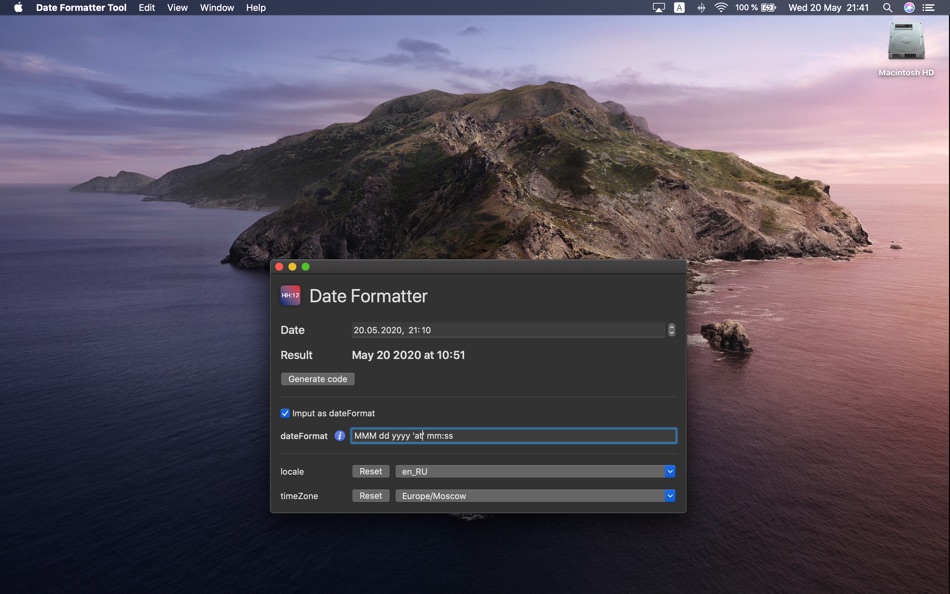
The application will help you to simply pick the correct format even if you have no Internet connection!
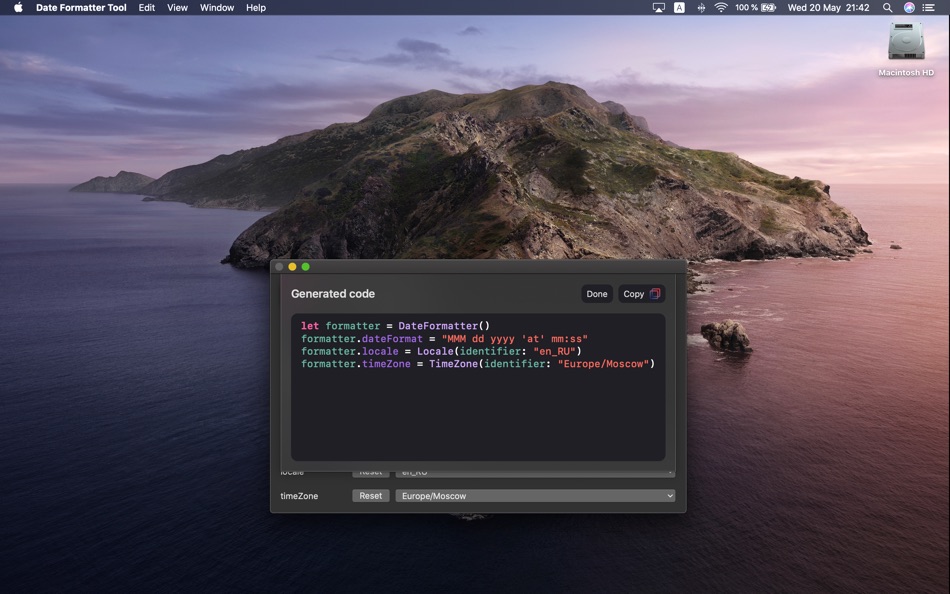
Date Formatter Tool provides you intuitive playground to apply different configurations.
Once you pick one, generate Swift code and paste it into your project.
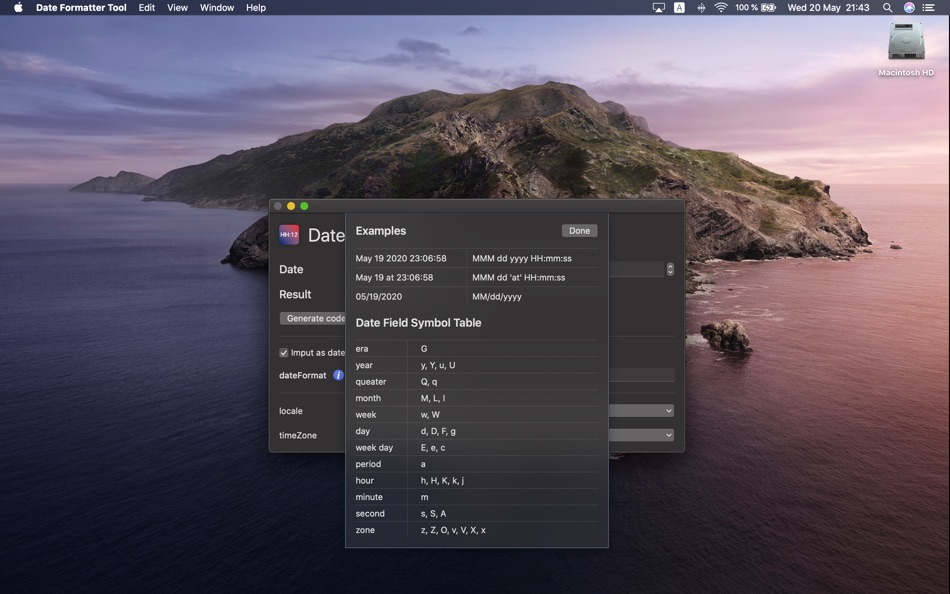
If you have any difficulties with raw date format, just watch the information reference by pressing cmd + i.
The application is made for Cocoa developers of any level.
It will be suitable extension to your development workflow.
ภาพหน้าจอ
มีอะไรใหม่
- เวอร์ชัน: 1.0.2
- อัปเดต:
- New features available:
- Relative date format;
- Navigation to the web reference.
ราคา
- วันนี้: ฟรี
- ต่ำสุด: ฟรี
- มากที่สุด: ฟรี
ติดตามราคา
ผู้พัฒนา
- Dmitriy Titov
- แพลตฟอร์ม: iOS แอป (3) macOS แอป (1)
- รายการ: 0 + 0
- แต้มแล: 0 + 0 ¡
- การจัดอันดับ: 0
- ความเห็น: 0
- ลดราคา: 0
- วิดีโอ: 0
- RSS: ติดตาม
แต้มแล
0 ☹️
การจัดอันดับ
0 ☹️
รายการ
0 ☹️
- Date Formatter Tool
ความเห็น
แสดงรีวิวเป็นคนแรกเลย 🌟
ข้อมูลเพิ่มเติม
- เวอร์ชัน: 1.0.2
- หมวดหมู่:
macOS แอป›เครื่องมือ - ระบบปฏิบัติการ:
macOS,macOS 10.15 และสูงกว่า - ขนาด:
5 Mb - ภาษาที่สนับสนุน:
English - การจัดประเภทเนื้อหา:
4+ - Mac App Store คะแนนโดย:
0 - อัปเดต:
- วันที่วางจำหน่าย:
รายชื่อติดต่อ
- เว็บไซท์:
 https://dateformatter.app
Date Formatter Tool URL แบบสั้น: คัดลอกแล้ว!- 🌟 แชร์
- Mac App Store
คุณอาจชอบ
-
- Date Format Creator
- macOS แอป: เครื่องมือ โดย: BRIDGETECH SOLUTIONS LIMITED
- $1.99
- รายการ: 0 + 1 การจัดอันดับ: 0 ความเห็น: 0
- แต้มแล: 2 + 0 เวอร์ชัน: 1.5 If you re a developer you ll know that working with dates can be difficult. Try to do anything reasonably complex with dates and before long you ll be imagining a perfect world where ... ⥯
-
- Formatter: JSON for Xcode
- macOS แอป: เครื่องมือ โดย: Samuel Goodwin
- $5.99
- รายการ: 0 + 0 การจัดอันดับ: 0 ความเห็น: 0
- แต้มแล: 0 + 0 เวอร์ชัน: 1.3.5 Formatter provides a quick way to reformat JSON files you are working with to make them more humanly readable. - Drag and drop onto the app window or dock icon to reformat files. - ... ⥯
-
- Prometheus Formatter
- macOS แอป: เครื่องมือ โดย: Shahab Kondri
- ฟรี
- รายการ: 0 + 0 การจัดอันดับ: 0 ความเห็น: 0
- แต้มแล: 0 + 0 เวอร์ชัน: 2.0 Prometheus Formatter is a Safari extension for macOS that transforms raw Prometheus and OpenMetrics text into a clear, navigable view. It groups metrics by family, highlights labels ... ⥯
-
- MDB Tool - For Microsoft Access for Mac OS X
- macOS แอป: เครื่องมือ โดย: Hankinsoft Development Inc
- $5.99
- รายการ: 0 + 0 การจัดอันดับ: 0 ความเห็น: 0
- แต้มแล: 0 + 0 เวอร์ชัน: 1.0.6 MDB Tool is the best resource for viewing Microsoft Access databases on a Mac. You can use it to export your data directly into SQL (for creating an SQLITE database) or directly to CSV ⥯
-
- Chmod Permissions Tool for Mac OS X
- macOS แอป: เครื่องมือ โดย: Ch1pa Software
- ฟรี
- รายการ: 0 + 0 การจัดอันดับ: 0 ความเห็น: 0
- แต้มแล: 0 + 0 เวอร์ชัน: 1.0 Get your permissions straight with Chmod Permissions Tool. The chmod command in Unix systems allows for the administrator to set permissions for the admin, groups, and public on what ... ⥯
-
- Fortinet Support Tool
- macOS แอป: เครื่องมือ โดย: Fortinet
- ฟรี
- รายการ: 0 + 0 การจัดอันดับ: 0 ความเห็น: 0
- แต้มแล: 0 + 0 เวอร์ชัน: 3.0.24 Utility tool for capturing debug information from supported Fortinet products. Supports FortiOS 7.6.3+ ⥯
-
- JSON Formatter for Safari
- macOS แอป: เครื่องมือ โดย: Pavel Dubov
- $0.99
- รายการ: 0 + 3 การจัดอันดับ: 0 ความเห็น: 0
- แต้มแล: 15 + 0 เวอร์ชัน: 1.5 Makes JSON readable in a tree structure when you load it in a browser tab. FEATURES: Powerful, Simple and Fast Syntax highlighting Collapsible and expandable trees Toggle between ... ⥯
-
- OK JSON - Viewer & Formatter
- macOS แอป: เครื่องมือ โดย: Anybox LTD
- * ฟรี
- รายการ: 0 + 0 การจัดอันดับ: 0 ความเห็น: 0
- แต้มแล: 7 + 0 เวอร์ชัน: 2.10.2 OK JSON is a native and scriptable JSON formatter on macOS. It s really fast and well-integrated with macOS. The notable features from OK JSON are: - JSON structure in both tree view ... ⥯
-
- Pretty JSON Formatter
- macOS แอป: เครื่องมือ โดย: Thanh Nguyen
- $0.99
- รายการ: 0 + 1 การจัดอันดับ: 0 ความเห็น: 0
- แต้มแล: 1 + 0 เวอร์ชัน: 1.6.0 Pretty JSON Formatter is now available as a native macOS app in addition to Safari Extension. You can open and format JSON directly without needing the browser. Multiple Input Options ... ⥯
- ใหม่
- JSON Formatter – Beautifier
- macOS แอป: เครื่องมือ โดย: Moca LLC
- $2.99
- รายการ: 0 + 0 การจัดอันดับ: 0 ความเห็น: 0
- แต้มแล: 0 + 0 เวอร์ชัน: 1.0.1 JSON Formatter is a lightweight macOS tool that instantly transforms messy JSON into clean, readable output with syntax highlighting. KEY FEATURES: One-click JSON formatting with ... ⥯
-
- Pixel Perfect Tool
- macOS แอป: เครื่องมือ โดย: Pavel Alekseev
- ฟรี
- รายการ: 2 + 1 การจัดอันดับ: 0 ความเห็น: 0
- แต้มแล: 3 + 0 เวอร์ชัน: 1.0.1 Overlay your mockup image above the Browser or Simulator and spot the differences like wrong paddings and fonts. The easiest way is to take screenshot from Figma/Sketch/Photoshop/XD ... ⥯
-
- Assets Tool for iOS Developers
- macOS แอป: เครื่องมือ โดย: TAGonSoft SRL
- $0.99
- รายการ: 0 + 0 การจัดอันดับ: 0 ความเห็น: 0
- แต้มแล: 0 + 0 เวอร์ชัน: 1.0.9 The Assets Tool Application is designed to help xcode developers create iOS and Mac apps fast, generating assets folders, resizing images to all needed sizes, creating app icons, and ... ⥯
-
- Localization Editor & Tool
- macOS แอป: เครื่องมือ โดย: Harshad Jadav
- $0.99
- รายการ: 0 + 1 การจัดอันดับ: 5 (1) ความเห็น: 0
- แต้มแล: 1 + 0 เวอร์ชัน: 1.3 Localization Editor Translate, Edit & Manage App Texts Make localizing your projects easy and efficient! Localization Editor helps developers, translators, and content managers edit, ... ⥯
-
- Icon Resizer Tool for xCode
- macOS แอป: เครื่องมือ โดย: Kirill Aust
- ฟรี
- รายการ: 1 + 0 การจัดอันดับ: 0 ความเห็น: 0
- แต้มแล: 5 + 0 เวอร์ชัน: 1.1.5 Icon Resizer Tool will quickly prepare icons of all required sizes for further export in xcode Supported platforms for icon: - macOS - iOS - iOS + iPad OS - watchOS How to use: 1. Drag ⥯