
| Udvikler: | Thomas Coomer (21) | ||
| Pris: | * $0.49 | ||
| Rangeringer: | 0 | ||
| Anmeldelser: | 0 Skriv en anmeldelse | ||
| Lister: | 1 + 2 | ||
| Point: | 13 + 1 (1.0) ¡ | ||
| Mac App Store | |||
Beskrivelse
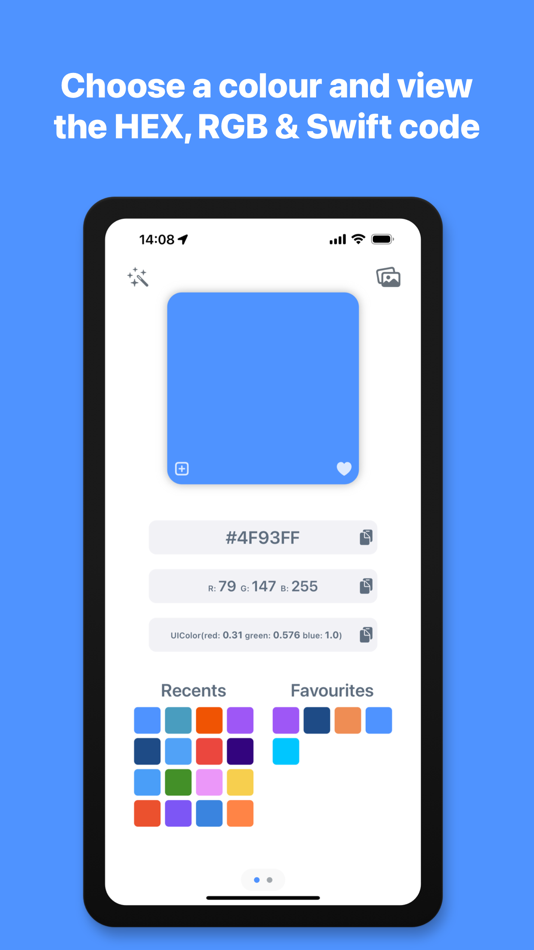
Choose a colour using the built in colour picker, or enter the colour values to see them converted to HEX, RGB and Swift code. You can then copy the colour codes with a single tap to use in your projects. The app automatically shows your recently used colours for reuse and allows you to add frequently used colours to your favourites.
You can organise your colours further, by grouping them in to different palettes for each project or brand that you are working with, name the colours to describe what part of the project they are being used for and write notes on each palette and colour. The palettes you create and colours you add will be automatically synced to the cloud and accessible on all of your Apple devices.
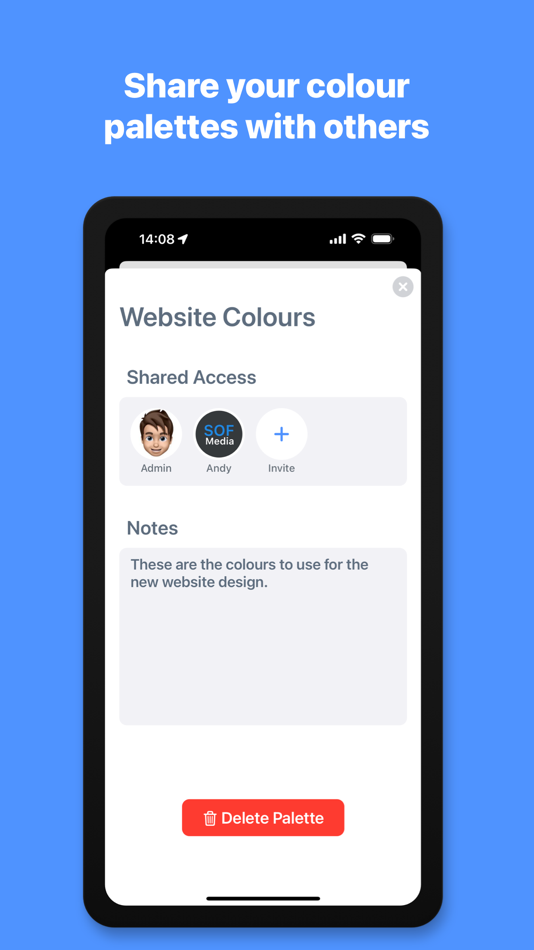
You can also share these palettes with other members of your design team or with a client, so that you are all working from the same colour palette. Invite others to your palette and set permissions for each person you invite, granting or denying them read, add, edit or remove access. You can also see any palettes that you have been sent within the app and choose to accept or deny the invitation, to add the palette to your shared list. The palettes you create and the palettes that are shared with you are automatically grouped and separated.
Import an image, client’s logo or style guide file from your photo library, files or camera and use the magnified colour picker to choose a specific colour from the image. The app will automatically scan the image using AI and detect the dominant colours within the image. Once it has extracted the colours, you can create a new palette containing these colours with a single tap.
If you need a little help with inspiration or to find the right colour for your project, you can use the AI Assistant tool to generate a palette or get the colour of an object. Enter a phrase such as “The sea” to see various shades of blue, “Giraffe” to see the colours of a giraffe or “New York Taxi” to be shown the colour code of the New York Taxi yellow. Once the assistant has detected the colours, you can then create a palette with these colours and it is automatically named from your search phrase.
*Subscription required for some features described above, including cloud palettes, sharing features and AI features - Monthly usage limits apply to AI features.
- Subscription Details -
Developer Colour Palette requires a monthly subscription after your 14 day free trial.
Your subscription can be cancelled at any time. No long term commitment required.
Subscriptions will be charged to your iTunes account at confirmation of purchase. Your subscription will automatically renew unless automatic renewal is turned off at least 24 hours before the end of the current period. Your account will be charged for renewal within 24 hours prior to the end of the current period. You can manage your subscriptions and automatic renewal status in Account Settings after purchase. Price may vary by location.
Privacy Policy: https://smudge.app/privacy
Terms and Conditions: https://smudge.app/app-terms
Skærmbilleder



Pris
-
* Indkøb i appen - I dag: $0.49
- Minimum: Gratis
- Maksimalt: $0.99
Overvåg priser
Udvikler
- Thomas Coomer
- Platforme: iOS Apps (3) iOS Spil (2) macOS Apps (12) macOS Spil (4)
- Lister: 4 + 3
- Point: 334 + 391 ¡
- Rangeringer: 0
- Anmeldelser: 0
- Rabatter: 1
- Videoer: 0
- RSS: Abonner
Point
-

- 289 Serg Romashov
- +1
-
- 3,509 Brain_vv
- +1
-
- 1,914 Lu Chin
- +1
-
- 9,757 Pui Hang Choi
- +1
-
- 313 Shindou
- +1
-
- 10,841 Simon Chan
- +1


Rangeringer
0 ☹️
Lister
- Developer Colour Palette

Anmeldelser
Vær den første til at gennemgå 🌟
Yderligere oplysninger
- Version: 1.0.3
- Kategori:
macOS Apps›Værktøjer - Operativsystem:
iPad,iPhone,macOS,macOS 15.0 eller nyere - Størrelse:
10 Mb - Understøttet sprog:
English - Indholdsklassificering:
4+ - Mac App Store Bedømmelse:
1.0(1) - Opdateret:
- Udgivelsesdato:
Kontaktpersoner
 https://smudge.app/developer-colour-paletteDeveloper Colour Palette Kort webadresse: Kopieret!
- 🌟 Del
- Mac App Store
Du vil måske også kunne lide
- -50% Ny
- Developer Tools Pro
- macOS Apps: Værktøjer Ved: Mohammed Aadhil
- ▼ $4.99
$9.99-50% - Lister: 0 + 0 Rangeringer: 0 Anmeldelser: 0
- Point: 1 + 0 Version: 3.0 Developer Tools Pro is a comprehensive utility app for developers, providing over 100+ essential utilities for data conversion, formatting, encoding, and analysis all in a single, ... ⥯
-
- Palette Bureau
- macOS Apps: Værktøjer Ved: Alexander Zats
- Gratis
- Lister: 0 + 0 Rangeringer: 0 Anmeldelser: 0
- Point: 0 + 0 Version: 3 Unleash your creativity with Palette Bureau, the ultimate app for color enthusiasts, designers, and artists. Inspired by the textures and hues of everyday objects, especially food, ... ⥯
-
- Developer Tools: Exabox
- macOS Apps: Værktøjer Ved: Alberto Malagoli
- * Gratis
- Lister: 0 + 3 Rangeringer: 0 Anmeldelser: 0
- Point: 7 + 0 Version: 3.0.0 exabox is your all-in-one developer tools companion featuring 30+ essential utilities for programming professionals. Transform, inspect, and manipulate data with confidence using our ... ⥯
-
- Developer Tool
- macOS Apps: Værktøjer Ved: Stanislav Duplinskiy
- Gratis
- Lister: 0 + 1 Rangeringer: 0 Anmeldelser: 0
- Point: 3 + 0 Version: 1.0.0 Try the new Pocket Developer Assistant! The application allows you to create slicing icons in 2 clicks! Lots of platforms supported - just drag and drop icons and export slices for ... ⥯
-
- Developer Tools - Tooly
- macOS Apps: Værktøjer Ved: Basile Cornet
- * Gratis
- Lister: 0 + 0 Rangeringer: 0 Anmeldelser: 0
- Point: 3 + 0 Version: 1.0.5 Tooly is an all-in-one toolkit designed to simplify and accelerate your development workflow. Whether you re a software engineer, a web developer, or a designer, Tooly provides a ... ⥯
-
- Developer's Tool Kit
- macOS Apps: Værktøjer Ved: Think Forward Media
- $0.99
- Lister: 0 + 0 Rangeringer: 0 Anmeldelser: 0
- Point: 0 + 0 Version: 1.18.3 The Developer's Tool Kit is an indispensable tool for all developers! Features: Text Processing: Automatically create the perfect Git Branch from your task management issue names! ... ⥯
-
- Apple Developer
- macOS Apps: Værktøjer Ved: Apple
- Gratis
- Lister: 4 + 4 Rangeringer: 0 Anmeldelser: 0
- Point: 4 + 2,015 (4.1) Version: 10.8.3 Welcome to Apple Developer, your source for developer news, features, and videos and the best place to experience WWDC. Keep up to date on the latest Apple frameworks and technologies. ⥯
-
- Color Palette for Safari
- macOS Apps: Værktøjer Ved: Pierre Stanislas
- $4.99
- Lister: 0 + 0 Rangeringer: 0 Anmeldelser: 0
- Point: 0 + 0 Version: 1.0 Transform Your Workflow Color Palette is the fastest way to extract and copy colors from any website in Safari. Whether you are a designer seeking inspiration, a developer matching ... ⥯
-
- Color Palette Creator
- macOS Apps: Værktøjer Ved: Jon Vogel
- Gratis
- Lister: 0 + 0 Rangeringer: 0 Anmeldelser: 0
- Point: 0 + 0 Version: 3.1 AI Color Picker Color palette tools are everywhere but AI Color Picker is built differently. Developed from the ground up using the latest AI and Apple-native technologies, AI Color ... ⥯
-
- Chroma: Palette Manager
- macOS Apps: Værktøjer Ved: Jota Uribe
- $5.99
- Lister: 0 + 0 Rangeringer: 0 Anmeldelser: 0
- Point: 2 + 0 Version: 1.9.4 Unleash your creativity with Chroma the ultimate tool for creating stunning color combinations in seconds. Whether you're a designer, developer, or artist, Chroma provides an intuitive ⥯
-
- Flags for Developer
- macOS Apps: Værktøjer Ved: Thibault Delimard
- Gratis
- Lister: 0 + 2 Rangeringer: 0 Anmeldelser: 0
- Point: 2 + 0 Version: 1.3 With Flags for developer, find more informations about the Emoji Flags - Code point - HTML - HTML Hex - UTF16 Hex - ISO 3166 alpha2 - ISO 3166 alpha3 - ISO 3166 Num - Currency code - ... ⥯
-
- Lexical Developer Tools
- macOS Apps: Værktøjer Ved: Mobile People Labs
- Gratis
- Lister: 0 + 0 Rangeringer: 0 Anmeldelser: 0
- Point: 0 + 0 Version: 16.0.0 Adds Lexical debugging tools to the Safari Developer Tools. Lexical Developer Tools is a Safari DevTools extension for the open-source Lexical JavaScript text editor framework. It ... ⥯
-
- AutoTranslate - Developer Tool
- macOS Apps: Værktøjer Ved: Remi Herbiet
- $19.99
- Lister: 0 + 0 Rangeringer: 0 Anmeldelser: 0
- Point: 0 + 0 Version: 25.1.1 AutoTranslate is a powerful developer tool that streamlines the process of creating localized XCStrings files for applications. Built specifically for developers who need to translate ... ⥯
-
- miSales Developer Sales Charts
- macOS Apps: Værktøjer Ved: If Then Dev, LLC
- * Gratis
- Lister: 0 + 0 Rangeringer: 0 Anmeldelser: 0
- Point: 0 + 1 (5.0) Version: 1.1 miSales Developer Sales Charts is a focused dashboard for iOS, macOS, and visionOS developers who want a clear, trustworthy view of their App Store performance without handing data to ... ⥯