
| 개발자: | ssntpl.com (4) | ||
| 가격: | 무료 | ||
| 순위: | 0 | ||
| 리뷰: | 0 리뷰 작성 | ||
| 목록: | 0 + 0 | ||
| 포인트: | 0 + 0 ¡ | ||
| Mac App Store | |||
기술

KEY FEATURES
Git Repository Monitoring
- Automatically scans your developer directories for git repos
- Shows clean/dirty status, current branch, ahead/behind counts, and last commit time
- Tracks .git size so you can spot bloated repositories
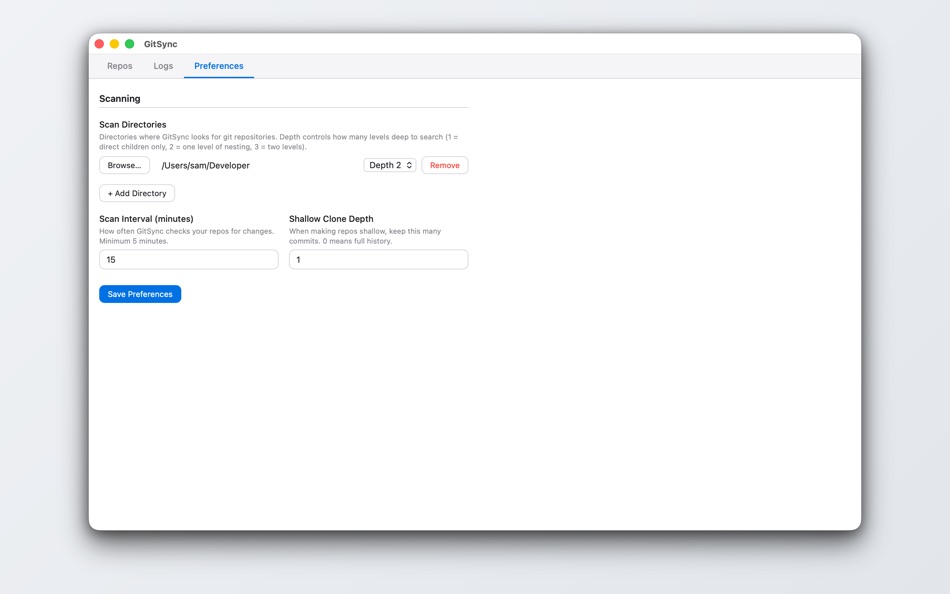
- Configurable scan interval (5+ minutes) and scan depth
- Search and filter repos by status, provider, or name (Cmd+K)
Cloud Sync — Back Up What Git Ignores
- Back up untracked files (.env, databases, IDE configs) to cloud storage
- Supports iCloud, Dropbox (via OAuth), OneDrive, Google Drive, Box, or any folder you choose
- Per-repo file selection with a hierarchical file browser
- Auto-backup on every scan cycle — changed files are synced automatically
- Auto-restore when you clone a repo on a new machine
- Visual sync status icons: synced (green), pending changes (orange), restorable (blue)
- Click the cloud icon to sync immediately or configure files
- Configurable ignore patterns to filter noise files from the file picker
Remote Repositories
- Connect your GitHub, GitLab, and Bitbucket accounts via OAuth
- See all your remote repos alongside local ones in a single view
- One-click clone with protocol selection (SSH or HTTPS)
- Clone destination pre-filled from your scan directories
- Filter by cloned, not cloned, clean, or dirty
Shallow Clone Management
- Convert repos to shallow clones to save disk space
- Unshallow repos when you need full history
- Configurable default shallow depth
SSH & Credential Management
- Import SSH keys per host for secure authentication
- Store personal access tokens securely in macOS Keychain
- Automatic auth detection for remote operations
Preferences
- macOS System Settings-inspired design
- Manage scan directories, connected accounts, and cloud storage providers
- Customize cloud sync ignore patterns
- Configure scan interval and shallow depth
GitSync is a native macOS app that runs entirely on your machine. Your code and credentials never leave your device — cloud sync files are stored in the cloud provider you choose.
스크린샷


새로운 기능
- 버전: 1.2.0
- 업데이트:
- Cloud Sync
- Back up untracked files (.env, databases, IDE configs) to iCloud, Dropbox, OneDrive, Google Drive, or any folder
- Auto-backup on every scan cycle with change detection
- Auto-restore files when cloning a repo on a new machine
- Visual sync status icons on each repo (synced, pending, restorable)
- Hierarchical file browser for selecting which files to sync
- Configurable ignore patterns to filter noise files
Remote Repositories
- Connect GitHub, GitLab, and Bitbucket accounts via OAuth
- See all remote repos alongside local ones
- One-click clone with SSH/HTTPS protocol selection
UI Redesign
- Streamlined repo table with inline status icons
- Clickable status chips for quick filtering
- Search with Cmd+K shortcut
- macOS System Settings-inspired Preferences
Other Improvements
- Shallow clone management (convert to/from shallow)
- SSH key import and credential management
- Default sort by last commit (most recent first)
가격
- 오늘: 무료
- 최소: 무료
- 최대: 무료
가격 추적
개발자
- ssntpl.com
- 플랫폼: Android 앱 (1) iOS 앱 (2) macOS 앱 (1)
- 목록: 0 + 0
- 포인트: 0 + 21 ¡
- 순위: 0
- 리뷰: 0
- 할인: 0
- 동영상: 0
- RSS: 구독
포인트
0 ☹️
순위
0 ☹️
목록
0 ☹️
- GitSync Lite
리뷰
첫 번째 리뷰를 남겨보세요 🌟
추가 정보
GitSync Lite 단축 URL: 복사됨!- 🌟 공유하기
- Mac App Store
당신은 또한 같은 수 있습니다
-
- Git Ignore Generator
- macOS 앱: 개발자 도구 게시자: Konstantin Adamov
- 무료
- 목록: 0 + 0 순위: 0 리뷰: 0
- 포인트: 0 + 0 버전: 1.0.12 Git ignore generator is an app that helps you create .gitignore files for your projects. You can choose from over 500 templates based on the programming languages, operating systems ... ⥯
-
- Git Streaks for GitHub
- macOS 앱: 개발자 도구 게시자: Honghao Zhang
- 무료
- 목록: 0 + 3 순위: 0 리뷰: 0
- 포인트: 3 + 0 버전: 1.2.6 Git Streaks: A sleek Mac menu bar app for GitHub enthusiasts Stay motivated and on top of your GitHub contributions with Git Streaks, a minimalist app designed to seamlessly integrate ... ⥯
-
- Git Server
- macOS 앱: 개발자 도구 게시자: 兰桂 吴
- $9.99
- 목록: 1 + 0 순위: 0 리뷰: 0
- 포인트: 1 + 0 버전: 1.5.4 Git Server allows you to easily install and manage a fully-functional Git server on the macOS platform. Host Git repositories on your own Mac computer, and you have the max control ... ⥯
-
- Git Reaper
- macOS 앱: 개발자 도구 게시자: Daniel Allsopp
- $2.99
- 목록: 0 + 0 순위: 0 리뷰: 0
- 포인트: 0 + 0 버전: 1.0 Git Reaper helps you quickly identify local branches that no longer have a matching remote branch, making it simple to spot and safely delete orphaned branches with a single click. In ... ⥯
-
- Git Merge Tool: Gitonium
- macOS 앱: 개발자 도구 게시자: Allsidium AS
- $39.99
- 목록: 0 + 2 순위: 0 리뷰: 0
- 포인트: 2 + 0 버전: 2025.9.1 Have you ever needed to merge a long-living feature branch into the main repository? You may have been working on a new feature for a long time, and now it's time to integrate it with ... ⥯
-
- Metavia Sync: Metadata Editor
- macOS 앱: 개발자 도구 게시자: Andrei Toporov
- 무료
- 목록: 0 + 0 순위: 0 리뷰: 0
- 포인트: 0 + 0 버전: 1.0.1 Streamline your multi-platform metadata workflow with AI-powered translations. Metavia Sync helps iOS, macOS, and Android developers manage multilingual app metadata efficiently. ... ⥯
-
- Source Files: Git Storage
- iOS 앱: 개발자 도구 게시자: Anders Borum ApS
- * 무료
- 목록: 2 + 2 순위: 0 리뷰: 0
- 포인트: 5 + 23 (4.6) 버전: 2026.11 Source Files is a faster way to access GitHub, Gitea, GitLab and BitBucket from the Finder and Files app without having to clone repositories or commit changes. Using REST APIs instead ⥯
- 새로운
- DiffStudio – File Git History
- macOS 앱: 개발자 도구 게시자: Krishna Varshney
- 무료
- 목록: 0 + 0 순위: 0 리뷰: 0
- 포인트: 0 + 0 버전: 1.0.0 DiffStudio is a Git history viewer for macOS that allows developers to explore file changes in Git repositories. The app displays commit history, file differences, and repository ... ⥯
-
- siGit Git Client & Code Editor
- iOS 앱: 개발자 도구 게시자: Splitfire AB
- 무료
- 목록: 0 + 1 순위: 0 리뷰: 0
- 포인트: 2 + 0 버전: 1.0.1 siGit is a powerful Git client, code editor, and more. ⥯
-
- Tracks for Git
- macOS 앱: 개발자 도구 게시자: The Del Mar Code Company LLC
- $4.99
- 목록: 0 + 0 순위: 0 리뷰: 0
- 포인트: 0 + 0 버전: 1.0 Tracks is a clean, focused Git graph viewer for macOS. See your branch history at a glance with commits, tags, and branch labels displayed inline alongside a visual graph. ## FEATURES ... ⥯
-
- IconSync: Icon Resizer & Sync
- macOS 앱: 개발자 도구 게시자: HAKAN OZGER
- $4.99
- 목록: 0 + 1 순위: 0 리뷰: 0
- 포인트: 5 + 0 버전: 1.0 Stop wasting time with web converters and manual file management. IconSync is the native macOS utility designed to resize and synchronize app icons for professional developers. Simply ... ⥯
-
- Pulsely Uptime Sync
- macOS 앱: 개발자 도구 게시자: Pulsely Consulting
- 무료
- 목록: 0 + 0 순위: 0 리뷰: 0
- 포인트: 0 + 0 버전: 0.1.9 Uptime Sync is a website uptime checker with iCloud support. You can monitor the uptime status of multiple websites with the data synchronized to multiple Mac, iOS and iPadOS devices. ... ⥯
-
- Snippets Sync for Xcode
- macOS 앱: 개발자 도구 게시자: 杰辉 赖
- $0.99
- 목록: 0 + 0 순위: 0 리뷰: 0
- 포인트: 1 + 0 버전: 1.2.1 Use iCloud's CloudKit technology to sync Xcode's CodeSnippets across multiple Macs and save the data in your iCloud private database. ⥯
-
- auth. - 2FA Smart Sync
- macOS 앱: 개발자 도구 게시자: ChakMing Wong
- $3.99
- 목록: 1 + 0 순위: 0 리뷰: 0
- 포인트: 2 + 6 (4.7) 버전: 26.1 Are you looking for a simple and comfortable 2FA/MFA security solution for your account? Auth. is a 2FA and OTP management tool for everyone. Works with all Apple personal devices - ... ⥯