
| ผู้พัฒนา: | 斌斌 沈 (6) | ||
| ราคา: | * ฟรี | ||
| การจัดอันดับ: | 0 | ||
| ความเห็น: | 0 เขียนความเห็น | ||
| รายการ: | 0 + 0 | ||
| แต้มแล: | 0 + 0 ¡ | ||
| Mac App Store | |||
คำอธิบาย

Unlike postman, Gotcha has a better UI/UX, less memory usage, fast start up speed, no network required.
Feedback & Bug Report: https://github.com/WhiteCosmos/Gotcha-HTTP-Client-Support
【Highlights】
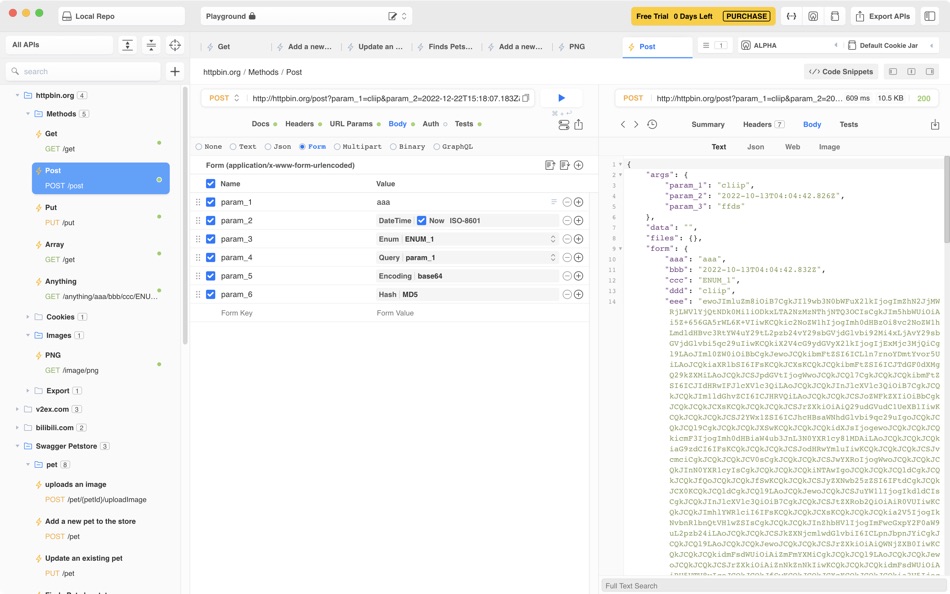
- Simple, modern UI/UX design, almost like native app.
- Flexible requests & group manager, create ulimited sub-groups as you wish.
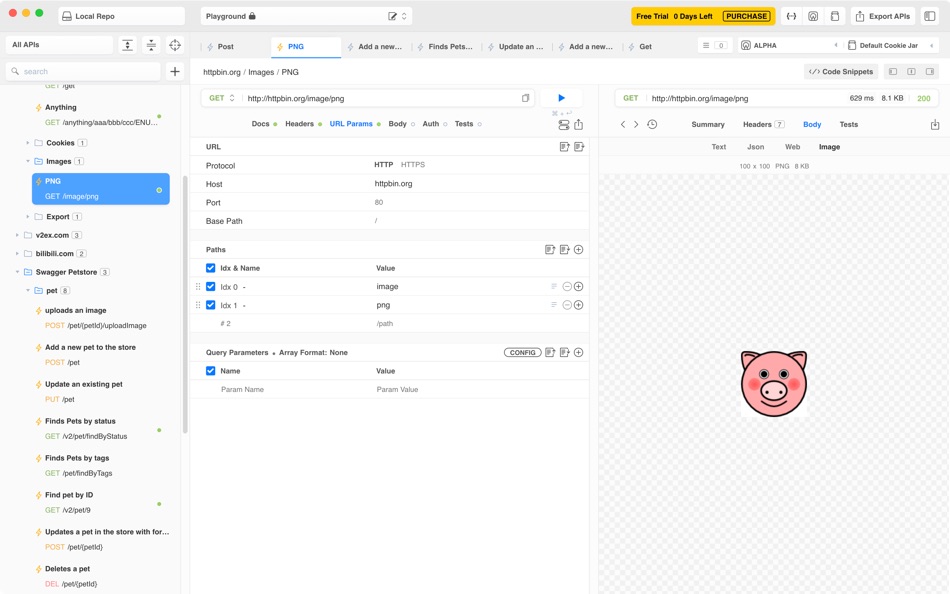
- Powerful request editor make you edit every single parts of url like host/port/path params/query params.
- Standalone JSON Editor, import json text by clipboard or file.
- View & test swagger/openapi APIs like Swagger-UI
- Genearte API Documentation directly from Java Project
【Features】
1. Url Editor
- Paste curl into url bar and import
- Path & Query Parameters Builder Support
- Support add custom http method
2. Request Body Support
- Text mode with gramma highlights
- Json editor, import json from clipboard or file
- Upload form (form-urlencoded)
- Upload multipart form
- GraphQL
3. Response Support
- Text (Json/XML/HTML)
- Image (JPEG/PNG/Webp)
- Web View
4. Header & Cookie
- Send custom headers with common headers prompt
- Send custom cookies
- Receive and send cookies automatically
- Multiple cookie jars support like PAW(developing)
5. Request Authentication
- HTTP Basic Auth
6. Import & Export
- Support importing postman collection file
- Import Swagger/OpenAPI APIs from file or url link, now is readonly
- Import Java Project, support Spring/SpringFox/JAX-RS frameworks, now is readonly
- Export single request to curl
7. Environment Variables
- Available
8. Add comment to request param
- Export to markdown
9. Response Assertion
- Response header
- Json format response body
【Terms And Conditions】
Terms of Service page: https://github.com/RabiAPI/RabiAPI-Support/blob/master/terms_of_service.md
Privacy Policy page: https://github.com/RabiAPI/RabiAPI-Support/blob/master/privacy-policy.md
ภาพหน้าจอ




ราคา
-
* การซื้อภายในแอพ - วันนี้: ฟรี
- ต่ำสุด: ฟรี
- มากที่สุด: ฟรี
ติดตามราคา
ผู้พัฒนา
แต้มแล
0 ☹️
การจัดอันดับ
0 ☹️
รายการ
0 ☹️
- Gotcha Rest Client
ความเห็น
แสดงรีวิวเป็นคนแรกเลย 🌟
ข้อมูลเพิ่มเติม
- เวอร์ชัน: 1.6.4
- หมวดหมู่:
macOS แอป›เครื่องมือ - ระบบปฏิบัติการ:
macOS,macOS 10.15 และสูงกว่า - ขนาด:
204 Mb - ภาษาที่สนับสนุน:
English - การจัดประเภทเนื้อหา:
4+ - Mac App Store คะแนนโดย:
0 - อัปเดต:
- วันที่วางจำหน่าย:
รายชื่อติดต่อ
- เว็บไซท์:
 https://gotcha.rest
Gotcha Rest Client URL แบบสั้น: คัดลอกแล้ว!- 🌟 แชร์
- Mac App Store
คุณอาจชอบ
-
- StateTransfer - a REST client
- macOS แอป: เครื่องมือ โดย: Holger Krupp
- $5.99
- รายการ: 0 + 0 การจัดอันดับ: 0 ความเห็น: 0
- แต้มแล: 0 + 0 เวอร์ชัน: 1.2 StateTransfer lets you test your REST APIs in a simple way. Define your Endpoint, HTTP methods, Header, Parameters and body and send the request. Optional Authentication can be done. ... ⥯
-
- TCP Client for Mac OS X
- macOS แอป: เครื่องมือ โดย: Marvin Wagner
- $0.99
- รายการ: 0 + 0 การจัดอันดับ: 0 ความเห็น: 0
- แต้มแล: 0 + 0 เวอร์ชัน: 1.0 Sie brauchen einen einfachen TCP-Client? Dann ist dieser TCP-Client genau das Richtige für Sie! In wenigen Sekunden ist der TCP Client eingerichtet und verbunden. Sie können mit diesem ⥯
-
- MLPerf Client
- macOS แอป: เครื่องมือ โดย: MLCommons Association
- ฟรี
- รายการ: 0 + 0 การจัดอันดับ: 0 ความเห็น: 0
- แต้มแล: 0 + 0 เวอร์ชัน: 1.5.1 MLPerf Client is a benchmark developed collaboratively at MLCommons to evaluate the performance of large language models (LLMs) and other AI workloads on personal computers from ... ⥯
-
- Chapar rest
- macOS แอป: เครื่องมือ โดย: Mohsen Mirzakhani
- ฟรี
- รายการ: 0 + 0 การจัดอันดับ: 0 ความเห็น: 0
- แต้มแล: 0 + 0 เวอร์ชัน: 0.4.6 Chapar is a powerful, native API testing tool built with GoLang, crafted to streamline and accelerate the testing process for developers. Designed with simplicity in mind, Chapar ... ⥯
-
- SSH Client - Terminal, Telnet
- macOS แอป: เครื่องมือ โดย: Moon Technolabs Pvt Ltd
- ฟรี
- รายการ: 1 + 2 การจัดอันดับ: 0 ความเห็น: 0
- แต้มแล: 5 + 393 (3.5) เวอร์ชัน: 4.9.4 Here is one of the most intelligent & advanced SSH Client apps to manage and connect remote servers for your iOS and Mac devices About SSH Client: SSH Client is an on-the-go SSH-Telnet ⥯
-
- HTTPBot: API & HTTP Client
- macOS แอป: เครื่องมือ โดย: Arvindh Sukumar
- ฟรี
- รายการ: 2 + 3 การจัดอันดับ: 0 ความเห็น: 0
- แต้มแล: 7 + 1,312 (4.5) เวอร์ชัน: 2026.0.1 HTTPBot is a powerful API client and debugger that lets you send HTTP/HTTPs requests, connect to WebSockets, inspect JSON & HTML responses, and debug APIs on the go. With HTTPBot, you ... ⥯
-
- S3 Client - Files location
- macOS แอป: เครื่องมือ โดย: Anders Borum ApS
- * ฟรี
- รายการ: 3 + 2 การจัดอันดับ: 0 ความเห็น: 0
- แต้มแล: 6 + 46 (4.8) เวอร์ชัน: 2026.7 Access your S3 storage directly from the Files app, Finder, and other applications on iPhone, iPad, and Mac. Developed by the creator of Working Copy, this application provides ... ⥯
-
- Termius: SSH Client & Terminal
- macOS แอป: เครื่องมือ โดย: Termius Corporation
- * ฟรี
- รายการ: 2 + 2 การจัดอันดับ: 0 ความเห็น: 0
- แต้มแล: 6 + 0 เวอร์ชัน: 9.37.0 Termius is a modern SSH client designed for productivity and collaboration. Connect with one click from desktop and mobile no re-entering IP addresses, ports, and passwords. With a ... ⥯
-
- iTerminus: SSH Client Terminal
- macOS แอป: เครื่องมือ โดย: Ravi Kakadiya
- ฟรี
- รายการ: 1 + 0 การจัดอันดับ: 0 ความเห็น: 0
- แต้มแล: 12 + 15 (4.5) เวอร์ชัน: 1.8.2 QuickSSH - SSH Terminal & Shell Fast, Secure, & Powerful SSH Client QuickSSH is a lightning-fast, secure, and feature-rich SSH terminal app designed for developers, system admins, and ... ⥯
-
- PortX - SSH, SFTP Client
- macOS แอป: เครื่องมือ โดย: NetSarang Computer, Inc.
- ฟรี
- รายการ: 2 + 1 การจัดอันดับ: 0 ความเห็น: 0
- แต้มแล: 6 + 17 (3.8) เวอร์ชัน: 2.0.8 PortX Mobile brings the power of our desktop SSH Client to your mobile device (SFTP is currently available on the Desktop version only, but will be supported on Mobile soon). With a ... ⥯
-
- Termix Pro: SSH & SFTP Client
- macOS แอป: เครื่องมือ โดย: Simon Zvara
- $9.99
- รายการ: 1 + 1 การจัดอันดับ: 0 ความเห็น: 0
- แต้มแล: 6 + 26 (4.9) เวอร์ชัน: 1.1.5 Termix is a modern SSH client and terminal developed by a European team of cybersecurity experts. It offers an unrivaled SSH and SFTP experience that enhances your productivity without ⥯
-
- Grip: gRPC client
- macOS แอป: เครื่องมือ โดย: codefreeze GmbH
- ฟรี
- รายการ: 2 + 1 การจัดอันดับ: 0 ความเห็น: 0
- แต้มแล: 4 + 0 เวอร์ชัน: 1.0.2 Grip is a GUI client for interacting with gRPC services. FEATURES Connect to your services with or without TLS Select your .proto files manually or let Grip fetch service definitions ... ⥯
-
- Terminux: SSH Client
- macOS แอป: เครื่องมือ โดย: Pooja Hariyani
- ฟรี
- รายการ: 0 + 2 การจัดอันดับ: 0 ความเห็น: 0
- แต้มแล: 4 + 75 (4.6) เวอร์ชัน: 1.8.1 Terminux Your Ultimate Tool for Professional Server Management Terminux is a cutting-edge SSH client designed to simplify and enhance your remote server management experience. Perfect ... ⥯
-
- API Orbit – REST & GraphQL
- macOS แอป: เครื่องมือ โดย: Stanislav Makushov
- * ฟรี
- รายการ: 0 + 0 การจัดอันดับ: 0 ความเห็น: 0
- แต้มแล: 1 + 0 เวอร์ชัน: 26.1 AI-powered REST & GraphQL client for API testing. API Orbit is a fast and intuitive API client built to help you send requests, debug responses, test endpoints, and generate ... ⥯