
| Sviluppatore: | Pink Zombie Studios Inc. (12) | ||
| Prezzo: | $9.99 | ||
| Classificazioni: | 0 | ||
| Recensioni: | 0 Scrivi una recensione | ||
| Commenti: | 0 Pubblica commento | ||
| Listes: | 0 + 0 | ||
| Punti: | 0 + 0 ¡ | ||
| Mac App Store | |||
Descrizione

As a developer for the Apple platform you frequently have to create application icons of various sizes. Personally, this is something I hate doing since sometimes, to get an icon right, you have to create the same set of icons over and over again so that you can test the icons in your app to make sure that it looks just right.
Iconizer aims to reduce this workload for you in several ways:
1. Iconizer allows you to load your icon into Iconizer and check it against various background colours in Iconizer itself, without needing to create various icon sizes, add it to your project, compile the project, and then run the app to see how the icons look.
2. Iconizer displays these images at all the different sizes required by each platform it supports (Mac OS X, iOS, watchOS, tvOS) and so, you can see how all your icons look at all the different sizes for each platform.
3. Iconizer will generate all the images at the correct sizes for each platform at the press of a single button - you don't have to do anything except to drag and drop the icon in, select the platform and the location to save the images to.
4. Iconizer will also create Xcode asset catalog specific image bundles so that you don't even need to copy the individual images into your asset catalog - you can simply create the icons in the Xcode project folder itself so that all you have to do is open you Xcode project and find the images in your project, ready for use.
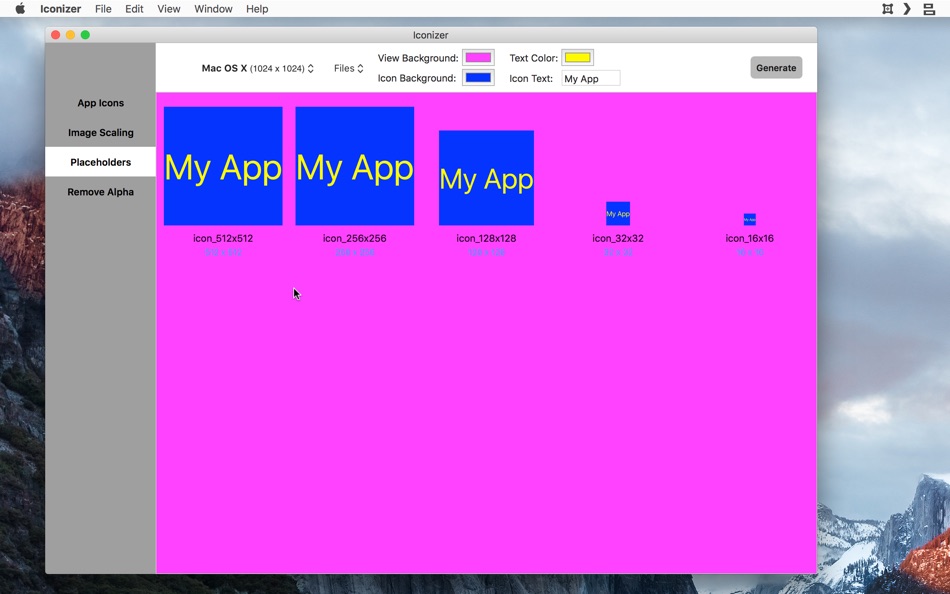
If the above wasn't enough, Iconizer also allows you to create quick custom placeholder icons. If your designer is busy, or you simply want a quick app icon to put in place till you get your finished artwork, Iconizer can help you with that. In fact, Iconizer lets you specify a background colour, a text colour, and some text of your choice to go on the placeholder icons.
Iconizer will also help you take images for a given scale (@3x would be the best) and to scale it up or down to create additional images to create all the different image for the different scales required by your project. Again, all of this as simple as dragging and dropping the images in and clicking a button.
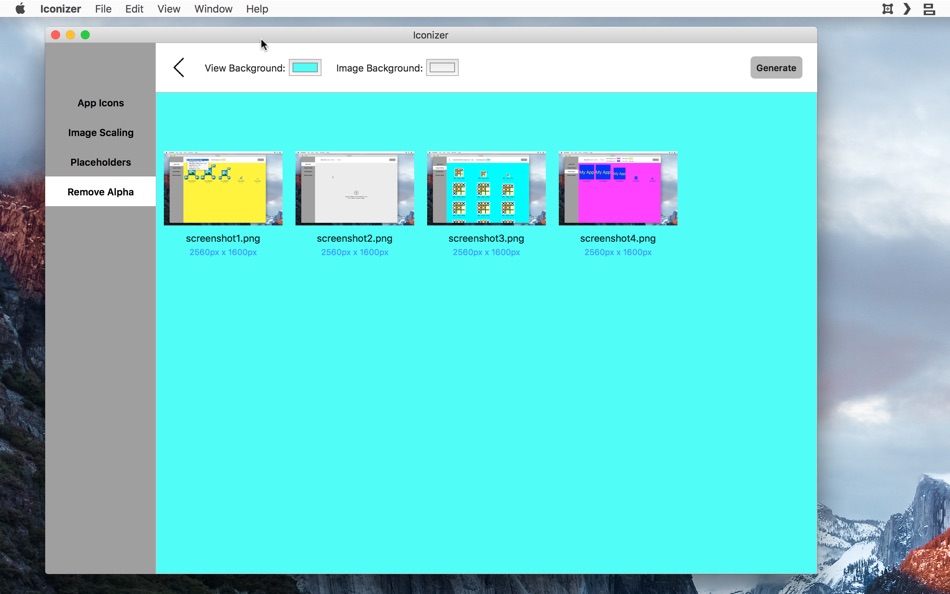
And to round things out, you can also batch process images via Iconizer to reomve transparency / alpha. This is especially useful when uploading images to iTunes Connect because it often asks that the images not contain transparency. While it is easy enough to use something like Preview to re-save the image without transparency, it is time consuming since you have to do that for each image separately. Iconizer allows you to save a bunch of images at once without transparency simply by dragging and dropping the images on to the Iconizer window and then clicking a button.
Iconizer has been written in such a way that new image formats and requirements can be added in quickly and easily by us. So, any time the image requirements change due to the addition of a new platform or new requirements by Apple, we plan to release a new version that meets the new requirements within a few days. So, Iconizer should be there to meet your image generation requirements today and in the future.
If you have any additional requirements or feature requests, do contact us and let us know. We are eager to improve Iconizer to be the best image generator out there!
Ad
Screenshot


Novità
- Versione: 1.4
- Aggiornata:
- * Updated for latest Xcode, macOS and also updated the required icon configurations for latest updates
Cronologia dei prezzi
- Oggi: $9.99
- Minimo: $9.99
- Massimo: $9.99
Monitora prezzi
Ad
Sviluppatore
- Pink Zombie Studios Inc.
- Piattaforme: iOS App (9) macOS App (3)
- Listes: 0 + 0
- Punti: 0 + 17 ¡
- Classificazioni: 0
- Recensioni: 0
- Commenti: 0
- Sconti: 0
- Video: 0
- RSS: Sottoscrivi
Punti (0)
0 ☹️
Classificazioni (0)
0 ☹️
Listes (0)
0 ☹️
- Iconizer - Icon Generator
Recensioni (0)
Scrivi tu la prima recensione 🌟
Commenti (0)
Sii il primo a commentare 🌟
Informazioni aggiuntive
- Versione: 1.4
- Categoria:
macOS App›Sviluppatori - Sistemi operativi:
macOS,macOS 10.11 e versioni successive - Dimensioni:
5 Mb - Lingue supportate:
English - Classificazione contenuti:
4+ - Mac App Store Voto:
0 - Aggiornata:
- Data di uscita:
«Iconizer - Icon Generator». Piattaforma: macOS. Categoria: Sviluppatori. Sviluppatore: «Pink Zombie Studios Inc.». Prima uscita: . Ultimo aggiornamento: . Prezzo attuale: $9.99. Prezzo più basso registrato: $9.99. Prezzo più alto registrato: $9.99. Questo titolo non ha ancora ricevuto valutazioni o recensioni su AppAgg. Lingue disponibili: English. AppAgg tiene traccia della cronologia dei prezzi, delle valutazioni e del feedback degli utenti per «Iconizer - Icon Generator». Segui futuri sconti e aggiornamenti tramite RSS. AppAgg non ospita applicazioni né distribuisce software. Tutti i marchi, loghi e screenshot appartengono ai rispettivi proprietari.
Iconizer - Icon Generator URL breve: Copiato!- 🌟 Condividi
- Mac App Store
Ti potrebbero piacere anche
-
- Icon Generator Pro
- macOS App: Sviluppatori di: Wicher B Donga
- $17.99
- Listes: 0 + 0 Classificazioni: 0 Recensioni: 0
- Punti: 0 + 0 Commenti: 0 Versione: 2 Effortless Icon Design with Icon Generator Pro Icon Generator Pro revolutionises icon creation with its AI-driven technology. Perfect for designers and marketers, this tool simplifies ... ⥯
-
- App Icon Generator: For Devs
- macOS App: Sviluppatori di: SELMAN USTUN
- $0.99
- Listes: 0 + 0 Classificazioni: 0 Recensioni: 0
- Punti: 0 + 0 Commenti: 0 Versione: 1.0 Generate Pixel-Perfect App Icons in Seconds! Stop wasting time manually resizing images for Xcode. App Icon Generator: For Devs is the ultimate tool designed to create complete Asset ... ⥯
-
- Simple App Icon Generator
- macOS App: Sviluppatori di: Endika Moreno
- Gratis
- Listes: 1 + 0 Classificazioni: 0 Recensioni: 0
- Punti: 0 + 0 Commenti: 0 Versione: 1.1.0 Simple App Icon Generator is a development tool for macOS that makes it easy to create app icon sets for different platforms. Simple App Icon Generator creates the necessary image ... ⥯
-
- Icon Renderer
- macOS App: Sviluppatori di: Konstantin Adamov
- $2.99
- Listes: 0 + 0 Classificazioni: 0 Recensioni: 0
- Punti: 0 + 0 Commenti: 0 Versione: 1.4.5 Full featured Application Icon generator. Supports multiply different types of layers with a lot of customizations. - Background - Text - Image Except for background layer, you can ... ⥯
-
- iCon - Create And Resize Icons
- macOS App: Sviluppatori di: ShaoBing Fu
- $0.99
- Listes: 0 + 0 Classificazioni: 0 Recensioni: 0
- Punti: 0 + 0 Commenti: 0 Versione: 1.1.5 iCon is a productivity tool application made for developers. If you are an iOS/Watch OS/Mac OS developer, you definitely need iCon. iCon uses a self-developed algorithm to ensure that ... ⥯
-
- Iconizer - App Icon Resizer
- macOS App: Sviluppatori di: Simon Bogh Holding ApS
- Gratis
- Listes: 1 + 0 Classificazioni: 0 Recensioni: 0
- Punti: 0 + 0 Commenti: 0 Versione: 1.0.6 Resizing and exporting icons for your app made simple and FREE! Convert high-resolution app icons in PSD, AI, EPS, PNG, JPG, GIF, PDF formats for use with - iOS - OSX - Apple Watch - ... ⥯
-
- Icon Preview
- macOS App: Sviluppatori di: Sindre Sorhus
- Gratis
- Listes: 0 + 1 Classificazioni: 0 Recensioni: 0
- Punti: 3 + 0 Commenti: 0 Versione: 1.2.0 Preview how your macOS app icon will look in the Dock and how your menu bar item icon will appear. The icon previews update automatically when the file changes. You can also set the ... ⥯
-
- Icon Resize
- macOS App: Sviluppatori di: WAN LUTFI WAN MD HATTA
- Gratis
- Listes: 1 + 1 Classificazioni: 0 Recensioni: 0
- Punti: 6 + 0 Commenti: 0 Versione: 1.12 Icons is very important for a developer. This tools help developer to quickly resize icon to multiple size for iOS or Mac. Actually any developer can develop this simple app. But why ... ⥯
-
- Icon Maker Pro
- macOS App: Sviluppatori di: CluBees Tech
- $1.99
- Listes: 3 + 1 Classificazioni: 0 Recensioni: 0
- Punti: 4 + 0 Commenti: 0 Versione: 2.6 Icon Maker Pro is the easiest way to create icons of all size required for different platforms i.e. iphone, ipad, mac and apple watch applications. It provides you with a wide variety ... ⥯
-
- Icon Resizer Tool for xCode
- macOS App: Sviluppatori di: Kirill Aust
- Gratis
- Listes: 1 + 0 Classificazioni: 0 Recensioni: 0
- Punti: 5 + 0 Commenti: 0 Versione: 1.1.5 Icon Resizer Tool will quickly prepare icons of all required sizes for further export in xcode Supported platforms for icon: - macOS - iOS - iOS + iPad OS - watchOS How to use: 1. Drag ⥯
-
- Icon Workshop
- macOS App: Sviluppatori di: Kobi Snir
- Gratis
- Listes: 1 + 0 Classificazioni: 0 Recensioni: 0
- Punti: 0 + 0 Commenti: 0 Versione: 2.5 Icon Workshop is a simple yet very useful tool let you resize and generate all icons resolutions for iOS, MacOS, WatchOS, Android App in a single click. Simply drop your source icon ... ⥯
-
- Icon Tool for Developers
- macOS App: Sviluppatori di: Hobbyist Software Limited
- Gratis
- Listes: 1 + 0 Classificazioni: 0 Recensioni: 0
- Punti: 3 + 0 Commenti: 0 Versione: 3.0 Easy icons foriPhone, iPad, CarPlay, Mac, Watch, iMessage and Android You can build from a single large file - or provide multiple files and let Icon Tool fill in the gaps. Note - this ⥯
-
- Icon Resizer
- macOS App: Sviluppatori di: Nicholas Dean
- Gratis
- Listes: 0 + 0 Classificazioni: 0 Recensioni: 0
- Punti: 1 + 0 Commenti: 0 Versione: 1.6 The quick and foolproof way to create all the required icons for your apps! Drop in a source image, press generate, and done. Every image you need for your app is neatly packaged ... ⥯
-
- Icon Maker (Asset Catalog for App Store Icons) for Mac OS X
- macOS App: Sviluppatori di: Nirmala T V
- Gratis
- Listes: 1 + 0 Classificazioni: 0 Recensioni: 0
- Punti: 0 + 0 Commenti: 0 Versione: 1.5 Easy way to resize iOS, OS X, Android, Watch App icons and Asset Catalogs in just two clicks. Features: - iOS & Android App Icons - OS X App - Watch App - Custom size Icons Drag and ... ⥯