
Gemte
Vælg det navn, der skal vises i menuen Gemte.
Færdig!
| Udvikler: | Mike West (10) | ||
| Pris: | $0.99 | ||
| Rangeringer: | 0 | ||
| Kommentarer: | 0 Skriv kommentar | ||
| Lister: | 0 + 0 | ||
| Point: | 0 + 0 ¡ | ||
| +1 Point | |||
Beskrivelse

Stop wasting time manually resizing screenshots for App submission. Image Prep is a powerful utility designed specifically for developers and designers to transform their source images into perfectly sized assets for macOS and iOS submissions.
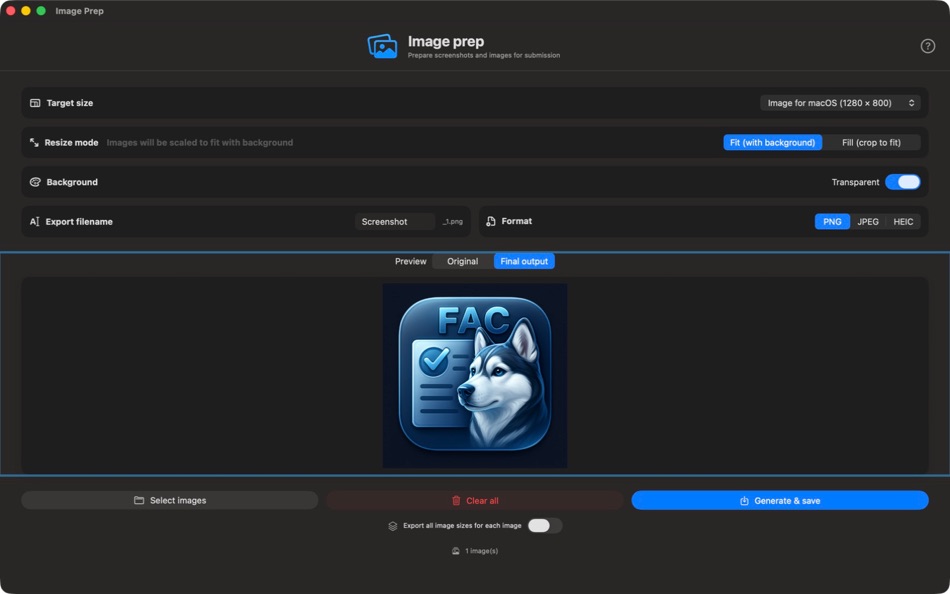
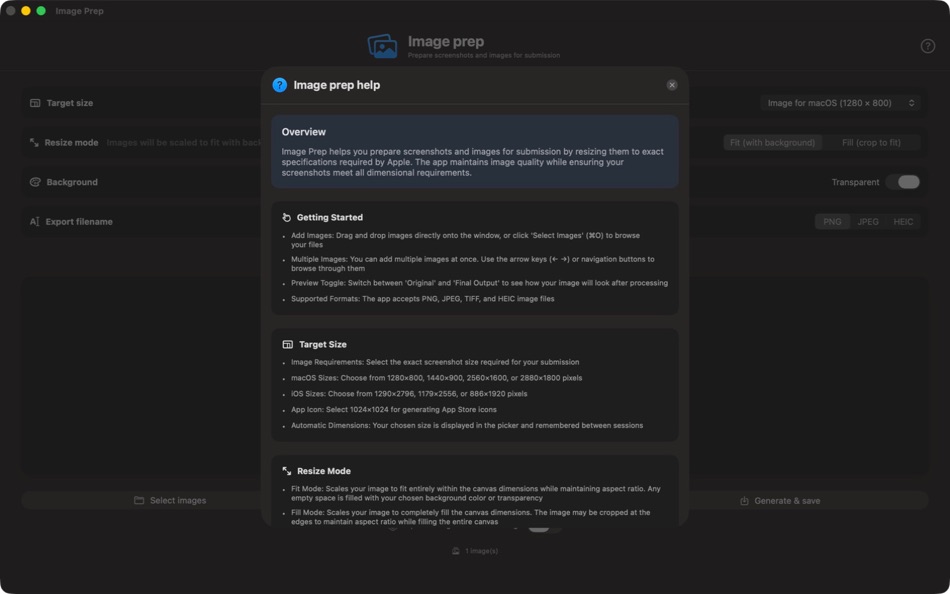
Effortless Batch Processing Load multiple images at once and generate all required App Image sizes in a single operation. With the "Export All Sizes" feature, you can instantly create 8 different versions of every image, covering all standard macOS and iOS requirements.
Total Layout Control Choose between two powerful resizing modes to ensure your app looks its best:
Fit Mode: Scale images to fit the target dimensions with a custom background or transparency.
Fill Mode: Create full-bleed assets by scaling images to fill the entire canvas (cropping where necessary).
Key Features:
Standard Presets: Includes dimensions for macOS (1280x800 to 2880x1800), iOS (1290x2796 to 886x1920), and 1024x1024 App Icons.
Custom Backgrounds: Select any solid color or use transparency (alpha channel) for your backgrounds in Fit mode.
Multi-Format Export: Save your final assets as high-quality PNG, JPEG (with adjustable quality), or modern HEIC files.
Developer Workflow: Features automatic sequential naming, invalid character filtering, and keyboard shortcuts (⌘O, ⌘S) to speed up your process.
Real-time Preview: Instantly toggle between your original image and the final processed output before you export.
Prepare your app for launch faster than ever with Image Prep.
App works with these localizations, so you can enjoy the app in your own system language.
Arabic (ar)
German (de)
English (en) – Source Language
Spanish (es)
French (fr)
Hindi (hi)
Indonesian (id)
Italian (it)
Japanese (ja)
Korean (ko)
Dutch (nl)
Polish (pl)
Portuguese (pt)
Russian (ru)
Thai (th)
Turkish (tr)
Ukrainian (uk)
Vietnamese (vi)
Chinese, Simplified (zh-Hans)
Chinese, Traditional (zh-Hant)
Skærmbilleder


Prishistorie
- Nuværende pris: $0.99
- Minimum: $0.99
- Maksimalt: $0.99
Overvåg priser
Ad
Yderligere oplysninger
- Udgivelsesdato:
- Kategori:
macOS Apps›Værktøjer - Operativsystem:
macOS,macOS 14.6 eller nyere - Størrelse:
1 Mb - Understøttet sprog:
Arabic,Chinese,Dutch,English,French,German,Hindi,Indonesian,Italian,Japanese,Korean,Polish,Portuguese,Russian,Spanish,Thai,Turkish,Ukrainian,Vietnamese - Indholdsklassificering:
4+ - Mac App Store Bedømmelse:
0
 https://github.com/mykamel/husky-audio-remover-site/blob/main/index.html
Nyheder
- Version: 1.0
- Opdateret:
Udvikler
- Mike West
- Platforme: iOS Apps (2) macOS Apps (8)
- Lister: 0 + 1
- Point: 6 + 2 ¡
- Rangeringer: 0
- Kommentarer: 0
- Rabatter: 0
- Videoer: 0
- RSS: Abonner
Lister (0)
0 ☹️
- Image Prep
Point (0)
0 ☹️
Rangeringer (0)
0 ☹️
Kommentarer (0)
Vær den første til at kommentere 🌟
«Image Prep». Platform: macOS. Kategori: Værktøjer. Udvikler: «Mike West». Første udgivelse: . Sidste opdatering: . Nuværende pris: $0.99. Laveste registrerede pris: $0.99. Højeste registrerede pris: $0.99. Denne titel har endnu ikke modtaget vurderinger eller anmeldelser på AppAgg. Tilgængelige sprog: Arabic, Chinese, Dutch, English, French, German, Hindi, Indonesian, Italian, Japanese, Korean, Polish, Portuguese, Russian, Spanish, Thai, Turkish, Ukrainian, Vietnamese. AppAgg sporer prishistorik, vurderinger og brugerfeedback for «Image Prep». Følg fremtidige rabatter og opdateringer via RSS. AppAgg hoster ikke applikationer eller distribuerer software. Alle varemærker, logoer og skærmbilleder tilhører deres respektive ejere.
Image Prep Kort webadresse: Kopieret!- 🌟 Del
- Mac App Store
Lignende
-
- Image Resize - @2 @3 Creator
- macOS Apps: Værktøjer Ved: 晖 姚
- * $2.99
- Lister: 0 0 0
- Point: 0 Version: 2.1 Image Resize takes any image and creates a full set for images, icons or universal assets with 3 steps. Drop file or folder, select output type, select output folder. For iOS ... ⥯
- Ny
- Image ML Annotator
- macOS Apps: Værktøjer Ved: James Studt
- Gratis
- Lister: 0 0 0
- Point: 0 Version: 1.0 Image ML Annotator helps you build labeled image datasets for object detection on macOS. If you are training a Create ML object detector, the slow part is often not the training ... ⥯
-
- Image Resizer Toolbox
- macOS Apps: Værktøjer Ved: Juan Vicente Guerrero Barria
- Gratis
- Lister: 0 0 0
- Point: 0 Version: 1.9 Helps you resize images for your iOS and OS X projects. Just drop an image, group of images or even a directory to get the corresponding 1x, 2x and 3x versions. NEW! Get the IRT Viewer ⥯
-
- Image Prepare
- macOS Apps: Værktøjer Ved: Denis Popov
- $1.99
- Lister: 1 0 0
- Point: 0 Version: 1.10 Created by developers and for developers. You can now easily make icons and images for your applications. Simply add an icon or an image to the App then choose the required devices and ⥯
-
- Simple Image Resizer Instantly
- macOS Apps: Værktøjer Ved: li bin
- $1.99
- Lister: 0 0 0
- Point: 0 Version: 1.1 Image Resizer is the simplest way to batch resize images on your Mac built for speed, clarity, and privacy. Drag your images into the window, choose Pixels or Percent, optionally lock ... ⥯
-
- Base64 Image Encoder
- macOS Apps: Værktøjer Ved: Friendly, Inc.
- $3.99
- Lister: 1 0 0
- Point: 0 Version: 2.0 This handy utility will let you encode your images into base64. Converting images to Base64, and embedding them into HTML and CSS, is a great way to speed up your website or ... ⥯
-
- Screenshot Prep
- macOS Apps: Værktøjer Ved: Md Yousuf Ali
- Gratis
- Lister: 0 0 0
- Point: 0 Version: 1.0 Why Screenshot Prep? Compelling screenshots are critical for app conversion. Screenshot Prep gives you the tools to frame your app in the latest devices, add catchy marketing text, and ⥯
-
- App Image Kit
- macOS Apps: Værktøjer Ved: 龙 金
- * Gratis
- Lister: 1 0 0
- Point: 0 Version: 3.3 App Image Kit is used for batch create app icons, launch images, Xcode image assets, app screenshots and effect texts. There are lots of built-in size-templates such as iOS, macOS, ... ⥯
-
- VAS Image Extractor
- macOS Apps: Værktøjer Ved: App Tyrant Corp
- Gratis
- Lister: 0 + 1 0 0
- Point: 1 Version: 1.0 Quickly and easily extract images out of your Visual Attributed String document files with VAS Image Extractor! VAS is the file format used in the Visual Attributed String Mac ... ⥯
-
- B64 - Base64 Image Converter
- macOS Apps: Værktøjer Ved: Mahtca Global S.R.L.
- Gratis
- Lister: 0 + 1 0 0
- Point: 1 Version: 2.1.0 This tool Is good when: - you want to encode or decode images in no time - you want to import base64 strings directly from file - reconstruct images from a base64 string you already ... ⥯
-
- My App Image
- macOS Apps: Værktøjer Ved: 镇 黄
- Gratis
- Lister: 0 0 0
- Point: 0 Version: 1.0 An application designed specifically for Mac to conveniently process images for iOS, iPad, macOS development and deployment needs, meeting various requirements. 1 Adjust image size: ... ⥯
-
- Squoosh Image
- macOS Apps: Værktøjer Ved: 朝品 冯
- * Gratis
- Lister: 0 0 0
- Point: 0 Version: 1.0.0 Small - The smaller the image, the faster it loads. "Squoosh Image" can reduce file size and maintain high quality. Simple - The interface is simple and easy to use, and it can help ... ⥯
-
- Base64 Image Tool
- macOS Apps: Værktøjer Ved: Anatolii Sukhonosov
- Gratis
- Lister: 0 0 0
- Point: 0 Version: 1.0 Base64 Image Tool is a fast, local utility for encoding and decoding images. Drop an image, choose a format, and instantly get clean Base64 or ready to use HTML/CSS snippets. Key ... ⥯
- Ny
- Reforge - Image converter
- macOS Apps: Værktøjer Ved: forYou inc.
- * Gratis
- Lister: 0 0 0
- Point: 0 Version: 1.3 Reforge is a Mac-exclusive professional tool that makes image format conversion simpler than ever before. Just drag and drop. Using Reforge is astonishingly simple. Just drop the ... ⥯