
| ผู้พัฒนา: | 北京如电科技有限公司 (6) | ||
| ราคา: | * ฟรี | ||
| การจัดอันดับ: | 0 | ||
| ความเห็น: | 0 เขียนความเห็น | ||
| รายการ: | 0 + 0 | ||
| แต้มแล: | 1 + 0 ¡ | ||
| Mac App Store | |||
คำอธิบาย

Key features:
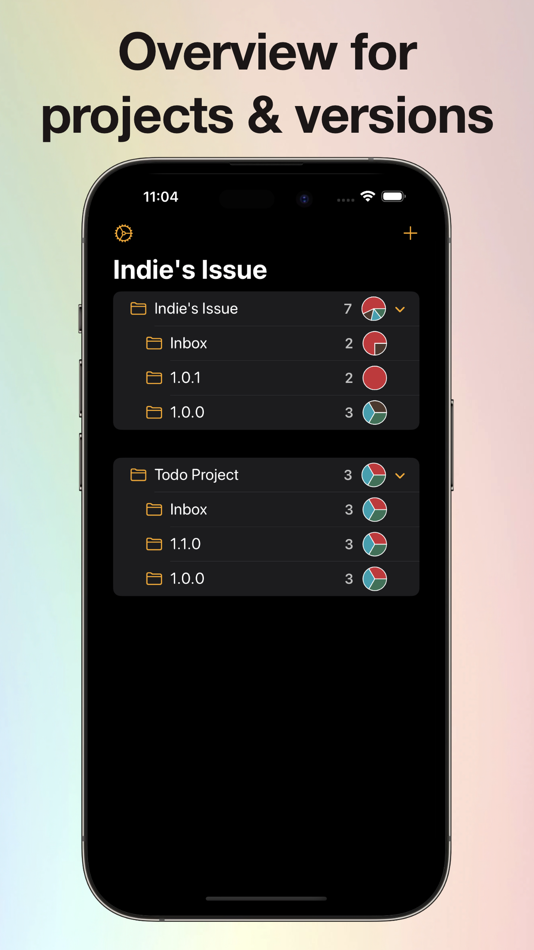
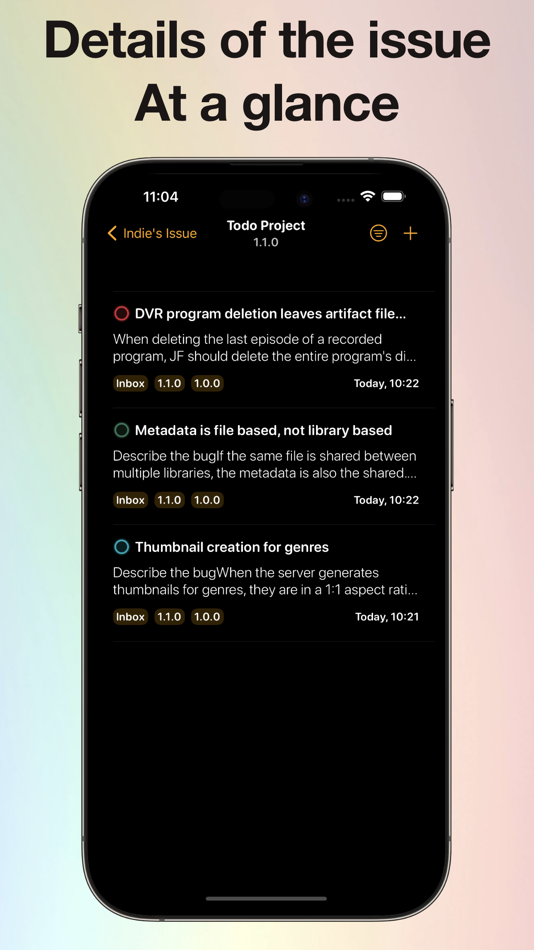
* Issue management: Record and categorize issues by project and version to ensure that each issue can be resolved in a timely manner.
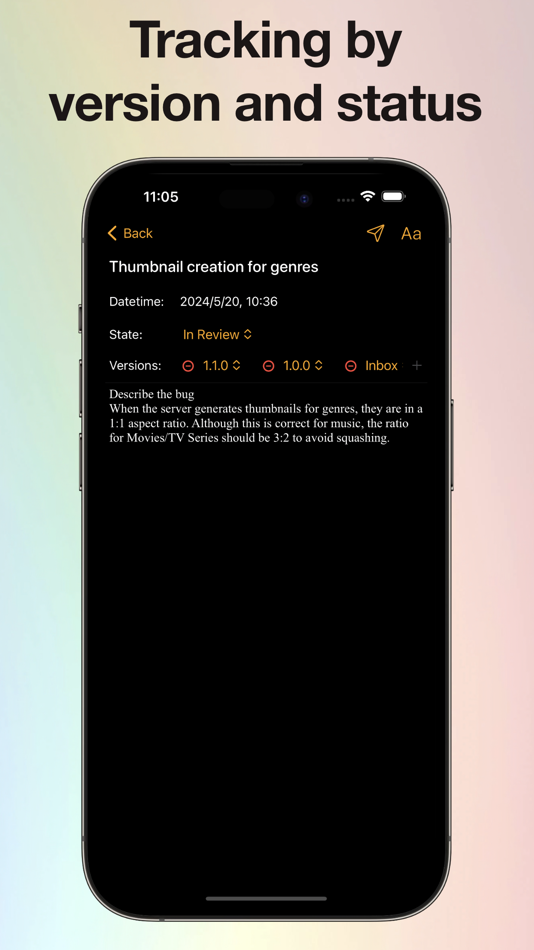
* Status Setting: Set status for each issue, and find and filter by status for easy management and tracking progress.
* Progress Reports: Projects and releases can view pie chart progress reports in real time to visualize project progress.
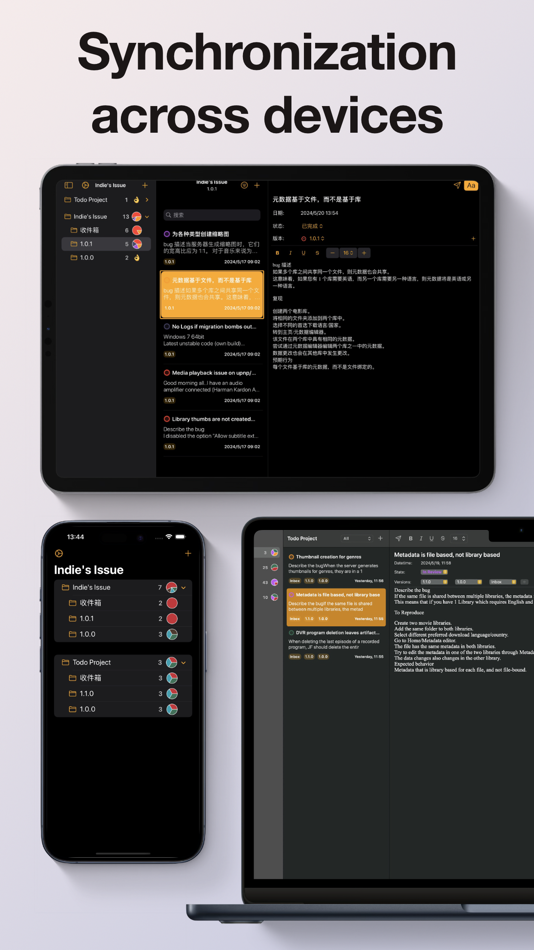
* Multi-platform support: Support iOS and macOS systems, so you can manage and view issues anytime, anywhere.
* iCloud Sync: Automatically synchronize data across devices to ensure your project information is always up-to-date.
Data security:
All data is only stored locally on your device and in your private iCloud space, we will not upload any of your server, key, script data.
Terms of Use
https://www.apple.com/legal/internet-services/itunes/dev/stdeula/
Privacy Policy
https://shellbean.notion.site/Privacy-b2c23f5001194849bac0e622b4a024de
ภาพหน้าจอ
ราคา
-
* การซื้อภายในแอพ - วันนี้: ฟรี
- ต่ำสุด: ฟรี
- มากที่สุด: ฟรี
ติดตามราคา
ผู้พัฒนา
- 北京如电科技有限公司
- แพลตฟอร์ม: macOS แอป (6)
- รายการ: 0 + 1
- แต้มแล: 6 + 17 ¡
- การจัดอันดับ: 0
- ความเห็น: 0
- ลดราคา: 0
- วิดีโอ: 0
- RSS: ติดตาม
แต้มแล
-

- 729 Erin
- +1

การจัดอันดับ
0 ☹️
รายการ
0 ☹️
- Indie's Issue
ความเห็น
แสดงรีวิวเป็นคนแรกเลย 🌟
ข้อมูลเพิ่มเติม
Indie's Issue URL แบบสั้น: คัดลอกแล้ว!- 🌟 แชร์
- Mac App Store
คุณอาจชอบ
-
- Issue Copy
- macOS แอป: เครื่องมือ โดย: Patrick
- ฟรี
- รายการ: 0 + 0 การจัดอันดับ: 0 ความเห็น: 0
- แต้มแล: 0 + 0 เวอร์ชัน: 1.0.0 Safari Extension inserting buttons for fast copy of issue key + summary for better copy&paste usage. This project is in no way affiliated with Atlassian. ⥯
-
- Beadster: Issue Tracking
- macOS แอป: เครื่องมือ โดย: System Operator LLC
- ฟรี
- รายการ: 0 + 0 การจัดอันดับ: 0 ความเห็น: 0
- แต้มแล: 0 + 0 เวอร์ชัน: 1.6 Issue tracking using beads tool for AI age. Works both for Agents and People ⥯
-
- App Workspace for Indie Devs
- macOS แอป: เครื่องมือ โดย: Mehroz Sheikh
- $3.99
- รายการ: 0 + 0 การจัดอันดับ: 0 ความเห็น: 0
- แต้มแล: 0 + 0 เวอร์ชัน: 1.0 Build better apps, faster. Indie Workspace is a project management tool made for solo developers and indie studios. Track your app development from idea to launch using a simple kanban ⥯
-
- AppJournal - Indie App Diary
- macOS แอป: เครื่องมือ โดย: Adam Foot
- ฟรี
- รายการ: 0 + 0 การจัดอันดับ: 0 ความเห็น: 0
- แต้มแล: 1 + 2 (3.0) เวอร์ชัน: 2.1 AppJournal provides indie app developers with a simple utility to record app milestones & changes. Developed for Apple platform developers, you can use AppJournal to track when your ... ⥯
-
- ControlTower for Indie Devs
- macOS แอป: เครื่องมือ โดย: LEAP STUDIO
- * ฟรี
- รายการ: 0 + 0 การจัดอันดับ: 0 ความเห็น: 0
- แต้มแล: 0 + 0 เวอร์ชัน: 1.0.2 A tool for simplifying your app release process. Designed for developers and project managers. Main features include: - App Store Connect Client: - Update app metadata. - Convert tasks ⥯
-
- Pasteboard Viewer
- macOS แอป: เครื่องมือ โดย: Sindre Sorhus
- ฟรี
- รายการ: 1 + 4 การจัดอันดับ: 0 ความเห็น: 0
- แต้มแล: 8 + 18 (4.9) เวอร์ชัน: 2.11.0 Inspect the system pasteboard while developing your app. This is a developer utility that lets you inspect the system pasteboard. This can be useful to ensure your app is putting the ... ⥯
-
- Cookie-Editor
- macOS แอป: เครื่องมือ โดย: Christophe Gagnier
- ฟรี
- รายการ: 4 + 1 การจัดอันดับ: 0 ความเห็น: 0
- แต้มแล: 6 + 46 (3.3) เวอร์ชัน: 1.13.0 Cookie-Editor is designed to have a simple to use interface that let you do most standard cookie operations. It is ideal for developing and testing web pages or even manual management ... ⥯
-
- Scarlet
- macOS แอป: เครื่องมือ โดย: Steven Troughton-Smith
- $0.99
- รายการ: 0 + 2 การจัดอันดับ: 0 ความเห็น: 0
- แต้มแล: 0 + 293 (4.5) เวอร์ชัน: 1.1.1 Let's face it, there are a lot of developers who like the idea of an issue tracker, but find it too much effort to use & maintain for solo, indie or hobby projects. Enter Scarlet. ... ⥯
-
- SimpleBugTracker
- macOS แอป: เครื่องมือ โดย: Matthias Santer
- * ฟรี
- รายการ: 0 + 2 การจัดอันดับ: 0 ความเห็น: 0
- แต้มแล: 4 + 0 เวอร์ชัน: 3.0.1 Manage your issues on multiple Apple devices (macOS, iOS) and keep data in sync: - Your data is saved on your device and your iCloud account only - Manage multiple products which ... ⥯
- -100%
- Fox Project Organizer
- macOS แอป: เครื่องมือ โดย: Daniel Griffin
- ▼ * ฟรี
$19.99-100% - รายการ: 0 + 1 การจัดอันดับ: 0 ความเห็น: 0
- แต้มแล: 3 + 3 (5.0) เวอร์ชัน: 3.0.3 Fox Issue Tracker is purpose-built for solo developers and small teams maintaining real projects. Organize your work and move to delivery without the overwhelming complexity of ... ⥯
-
- XCStrings AI: AI Localization
- macOS แอป: เครื่องมือ โดย: Kai Chi Tsao
- $0.99
- รายการ: 0 + 1 การจัดอันดับ: 5 (1) ความเห็น: 0
- แต้มแล: 5 + 0 เวอร์ชัน: 1.0.2 ## Lightning-Fast Localization: Get Your App Supporting Global Languages in 5 Minutes! Streamline your iOS and macOS app localization workflow with XCStrings AI the ultimate AI-powered ⥯
-
- OctoSpace
- macOS แอป: เครื่องมือ โดย: Pavel Makhov
- $4.99
- รายการ: 0 + 2 การจัดอันดับ: 0 ความเห็น: 0
- แต้มแล: 2 + 0 เวอร์ชัน: 1.7 With this app, you'll be able to quickly access GitHub's pull requests, issues, and repositories of any organization you're part of. Key Features: - easy setup - just generate an ... ⥯
-
- Testpiler
- macOS แอป: เครื่องมือ โดย: Furnace Creek Software LLC
- * ฟรี
- รายการ: 0 + 1 การจัดอันดับ: 0 ความเห็น: 0
- แต้มแล: 1 + 0 เวอร์ชัน: 1.1 Testpiler is an app that allows you to easily convert unit tests written in Swift from XCTest to the new Swift Testing framework. Simply add a folder containing your unit tests, or add ⥯
-
- Adaptivity (A)
- macOS แอป: เครื่องมือ โดย: Geoff Hackworth
- $7.99
- รายการ: 2 + 5 การจัดอันดับ: 0 ความเห็น: 0
- แต้มแล: 0 + 91 (5.0) เวอร์ชัน: 9.5 Adaptivity is an invaluable tool for developers and designers. Use it to visualize how Size Classes and margins for layout, readable content and the safe area look on real devices and ... ⥯