
| Разработчик: | Resetnic Dragos (4) | ||
| Цена: | $1.99 | ||
| Рейтинги: | 0 | ||
| Отзывы: | 0 Написать отзыв | ||
| Списки: | 0 + 1 | ||
| Очки: | 4 + 0 ¡ | ||
| Mac App Store | |||
Описание

Stop switching contexts or relying on web tools. This app provides essential JSON manipulation directly within your favorite development environments:
**1. Xcode Source Editor Extension:**
Supercharge your coding workflow! Directly format, compact, and beautify JSON files without leaving Xcode.
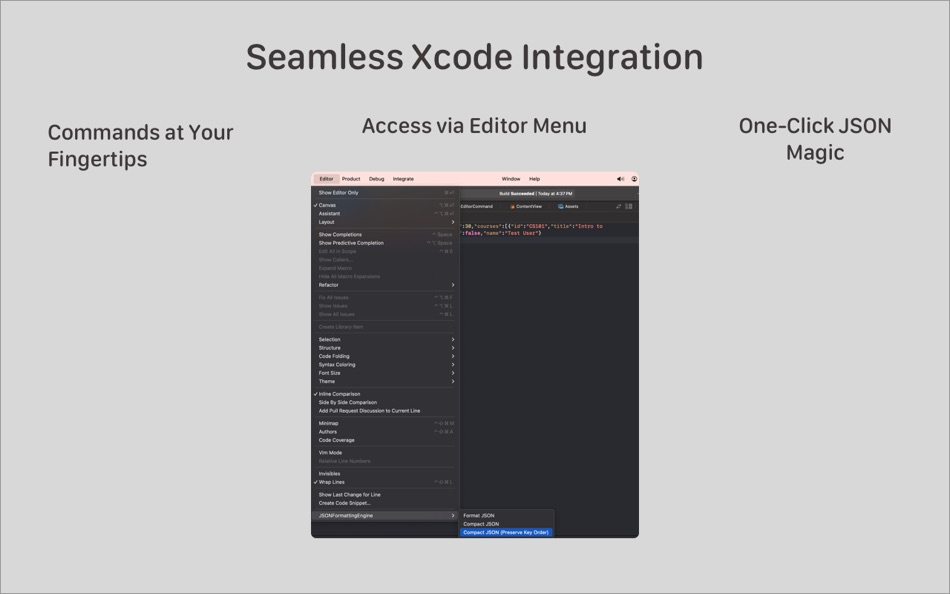
• **Format JSON (Pretty Print):** Clean up messy JSON with proper indentation and sorted keys for maximum readability and easier diffs. Avoids unnecessary escaping of slashes.
• **Compact JSON (Sorted Keys):** Minify JSON data to a single line with alphabetically sorted keys.
• **Compact JSON (Preserve Key Order):** Minify JSON while maintaining the original key order, vital for specific data structures.
• **Easy Access:** Commands appear directly in Xcode's "Editor" menu for `.json` files.
• **Keyboard Shortcuts:** Set your own custom shortcuts via Xcode's Key Bindings settings for lightning-fast access!
**2. Safari Web Extension:**
Inspect and understand JSON data on the web faster than ever!
• **In-Browser Formatting:** Automatically detects pages serving JSON (or activate via toolbar button) and displays it in a clean, syntax-highlighted, and readable format.
• **Replaces Default View:** Provides a much clearer and more usable interface than the browser's default raw text display.
• **Simple Activation:** Click the toolbar icon to format pages that weren't automatically detected.
**CORE BENEFITS:**
• **Increased Productivity:** Save time and reduce context switching.
• **Improved Readability:** Understand complex JSON structures easily.
• **Private & Secure:** All processing happens entirely locally on your Mac. No data, code, or content is ever sent to external servers. Your privacy is paramount.
**HOW TO USE:**
* **For Xcode:**
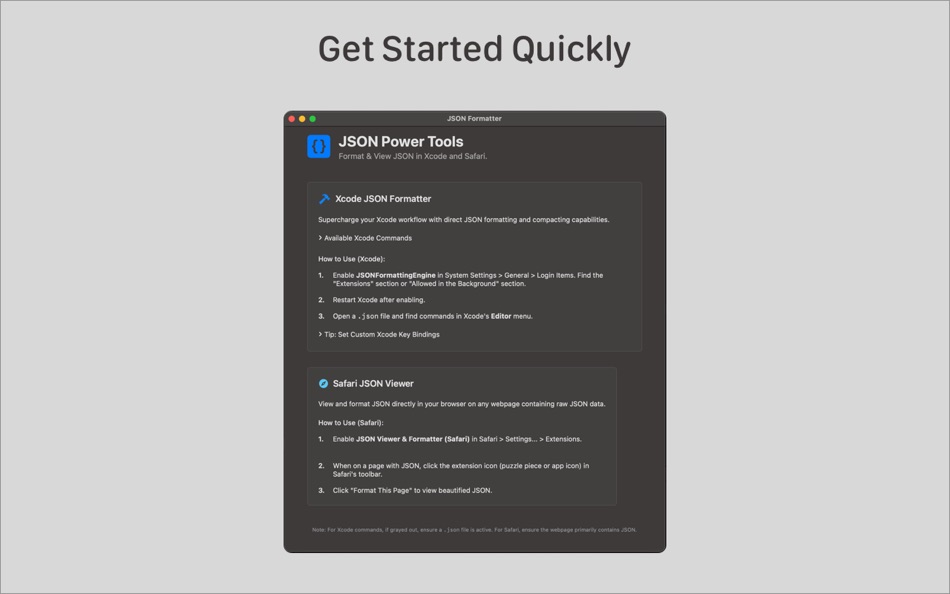
1. Enable "JSONFormattingEngine" in System Settings > General > Login Items (look under Extensions or Allowed in Background).
2. Restart Xcode.
3. Open a `.json` file -> find commands in the Editor menu.
* **For Safari:**
1. Enable "JSON Viewer & Formatter (Safari)" in Safari > Settings... > Extensions.
2. Visit a page with raw JSON, or click the toolbar icon on a suspected JSON page and select "Format This Page".
Whether you're an app developer, web developer, or anyone working with JSON, JSON Power Tools is the essential utility for streamlining your workflow on macOS. Download now!
Скриншоты

Что нового
- Версия: 1.1
- Обновлено:
- Introducing the Safari JSON Viewer & Formatter!
• **NEW Safari Extension:** Now you can view and format JSON directly within your Safari browser! Perfect for inspecting API responses or viewing raw JSON files on the web. Enable it in Safari's Settings > Extensions.
• **Xcode Enhancement:** Added 'Compact JSON (Preserve Key Order)' command to the Xcode Source Editor Extension.
• **UI Update:** The main app window has been updated with clear instructions for both Xcode and Safari extensions.
• Minor bug fixes and performance improvements for both extensions.
Thanks for using JSON Power Tools!
Цена
- Сегодня: $1.99
- Минимум: Бесплатно
- Максимум: $1.99
Отслеживайте цены
Разработчик
- Resetnic Dragos
- Платформы: iOS Приложения (3) macOS Приложения (1)
- Списки: 0 + 1
- Очки: 5 + 63 ¡
- Рейтинги: 0
- Отзывы: 0
- Скидки: 0
- Видео: 0
- RSS: Подписаться
Очки
-

- 3,488 Brain_vv
- +1
-
- 10,842 Simon Chan
- +1
-
- 449 upto
- +1
-
- 1,914 Lu Chin
- +1


Рейтинги
0 ☹️
Списки
0 ☹️
- JSON Power Tools
Отзывы
Ваш отзыв будет первым 🌟
Дополнительная информация
- Версия: 1.1
- Категория:
macOS Приложения›Инструменты разработчика - Операционные системы:
macOS,macOS 15.4 и выше - Размер:
507 Kb - Поддерживаемые языки:
English - Возрастные ограничения:
4+ - Mac App Store Рейтинг:
0 - Обновлено:
- Дата выпуска:
JSON Power Tools Короткий URL: Скопировано!- 🌟 Поделиться
- Mac App Store
Вам также могут понравиться
-
- JSON Brace for Safari
- macOS Приложения: Инструменты разработчика От: Sergei Rebrov
- * Бесплатно
- Списки: 0 + 1 Рейтинги: 0 Отзывы: 0
- Очки: 3 + 1 (5.0) Версия: 2.0.3 JSON Brace turns unreadable JSON responses into beautifully formatted, navigable data structures right in Safari. Download for free and enjoy all core features upgrade to Pro anytime ... ⥯
-
- JSON Codable
- macOS Приложения: Инструменты разработчика От: Mo'tasem Assfour
- Бесплатно
- Списки: 0 + 0 Рейтинги: 0 Отзывы: 0
- Очки: 0 + 0 Версия: 1.0 Json Codable is a native macOS app that turns JSON into clean, type-safe Swift Codable models. Paste or import JSON, choose your options, and generate Swift code that s ready to drop ... ⥯
-
- JSON Thru
- macOS Приложения: Инструменты разработчика От: Celil Cagatay Gedik
- Бесплатно
- Списки: 0 + 0 Рейтинги: 0 Отзывы: 0
- Очки: 0 + 0 Версия: 1.1.1 JSON Thru for Safari is a free, open-source Safari extension designed to make working with JSON data effortless and secure. Whether you're a developer, tester, or data enthusiast, JSON ⥯
-
- JSON Assistant
- macOS Приложения: Инструменты разработчика От: CoffeeDevs LLC
- Бесплатно
- Списки: 0 + 0 Рейтинги: 0 Отзывы: 0
- Очки: 1 + 0 Версия: 1.6.3 JSON Assistant is a fast, privacy-first JSON viewer and formatter for iOS and macOS. Paste JSON, drop a file, or open from Share Sheet then pretty-print, explore the tree, and save ... ⥯
-
- JSON Editor for SSEM DEV
- macOS Приложения: Инструменты разработчика От: DongSeop Kim
- Бесплатно
- Списки: 0 + 0 Рейтинги: 0 Отзывы: 0
- Очки: 0 + 0 Версия: 1.0 JSON Editor is a web-based tool to view, edit, format, and validate JSON data. Features: Tree view and code view modes Syntax highlighting with Ace Editor JSON validation and ... ⥯
-
- JSON Beautifier and Editor
- macOS Приложения: Инструменты разработчика От: Bermet Kasykeeva
- Бесплатно
- Списки: 1 + 0 Рейтинги: 0 Отзывы: 0
- Очки: 1 + 0 Версия: 0.5.10 This extension monitors JSON pages and converts them into a human-readable object. You can view, edit, search through values and keys. You can even change the format of a key or drag ... ⥯
-
- JSON Utilities
- macOS Приложения: Инструменты разработчика От: ElamParithi Arul
- Бесплатно
- Списки: 0 + 0 Рейтинги: 0 Отзывы: 0
- Очки: 2 + 1 (5.0) Версия: 2.0 Transform complex JSON into beautiful, readable code with this minimalist editor. Designed with simplicity at its core, every feature enhances your workflow without cluttering your ... ⥯
-
- Json Canvas
- macOS Приложения: Инструменты разработчика От: 舟 方
- Бесплатно
- Списки: 0 + 0 Рейтинги: 0 Отзывы: 0
- Очки: 1 + 0 Версия: 1.0 What can you do with JSON Canvas? - See clearly: Auto-format JSON, no more messy text. - Fix instantly: Highlight and correct errors with one tap. - Edit easily: Add, remove, or change ⥯
-
- Json Graph Editor
- macOS Приложения: Инструменты разработчика От: SHINSUKE MAKINO
- Бесплатно
- Списки: 0 + 0 Рейтинги: 0 Отзывы: 0
- Очки: 1 + 0 Версия: 1.0.0 Explore and edit your deeply-nested JSON files with graph-visualized UI. Features: Visualize JSON files as explorable graph Zooming-in/out Edit JSON files Editable Table view of ... ⥯
-
- JSON Wizard
- macOS Приложения: Инструменты разработчика От: InSili.co
- $14.99
- Списки: 0 + 0 Рейтинги: 0 Отзывы: 0
- Очки: 0 + 0 Версия: 2.4 Edit. Visualize. Export. The ultimate JSON-driven Data Management app. Easy-to-use Import your JSON and work on the response directly. Do you want to access a network resource? You can ⥯
-
- JSON Unstringify
- macOS Приложения: Инструменты разработчика От: Aleksei Rytikov
- Бесплатно
- Списки: 0 + 0 Рейтинги: 0 Отзывы: 0
- Очки: 0 + 0 Версия: 1.0 Beautifies selected nested JSON by expanding it into readable objects ⥯
-
- JSON Tools
- macOS Приложения: Инструменты разработчика От: Schimera Pty Ltd
- Бесплатно
- Списки: 1 + 1 Рейтинги: 0 Отзывы: 0
- Очки: 1 + 0 Версия: 1.0 JSON Tools is an XCode Source Editor extension for working with JSON files. You can quickly: Validate a JSON file and be notified of any errors found Pretty format the file to make it ... ⥯
-
- Power JSON Editor
- macOS Приложения: Инструменты разработчика От: 基伟 徐
- $4.99
- Списки: 1 + 2 Рейтинги: 0 Отзывы: 0
- Очки: 2 + 0 Версия: 2.19.0 Power JSON Editor is a JSON editor for developers with Visual Tree View and multiple plugins like Array Table Editor and jq Processor, also with format converter plugins, it is easy to ⥯
-
- JSON Editor
- macOS Приложения: Инструменты разработчика От: VDT LABS S.R.L.
- * $7.99
- Списки: 0 + 1 Рейтинги: 0 Отзывы: 0
- Очки: 1 + 0 Версия: 2.9 JSON Editor is a tree & text editor for JSON, JSON5 and JSON Lines data formats. In a clean and user-friendly interface, it allows you to create, visualize, modify, validate, format ... ⥯