
Bogmærker
| Udvikler: | Tuan Truong (4) | ||
| Pris: | * Gratis | ||
| Score: | 6.120 Platin | ||
| Ranglister: | 0 | ||
| Kommentarer: | 0 Skriv kommentar | ||
| Lister: | 0 1 | ||
| Point: | 5 | ||
| +1 Point | |||
Kort fortalt
Mød LineSmith for Xcode, en app fra Tuan Truong i kategorien »Udviklerværktøjer«.
Udkom , og opdateringerne bliver ved med at komme (den nyeste kom ). Det kalder vi dedikation.
Gratis at downloade. Derefter er det op til dig: der er køb i appen.
Virker på macOS 14.0 og nyere. Tjek lige, hvilken version du har.
AppAgg-scoren er 6.120. Det er Platin, og kun Legende ligger højere.
Kun 2 megabyte. Der er plads, selv på en fyldt harddisk.
Aldersgrænse »4+«: også fint for børn.
Taler kun ét sprog, og det er ikke dansk.
5 personer er allerede gået videre til butikken herfra. Det er appens Point på AppAgg.
Udvikleren har yderligere 1 spil og 2 apps på AppAgg. Tag et kig.
Forresten har denne udvikler 1 tilbud lige nu.
Vil du høre om opdateringer og nye apps først? Følg udvikleren eller abonner på vores RSS-feed. Push-beskeder kommer via appen AppAgg Alerts til Android og iOS.
Andre platforme 0
 | LineSmith for XcodeMac App Store6K PlatinmacOSKøb i appen $1.99 – $9.99 | Gratis |
Lige nu kun i denne butik.
Prishistorik 0
- Nuværende pris: Gratis
- Minimum: Gratis
- Maksimum: Gratis
Dit eget feed på forsiden
Skærmbilleder 6

Beskrivelse
Formerly TextPlus. Your existing shortcuts still work.
COMMANDS
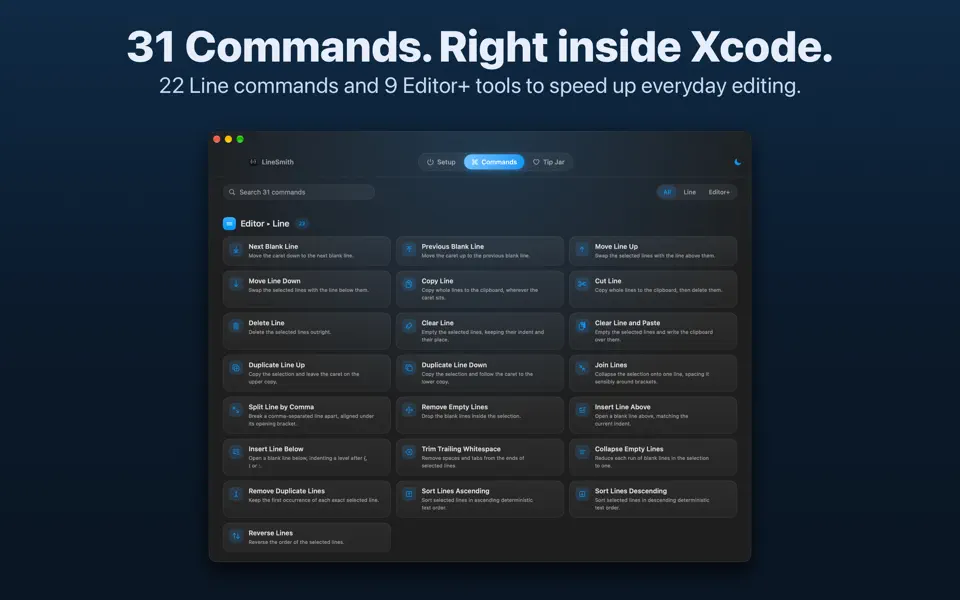
Editor > Line
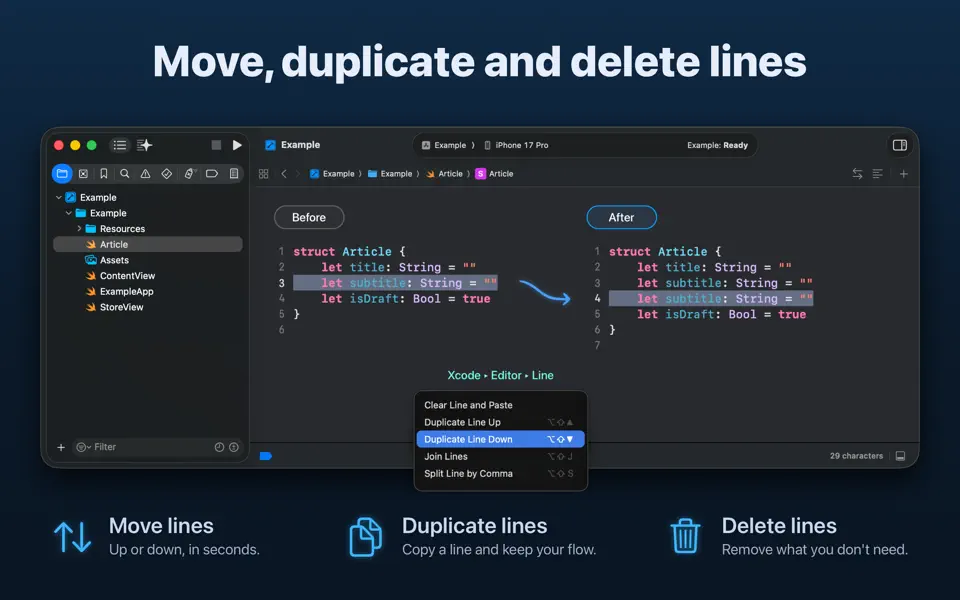
• Move Line Up / Move Line Down — swap the selection with the line above or below
• Duplicate Line Up / Duplicate Line Down — copy the selection and choose which copy keeps the caret
• Delete Line — delete whole lines wherever the caret sits
• Clear Line — empty the lines but keep their indentation and position
• Clear Line and Paste — replace the selected lines with the clipboard
• Copy Line / Cut Line — put whole lines on the clipboard, no selecting first
• Insert Line Above / Insert Line Below — open a blank line at the right indent
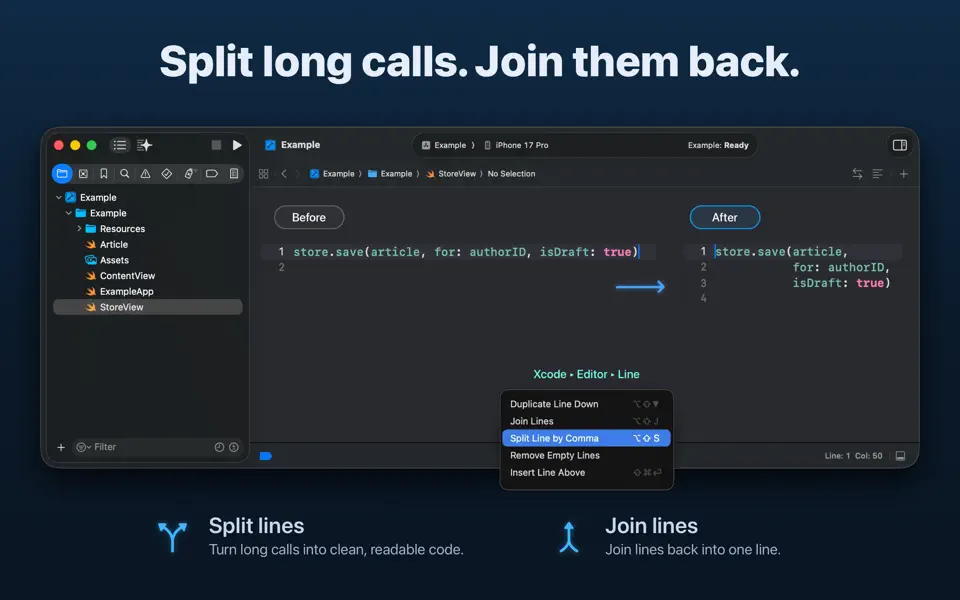
• Join Lines — collapse a selection onto one line, spacing it sensibly around brackets
• Split Line by Comma — break a comma-separated line apart, aligned under its bracket
• Remove Empty Lines — drop the blank lines inside a selection
• Next Blank Line / Previous Blank Line — move the caret between blocks
• Trim Trailing Whitespace — remove spaces and tabs from selected line endings
• Collapse Empty Lines — reduce each run of blank lines to one
• Remove Duplicate Lines — keep the first occurrence of each exact selected line
• Sort Lines Ascending / Sort Lines Descending — sort selected lines deterministically
• Reverse Lines — reverse the order of the selected lines
Editor > Editor+
• Remove Comment — strip // comments, leaving code and string or regex literals alone
• Add Type Extension — write an extension on the first type declared in the file
• Add Type Delegate — write a delegate protocol for it
• Insert MARK Section — insert a // MARK: section placeholder
• Wrap in #if DEBUG — wrap selected lines in a conditional compilation block
• Organize Imports — sort and de-duplicate safe, contiguous Swift import blocks
• Wrap in Task — wrap and indent selected lines in Task { }
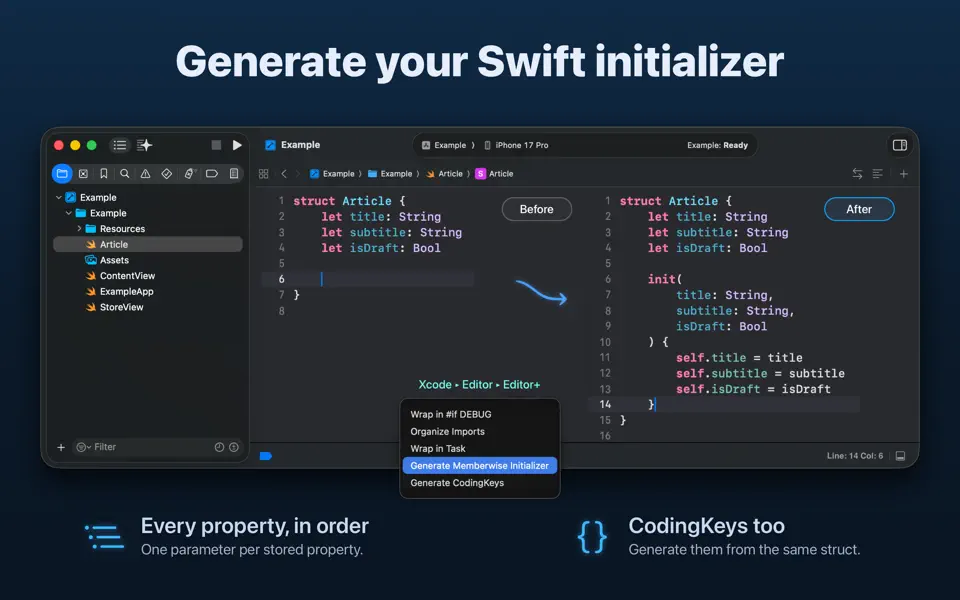
• Generate Memberwise Initializer — create an initializer from a struct's stored properties, and decline rather than guess on syntax it cannot handle
• Generate CodingKeys — create CodingKeys from direct stored properties
FREE, AND STAYING FREE
All 31 commands are free. There is no paid tier, no account, no ads and no tracking. LineSmith collects nothing about you or your code. If LineSmith saves you time, there is a tip jar in the app; a tip unlocks nothing, because there is nothing to unlock.
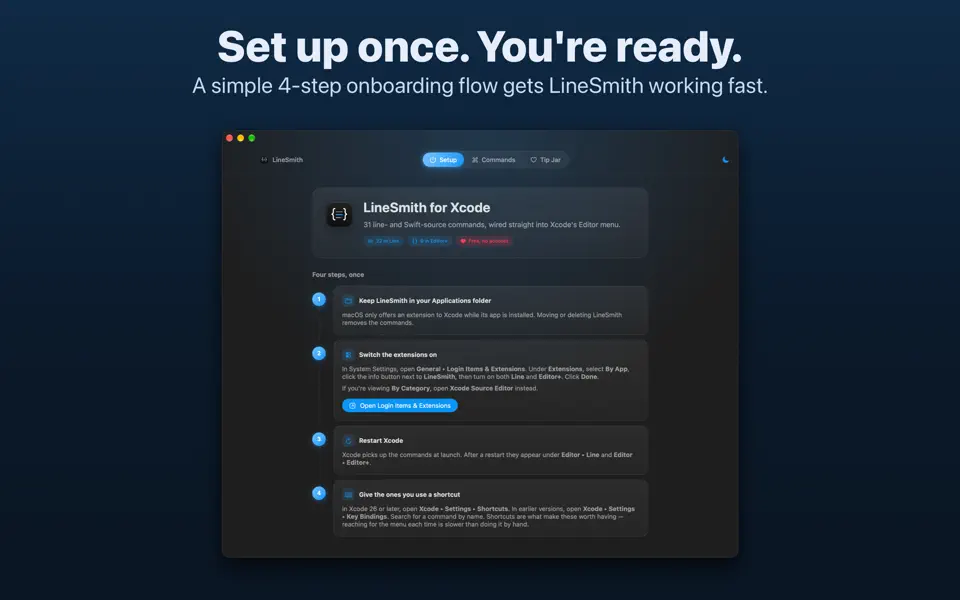
SETTING IT UP
1. Keep LineSmith in your Applications folder.
2. In System Settings, find Xcode Source Editor and enable both Line and Editor+.
3. Restart Xcode.
4. Assign shortcuts in Xcode > Settings > Shortcuts (Key Bindings in earlier Xcode versions).
Requires macOS 14 or later and Xcode.
UPGRADING FROM TEXTPLUS
The 19 command identifiers inherited from TextPlus are unchanged, so existing keyboard shortcuts carry over. Version 2.0 also brings reliability fixes and 12 new commands, for 31 in total.
Fra udvikleren
Lister 0
-
 LineSmith for Xcode
Point 5
-

- +1 Point
-
- 2.002 Dragon
- +1
-
- 17 Kai Lee
- +1
-
- 1.249 바람처어럼
- +1
-
- 18.989 Simon Chan
- +1
-
- 173 upto
- +1






Ranglister 0
-
- Din bedømmelse
Udvikler 4
- Tuan Truong
- Følgere: 0
- Platforme: iOS Apps (2) macOS Apps (1) macOS Spil (1)
- Tilbud: 1
- Lister: 0 1
- Point: 7
- Ranglister: 0
- Kommentarer: 0
- Videoer: 0
- RSS: Abonner
Nyheder
- Version: 2.0.2
- Sidst opdateret:
- LineSmith 2.0.2
• Undo after a command now restores only the lines that changed, without selecting the whole file or jumping to the top.
• Generate Memberwise Initializer and Generate CodingKeys handle trailing comments, property wrappers, property observers, and class methods correctly, and no longer guess wrong types.
• Join Lines keeps trailing comments intact and handles blank lines better.
• Split Line by Comma aligns under the innermost open bracket.
• Clear Line and Paste keeps indentation when the clipboard is empty.
• Files with mixed LF/CRLF line endings keep the endings of untouched lines.
• All 31 editing commands remain free.
Yderligere oplysninger
- Udgivelsesdato:
- Kategori:
macOS-apps›Udviklerværktøjer - Operativsystem:
macOSmacOS 14.0 eller nyere - Størrelse:
2 Mb - Understøttede sprog:
Engelsk - Indholdsklassificering:
4+ - Mac App Store Bedømmelse: ¡
0 - Websted:
 https://leafworkstudio.com/linesmith
AppAgg-score
Estimeret AppAgg-score for
LineSmith for Xcode
Udvikler: Tuan Truong
En højere score afspejler som regel bedre resultater på de områder, AppAgg måler.
Baseret på: popularitet · brugervurderinger · aktualitet · tilbud · butiksdata · fællesskabsaktivitet
Genberegnes dagligt ud fra aktuelle AppAgg-data.
Kommentarer 0 ¡
Del
LineSmith for Xcode Kort webadresse: Kopieret!- Mac App Store

