
Lesezeichen
| Entwickler: | Tuan Truong (4) | ||
| Preis: | * Kostenlos | ||
| Score: | 6.120 Platin | ||
| Ranglisten: | 0 | ||
| Kommentare: | 0 Kommentar posten | ||
| Listen: | 0 1 | ||
| Punkte: | 5 | ||
| +1 Punkt | |||
Kurzinfo
Vorhang auf für LineSmith for Xcode, eine App von Tuan Truong aus der Kategorie „Entwickler-Tools“.
Erschienen , und die Updates kommen weiter. Das neueste kam . Das nennen wir Hingabe.
Kostenlos herunterladen, danach entscheidest du selbst. Es gibt In-App-Käufe.
Läuft ab macOS 14.0. Schau am besten nach, welche Version du hast.
Der AppAgg-Score liegt bei 6.120. Das ist Platin, nur Legende steht noch höher.
Nur 2 Megabyte, passt sogar auf eine volle Festplatte.
Altersfreigabe „4+“, also auch für Kinder geeignet.
Spricht nur eine Sprache, und das ist nicht Deutsch.
5 Leute sind schon von hier aus in den Store gewechselt. Das sind die Punkte der App auf AppAgg.
Der Entwickler hat noch 1 weiteres Spiel und 2 Apps auf AppAgg. Ein Blick lohnt sich.
Übrigens, dieser Entwickler hat gerade 1 Angebot.
Willst du als Erstes von Updates und neuen Apps erfahren? Folge dem Entwickler oder abonniere den RSS-Feed. Push-Nachrichten kommen über die App AppAgg Alerts für Android und iOS.
Andere Plattformen 0
 | LineSmith for XcodeMac App Store6K PlatinmacOSIn-App-Käufe $1.99 – $9.99 | Kostenlos |
Derzeit nur in diesem Store.
Preisentwicklung 0
- Aktueller Preis: Kostenlos
- Minimum: Kostenlos
- Maximum: Kostenlos
Dein eigener Feed auf der Startseite
Screenshots 6

Beschreibung
Formerly TextPlus. Your existing shortcuts still work.
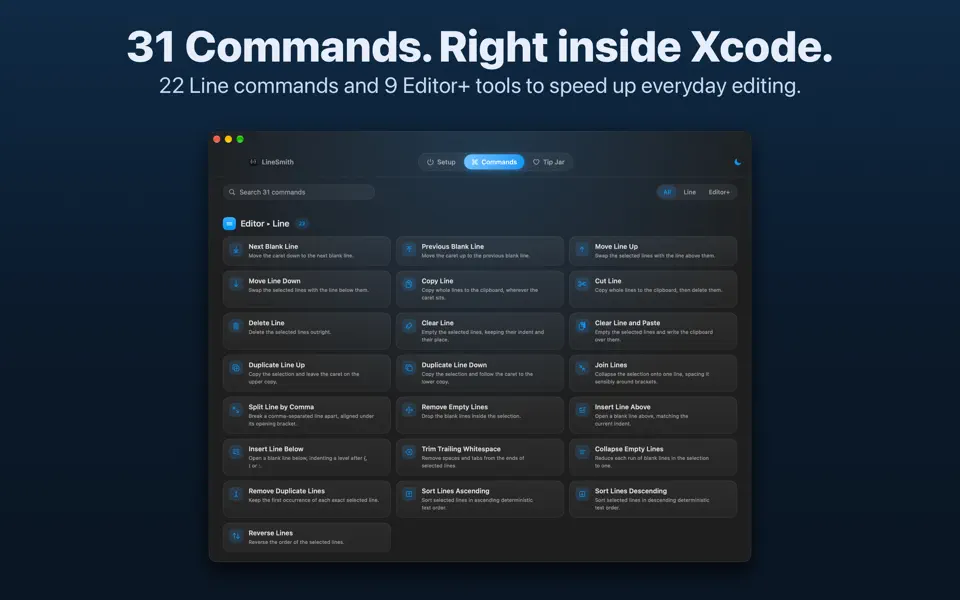
COMMANDS
Editor > Line
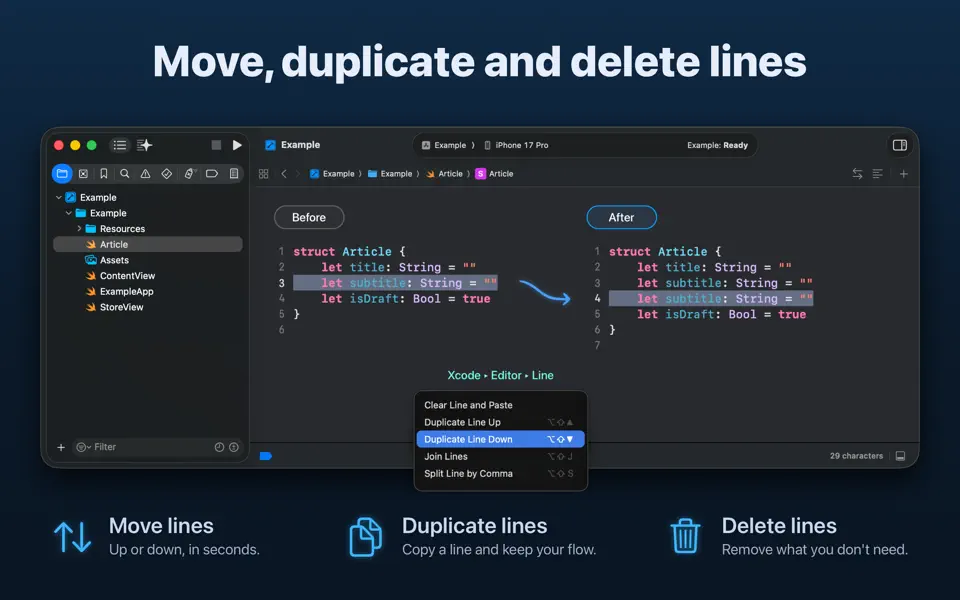
• Move Line Up / Move Line Down — swap the selection with the line above or below
• Duplicate Line Up / Duplicate Line Down — copy the selection and choose which copy keeps the caret
• Delete Line — delete whole lines wherever the caret sits
• Clear Line — empty the lines but keep their indentation and position
• Clear Line and Paste — replace the selected lines with the clipboard
• Copy Line / Cut Line — put whole lines on the clipboard, no selecting first
• Insert Line Above / Insert Line Below — open a blank line at the right indent
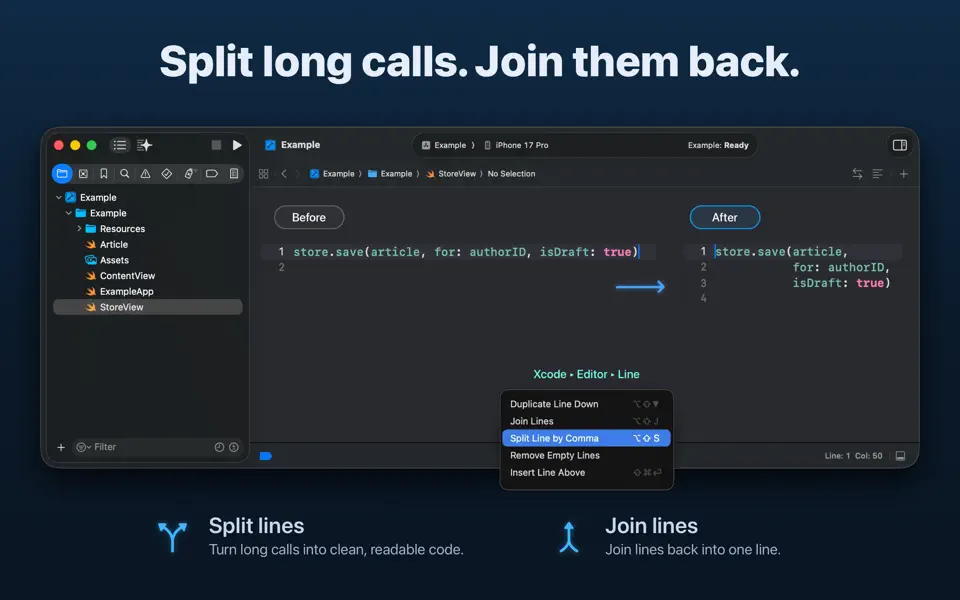
• Join Lines — collapse a selection onto one line, spacing it sensibly around brackets
• Split Line by Comma — break a comma-separated line apart, aligned under its bracket
• Remove Empty Lines — drop the blank lines inside a selection
• Next Blank Line / Previous Blank Line — move the caret between blocks
• Trim Trailing Whitespace — remove spaces and tabs from selected line endings
• Collapse Empty Lines — reduce each run of blank lines to one
• Remove Duplicate Lines — keep the first occurrence of each exact selected line
• Sort Lines Ascending / Sort Lines Descending — sort selected lines deterministically
• Reverse Lines — reverse the order of the selected lines
Editor > Editor+
• Remove Comment — strip // comments, leaving code and string or regex literals alone
• Add Type Extension — write an extension on the first type declared in the file
• Add Type Delegate — write a delegate protocol for it
• Insert MARK Section — insert a // MARK: section placeholder
• Wrap in #if DEBUG — wrap selected lines in a conditional compilation block
• Organize Imports — sort and de-duplicate safe, contiguous Swift import blocks
• Wrap in Task — wrap and indent selected lines in Task { }
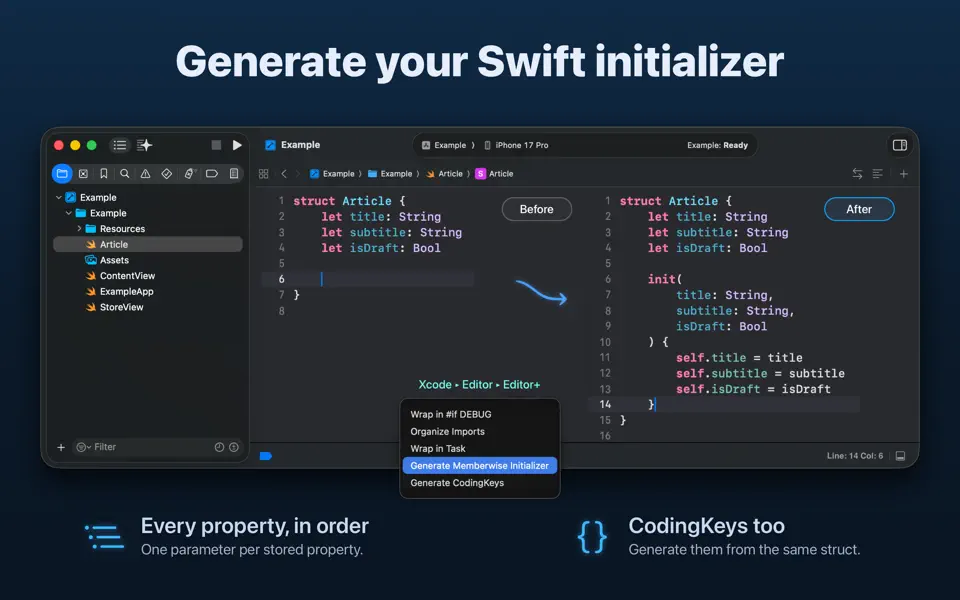
• Generate Memberwise Initializer — create an initializer from a struct's stored properties, and decline rather than guess on syntax it cannot handle
• Generate CodingKeys — create CodingKeys from direct stored properties
FREE, AND STAYING FREE
All 31 commands are free. There is no paid tier, no account, no ads and no tracking. LineSmith collects nothing about you or your code. If LineSmith saves you time, there is a tip jar in the app; a tip unlocks nothing, because there is nothing to unlock.
SETTING IT UP
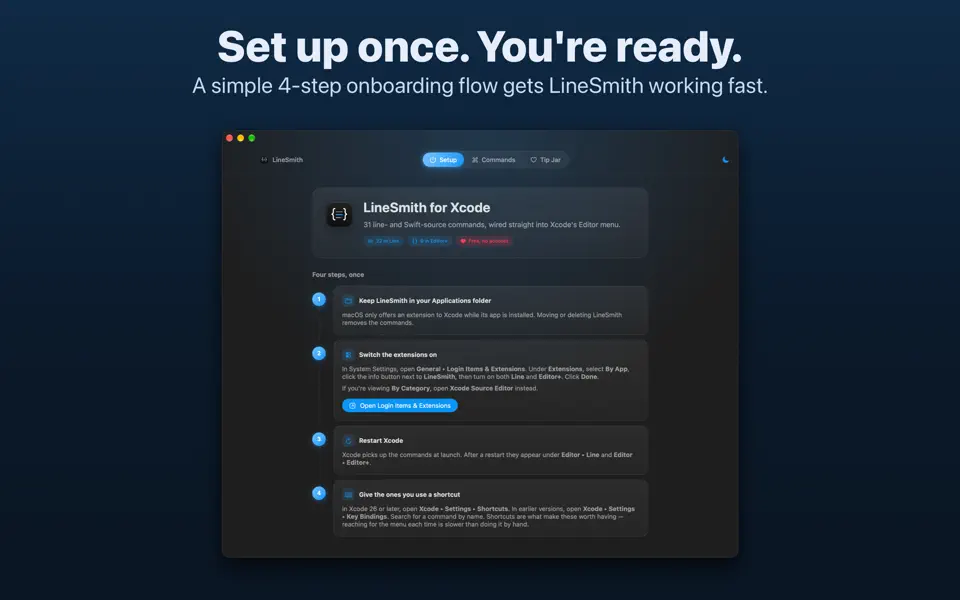
1. Keep LineSmith in your Applications folder.
2. In System Settings, find Xcode Source Editor and enable both Line and Editor+.
3. Restart Xcode.
4. Assign shortcuts in Xcode > Settings > Shortcuts (Key Bindings in earlier Xcode versions).
Requires macOS 14 or later and Xcode.
UPGRADING FROM TEXTPLUS
The 19 command identifiers inherited from TextPlus are unchanged, so existing keyboard shortcuts carry over. Version 2.0 also brings reliability fixes and 12 new commands, for 31 in total.
Vom Entwickler
Listen 0
-
 LineSmith for Xcode
Punkte 5
-

- +1 Punkt
-
- 2.002 Dragon
- +1
-
- 17 Kai Lee
- +1
-
- 1.249 바람처어럼
- +1
-
- 18.989 Simon Chan
- +1
-
- 173 upto
- +1






Ranglisten 0
-
- Deine Bewertung
Entwickler 4
- Tuan Truong
- Follower: 0
- Plattformen: iOS Apps (2) macOS Apps (1) macOS Spiele (1)
- Angebote: 1
- Listen: 0 1
- Punkte: 7
- Ranglisten: 0
- Kommentare: 0
- Videos: 0
- RSS: Abonnieren
Neue Funktionen
- Version: 2.0.2
- Zuletzt aktualisiert:
- LineSmith 2.0.2
• Undo after a command now restores only the lines that changed, without selecting the whole file or jumping to the top.
• Generate Memberwise Initializer and Generate CodingKeys handle trailing comments, property wrappers, property observers, and class methods correctly, and no longer guess wrong types.
• Join Lines keeps trailing comments intact and handles blank lines better.
• Split Line by Comma aligns under the innermost open bracket.
• Clear Line and Paste keeps indentation when the clipboard is empty.
• Files with mixed LF/CRLF line endings keep the endings of untouched lines.
• All 31 editing commands remain free.
Weitere Informationen
- Veröffentlichungsdatum:
- Kategorie:
macOS-Apps›Entwickler-Tools - Betriebssysteme:
macOSmacOS 14.0 oder höher - Größe:
2 Mb - Unterstützte Sprachen:
Englisch - Altersfreigabe:
4+ - Mac App Store Bewertung: ¡
0 - Webseite:
 https://leafworkstudio.com/linesmith
AppAgg-Score
Geschätzter AppAgg-Score für
LineSmith for Xcode
Entwickler: Tuan Truong
Ein höherer Score weist meist auf bessere Werte bei den von AppAgg erfassten Kennzahlen hin.
Basierend auf: Popularität · Nutzerbewertungen · Aktualität · Angeboten · Store-Daten · Community-Aktivität
Wird täglich anhand aktueller AppAgg-Daten neu berechnet.
Kommentare 0 ¡
Teilen
LineSmith for Xcode Kurz-URL: Kopiert!- Mac App Store

