
Kirjanmerkit
| Kehittäjä: | Tuan Truong (4) | ||
| Hinta: | * Ilmainen | ||
| Arvio: | 6 120 Platina | ||
| Sijoitukset: | 0 | ||
| Kommentit: | 0 Lähetä kommentti | ||
| Listat: | 0 1 | ||
| Pisteet: | 5 | ||
| +1 Piste | |||
Lyhyesti
Tutustu: LineSmith for Xcode, kehittäjän Tuan Truong sovellus kategoriassa ”Kehittäjätyökalut”.
Julkaistu , ja päivityksiä tulee edelleen (uusin saapui ). Siinä on omistautumista.
Lataus on ilmainen. Sen jälkeen päätät itse: sovelluksessa on ostoksia.
Toimii, kun käytössä on macOS 14.0 tai uudempi. Kannattaa tarkistaa oma versiosi.
AppAgg-arvio on 6 120. Se on taso Platina, ja vain Legenda on korkeammalla.
Vain 2 megatavua. Mahtuu täydellekin levylle.
Ikäraja ”4+”, joten sopii lapsillekin.
Puhuu vain yhtä kieltä, eikä se ole suomi.
Jo 5 ihmistä on siirtynyt täältä kauppaan. Nämä siirtymät ovat sovelluksen Pisteet AppAggissa.
Kehittäjällä on AppAggissa vielä 1 peli ja 2 sovellusta. Kannattaa vilkaista.
Muuten, tällä kehittäjällä on juuri nyt 1 tarjous.
Haluatko kuulla päivityksistä ja uusista sovelluksista ensimmäisenä? Seuraa kehittäjää tai tilaa RSS-syöte. Push-ilmoitukset saat AppAgg Alerts -sovelluksella, joka toimii Android- ja iOS-laitteissa.
Muut alustat 0
 | LineSmith for XcodeMac App Store6K PlatinamacOSSovelluksen sisäiset ostot $1.99 – $9.99 | Ilmainen |
Tällä hetkellä vain tässä kaupassa.
Hintahistoria 0
- Nykyinen hinta: Ilmainen
- Vähintään: Ilmainen
- Enintään: Ilmainen
Oma syöte etusivulla
Näyttökuvat 6

Kuvaus
Formerly TextPlus. Your existing shortcuts still work.
COMMANDS
Editor > Line
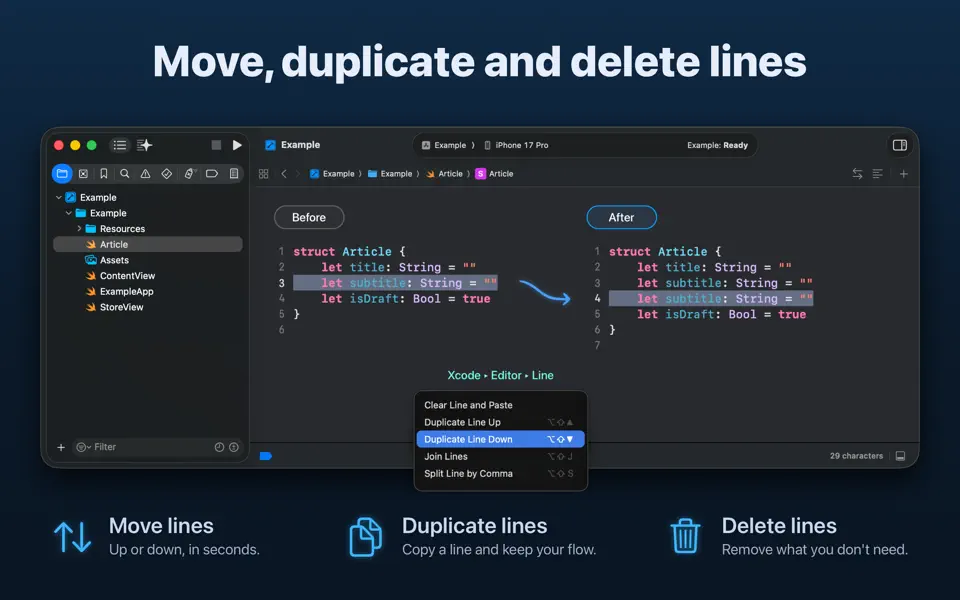
• Move Line Up / Move Line Down — swap the selection with the line above or below
• Duplicate Line Up / Duplicate Line Down — copy the selection and choose which copy keeps the caret
• Delete Line — delete whole lines wherever the caret sits
• Clear Line — empty the lines but keep their indentation and position
• Clear Line and Paste — replace the selected lines with the clipboard
• Copy Line / Cut Line — put whole lines on the clipboard, no selecting first
• Insert Line Above / Insert Line Below — open a blank line at the right indent
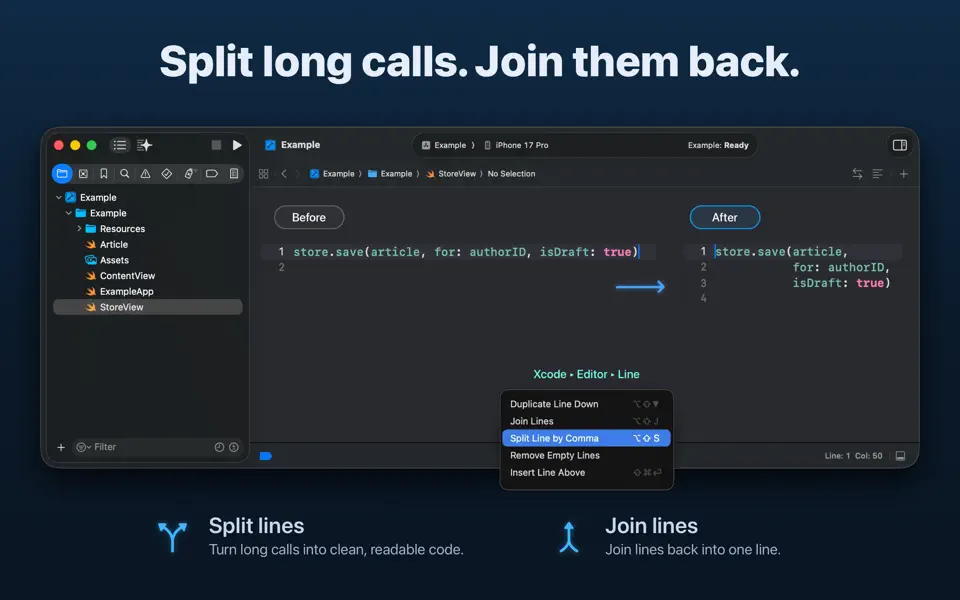
• Join Lines — collapse a selection onto one line, spacing it sensibly around brackets
• Split Line by Comma — break a comma-separated line apart, aligned under its bracket
• Remove Empty Lines — drop the blank lines inside a selection
• Next Blank Line / Previous Blank Line — move the caret between blocks
• Trim Trailing Whitespace — remove spaces and tabs from selected line endings
• Collapse Empty Lines — reduce each run of blank lines to one
• Remove Duplicate Lines — keep the first occurrence of each exact selected line
• Sort Lines Ascending / Sort Lines Descending — sort selected lines deterministically
• Reverse Lines — reverse the order of the selected lines
Editor > Editor+
• Remove Comment — strip // comments, leaving code and string or regex literals alone
• Add Type Extension — write an extension on the first type declared in the file
• Add Type Delegate — write a delegate protocol for it
• Insert MARK Section — insert a // MARK: section placeholder
• Wrap in #if DEBUG — wrap selected lines in a conditional compilation block
• Organize Imports — sort and de-duplicate safe, contiguous Swift import blocks
• Wrap in Task — wrap and indent selected lines in Task { }
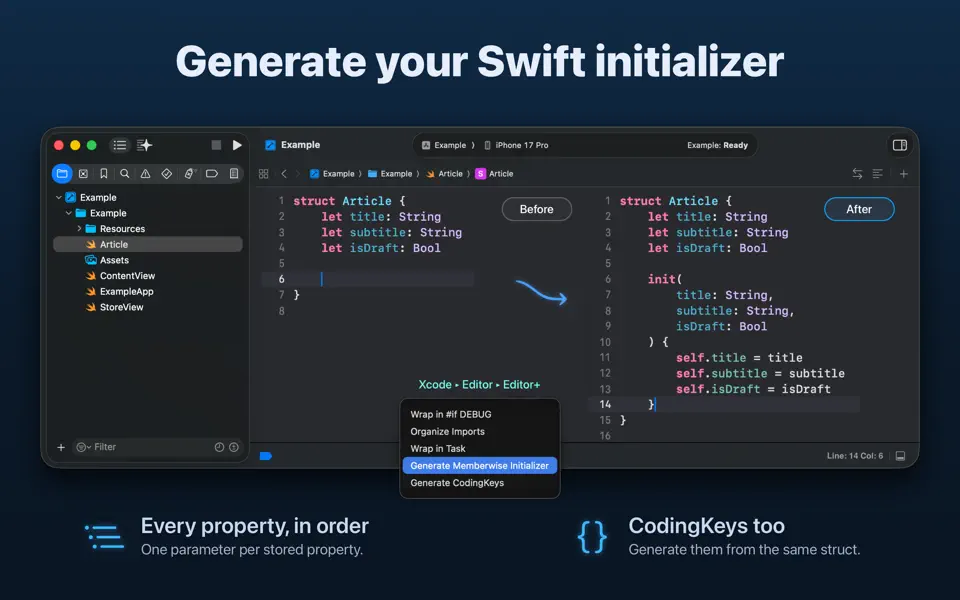
• Generate Memberwise Initializer — create an initializer from a struct's stored properties, and decline rather than guess on syntax it cannot handle
• Generate CodingKeys — create CodingKeys from direct stored properties
FREE, AND STAYING FREE
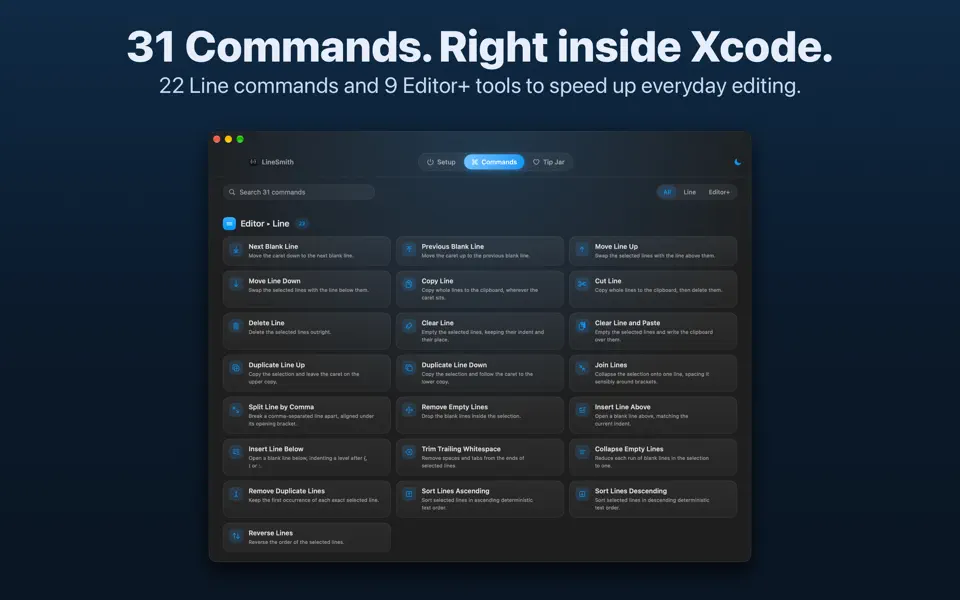
All 31 commands are free. There is no paid tier, no account, no ads and no tracking. LineSmith collects nothing about you or your code. If LineSmith saves you time, there is a tip jar in the app; a tip unlocks nothing, because there is nothing to unlock.
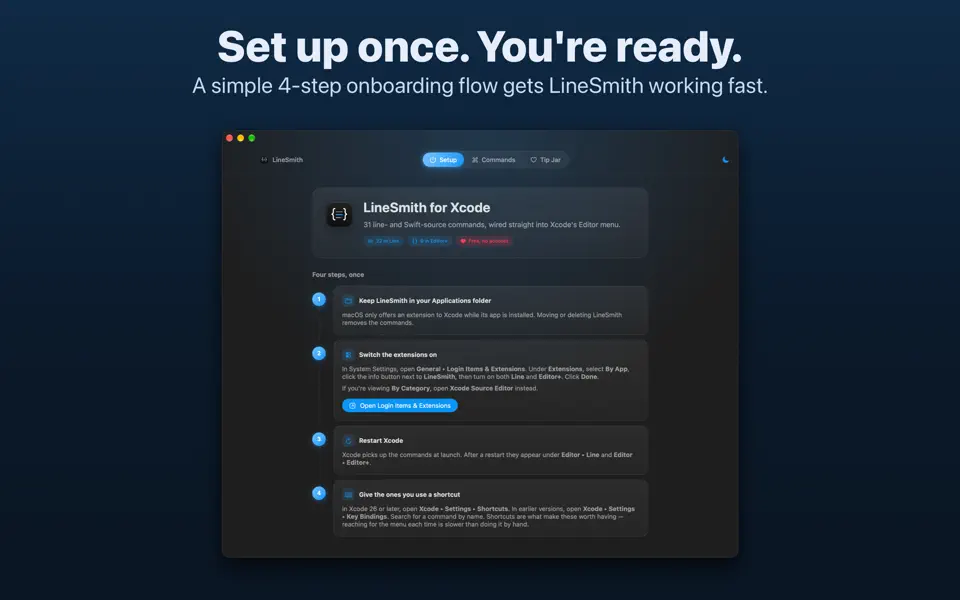
SETTING IT UP
1. Keep LineSmith in your Applications folder.
2. In System Settings, find Xcode Source Editor and enable both Line and Editor+.
3. Restart Xcode.
4. Assign shortcuts in Xcode > Settings > Shortcuts (Key Bindings in earlier Xcode versions).
Requires macOS 14 or later and Xcode.
UPGRADING FROM TEXTPLUS
The 19 command identifiers inherited from TextPlus are unchanged, so existing keyboard shortcuts carry over. Version 2.0 also brings reliability fixes and 12 new commands, for 31 in total.
Kehittäjältä
Listat 0
-
 LineSmith for Xcode
Pisteet 5
-

- +1 Piste
-
- 2 002 Dragon
- +1
-
- 17 Kai Lee
- +1
-
- 1 249 바람처어럼
- +1
-
- 18 989 Simon Chan
- +1
-
- 173 upto
- +1






Sijoitukset 0
-
- Arviosi
Kehittäjä 4
- Tuan Truong
- Seuraajat: 0
- Alustat: iOS Sovellukset (2) macOS Sovellukset (1) macOS Pelit (1)
- Tarjoukset: 1
- Listat: 0 1
- Pisteet: 7
- Sijoitukset: 0
- Kommentit: 0
- Videot: 0
- RSS: Tilaa
Uutta
- Versio: 2.0.2
- Viimeksi päivitetty:
- LineSmith 2.0.2
• Undo after a command now restores only the lines that changed, without selecting the whole file or jumping to the top.
• Generate Memberwise Initializer and Generate CodingKeys handle trailing comments, property wrappers, property observers, and class methods correctly, and no longer guess wrong types.
• Join Lines keeps trailing comments intact and handles blank lines better.
• Split Line by Comma aligns under the innermost open bracket.
• Clear Line and Paste keeps indentation when the clipboard is empty.
• Files with mixed LF/CRLF line endings keep the endings of untouched lines.
• All 31 editing commands remain free.
Lisätietoja
- Julkaisupäivämäärä:
- Luokka:
macOS-sovellukset›Kehittäjätyökalut - Käyttöjärjestelmä:
macOSmacOS 14.0 tai uudempi - Koko:
2 Mb - Tuetut kielet:
Englanti - Sisällön ikärajoitus:
4+ - Mac App Store Arvio: ¡
0 - Verkkosivusto:
 https://leafworkstudio.com/linesmith
AppAgg-arvio
Laskennallinen AppAgg-arvio:
LineSmith for Xcode
Kehittäjä: Tuan Truong
Korkeampi arvio kertoo yleensä paremmista tuloksista AppAggin seuraamissa mittareissa.
Perustuu: suosioon · käyttäjäarvioihin · tuoreuteen · tarjouksiin · kauppadataan · yhteisön aktiivisuuteen
Lasketaan uudelleen päivittäin tuoreiden AppAgg-tietojen perusteella.
Kommentit 0 ¡
Jaa
LineSmith for Xcode Lyhennetty URL: Kopioitu!- Mac App Store

