
Segnalibri
| Sviluppatore: | Tuan Truong (4) | ||
| Prezzo: | * Gratis | ||
| Punteggio: | 6120 Platino | ||
| Classifiche: | 0 | ||
| Commenti: | 0 Pubblica commento | ||
| Liste: | 0 1 | ||
| Punti: | 5 | ||
| +1 Punto | |||
In breve
Ti presentiamo LineSmith for Xcode, un’app di Tuan Truong della categoria «Strumenti per sviluppatori».
Uscita , e gli aggiornamenti continuano ad arrivare: l’ultimo è uscito . Questa sì che è dedizione.
Si scarica gratis. Poi decidi tu (ci sono acquisti in-app).
Funziona su macOS 14.0 o versioni successive. Meglio controllare quale hai.
Il suo Punteggio AppAgg è 6120. Livello Platino (più in alto c’è solo Leggenda).
Solo 2 megabyte. Ci sta anche su un disco pieno zeppo.
Classificazione «4+»: va bene anche per i bambini.
Parla una sola lingua, e non è l’italiano.
5 persone sono già passate da qui allo store. Sono i suoi Punti su AppAgg.
Lo sviluppatore ha 1 altro gioco e 2 app su AppAgg. Vale la pena dare un’occhiata.
A proposito, questo sviluppatore ha 1 offerta in corso.
Vuoi sapere prima di tutti di aggiornamenti e nuove app? Segui lo sviluppatore o iscriviti al feed RSS. Le notifiche push arrivano tramite l’app AppAgg Alerts per Android e iOS.
Altre piattaforme 0
 | LineSmith for XcodeMac App Store6K PlatinomacOSAcquisti in-app $1.99 – $9.99 | Gratis |
Per ora solo in questo store.
Cronologia dei prezzi 0
- Prezzo attuale: Gratis
- Minimo: Gratis
- Massimo: Gratis
Il tuo feed personale nella home
Screenshot 6

Descrizione
Formerly TextPlus. Your existing shortcuts still work.
COMMANDS
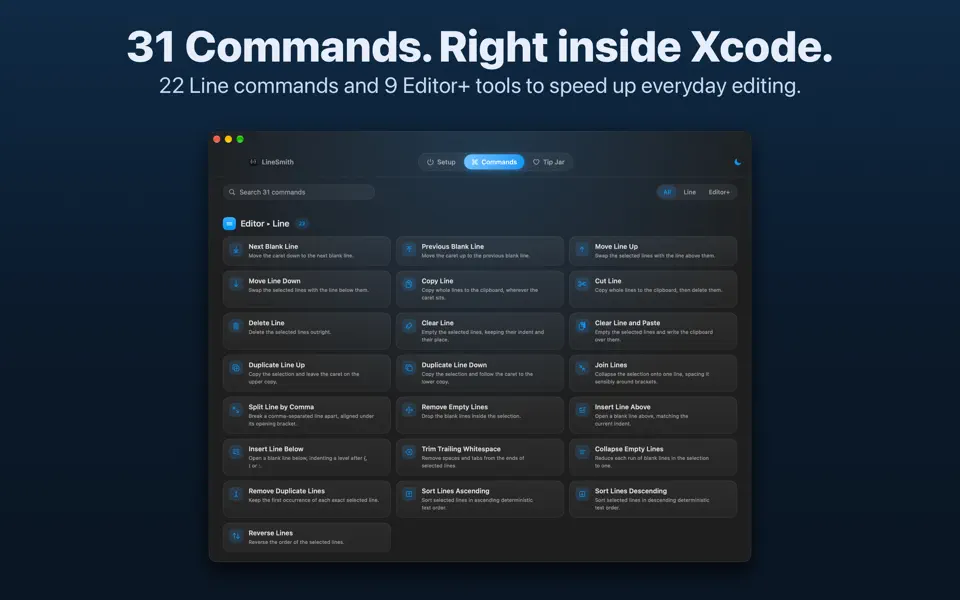
Editor > Line
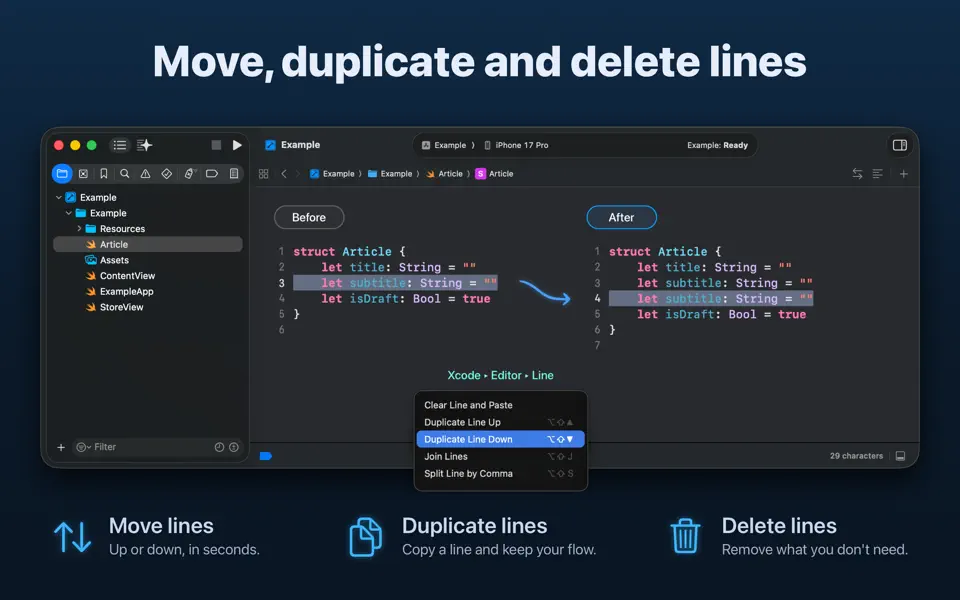
• Move Line Up / Move Line Down — swap the selection with the line above or below
• Duplicate Line Up / Duplicate Line Down — copy the selection and choose which copy keeps the caret
• Delete Line — delete whole lines wherever the caret sits
• Clear Line — empty the lines but keep their indentation and position
• Clear Line and Paste — replace the selected lines with the clipboard
• Copy Line / Cut Line — put whole lines on the clipboard, no selecting first
• Insert Line Above / Insert Line Below — open a blank line at the right indent
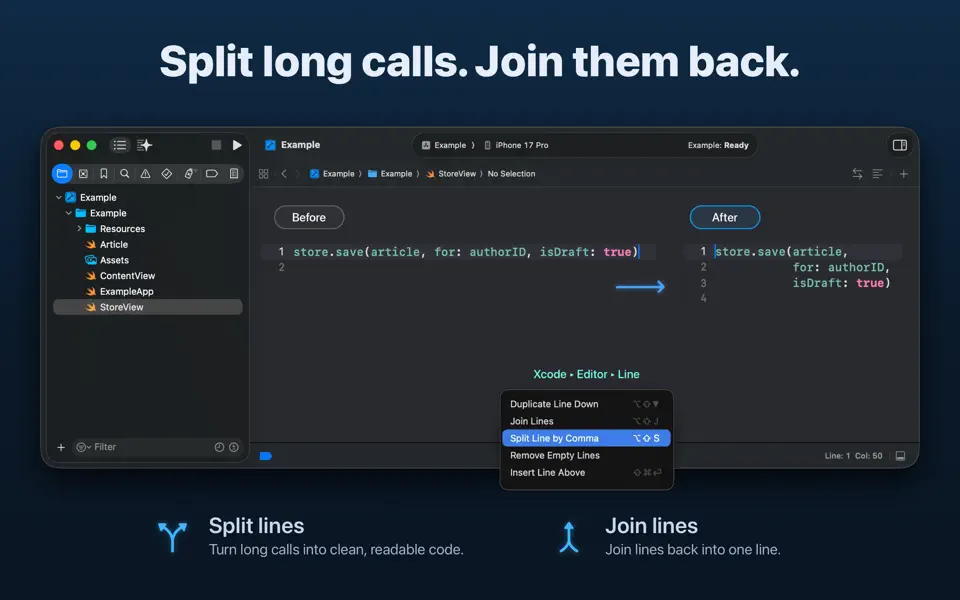
• Join Lines — collapse a selection onto one line, spacing it sensibly around brackets
• Split Line by Comma — break a comma-separated line apart, aligned under its bracket
• Remove Empty Lines — drop the blank lines inside a selection
• Next Blank Line / Previous Blank Line — move the caret between blocks
• Trim Trailing Whitespace — remove spaces and tabs from selected line endings
• Collapse Empty Lines — reduce each run of blank lines to one
• Remove Duplicate Lines — keep the first occurrence of each exact selected line
• Sort Lines Ascending / Sort Lines Descending — sort selected lines deterministically
• Reverse Lines — reverse the order of the selected lines
Editor > Editor+
• Remove Comment — strip // comments, leaving code and string or regex literals alone
• Add Type Extension — write an extension on the first type declared in the file
• Add Type Delegate — write a delegate protocol for it
• Insert MARK Section — insert a // MARK: section placeholder
• Wrap in #if DEBUG — wrap selected lines in a conditional compilation block
• Organize Imports — sort and de-duplicate safe, contiguous Swift import blocks
• Wrap in Task — wrap and indent selected lines in Task { }
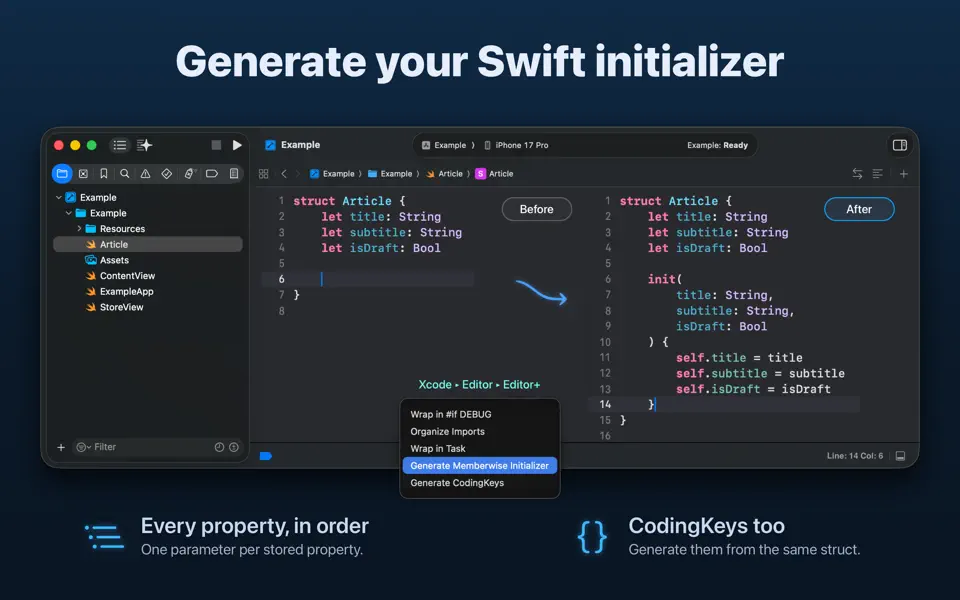
• Generate Memberwise Initializer — create an initializer from a struct's stored properties, and decline rather than guess on syntax it cannot handle
• Generate CodingKeys — create CodingKeys from direct stored properties
FREE, AND STAYING FREE
All 31 commands are free. There is no paid tier, no account, no ads and no tracking. LineSmith collects nothing about you or your code. If LineSmith saves you time, there is a tip jar in the app; a tip unlocks nothing, because there is nothing to unlock.
SETTING IT UP
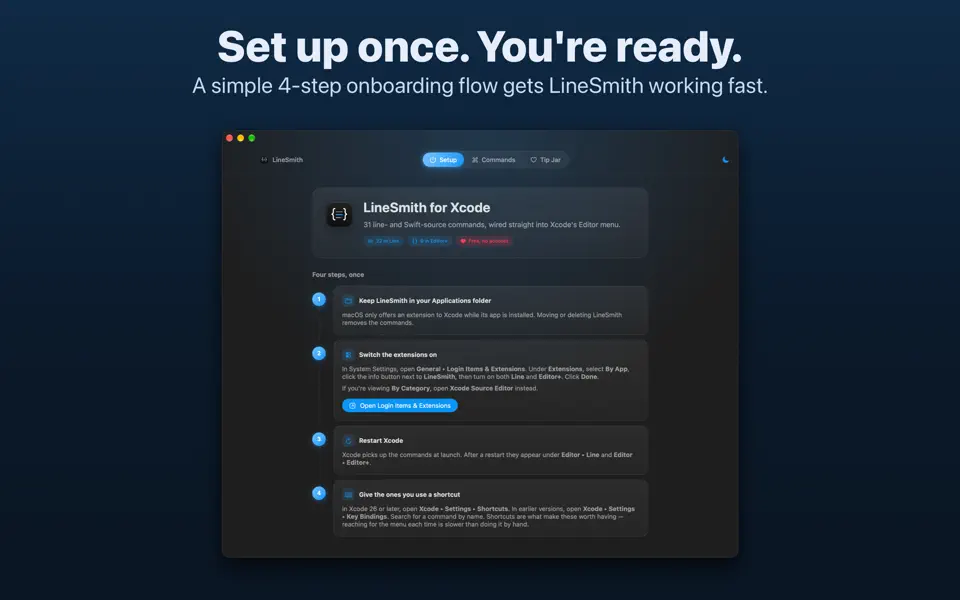
1. Keep LineSmith in your Applications folder.
2. In System Settings, find Xcode Source Editor and enable both Line and Editor+.
3. Restart Xcode.
4. Assign shortcuts in Xcode > Settings > Shortcuts (Key Bindings in earlier Xcode versions).
Requires macOS 14 or later and Xcode.
UPGRADING FROM TEXTPLUS
The 19 command identifiers inherited from TextPlus are unchanged, so existing keyboard shortcuts carry over. Version 2.0 also brings reliability fixes and 12 new commands, for 31 in total.
Dallo sviluppatore
Liste 0
-
 LineSmith for Xcode
Punti 5
-

- +1 Punto
-
- 2002 Dragon
- +1
-
- 17 Kai Lee
- +1
-
- 1249 바람처어럼
- +1
-
- 18.989 Simon Chan
- +1
-
- 173 upto
- +1






Classifiche 0
-
- La tua valutazione
Sviluppatore 4
- Tuan Truong
- Follower: 0
- Piattaforme: iOS App (2) macOS App (1) macOS Giochi (1)
- Offerte: 1
- Liste: 0 1
- Punti: 7
- Classifiche: 0
- Commenti: 0
- Video: 0
- RSS: Iscriviti
Novità
- Versione: 2.0.2
- Ultimo aggiornamento:
- LineSmith 2.0.2
• Undo after a command now restores only the lines that changed, without selecting the whole file or jumping to the top.
• Generate Memberwise Initializer and Generate CodingKeys handle trailing comments, property wrappers, property observers, and class methods correctly, and no longer guess wrong types.
• Join Lines keeps trailing comments intact and handles blank lines better.
• Split Line by Comma aligns under the innermost open bracket.
• Clear Line and Paste keeps indentation when the clipboard is empty.
• Files with mixed LF/CRLF line endings keep the endings of untouched lines.
• All 31 editing commands remain free.
Informazioni aggiuntive
- Data di uscita:
- Categoria:
App per macOS›Strumenti per sviluppatori - Sistemi operativi:
macOSmacOS 14.0 e versioni successive - Dimensioni:
2 Mb - Lingue supportate:
Inglese - Classificazione contenuti:
4+ - Mac App Store Valutazione: ¡
0 - Sito web:
 https://leafworkstudio.com/linesmith
Punteggio AppAgg
Punteggio AppAgg stimato per
LineSmith for Xcode
Sviluppatore: Tuan Truong
Un punteggio più alto riflette in genere risultati migliori negli indicatori di AppAgg.
Basato su: popolarità · valutazioni degli utenti · freschezza · offerte · dati degli store · attività della community
Ricalcolato ogni giorno con dati AppAgg aggiornati.
Commenti 0 ¡
Condividi
LineSmith for Xcode URL breve: Copiato!- Mac App Store

