
书签
为此书签设置标题。
书签已保存
| 开发者: | Tuan Truong (4) | ||
| 价格: | * 免费 | ||
| 评分: | 6,120 铂金 | ||
| 排名: | 0 | ||
| 评论: | 0 发表评论 | ||
| 列表: | 0 1 | ||
| 积分: | 5 | ||
| +1 积分 | |||
摘要
来认识一下 LineSmith for Xcode,Tuan Truong 出品的应用,归在“软件开发工具”分类下。
免费下载。之后花不花钱随你,里面有内购。
需要 macOS 14.0 或更高版本,先看看你的系统是哪个版本吧。
AppAgg 评分 6,120,已达铂金级,再往上就只有传奇级了。
只有 2 MB,硬盘塞满了也装得下。
年龄分级为“4+”,孩子也适合。
只会一种语言,而且不是中文。
已经有 5 人从这里前往商店。这就是它在 AppAgg 上的积分。
这位开发者在 AppAgg 上还有 1 款游戏和 2 款应用,值得一看。
顺便一提,这位开发者现在有 1 款作品在打折。
想第一时间知道更新和新应用?关注开发者或订阅RSS 订阅源。推送通知通过 AppAgg Alerts 应用发送,支持 Android 和 iOS。
广告
其他平台 0
 | LineSmith for XcodeMac App Store6K 铂金macOS提供应用内购商品 $1.99 – $9.99 | 免费 |
目前仅在此商店提供。
价格历史 0
- 目前价格: 免费
- 最小值: 免费
- 最大值: 免费
首页专属动态
为「新上架与最近更新」选择平台,首页就只显示你需要的应用和游戏。
屏幕截图 6

描述
Formerly TextPlus. Your existing shortcuts still work.
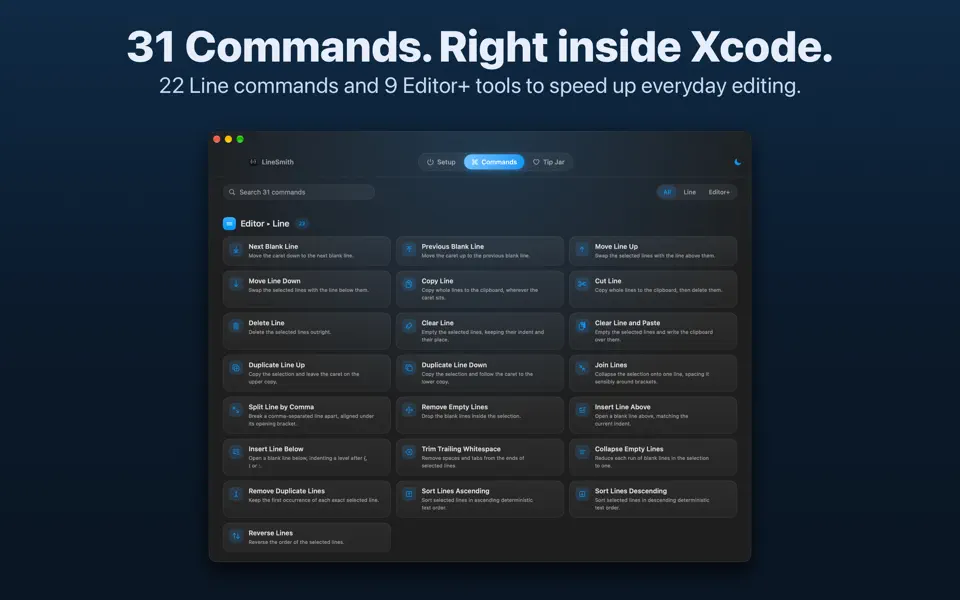
COMMANDS
Editor > Line
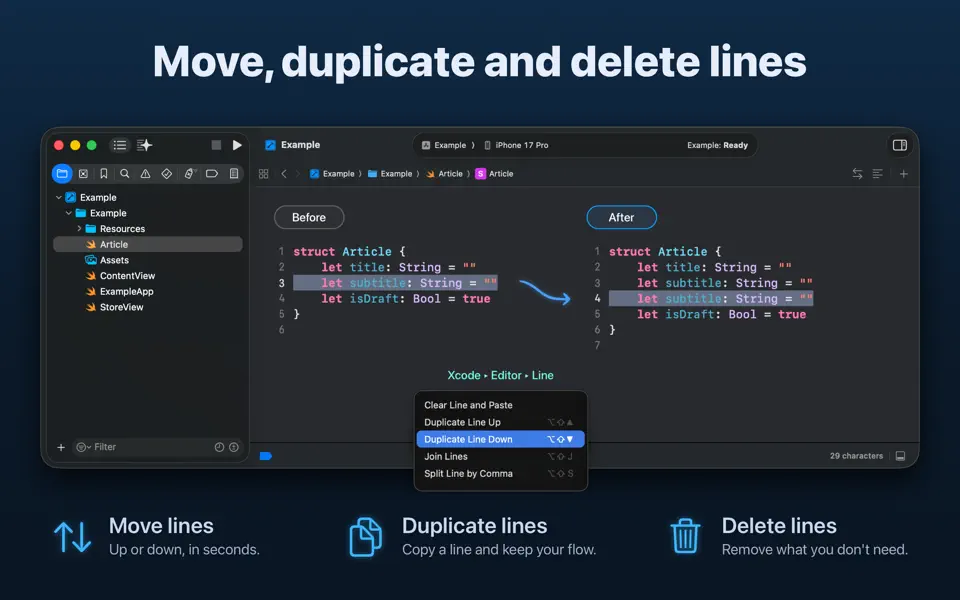
• Move Line Up / Move Line Down — swap the selection with the line above or below
• Duplicate Line Up / Duplicate Line Down — copy the selection and choose which copy keeps the caret
• Delete Line — delete whole lines wherever the caret sits
• Clear Line — empty the lines but keep their indentation and position
• Clear Line and Paste — replace the selected lines with the clipboard
• Copy Line / Cut Line — put whole lines on the clipboard, no selecting first
• Insert Line Above / Insert Line Below — open a blank line at the right indent
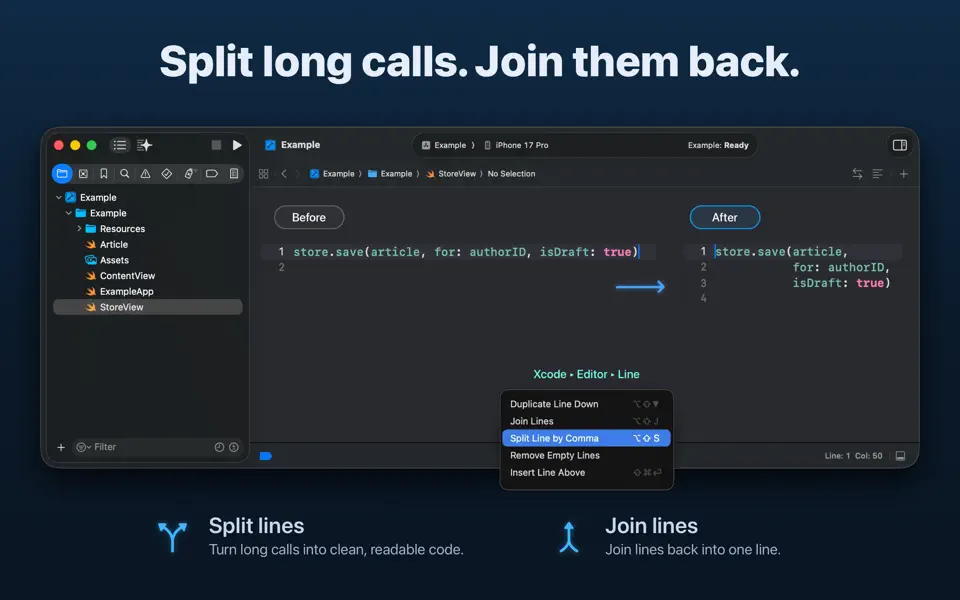
• Join Lines — collapse a selection onto one line, spacing it sensibly around brackets
• Split Line by Comma — break a comma-separated line apart, aligned under its bracket
• Remove Empty Lines — drop the blank lines inside a selection
• Next Blank Line / Previous Blank Line — move the caret between blocks
• Trim Trailing Whitespace — remove spaces and tabs from selected line endings
• Collapse Empty Lines — reduce each run of blank lines to one
• Remove Duplicate Lines — keep the first occurrence of each exact selected line
• Sort Lines Ascending / Sort Lines Descending — sort selected lines deterministically
• Reverse Lines — reverse the order of the selected lines
Editor > Editor+
• Remove Comment — strip // comments, leaving code and string or regex literals alone
• Add Type Extension — write an extension on the first type declared in the file
• Add Type Delegate — write a delegate protocol for it
• Insert MARK Section — insert a // MARK: section placeholder
• Wrap in #if DEBUG — wrap selected lines in a conditional compilation block
• Organize Imports — sort and de-duplicate safe, contiguous Swift import blocks
• Wrap in Task — wrap and indent selected lines in Task { }
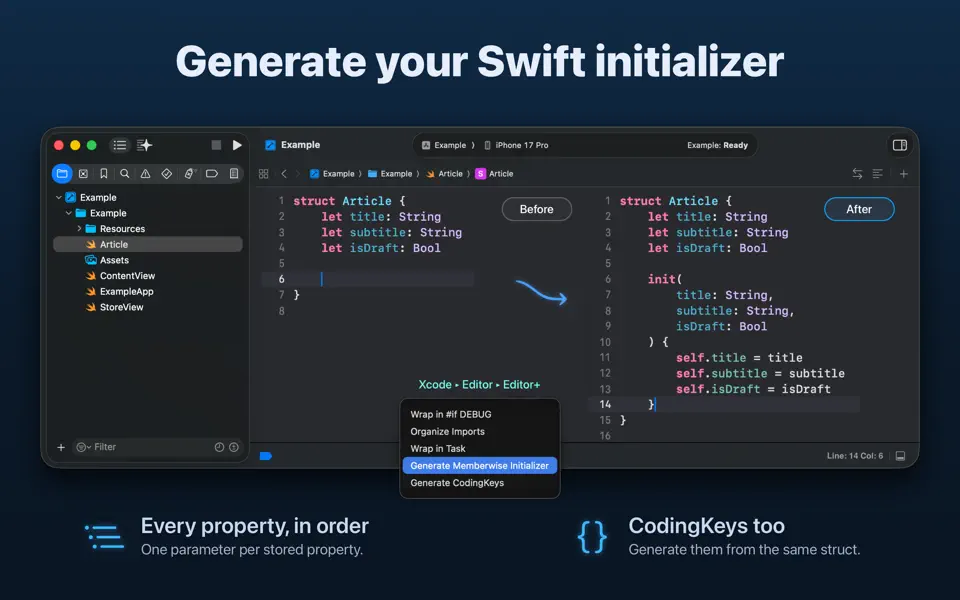
• Generate Memberwise Initializer — create an initializer from a struct's stored properties, and decline rather than guess on syntax it cannot handle
• Generate CodingKeys — create CodingKeys from direct stored properties
FREE, AND STAYING FREE
All 31 commands are free. There is no paid tier, no account, no ads and no tracking. LineSmith collects nothing about you or your code. If LineSmith saves you time, there is a tip jar in the app; a tip unlocks nothing, because there is nothing to unlock.
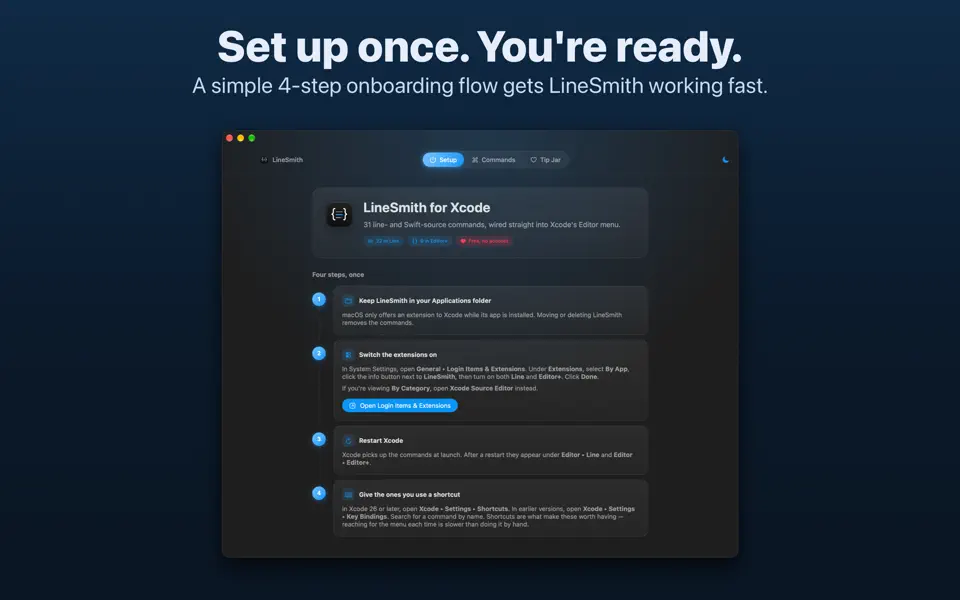
SETTING IT UP
1. Keep LineSmith in your Applications folder.
2. In System Settings, find Xcode Source Editor and enable both Line and Editor+.
3. Restart Xcode.
4. Assign shortcuts in Xcode > Settings > Shortcuts (Key Bindings in earlier Xcode versions).
Requires macOS 14 or later and Xcode.
UPGRADING FROM TEXTPLUS
The 19 command identifiers inherited from TextPlus are unchanged, so existing keyboard shortcuts carry over. Version 2.0 also brings reliability fixes and 12 new commands, for 31 in total.
来自开发者
你是开发者吗?
在页面顶部发布新闻,关注者会通过邮件收到。添加你的 YouTube 视频,它们会排在“视频”版块最前面。
列表 0
-
 LineSmith for Xcode
积分 5
-

- +1 积分
-
- 2,002 Dragon
- +1
-
- 17 Kai Lee
- +1
-
- 1,249 바람처어럼
- +1
-
- 18,989 Simon Chan
- +1
-
- 173 upto
- +1






排名 0
-
- 您的评分
开发者 4
新版变化
- 版本: 2.0.2
- 最后更新:
- LineSmith 2.0.2
• Undo after a command now restores only the lines that changed, without selecting the whole file or jumping to the top.
• Generate Memberwise Initializer and Generate CodingKeys handle trailing comments, property wrappers, property observers, and class methods correctly, and no longer guess wrong types.
• Join Lines keeps trailing comments intact and handles blank lines better.
• Split Line by Comma aligns under the innermost open bracket.
• Clear Line and Paste keeps indentation when the clipboard is empty.
• Files with mixed LF/CRLF line endings keep the endings of untouched lines.
• All 31 editing commands remain free.
其他信息
 https://leafworkstudio.com/linesmith
AppAgg 评分
6,120
AppAgg 预估评分:
LineSmith for Xcode
开发者: Tuan Truong
6,120 铂金
评分越高,通常表示其在 AppAgg 上的各项指标表现越好。
基于: 热度 · 用户评分 · 新鲜度 · 优惠 · 商店数据 · 社区活跃度
根据最新 AppAgg 数据每日重新计算。
网站徽章:  已复制!
评论 0 ¡
来发第一条评论吧
分享
LineSmith for Xcode 短网址: 已复制!- Mac App Store

