
Saved
Choose the name that will be shown in your Saved menu.
Done!
| Developer: | Damian Pieszczynski (2) | ||
| Price: | $4.99 | ||
| Score: | 580 Bronze | ||
| Rankings: | 0 | ||
| Comments: | 0 Add a comment | ||
| Lists: | 0 + 0 | ||
| Points: | 0 + 0 ¡ | ||
| +1 Points | |||
Description

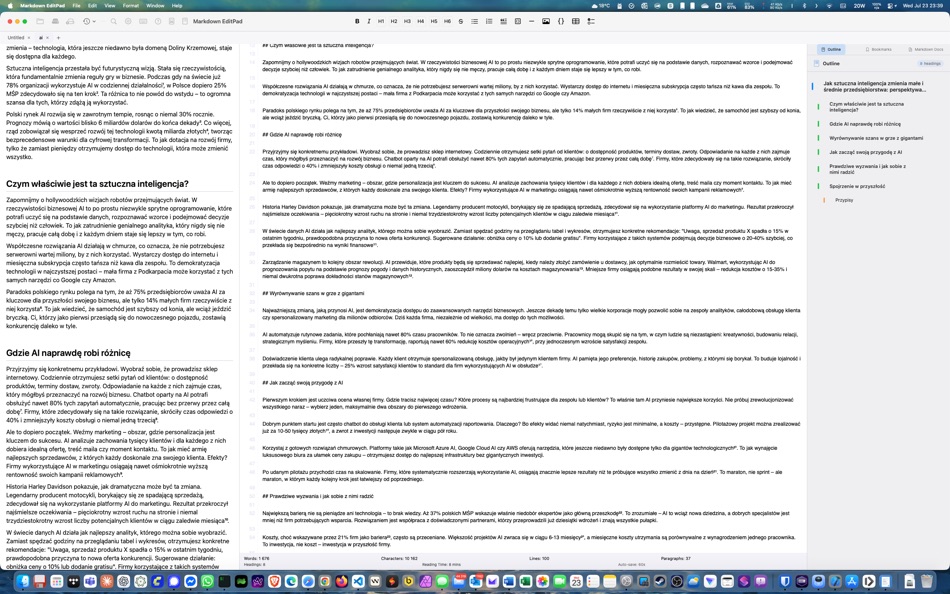
Features:
- live preview
- outline
- bookmarks
- markdown docs and interface to add markdown tags
- export to HTML and RTF
Screenshots


Ad
Price History
- Current price: $4.99
- Minimum: $4.99
- Maximum: $4.99
Track prices
AppAgg Score
580
Estimated AppAgg Score for
Markdown EditPad
580 Bronze
Higher scores usually mean stronger signals on AppAgg.
Based on: popularity · ratings · freshness · deals · store data · community signals
Recalculated daily using fresh AppAgg data.
Short URL: Copied!
What's new
- Version: 1.0
- Last Updated:
Additional Information
- Release Date:
- Category:
macOS Apps›Developer Tools - OS:
macOS,macOS 14.6 and up - Size:
2 Mb - Supported Languages:
Spanish - Content Rating:
4+ - Mac App Store Rating:
0
Developer
- Damian Pieszczynski
- Platforms: Android Apps (1) macOS Apps (1)
- Lists: 0 + 0
- Points: 0 + 0 ¡
- Rankings: 0
- Comments: 0
- Deals: 0
- Videos: 0
- RSS: Subscribe
Lists (0)
0
- Markdown EditPad
Points (0)
0
Rankings (0)
0
Comments (0)
Be the first to comment
Summary
Markdown EditPad Short URL: Copied!- Share
- Mac App Store
«Markdown EditPad» is a Developer Tools app for macOS, developed by «Damian Pieszczynski». It was first released on and last updated on . The lowest historical price was $4.99, and the highest was $4.99. This app has not yet received any ratings on AppAgg. Available languages: Spanish. AppAgg continuously tracks the price history, ratings, and user feedback for «Markdown EditPad». AppAgg does not host applications or distribute software. All trademarks, logos and screenshots belong to their respective owners. Subscribe to this app or follow its RSS feed to get notified about future deals or updates.
Similar
-
- Markdown Browser
- macOS Apps: Developer Tools By: Shaun Hirst
- $1.99
- Lists: 0 0 0
- Points: 0 + 0 720 Version: 1.0.0 Markdown Browser is a powerful yet elegant native Mac application designed for reading, browsing, and navigating Markdown documents with ease. Whether you're reviewing documentation, ... ⥯
-
- Markdown Workbench
- macOS Apps: Developer Tools By: David Page
- $2.99
- Lists: 0 + 1 0 0
- Points: 4 + 0 5K Version: 1.0.4 Markdown Workbench is a fast, focused document viewer and editor built for people who work with Markdown and code files every day. Open any Markdown file and see it beautifully ... ⥯
-
- Markdown Buddy
- macOS Apps: Developer Tools By: Jan Tumpach
- $0.99
- Lists: 0 0 0
- Points: 0 + 0 580 Version: 1.2 Markdown Buddy is a native macOS app that lets you preview Markdown files beautifully, right from your code editor or Finder. Source Editor Extension Integrates directly into your ... ⥯
-
- Markdown Export
- macOS Apps: Developer Tools By: Tanvir N Hasan
- * Free
- Lists: 0 0 0
- Points: 0 + 0 600 Version: 1.3 A Professional Markdown-to-Document Converter Transform your markdown into beautifully formatted PDFs, Word documents, and PNG images with just a click. Markdown Export combines a ... ⥯
-
- Markdown Quick Look
- macOS Apps: Developer Tools By: Bitfield AB
- $4.99
- Lists: 0 0 0
- Points: 0 + 0 580 Version: 1.0 Stop opening files just to peek. Markdown Quick Look adds instant, beautifully rendered Markdown previews to Finder. Press the spacebar on any .md, .markdown, or .mdown file and see ... ⥯
-
- Ohai Markdown Viewer
- macOS Apps: Developer Tools By: Verbari LLC
- $14.99
- Lists: 0 0 0
- Points: 0 + 0 1K Version: 1.0 Stop reading raw text in your terminal. Ohai is a native macOS markdown viewer built for the age of AI. It acts as a real-time canvas for tools like Claude Code, Cursor, and Copilot. ... ⥯
-
- Meva - Markdown Viewer
- macOS Apps: Developer Tools By: Shuchi Muley
- * Free
- Lists: 0 0 0
- Points: 0 + 0 600 Version: 1.3.0 Markdown files deserve a better reader. Meva is a fast, native markdown viewer built specifically for consuming documentation generated by tools like Claude, ChatGPT, Cursor, and ... ⥯
-
- Telescopo: Markdown Viewer
- macOS Apps: Developer Tools By: Bad Command AI
- * Free
- Lists: 0 + 1 0 0
- Points: 6 + 0 5K Version: 6.1.0 Telescopo: Markdown Viewer is a lightning-fast, native Markdown viewer for macOS featuring an integrated AI Assistant, builtin Mermaid diagrams, LaTeX math, and pro-grade PDF exports. ... ⥯
- New
- Layerz Markdown
- macOS Apps: Developer Tools By: Layerz Corp.
- Free
- Lists: 0 0 0
- Points: 0 + 0 600 Version: 1.1.1 Layerz Markdown lets you read and write Markdown beautifully. Open a folder to see all your documents in a sidebar. Click any file to view it with rich formatting tables, code blocks, ... ⥯
-
- Pixley Markdown
- macOS Apps: Developer Tools By: Jose Duarte
- Free
- Lists: 0 + 1 0 0
- Points: 1 + 0 1K Version: 3.1 AI tools generate markdown. Pixley makes it interactive. Open a file or browse a folder of markdown documents in a clean sidebar. Pixley converts plain text into interactive controls ... ⥯
-
- Easy Markdown
- macOS Apps: Developer Tools By: Roberto Panetta
- $7.99
- Lists: 0 + 1 0 0
- Points: 0 + 0 1K Version: 1.9.3 Easy Markdown lets you create Web pages just writing plain text with Markdown syntax. It's simply and powerful. We are sure you will love it. A text written in Markdown is a plain text ⥯
-
- BetterLocale MarkDown
- macOS Apps: Developer Tools By: Christian Drapatz
- $3.99
- Lists: 0 0 0
- Points: 1 + 0 1K Version: 1.0 BetterLocale MarkDown is a powerful Markdown editor for macOS. It combines a clear writing interface with a direct HTML live preview. As you write your Markdown text on the left, you ... ⥯
- New
- QL Markdown by XN
- macOS Apps: Developer Tools By: XNsystems Co., Ltd
- $1.99
- Lists: 0 0 0
- Points: 0 + 0 1K Version: 1.0 QL Markdown is a macOS extension that renders Markdown files in Finder's Quick Look at GitHub-grade quality. Just select a .md file and press the space bar a clean, well-formatted ... ⥯
-
- Markdown2PDF: Convert Markdown
- macOS Apps: Developer Tools By: Haplo, LLC
- $1.99
- Lists: 0 0 0
- Points: 0 + 0 580 Version: 1.2 Easily Convert Markdown to PDF with Markdown2PDF Markdown2PDF is the fastest way to turn your Markdown files into high-quality PDFs. Whether you re writing notes, documentation, or ... ⥯