
저장됨
저장됨 메뉴에 표시할 이름을 선택하세요.
완료!
기술

Built on Apple’s native Virtualization framework, MiniVirtual is designed for efficient CPU, memory and battery use on Apple silicon. It focuses on the essential workflow: choose a system image, configure the hardware, boot, share files, use the network and get back to building.
What you can do:
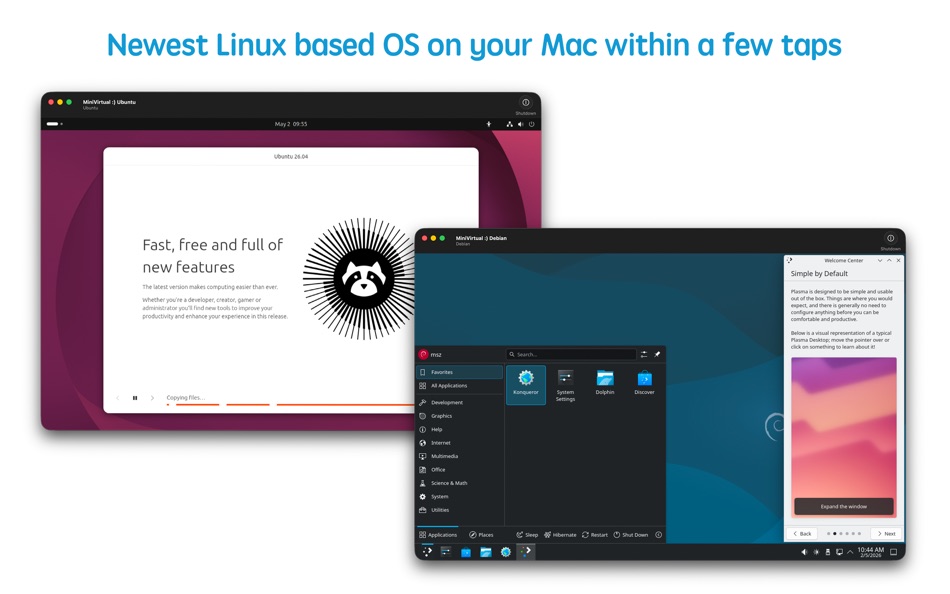
• Create Linux VMs with popular distributions such as Ubuntu, Debian, Fedora and openSUSE.
• Run compatible macOS virtual machines on supported Macs.
• Install from custom .iso, .dmg and other disk images.
• Configure CPU cores, memory, storage and additional disks.
• Share folders from Downloads, the app sandbox, or folders you choose.
• Copy and paste through clipboard sharing where supported by the guest.
• Connect the guest to the internet through shared NAT networking.
• Use Rosetta inside ARM Linux VMs to run many Intel x86_64 Linux binaries on Apple silicon.
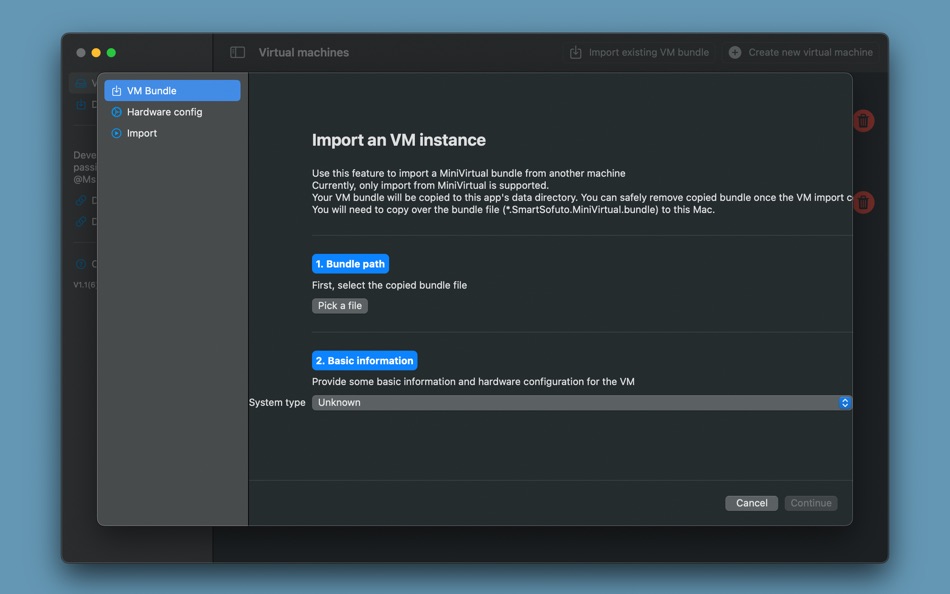
• Export, copy and import VM bundles between Macs with MiniVirtual installed.
• Keep separate VMs for development, testing, package experiments, command-line tools and clean Linux workspaces.
Designed for Apple silicon:
MiniVirtual is best for Macs with M-series chips. Guest systems must support the same CPU architecture as your Mac. On Apple silicon, choose ARM64/AArch64 Linux images or compatible macOS restore images. Intel-only operating system installers cannot be booted as full VMs on Apple silicon through this app. Rosetta support is for running many x86_64 Linux binaries inside an ARM Linux VM, not for booting an x86_64 operating system image.
Current limitations:
• Bridged networking is not available in the current version.
• USB device mounting is not supported.
• Serial port mounting is not supported.
• Existing disks cannot be resized after creation. You can add more disks instead.
• Guest OS support depends on the system image, architecture and drivers provided by that OS.
MiniVirtual is made for developers, students, makers, Linux users and Mac power users who want a focused VM tool without a heavy desktop suite. It is not trying to be everything. It is a small, practical virtual machine command center for running compatible Linux and macOS environments on your Mac.
Disclaimer: macOS, Ubuntu, Debian, Fedora, openSUSE, Kali, Parrot Security, Rosetta and other system or product names belong to their respective owners. MiniVirtual is not affiliated with or endorsed by those projects or owners.
스크린샷





Ad
가격 내역
-
* 인앱 구매 - 현재 가격: 무료
- 최소: 무료
- 최대: $1.99
가격 추적
AppAgg 평가
1,500
AppAgg 예상 평가:
Mini Virtual Machine
1,500 골드
평가가 높을수록 보통 AppAgg에서 더 강한 신호를 의미합니다.
기준: 인기 · 사용자 평점 · 최신성 · 딜 · 스토어 데이터 · 커뮤니티 활동
최신 AppAgg 데이터를 바탕으로 매일 다시 계산됩니다.
단축 URL: 복사됨!
새로운 기능
- 버전: 8.0
- 마지막 업데이트:
- - Improved VM launching logic
- Allow resuming downloads
- Added new support center to submit requests
추가 정보
 https://mszpro.com/mini-virtual
개발자
목록 (0)
0
- Mini Virtual Machine
포인트 (5)
-

- 9,546 Pui Hang Choi
- +1
-
- 1,178 Anthony
- +1
-
- 2,930 바람처어럼
- +1
-
- 3,766 Dragon
- +1
-
- 11,481 Simon Chan
- +1





순위 (0)
0
댓글 (0)
가장 먼저 댓글을 남겨주세요
요약
Mini Virtual Machine 단축 URL: 복사됨!- 공유하기
- Mac App Store
«Mini Virtual Machine». 플랫폼: macOS. 카테고리: 개발자 도구. 개발자: «AsterKit». 첫 번째 릴리스: . 마지막 업데이트: . 현재 가격: 무료. 이 타이틀은 아직 AppAgg에서 평가나 리뷰를 받지 못했습니다. 추적된 포인트: 확인됨: 5, 간접: 0. 사용 가능한 언어: Chinese, English, French, German, Indonesian, Italian, Japanese, Korean, Portuguese, Russian, Spanish, Swedish, Ukrainian, Vietnamese. AppAgg는 «Mini Virtual Machine»의 가격 기록, 평점 및 사용자 피드백을 추적합니다. AppAgg는 애플리케이션을 호스팅하거나 소프트웨어를 배포하지 않습니다. 모든 상표, 로고 및 스크린샷은 해당 소유자의 자산입니다. 향후 할인 및 업데이트 받기: RSS에서 확인할 수 있습니다
유사 항목
-
- SoftVM: Light Virtual Machine
- macOS 앱: 개발자 도구 게시자: SoftSky App LTD
- 무료
- 목록: 0 0 0
- 포인트: 1 + 0 520 버전: 1.3.2 SoftVM delivers ultra-lightweight virtualization built specifically for Apple Silicon Macs. Experience native performance with minimal resource overhead. Why Choose SoftVM? ... ⥯
-
- Virtual Serial Port Controller
- macOS 앱: 개발자 도구 게시자: Bjoern Eschrich
- * 무료
- 목록: 0 + 1 0 0
- 포인트: 5 + 0 680 버전: 2.00.219 Virtual Serial Port Controller Advanced Communication Testing Solution The Virtual Serial Port Controller is a sophisticated software application designed to create and manage virtual ... ⥯
-
- Virtual Location
- macOS 앱: 개발자 도구 게시자: 业坤 张
- * $4.99
- 목록: 0 + 1 0 0
- 포인트: 2 + 0 560 버전: 3.35 - Virtual Location is an application that can help you modify iPhone/iPad the location,It requires download both Magellan App(Free).Please check the support link for details. - And ... ⥯
-
- Mini Pong - Menu Bar Game
- macOS 앱: 개발자 도구 게시자: Leo Tilie
- $1.99
- 목록: 0 0 0
- 포인트: 0 + 0 500 버전: 1.6 Waiting for your code to compile? Watching your AI model think? MiniPong is the perfect micro-break a tiny Pong arcade that lives in your macOS menu bar, always one click away. Play a ... ⥯
-
- Bushel - Virtual Machines
- macOS 앱: 개발자 도구 게시자: BrightDigit
- * 무료
- 목록: 0 + 1 0 0
- 포인트: 0 + 0 530 버전: 2.3.0 Need to try out old versions of macOS for your software? Want to try a script or piece of software without breaking your Mac? Discover the features of Bushel and step into a world of ... ⥯
-
- FaceStream AR Virtual Camera
- macOS 앱: 개발자 도구 게시자: FaceStream Corporation
- $0.99
- 목록: 0 0 0
- 포인트: 0 + 0 500 버전: 1.0 Enhance your video calls with FaceStream AR Virtual Camera! This innovative app lets you select a virtual camera for video meetings on Google Meet, Microsoft Teams, Zoom, and more. Key ⥯
-
- Iconographer Mini
- macOS 앱: 개발자 도구 게시자: Ohanaware Co., Ltd
- $2.99
- 목록: 0 0 0
- 포인트: 0 + 0 500 버전: 1.2.1 Iconographer Mini is a quick and easy way to take a logo and create either a Mac Iconset (for use with Xcode) or a compressed ICNS file for use with other Mac development tools (like ... ⥯
-
- Wormhole Virtual Location
- macOS 앱: 개발자 도구 게시자: Baofeng County Jixu Education Information Consulting Co., Ltd.
- * 무료
- 목록: 0 0 0
- 포인트: 0 + 0 500 버전: 2.1.2 Wormhole Virtual Location is an application for easily modifying your iPhone and iPad's location. It is useful for developers to simulate and debug geolocation issues. Main features: * ⥯
-
- Termial – AI SSH Terminal
- macOS 앱: 개발자 도구 게시자: Virtual Vertex S.R.L.
- * 무료
- 목록: 0 0 0
- 포인트: 1 + 0 520 버전: 1.2.1 Termial is a modern, AI-powered terminal application for developers, system administrators, and DevOps professionals who need to manage local and remote servers efficiently. AI Agent ... ⥯
-
- virtualOS VM
- macOS 앱: 개발자 도구 게시자: Jahn Bertsch
- 무료
- 목록: 1 + 2 0 0
- 포인트: 6 + 0 1K 버전: 2.3.2 Run a virtual macOS machine on your Apple Silicon computer. On first start, the latest macOS restore image can be downloaded from Apple servers. After installation has finished, you ... ⥯
-
- Tesseract
- macOS 앱: 개발자 도구 게시자: GIUSEPPE ROCCO
- $4.99
- 목록: 0 0 0
- 포인트: 1 + 0 510 버전: 1.5.2 Tesseract is a cutting-edge virtual machine manager for macOS, designed to combine power and ease of use. Built on the solid foundations of VirtualizationKit, a custom framework based ... ⥯
-
- Big Blue VMSphere
- macOS 앱: 개발자 도구 게시자: BIG BLUE VMSPHERE (PTE.) LTD.
- * 무료
- 목록: 0 0 0
- 포인트: 0 + 0 500 버전: 1.0 Big Blue VMSphere is the new standard set for Virtual Machines. Virtualisation and management of your environment fitting into your development environment and scalable to your ... ⥯
-
- Server for Home Assistant
- macOS 앱: 개발자 도구 게시자: Kenneth Kao
- $12.99
- 목록: 0 0 0
- 포인트: 0 + 0 500 버전: 1.5 Set up and run Home Assistant OS on your Mac effortlessly. Turn your Mac into a powerful smart home automation hub with just one click. Easily set up a server that runs Home Assistant ... ⥯