
저장됨
저장됨 메뉴에 표시할 이름을 선택하세요.
완료!
| 개발자: | Connor Finlay (3) | ||
| 가격: | $12.99 | ||
| 평가: | 750 실버 | ||
| 순위: | 0 | ||
| 댓글: | 0 댓글 게시 | ||
| 목록: | 0 + 0 | ||
| 포인트: | 0 + 0 ¡ | ||
| +1 포인트 | |||
기술

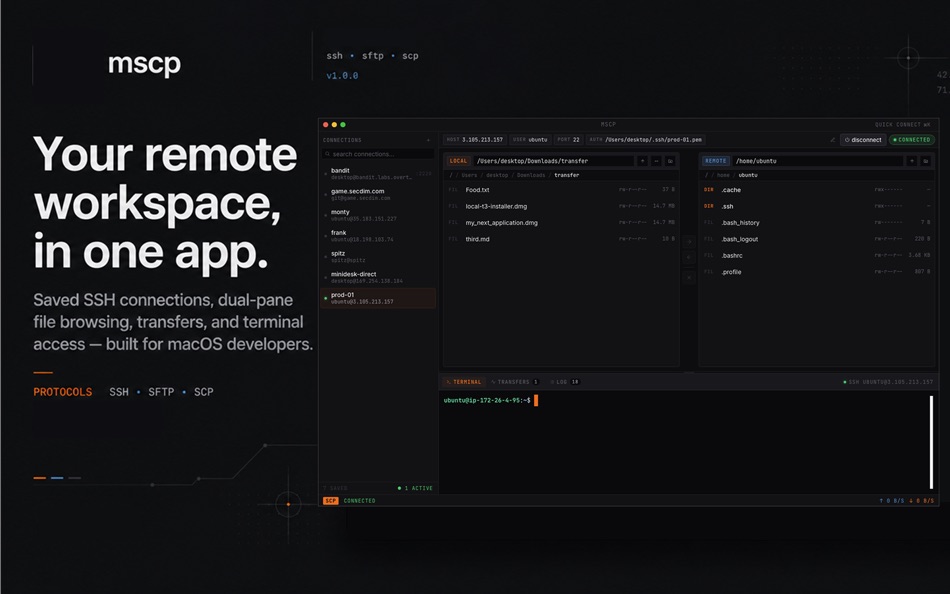
Built around a fast dual-pane workflow, mscp brings saved SSH connections, local and remote file browsing, SFTP/SCP-style transfers, and remote terminal access into one focused desktop workspace.
Instead of juggling a terminal, file browser, FTP client, and connection notes, you can connect to a server, browse local and remote folders side by side, move files, monitor transfers, and open a remote shell from the same app.
A focused remote workspace
mscp is designed for developers, sysadmins, DevOps engineers, data engineers, technical founders, and power users who regularly move between their Mac and remote Linux machines.
Create saved SSH connection profiles for the servers you use every day. Search connections quickly, open recent hosts, and keep your remote workflows organised without rebuilding commands by hand each time.
Dual-pane file browsing
Work with local files on one side and remote server files on the other. Navigate folders, inspect file details, create directories, rename items, delete files, and move assets between your Mac and a connected server.
Uploads, downloads, and transfer tracking
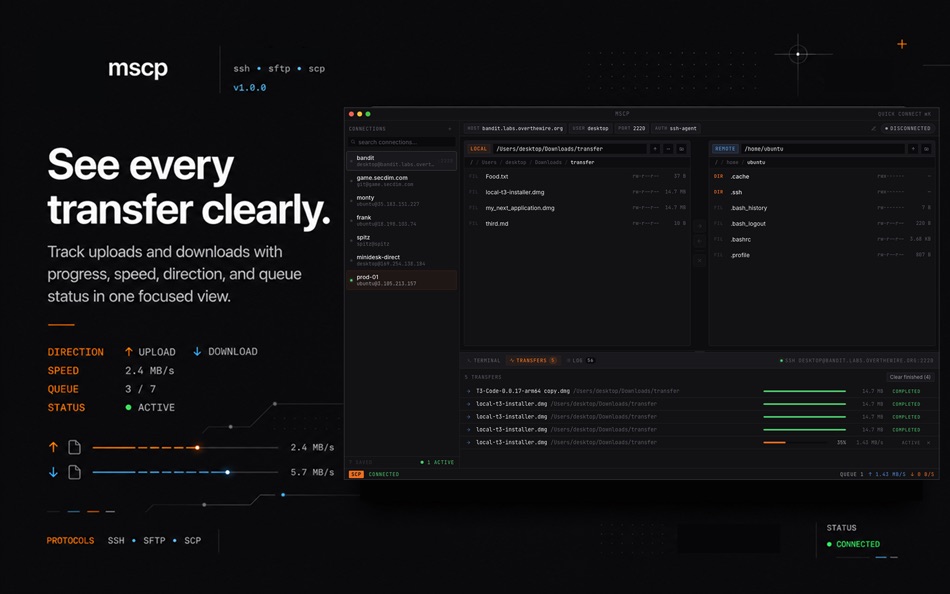
mscp gives transfers their own dedicated view, so you can clearly see what is moving and where it is going.
Track uploads and downloads with progress, direction, speed, status, and queue information. Whether you are pushing a build artifact, pulling logs, or moving project files, the transfer queue keeps the process visible.
Remote terminal access
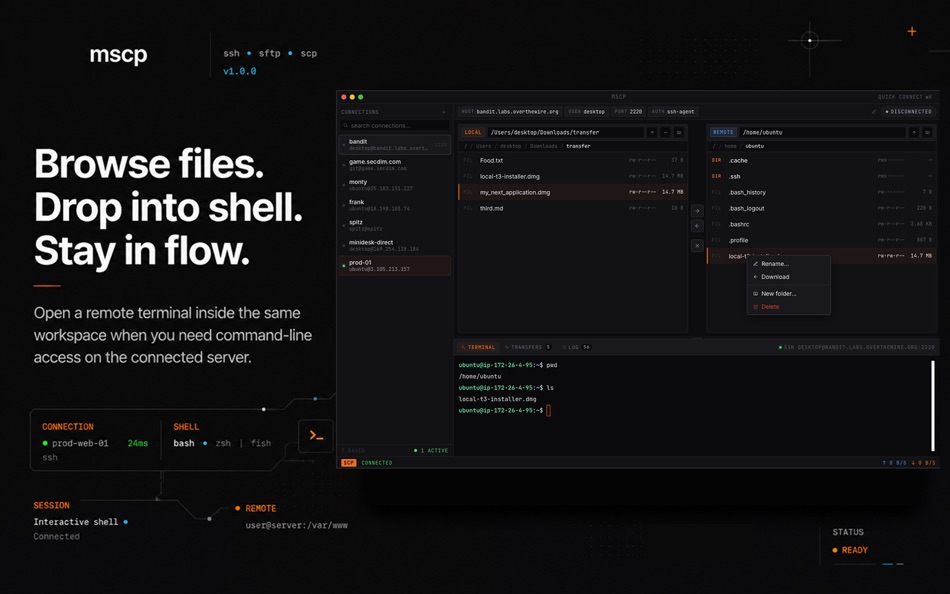
When browsing files is not enough, open a remote SSH terminal inside the app. Run commands on the connected server without switching context or leaving the workspace.
The terminal is designed for remote shell access, keeping the app focused on SSH workflows rather than becoming a general local terminal replacement.
Built with macOS permissions in mind
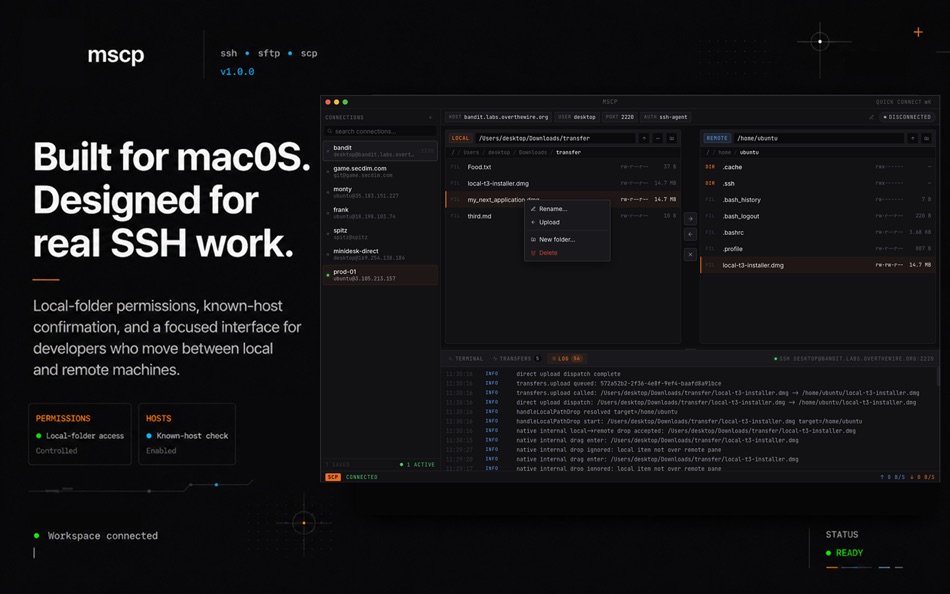
mscp uses the macOS folder picker and local folder authorisation flow, so you stay in control of which local folders the app can access.
Key features
Saved SSH connection profiles
SSH config import
SSH known-host verification
Remote SSH terminal
Dual-pane local and remote file browser
SFTP/SCP-style upload and download workflows
Transfer queue with progress, speed, direction, and status
Context menus for file actions
Connection search and quick connection workflows
Developer-friendly connection errors
Dark, compact, native-feeling macOS interface
Who mscp is for
mscp is for people who already use SSH and remote servers, but want a cleaner graphical workflow for everyday file movement and server work.
Use it to browse remote project directories, upload builds, download logs, manage server files, inspect folders, and open a shell without constantly switching between tools.
If your work lives between your Mac and remote machines, mscp gives you a practical, focused way to connect, browse, transfer, and work.
스크린샷


Ad
가격 내역
- 현재 가격: $12.99
- 최소: $12.99
- 최대: $12.99
가격 추적
AppAgg 평가
750
AppAgg 예상 평가:
mscp
750 실버
평가가 높을수록 보통 AppAgg에서 더 강한 신호를 의미합니다.
기준: 인기 · 사용자 평점 · 최신성 · 딜 · 스토어 데이터 · 커뮤니티 활동
최신 AppAgg 데이터를 바탕으로 매일 다시 계산됩니다.
단축 URL: 복사됨!
새로운 기능
- 버전: 1.0
- 마지막 업데이트:
추가 정보
- 출시일:
- 카테고리:
macOS 앱›개발자 도구 - 운영체제:
macOS,macOS 12.0 이상 - 크기:
7 Mb - 지원되는 언어:
English - 콘텐츠 등급:
4+ - Mac App Store 개의 평가:
0 - 웹사이트:
 https://mscp.pages.dev/
개발자
- Connor Finlay
- 플랫폼: iOS 앱 (1) macOS 앱 (2)
- 목록: 0 + 0
- 포인트: 0 + 0 ¡
- 순위: 0
- 댓글: 0
- 할인: 0
- 동영상: 0
- RSS: 구독
목록 (0)
0
- mscp
포인트 (0)
0
순위 (0)
0
댓글 (0)
가장 먼저 댓글을 남겨주세요
요약
mscp 단축 URL: 복사됨!- 공유하기
- Mac App Store
«mscp». 플랫폼: macOS. 카테고리: 개발자 도구. 개발자: «Connor Finlay». 첫 번째 릴리스: . 마지막 업데이트: . 현재 가격: $12.99. 최저 기록 가격: $12.99. 최고 기록 가격: $12.99. 이 타이틀은 아직 AppAgg에서 평가나 리뷰를 받지 못했습니다. 사용 가능한 언어: English. AppAgg는 «mscp»의 가격 기록, 평점 및 사용자 피드백을 추적합니다. AppAgg는 애플리케이션을 호스팅하거나 소프트웨어를 배포하지 않습니다. 모든 상표, 로고 및 스크린샷은 해당 소유자의 자산입니다. 향후 할인 및 업데이트 받기: RSS에서 확인할 수 있습니다
유사 항목
-
- Sitemap Plus
- macOS 앱: 개발자 도구 게시자: OurBigAdventure, LLC
- 무료
- 목록: 1 + 1 0 0
- 포인트: 26 + 0 2K 버전: 2.4 Sitemap Plus is designed for web developers, to build a list of pages on websites that they own, the server status at the time of the crawl and the download time for each page. Sitemap ⥯
-
- DevTools - Smarter coding
- macOS 앱: 개발자 도구 게시자: Anh Nguyen
- * 무료
- 목록: 2 + 3 0 0
- 포인트: 22 + 0 15K 버전: 1.2.3 DevTools is an all-in-one offline application that provides developers with essential tools for daily tasks and ensures data security. The app has been trusted by over 15,000 ... ⥯
-
- Klipped
- macOS 앱: 개발자 도구 게시자: Andrew Drake
- 무료
- 목록: 0 + 2 0 0
- 포인트: 19 + 0 1K 버전: 3.0.2 Beauty in simplicity. Klipped is a minimalist scratch pad that is a buddy for all your other apps. Write ideas down. Paste text and use as a clipboard; delete when you re done. No ... ⥯
-
- 18 Strings
- macOS 앱: 개발자 도구 게시자: Remote Sunrise LTD
- 무료
- 목록: 0 + 1 0 0
- 포인트: 17 + 0 1K 버전: 2022.6 Hate doing localization for your project? Now you can hate it a little less: Save tons of money by doing automatic translation using strings from your other projects you have already ... ⥯
- -100%
- Base64 Coder
- macOS 앱: 개발자 도구 게시자: Pavel Kosykh
- ▼ 무료
$1.99-100% - 목록: 0 + 2 0 0
- 포인트: 14 + 0 2K 버전: 2.1.0 Base64 Coder is a fast and easy converter files to a Base64 format. Features: Fast work; Automatically string copy; Drag & Drop; MIME prefix support; Save result to file; Result ... ⥯
-
- SnippetsLab
- macOS 앱: 개발자 도구 게시자: Renfei Song
- 무료
- 목록: 6 + 8 5 (1) 0
- 포인트: 13 + 0 3K 버전: 2.6.4 Mac App Store Best of 2015 Featured in App Store editorial All Your Code, Brilliantly Organized , Keep Your Code at Your Fingertips and Welcome to the Mac App Store! Featured app in ... ⥯
-
- Eplist - convert data to plist
- macOS 앱: 개발자 도구 게시자: HuMinghua
- * 무료
- 목록: 1 + 2 0 0
- 포인트: 10 + 0 5K 버전: 2.0.1 Eplist for Excel is a lightweight conversion tool to help developers to improve development efficiency. You can convert your datas or configuration from excel(.xls and .xlsx) document ... ⥯
-
- Anycode: Code Snippet to Image
- macOS 앱: 개발자 도구 게시자: 宏旭 朱
- 무료
- 목록: 0 + 2 0 0
- 포인트: 10 + 0 1K 버전: 0.7.0 Anycode is a document-based app that helps you manage your code snippets. - Supports syntax highlighting for Bash, C, C++, C#, Clojure, Dart, Go, Java, JavaScript, JSON, Kotlin, ... ⥯
-
- Network Debugger
- macOS 앱: 개발자 도구 게시자: 志健 袁
- * 무료
- 목록: 0 + 1 0 0
- 포인트: 10 + 0 6K 버전: 1.2.0 Professional network debugging tool for macOS Network Debugger helps developers and testers quickly build TCP and UDP connections, send and inspect messages, and automate repetitive ... ⥯
-
- Application Localizer
- macOS 앱: 개발자 도구 게시자: Serhii Tal
- 무료
- 목록: 0 + 1 0 0
- 포인트: 9 + 0 1K 버전: 2.0.1 What this app does? It's a powerful tool for macOS designed to help developers easily localize their apps. So you can translate your SwiftUI app's text strings into any language using ... ⥯
-
- RocketSim for Xcode Simulator
- macOS 앱: 개발자 도구 게시자: SwiftLee
- * 무료
- 목록: 1 + 3 0 0
- 포인트: 9 + 0 9K 버전: 16.0.0 RocketSim enhances the Xcode Simulator for iOS and iPadOS development: boost productivity and streamline your workflow with capture, networking, build insights, and quick actions ... ⥯
-
- LocalizApp: Translate your app
- macOS 앱: 개발자 도구 게시자: Dimitri Giani
- * 무료
- 목록: 0 + 3 0 0
- 포인트: 9 + 0 9K 버전: 3.2.1 Make app localization effortless with LocalizApp. Harness the power of AI and smart translation tools to transform your development workflow. Key features: AI-Powered Translation with ... ⥯
-
- KeyPad - Keyboard and Remote
- macOS 앱: 개발자 도구 게시자: Toolbunch LLC
- * 무료
- 목록: 0 0 0
- 포인트: 9 + 0 6K 버전: 2.20 Use your Mac keyboard to control all your devices. From smartphones and tablets to TVs and even the raspberry pi, KeyPad turns your Mac into a powerful universal Bluetooth keyboard, ... ⥯