
| 开发人员: | Niklas Saers (10) | ||
| 价格: | $9.99 | ||
| 排名: | 0 | ||
| 评价: | 0 我要评价 | ||
| 评论: | 0 发表评论 | ||
| 列表: | 0 + 0 | ||
| 积分: | 0 + 0 ¡ | ||
| Mac App Store | |||
说明

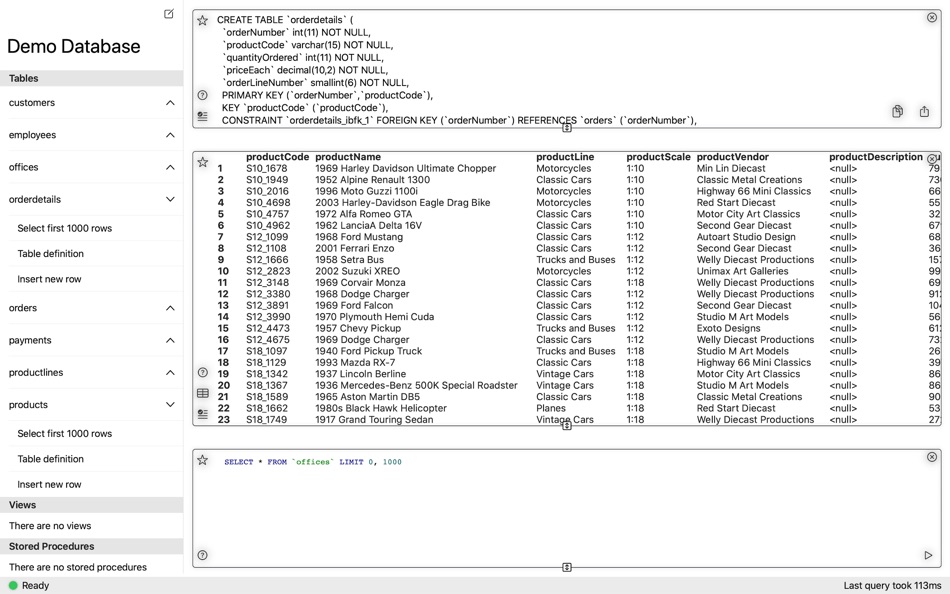
Great SQL query editor with syntax highlighting and fast query editing
Queries are saved across devices using iCloud
Work with and see multiple SQL queries and results at the same time. You get to set how much space each query should have on the screen.
Helps you generate advanced queries, but always lets you review before you execute them.
Save favorite queries for later. And when you close MySQL Commander and later reopen it, your queries are exactly where you left them, ready to be replayed
Open connections to different (or even the same) instance using multiple windows in split view
Full SSH support
- Authenticate either with certificates or passwords
- Connect to either the database host you're tunnelling too, or to a database on a remote host the tunnel gives you access to
Browse query results like you do in a spreadsheet
Export data as CSV, XML and JSON to your favorite apps such as Apple Numbers or Microsoft Excel.
Both light- and dark-mode support.
Respects your text size preferences via Dynamic Text
Your purchase includes all current features and all features that are provided during the next year. For features developed thereafter, an in-app purchase will become available.
Ad
屏幕截图
价格历史
- 今天: $9.99
- 最小值: $9.99
- 最大值: $9.99
可选
开发人员
- Niklas Saers
- 平台: iOS 应用 (7) macOS 应用 (3)
- 列表: 0 + 0
- 积分: 0 + 7 ¡
- 排名: 0
- 评价: 0
- 评论: 0
- 折扣: 0
- 视频: 0
- RSS: 订阅
积分 (0)
0 ☹️
排名 (0)
0 ☹️
列表 (0)
0 ☹️
- MySQL Commander
评价 (0)
抢先评价一下吧 🌟
其他信息
通讯录
 http://www.saers.com/dbclient
 «MySQL Commander». 平台: macOS. 类别: 软件开发工具. 开发商: «Niklas Saers». 首次发布: . 最后更新: . 目前价格: $9.99. 最低记录价格: $9.99. 最高记录价格: $9.99. 该条目尚未在 AppAgg 上获得评分或评论。 可用语言: English. AppAgg 会跟踪 «MySQL Commander»的价格历史、评分和用户反馈。 关注未来折扣和更新: RSS. AppAgg 不托管应用程序或分发软件。 所有商标、徽标和屏幕截图均属于其各自所有者。
评论 (0)
成为第一个发表评论的人 🌟
MySQL Commander 短网址: 已复制!- 🌟 分享
- Mac App Store
Ad
您可能还喜欢
-
- MySQL Database Optimizer
- macOS 应用: 软件开发工具 来自: SBM Development SRL
- $5.99
- 列表: 0 + 0 排名: 0 评价: 0
- 积分: 0 + 0 评论: 0 版本: 1.9.2 MySQL / MariaDB Optimizer is an effective app that gives you recommendations to optimize MySQL / MariaDB databases. The app provides a graphical interface simplify the process of ... ⥯
-
- SQLPro for MySQL
- macOS 应用: 软件开发工具 来自: Hankinsoft Development Inc
- * 免费
- 列表: 2 + 1 排名: 0 评价: 0
- 积分: 2 + 0 评论: 0 版本: 2026.15 SQLPro for MySQL is a powerful MySQL & MariaDB database client which allows quick and simple access to MySQL Servers, including (but not limited to) those hosted in Amazon RDS and ... ⥯
-
- PostgreSQL Commander - Desktop
- macOS 应用: 软件开发工具 来自: Niklas Saers
- 免费
- 列表: 0 + 0 排名: 0 评价: 0
- 积分: 0 + 0 评论: 0 版本: 1.3.2 Powerful PostgreSQL client for macOS Great SQL query editor with syntax highlighting and fast query editing Queries are saved across devices using iCloud Work with and see multiple SQL ⥯
-
- Sqlman - MySQL Database GUI
- macOS 应用: 软件开发工具 来自: 强 李
- * 免费
- 列表: 0 + 2 排名: 0 评价: 0
- 积分: 3 + 0 评论: 0 版本: 1.1.7 Sqlman is a MySQL database client GUI focused on fast querying. It allows quick switching between multiple table queries, keeps query history, and makes it easy to reopen past queries. ⥯
-
- DBManage-mysql postgres mssql
- macOS 应用: 软件开发工具 来自: 著显 朱
- 免费
- 列表: 0 + 1 排名: 0 评价: 0
- 积分: 1 + 0 评论: 0 版本: 3.83 Database manage tool for MySQL MSSQL PostgreSQL Oracle SQLite SQLServer ETCD Redis mongodb 1.connect database with ip port username password 2.show all database 3.chose database show ... ⥯
-
- Navicat 17 for MySQL
- macOS 应用: 软件开发工具 来自: PremiumSoft CyberTech Ltd.
- * 免费
- 列表: 0 + 0 排名: 0 评价: 0
- 积分: 0 + 0 评论: 0 版本: 17.3.9 Navicat for MySQL is a complete package designed for the unified management and development of MySQL and MariaDB databases. It features visual designers for database modeling and data ... ⥯
- 新
- XPane - Enjoy your data
- macOS 应用: 软件开发工具 来自: 13apps
- 免费
- 列表: 0 + 1 排名: 0 评价: 0
- 积分: 0 + 0 评论: 0 版本: 10.2 XPane MySQL Editor for Mac Connect to your MySQL databases, browse and edit data, run SQL, and manage tables all from a clean, native Mac app. What you can do Add and save multiple ... ⥯
-
- Sequel Ace
- macOS 应用: 软件开发工具 来自: Moballo, LLC
- 免费
- 列表: 1 + 2 排名: 0 评价: 0
- 积分: 4 + 0 评论: 0 版本: 5.2.0 Sequel Ace is an unofficial "sequel" to longtime macOS tool Sequel Pro. Sequel Ace is a fast, easy-to-use Mac database management application for working with MySQL & MariaDB ... ⥯
-
- Valentina Studio
- macOS 应用: 软件开发工具 来自: Paradigma Software
- * 免费
- 列表: 0 + 1 排名: 0 评价: 0
- 积分: 2 + 0 评论: 0 版本: 16.5 100% Free - The Best Database Management GUI for DuckDB, SQLite, MS SQL Server, MariaDB, MongoDB, MySQL, PostgreSQL and Valentina databases Valentina Studio brings you powerful, visual ⥯
- 新
- TableAI - AI Database Client
- macOS 应用: 软件开发工具 来自: Andrei Yakushau
- * 免费
- 列表: 0 + 0 排名: 0 评价: 0
- 积分: 0 + 0 评论: 0 版本: 1.0.1 TableAI is a modern AI-powered database client for macOS that makes working with MySQL and PostgreSQL fast, simple, and private. Ask questions in natural language, explore results in a ⥯
-
- CSV Converter Pro
- macOS 应用: 软件开发工具 来自: IWT SOFTWARE LABS LLC
- $1.99
- 列表: 0 + 0 排名: 0 评价: 0
- 积分: 2 + 0 评论: 0 版本: 2.5 CSV Converter Pro is a powerful tool for converting CSV data to SQL, JSON, XML & HTML. This App is very easy to use, simply load your CSV file and choose what format to export. Have a ... ⥯
-
- Dolt Workbench
- macOS 应用: 软件开发工具 来自: DoltHub Inc
- 免费
- 列表: 0 + 0 排名: 0 评价: 0
- 积分: 1 + 0 评论: 0 版本: 0.3.62 A modern SQL workbench for your MySQL and PostgreSQL compatible databases, offering a modern UI for viewing and editing your data with powerful version control features when using ... ⥯
-
- QueryMax
- macOS 应用: 软件开发工具 来自: Stackcommander LLC
- * 免费
- 列表: 0 + 0 排名: 0 评价: 0
- 积分: 1 + 0 评论: 0 版本: 1.0.8 QueryMax is a professional database management tool for MySQL, MariaDB and SQLite on macOS. Built for developers, database administrators, and data professionals who need a reliable ... ⥯
-
- System-i DBcompare
- macOS 应用: 软件开发工具 来自: System-i snc
- $4.99
- 列表: 0 + 0 排名: 0 评价: 0
- 积分: 0 + 0 评论: 0 版本: 2024.7.1 System-I DB Compare helps you to compare structure between two different databases. The comparison is first of all the tables, and then field by field. The comparison will be made ONLY ⥯