
Gespeichert
Wähle den Namen, der im Menü Gespeichert angezeigt werden soll.
Fertig!
| Entwickler: | 文涛 隋 (10) | ||
| Preis: | Kostenlos | ||
| Einschätzung: | 770 | ||
| Klassifizierungen: | 0 | ||
| Kommentare: | 0 Kommentar posten | ||
| Listen: | 0 + 1 | ||
| Punkte: | 1 + 0 ¡ | ||
| +1 Punkte | |||
Beschreibung

该项目是一个开源项目:https://github.com/wintelsui/MyUtilsForXcode
MyUtils For Xcode
Xcode's Best Assistant
我的 Xcode 工具集,开发好帮手
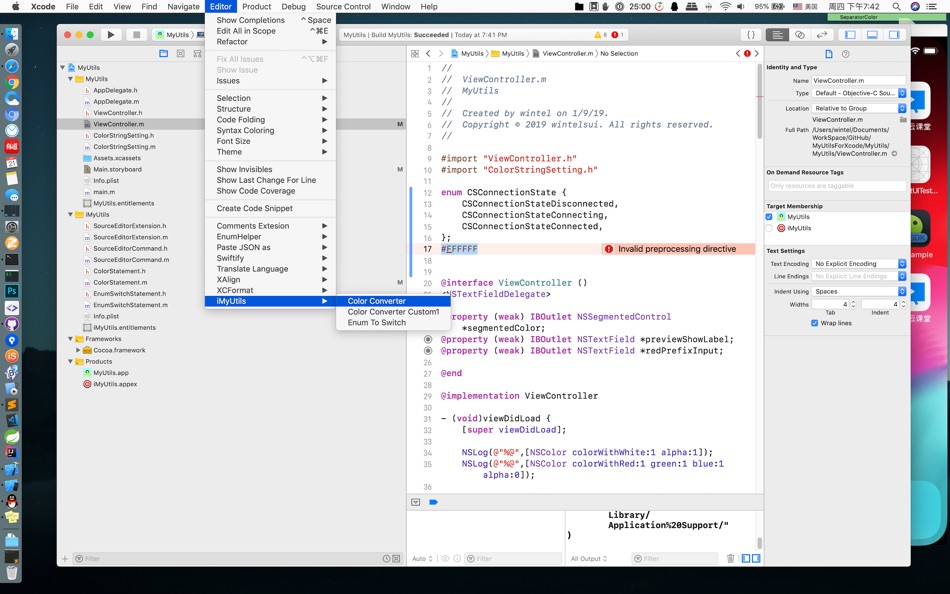
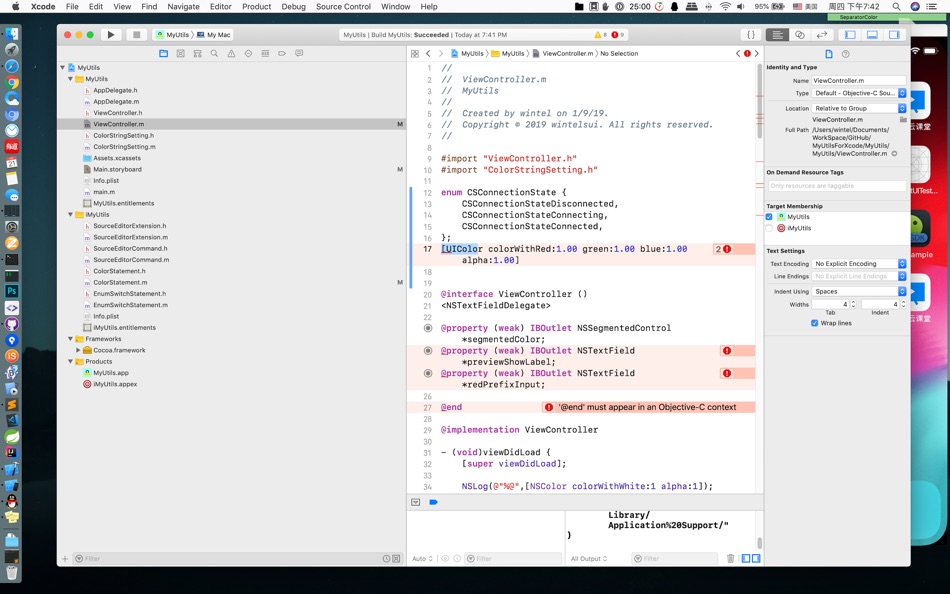
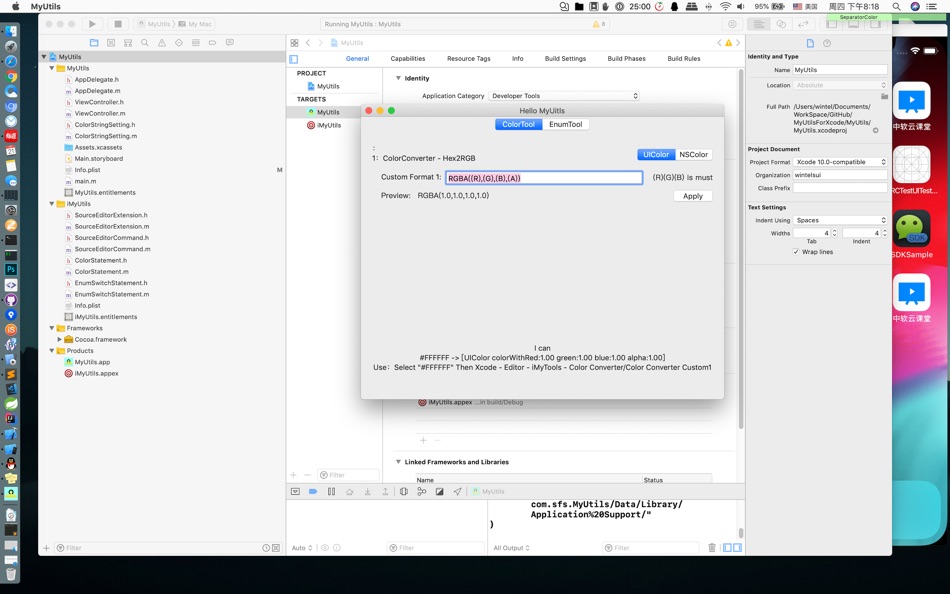
#FFFFFF -> [UIColor colorWithRed:1.00 green:1.00 blue:1.00 alpha:1.00]
Use:Select "#FFFFFF" Then Xcode - Editor - iMyTools - Color Converter/Color Converter Custom1
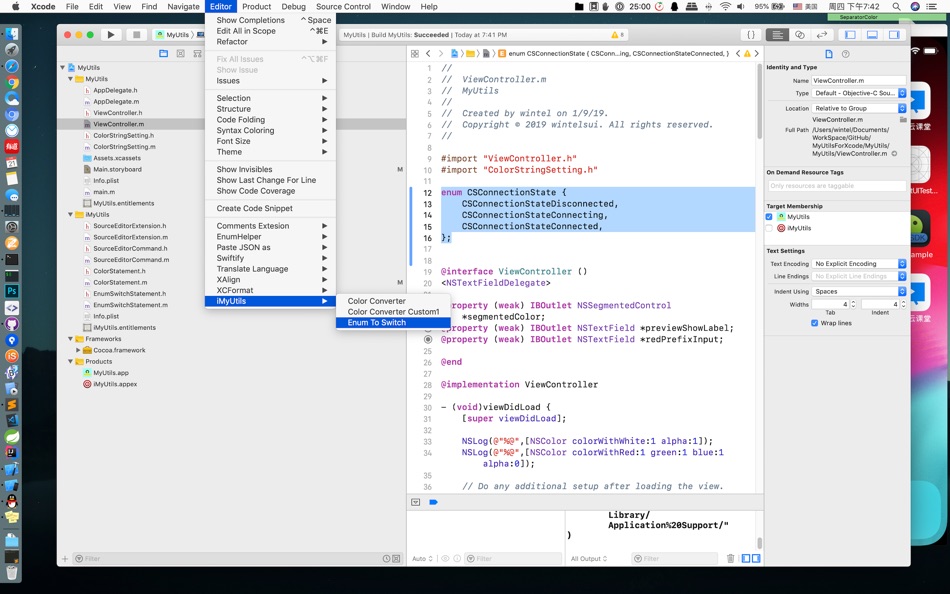
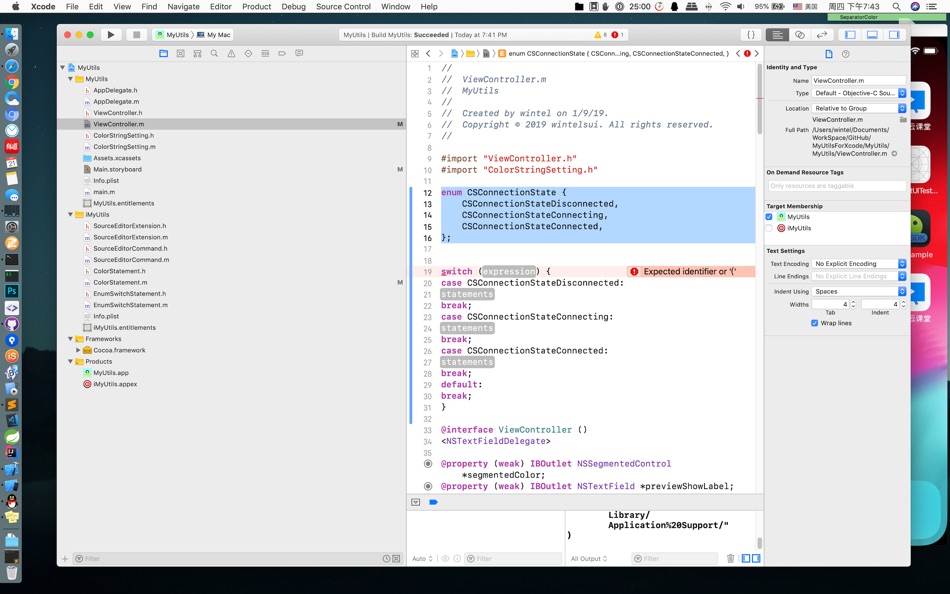
Enum -> Switch case
Use:Select All Enum Code Then Xcode - Editor - iMyTools - Enum To Switch
Random String -> Create Random String
Use:Select Number Or None Code Then Xcode - Editor - iMyTools - Random String
Resource123
Make Image/Icon to @1x, @2x, @3x Size
Translator
translate language for code
Screenshots
Ad
Preisentwicklung
- Aktueller Preis: Kostenlos
- Mindestens: Kostenlos
- Maximale: Kostenlos
Preise beobachten
AppAgg-Einschätzung
770
Geschätzte AppAgg-Einschätzung für
MyUtils for Xcode
770 Bronze
Höhere Einschätzungen bedeuten meist stärkere Signale auf AppAgg.
Basierend auf: 🔥 Popularität · ⭐ Nutzerbewertungen · 🕒 Aktualität · 🏷️ Angeboten · 🏬 Shop-Daten · 👥 Community-Aktivität
Wird täglich anhand aktueller AppAgg-Daten neu berechnet.
Kurz-URL: Kopiert!
Weitere informationen
- Veröffentlichungsdatum:
- Kategorie:
macOS Apps›Entwickler-Tools - Betriebssysteme:
macOS,macOS 10.13 oder höher - Größe:
1 Mb - Unterstützte Sprachen:
English - Altersfreigabe:
4+ - Mac App Store Bewertung:
0
 https://wintelsui.github.io/pages/WTMyUtils
Entwickler
- 文涛 隋
- Plattformen: iOS Apps (9) macOS Apps (1)
- Listen: 0 + 1
- Punkte: 1 + 8 ¡
- Klassifizierungen: 0
- Kommentare: 0
- Rabatte: 0
- Videos: 0
- RSS: Abonnieren
Listen (0)
0 ☹️
- MyUtils for Xcode
Punkte (1)
-

- 11,490 Simon Chan
- +1

Klassifizierungen (0)
0 ☹️
Kommentare (0)
Seien Sie der Erste, der einen Kommentar abgibt 🌟
Kurzinfo
MyUtils for Xcode Kurz-URL: Kopiert!- 🌟 Teilen
- Mac App Store
«MyUtils for Xcode». Plattform: macOS. Kategorie: Entwickler-Tools. Entwickler: «文涛 隋». Erste Veröffentlichung: . Letzte Aktualisierung: . Aktueller Preis: kostenlos. Dieser Titel hat noch keine Bewertungen oder Rezensionen auf AppAgg erhalten. Verfolgte Punkte: bestätigte 1, indirekte 0. Verfügbare Sprachen: English. AppAgg verfolgt den Preisverlauf, Bewertungen und Benutzerfeedback für «MyUtils for Xcode». Verfolgen Sie zukünftige Rabatte und Updates über RSS. AppAgg hostet keine Anwendungen und vertreibt keine Software. Alle Marken, Logos und Screenshots gehören ihren jeweiligen Eigentümern.
Ähnliches
-
- My Icon Gear
- macOS Apps: Entwickler-Tools Von: 鑫 肇
- * Kostenlos
- Listen: 0 0 0
- Punkte: 0 + 0 3K Version: 1.2.1 My Icon Gear is an application that converts images into app icons usable on Apple platforms (macOS, iOS, iPadOS, watchOS). Users simply need to drag the image into the image box and ... ⥯
-
- My SSH Port Forwarder
- macOS Apps: Entwickler-Tools Von: Yuksel Saliev
- $0.99
- Listen: 0 0 0
- Punkte: 0 + 0 4K Version: 1.7 My SSH Port Forwarder is a native macOS menu bar app (not another browser wrapper) for managing secure port forwarding - over SSH or AWS SSM with speed, reliability, and simplicity. ... ⥯
-
- Xcode app Icons: Icon Crafter
- macOS Apps: Entwickler-Tools Von: Mahmoud Suliman
- * Kostenlos
- Listen: 0 0 0
- Punkte: 0 + 0 4K Version: 1.2 IconCrafter Effortless App Icon Generation for Apple Platforms Create beautiful, Xcode-ready app icons for iOS, iPadOS, macOS, visionOS, watchOS, and tvOS in seconds! IconCrafter is ... ⥯
-
- My App Image
- macOS Apps: Entwickler-Tools Von: 镇 黄
- Kostenlos
- Listen: 0 0 0
- Punkte: 0 + 0 690 Version: 1.0 An application designed specifically for Mac to conveniently process images for iOS, iPad, macOS development and deployment needs, meeting various requirements. 1 Adjust image size: ... ⥯
-
- My JSON Editor
- macOS Apps: Entwickler-Tools Von: Richard Wuerflein
- * Kostenlos
- Listen: 0 0 0
- Punkte: 3 + 0 3K Version: 1.1 A free to use JSON Editor for the MacOS that makes editing data simple and efficient. You can effortlessly modify even complex structures, with smart tools assisting in the ... ⥯
-
- My Rupert
- macOS Apps: Entwickler-Tools Von: Victor Nguyen
- Kostenlos
- Listen: 0 0 0
- Punkte: 0 + 0 650 Version: 0.3.2 Rupert is an animated pixel pet, the always-on-top companion designed for high-velocity developers. When your CLI agents (Claude Code or Gemini) stop to ask for permission, Rupert ... ⥯
-
- Swiftify for Xcode
- macOS Apps: Entwickler-Tools Von: Swiftify, Inc.
- * Kostenlos
- Listen: 0 + 2 1 (1) 0
- Punkte: 0 + 0 6K Version: 6.2 To install Swiftify for Xcode in Xcode 26 (or Xcode 16) on macOS Sequoia (or Sonoma): Quit Xcode Launch Swiftify for Xcode from your Applications folder and follow the link to get your ⥯
-
- SN Utils
- macOS Apps: Entwickler-Tools Von: Arnoud Kooi
- Kostenlos
- Listen: 0 + 1 0 0
- Punkte: 1 + 0 1K Version: 10.0.3.6 SN Utils boosts productivity in ServiceNow directly from your browser, with zero footprint on your instances. Trusted by ServiceNow professionals worldwide since 2016, and reimagined ... ⥯
-
- Dev Utils
- macOS Apps: Entwickler-Tools Von: Shaun Hirst
- $2.99
- Listen: 0 0 0
- Punkte: 1 + 0 4K Version: 1.3.7 Dev Utils is your Swiss Army knife for macOS development. Whether you're debugging, formatting, encoding, or inspecting data, Dev Utils offers a curated set of powerful, offline-first ... ⥯
-
- DevTools App for Xcode
- macOS Apps: Entwickler-Tools Von: JADE TEAMWORKS LLC
- * Kostenlos
- Listen: 0 0 0
- Punkte: 0 + 0 4K Version: 1.6.0 Built by developers, for developers. DevTools for Xcode is the essential companion for your Mac development workflow. We know how Xcode devours disk space with redundant files and the ... ⥯
-
- SimCleaner for Xcode
- macOS Apps: Entwickler-Tools Von: Ivan Stepanok
- * Kostenlos
- Listen: 0 0 0
- Punkte: 0 + 0 3K Version: 1.1 SimCleaner for Xcode is your control panel for Xcode simulators. It shows all your devices in one clean window, helps you launch the ones you need, and safely remove those you no ... ⥯
-
- PrettySwift for Xcode
- macOS Apps: Entwickler-Tools Von: Tony Coconate
- Kostenlos
- Listen: 0 + 1 0 0
- Punkte: 0 + 0 770 Version: 1.2 PrettySwift is a Xcode Source Editor Extension that formats and lints your Swift code. It uses swift-format to format or lint and takes a zero-configuration approach. ⥯
-
- DirtyWords for Xcode
- macOS Apps: Entwickler-Tools Von: 萧玉 杨
- Kostenlos
- Listen: 0 0 0
- Punkte: 0 + 0 500 Version: 1.0 Highlight dirty words in Xcode. Many developers like to write dirty words in the code. This tool will highlight these dirty words in the code. It urge developers to correct these ... ⥯