
| Udvikler: | Tomoyuki Okawa (66) | ||
| Pris: | Gratis | ||
| Rangeringer: | 0 | ||
| Anmeldelser: | 0 Skriv en anmeldelse | ||
| Kommentarer: | 0 Skriv kommentar | ||
| Lister: | 1 + 0 | ||
| Point: | 1 + 0 ¡ | ||
| Mac App Store | |||
Beskrivelse
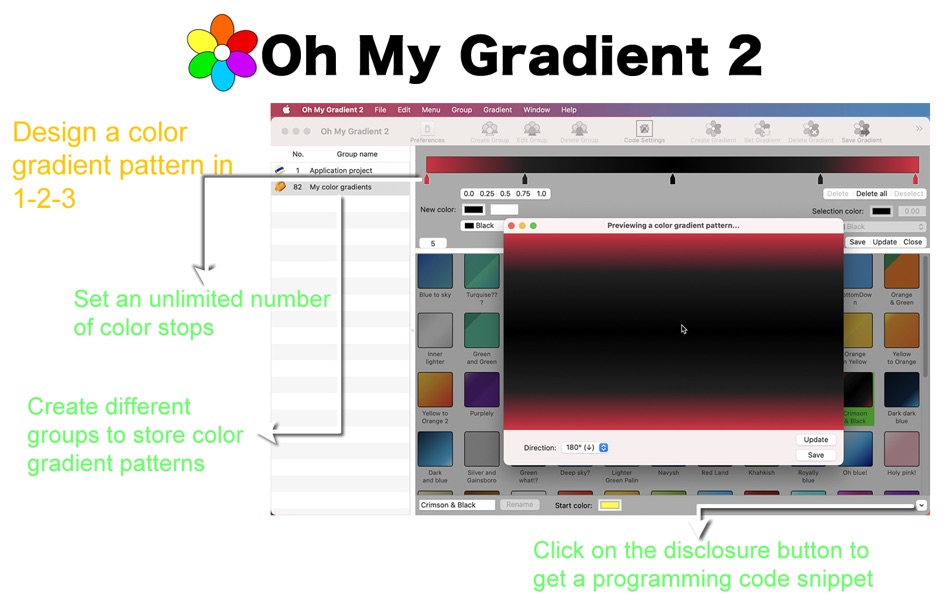
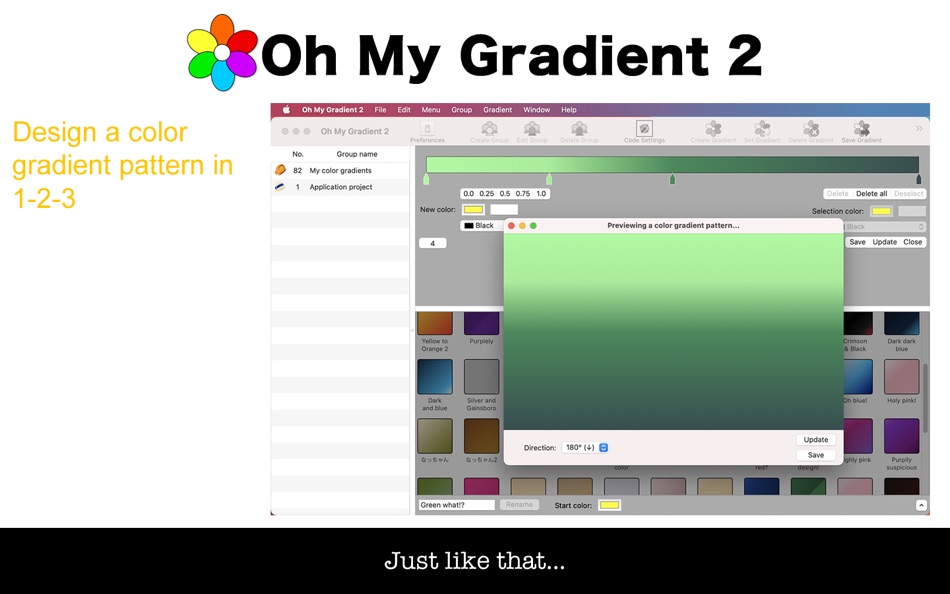
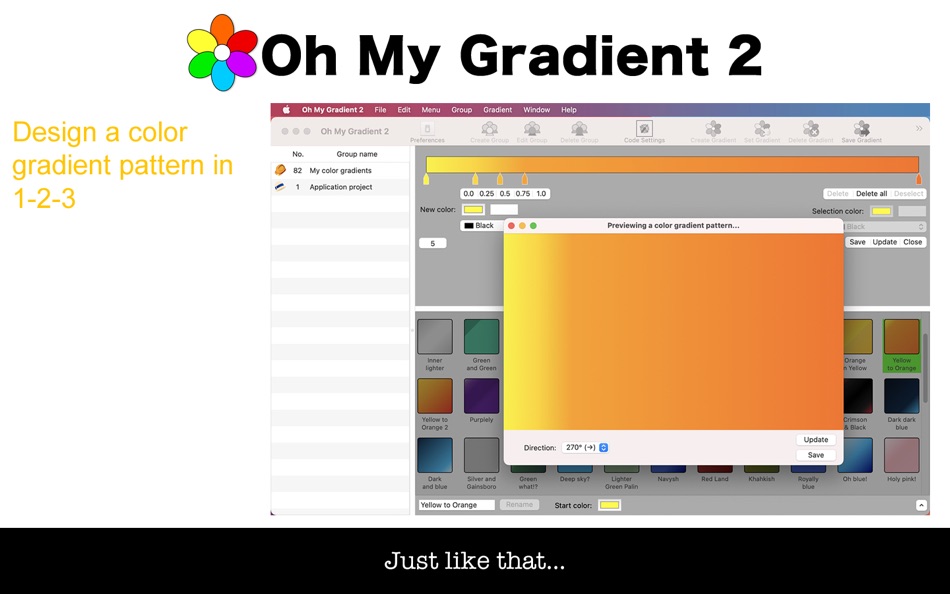
Oh My Gradient 2 is a desktop application for software developers who wish to design color gradient patterns with ease and then automatically generate code for them. Oh My Gradient 2 lets you set an unlimited number of color stops (markers) over a horizontally-stretched view. Select a color and then click on one of the five location tabs (0.0, 0.25, 0.50, 0.75, 1.0) to set a new color stop. Or enter the relative location where to set one manually. You can move a color marker you have set left to right with your mouse pointer.
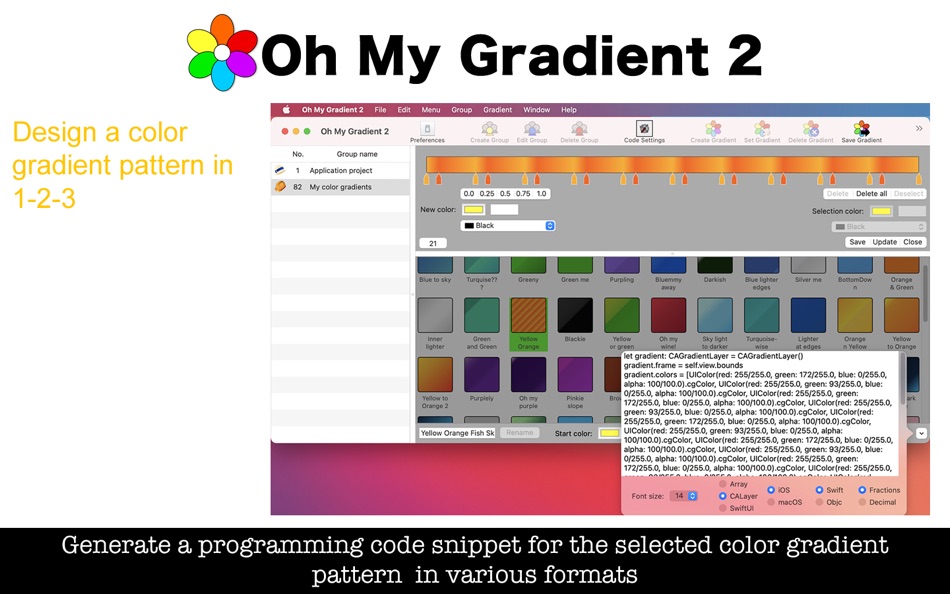
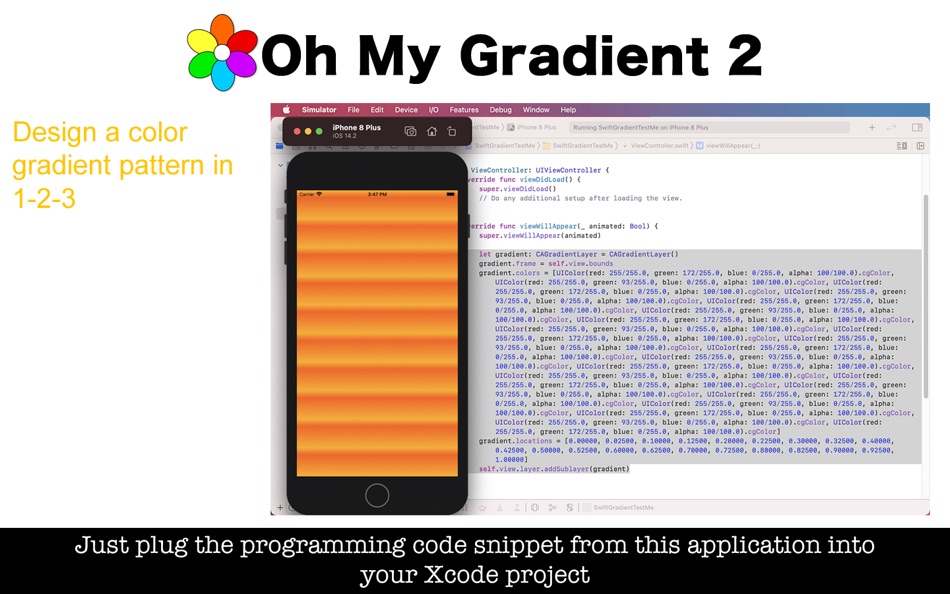
Oh My Gradient 2 lets you generate code in three different formats. One is an array of dictionaries in Objective-C or Swift with keys such as 'red,' 'green,' 'blue,' 'alpha,' 'location.' Another format of code is used to create a CAGradient layer in Objective-C or Swift. The third format of code that Oh My Gradient 2 supports is the Gradient struct for SwiftUI.
- What's new? -
1. Generate a programming code snippet for SwiftUI Gradient struct.
2. Generate a programming code snippet for an array of dictionaries with keys such as 'red,' 'green,' 'blue,' 'alpha,' 'location.'
3. Save a color gradient pattern you select as a separate application file (.omc2). Recover Recover data from one.
4. Save a group of color gradient patterns you select as a separate application file (.omg2). Recover data from one.
5. Additional group icons are available now with a total of 224 icons.
6. Move a color gradient pattern you select to a different group.
7. Duplicate a color gradient pattern you select.
- Features -
1. Add an unlimited number of color stops (color markers) to the gradient view.
2. Create different groups to store color gradient patterns.
3. Preview the color gradient pattern you design in different directions.
4. Save the color gradient pattern shown over the preview screen as an image to the disk.
5. Generate lines of code for an array of dictionaries with keys such as 'red,' 'green,' 'blue,' 'alpha,' 'location.'
6. Generate lines of code for the CAGradientLayer class in Objective-C and Swift.
7. Generate lines of code for the SwiftUI Gradient struc.
8. Write code for all color gradient patterns for the group you select to a text file.
9. Save a color gradient pattern as a separate application file. Open and recover data from a saved file.
10.Save all color gradient patterns under the group you select as a separate application file. Open and recover data from a saved file.
11.Move a color gradient pattern you select to a different group.
12.Duplicate a color gradient pattern you select.
13.Download a zip file containing sample Xcode projects.
14.The application supports the light mode and the dark mode.
15.The fullScreen mode is supported.
16.The application supports the retina screen.
17.Languages: English only.
18.Choose Show User's Guide (Command + Shift + G) to read application's user's guide.
- System requirements -
1. 10.14, 10.15 (10.15.7), 11.0 (11.0.1)
2. 64-bit system
- Limitations -
1. The supported export formats for a color gradient pattern preview image are BMP, GIF, HEIC, JPEG, JPEG 2000, PNG, TIFF. Not all of these graphic formats support the high resolutions. If the user chooses BMP, GIF, HEIC or JPEG 2000, a resulting image will have resolutions of 72 dpi x 72 dpi whether they have a retina display or not.
Ad
Skærmbilleder
Nyheder
- Version: 2.0.4
- Opdateret:
- 1. A series of minor changes are made with the latest version of Xcode.
Prishistorie
- I dag: Gratis
- Minimum: Gratis
- Maksimalt: Gratis
Overvåg priser
Ad
Udvikler
- Tomoyuki Okawa
- Platforme: iOS Apps (24) macOS Apps (40) macOS Spil (2)
- Lister: 1 + 1
- Point: 6 + 12 ¡
- Rangeringer: 0
- Anmeldelser: 0
- Kommentarer: 0
- Rabatter: 0
- Videoer: 0
- RSS: Abonner
Point (1)
-

- 11,042 Simon Chan
- +1

Rangeringer (0)
0 ☹️
Lister (1)
- Oh My Gradient 2

Anmeldelser (0)
Vær den første til at gennemgå 🌟
Kommentarer (0)
Vær den første til at kommentere 🌟
Yderligere oplysninger
- Version: 2.0.4
- Kategori:
macOS Apps›Værktøjer - Operativsystem:
macOS,macOS 10.14 eller nyere - Størrelse:
25 Mb - Understøttet sprog:
English - Indholdsklassificering:
4+ - Mac App Store Bedømmelse:
0 - Opdateret:
- Udgivelsesdato:
«Oh My Gradient 2». Platform: macOS. Kategori: Værktøjer. Udvikler: «Tomoyuki Okawa». Første udgivelse: . Sidste opdatering: . Nuværende pris: gratis. Denne titel har endnu ikke modtaget vurderinger eller anmeldelser på AppAgg. Lister: offentlige 1, private 0. Sporede punkter: bekræftede 1, indirekte 0. Tilgængelige sprog: English. AppAgg sporer prishistorik, vurderinger og brugerfeedback for «Oh My Gradient 2». Følg fremtidige rabatter og opdateringer via RSS. AppAgg hoster ikke applikationer eller distribuerer software. Alle varemærker, logoer og skærmbilleder tilhører deres respektive ejere.
Oh My Gradient 2 Kort webadresse: Kopieret!- 🌟 Del
- Mac App Store
Du vil måske også kunne lide
-
- Oh My Bees
- macOS Apps: Værktøjer Ved: Tomoyuki Okawa
- * Gratis
- Lister: 0 + 0 Rangeringer: 0 Anmeldelser: 0
- Point: 0 + 0 Kommentarer: 0 Version: 1.0.4 If you are in software development business, you want to have a system to manage bug reports collectively. Oh My Bees lets you open a bug report, assigning it a level of seriousness. ... ⥯
-
- Mesh Gradient Tool
- macOS Apps: Værktøjer Ved: Michael Bedar
- Gratis
- Lister: 0 + 0 Rangeringer: 0 Anmeldelser: 0
- Point: 0 + 0 Kommentarer: 0 Version: 1.0 Mesh Gradient Tool is a SwiftUI-focused design and developer utility for crafting complex MeshGradients with precision. Build gradients visually using a Bezier-point grid and live ... ⥯
-
- GradientFinder: Color Designer
- macOS Apps: Værktøjer Ved: Shivam Rishi
- $0.99
- Lister: 0 + 0 Rangeringer: 0 Anmeldelser: 0
- Point: 0 + 0 Kommentarer: 0 Version: 1.1 Create stunning gradients instantly with GradientFinder - the ultimate gradient generator for developers and designers. Export SwiftUI code with one click and build beautiful color ... ⥯
-
- OhMyStar
- macOS Apps: Værktøjer Ved: NEURAL CRAFT LIMITED
- Gratis
- Lister: 1 + 0 Rangeringer: 0 Anmeldelser: 0
- Point: 1 + 0 Kommentarer: 0 Version: 2.2.8 Oh My Star, the best way to organize your Github Stars. Only for macOS. If you are Github player, you should try this excellent application to keep your stars' repo organized. ... ⥯
-
- SVG Shaper for SwiftUI
- macOS Apps: Værktøjer Ved: ZeeZide GmbH
- Gratis
- Lister: 0 + 3 Rangeringer: 0 Anmeldelser: 0
- Point: 8 + 0 Kommentarer: 0 Version: 1.0.6 SVG Shaper for SwiftUI is a little macOS application that accepts images in the Scalable Vector Graphics format (SVG) and converts those into SwiftUI source code. Got an SVG icon from ... ⥯
-
- BezierCode
- macOS Apps: Værktøjer Ved: WAN LUTFI WAN MD HATTA
- $2.99
- Lister: 0 + 2 Rangeringer: 0 Anmeldelser: 0
- Point: 6 + 0 Kommentarer: 0 Version: 1.32 Drawing manually using Xcode is tedious, if not hard. BezierCode is a full vector drawing application that will automatically translate your drawing into Objective C code. Its user ... ⥯
-
- Monodraw
- macOS Apps: Værktøjer Ved: Helftone
- $9.99
- Lister: 3 + 1 Rangeringer: 0 Anmeldelser: 0
- Point: 2 + 0 Kommentarer: 0 Version: 1.7 Monodraw allows you to easily create text-based art (like diagrams, layouts, flow charts) and visually represent algorithms, data structures, binary formats and more. Because it's all ... ⥯
-
- Pixera
- macOS Apps: Værktøjer Ved: Parth Antala
- * Gratis
- Lister: 0 + 0 Rangeringer: 0 Anmeldelser: 0
- Point: 0 + 0 Kommentarer: 0 Version: 1.6 Pixera Stylish Screenshots, Instantly Pixera transforms ordinary screenshots into beautifully framed, share-ready visuals. Automatically! With a single shortcut, Pixera opens an ... ⥯
-
- AppGraphics
- macOS Apps: Værktøjer Ved: Day 1 Solutions SRL
- $5.99
- Lister: 1 + 0 Rangeringer: 0 Anmeldelser: 0
- Point: 1 + 0 Kommentarer: 0 Version: 1.2 "AppGraphics offers you the possibility to quickly generate graphic resources for your iOS applications with ease. The app allows you to rely on the built-in collection of designs and ... ⥯
-
- Shell Assistant
- macOS Apps: Værktøjer Ved: Michael Taylor
- Gratis
- Lister: 0 + 0 Rangeringer: 0 Anmeldelser: 0
- Point: 3 + 0 Kommentarer: 0 Version: 0.9.6 Great SSH server management tool SSH Client Terminal SFTP File manager View images and pdfs Stream audio and video Edit code on the server Use selections in the terminal Paste history ... ⥯
-
- bmGlyph
- macOS Apps: Værktøjer Ved: Stéphane QUERAUD
- $9.99
- Lister: 0 + 0 Rangeringer: 0 Anmeldelser: 0
- Point: 0 + 0 Kommentarer: 0 Version: 2.3.0 bmGlyph - bitmap font generator. bmGlyph is a tool which allow you to create nice bitmap fonts and use it in your game or application. (a bitmap font generator with a font atlas). ... ⥯
-
- Macty
- macOS Apps: Værktøjer Ved: Ky Thanh Pham
- $9.99
- Lister: 0 + 0 Rangeringer: 0 Anmeldelser: 0
- Point: 0 + 0 Kommentarer: 0 Version: 1.1 Macty is a lightweight developer utility that lives in your menu bar, ready to format, decode, and clean your data in seconds. POWERFUL FORMATTING JSON: Beautify, minify, validate, and ⥯
-
- SortingMatters
- macOS Apps: Værktøjer Ved: Roger Oba
- $1.99
- Lister: 0 + 2 Rangeringer: 0 Anmeldelser: 0
- Point: 0 + 0 Kommentarer: 0 Version: 1.0.1 As the author of SortingMatters, I'm a little biased to describe it. I've honestly been using this tool for over 5 years and whenever I factory reset my mac I can't survive a single ... ⥯
-
- SwiftLinks
- macOS Apps: Værktøjer Ved: Harbourview Technologies LLC
- Gratis
- Lister: 0 + 1 Rangeringer: 0 Anmeldelser: 0
- Point: 2 + 0 Kommentarer: 0 Version: 1.01 Do you develop software in Xcode and store the code on GitHub? Do you often share code via links to specific file and line numbers on GitHub? Then oh boy do I have the app for you! ... ⥯