
| Developer: | Triplane (2) | ||
| Price: | Free | ||
| Rankings: | 0 | ||
| Reviews: | 0 Write a Review | ||
| Lists: | 2 + 1 | ||
| Points: | 6 + 0 ¡ | ||
| Mac App Store | |||
Description

Power User Friendly
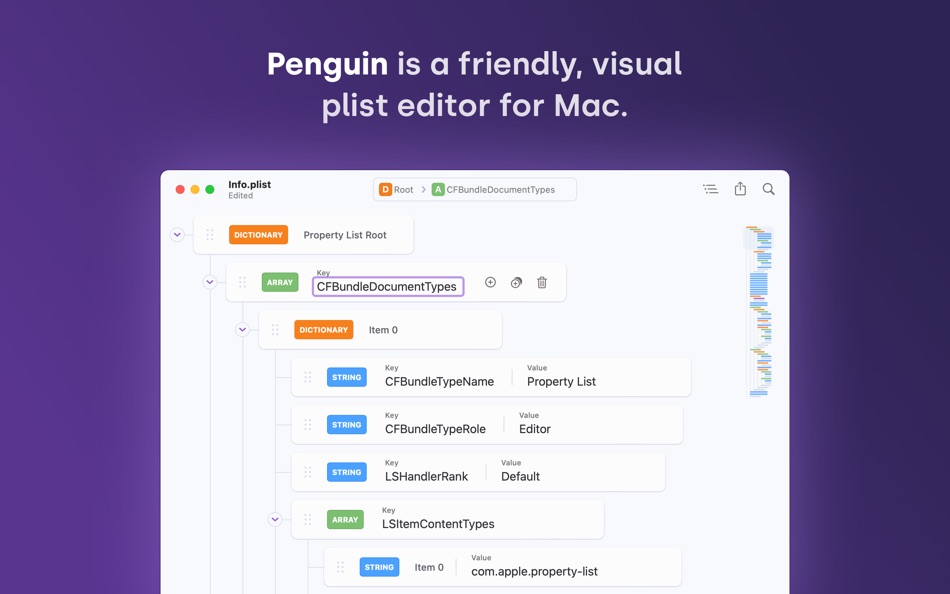
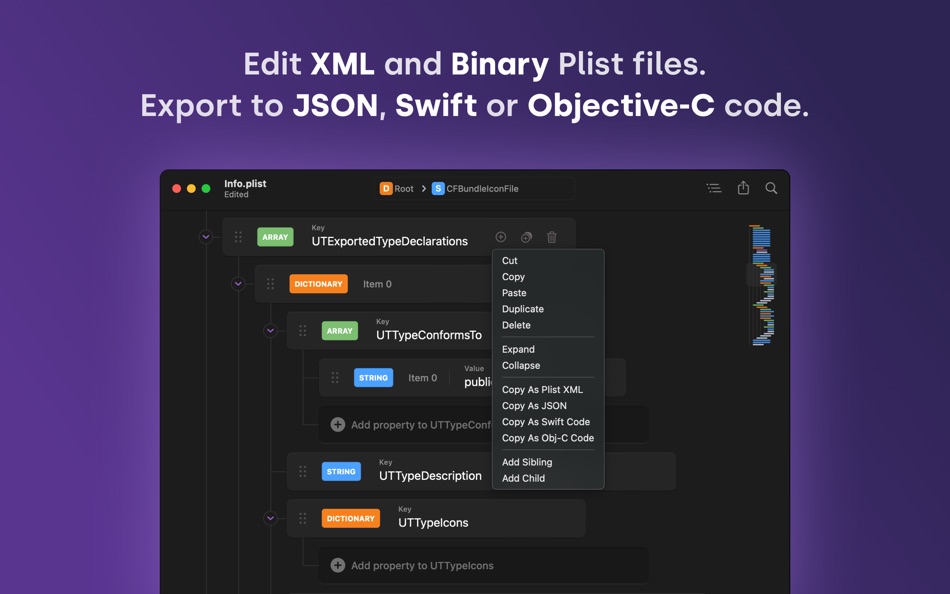
Penguin is loaded with tools and features that make editing plists a breeze. Keyboard shortcuts help you traverse the document tree, add new nodes and expand or collapse list segments. Contextual right-click menus allow you to export segments of the plist as XML, JSON, Swift or Obj-C code. A built in linter ensures your files are error-free.
Info.plist Ready
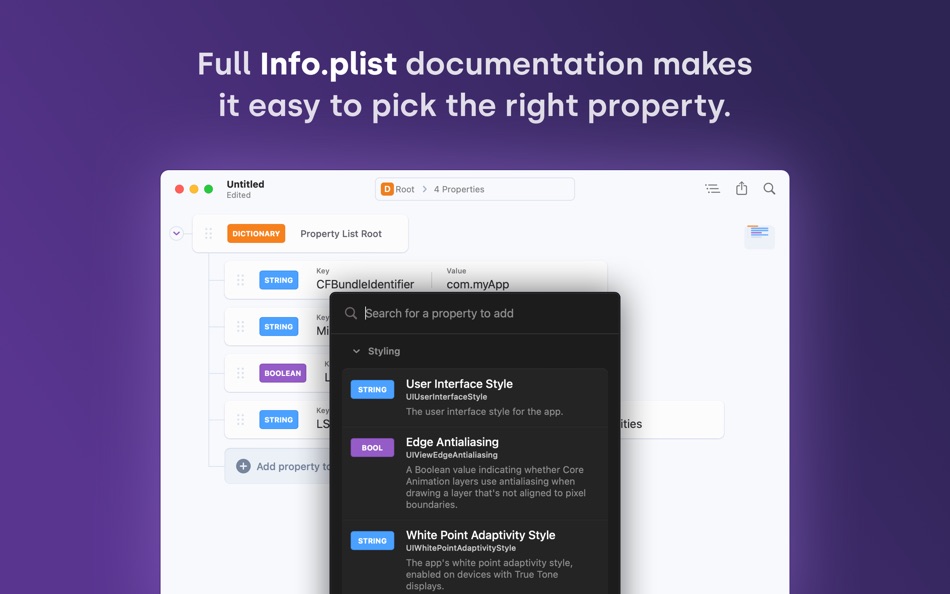
Editing an Information Property List file? No problem! Penguin comes with a context aware New Property Panel that offers a list of available keys and values and a summary of what each one does.
Natively Designed
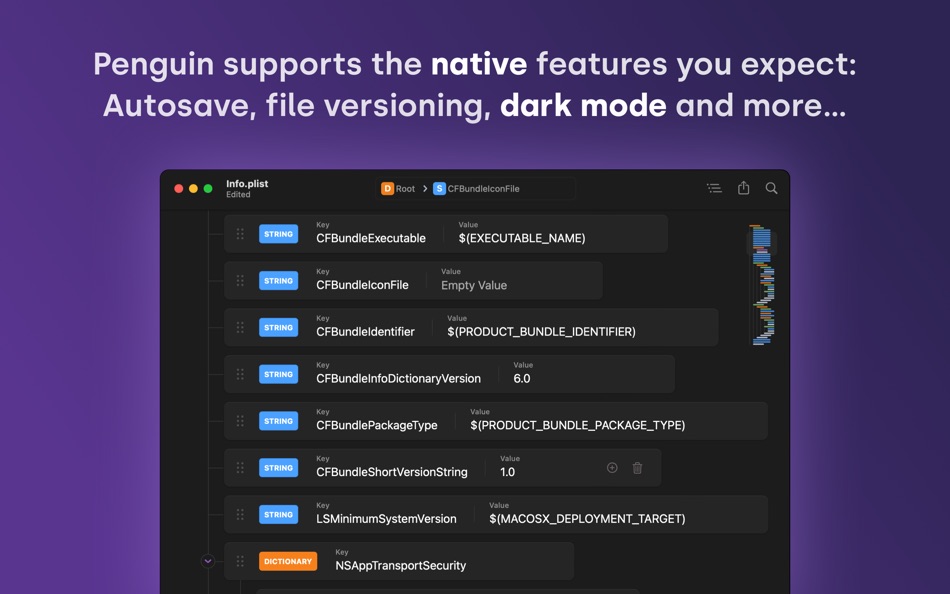
Penguin is a native Mac app. That means support for autosave, file versioning, iCloud, Finder integration and much more right out of the box. And of course that also means support for system-wide dark mode too. Penguin runs great on Apple Silicon Macs and has been optimized to consume as little battery power as possible.
High Performer
Penguin was designed to be fast so nothing gets in between you and the file you want to edit. List virtualization means Penguin can handle huge plist files without slowing down the interface.
Features at a Glance
File Support - Penguin supports editing XML and Binary Plist files.
Export / Share - Export all or part of the plist to XML, Binary, JSON, Swift or Obj-C dictionaries.
Source Control Friendly - Plist files are saved in Xcode's formatting style by default.
Keyboard Shortcuts - Sort, Collapse, Expand and add properties with keyboard shortcuts.
Documentation - See and search Info.plist keys and descriptions for all Apple platforms.
File Structure - XML Plists maintain their sort order across saves.
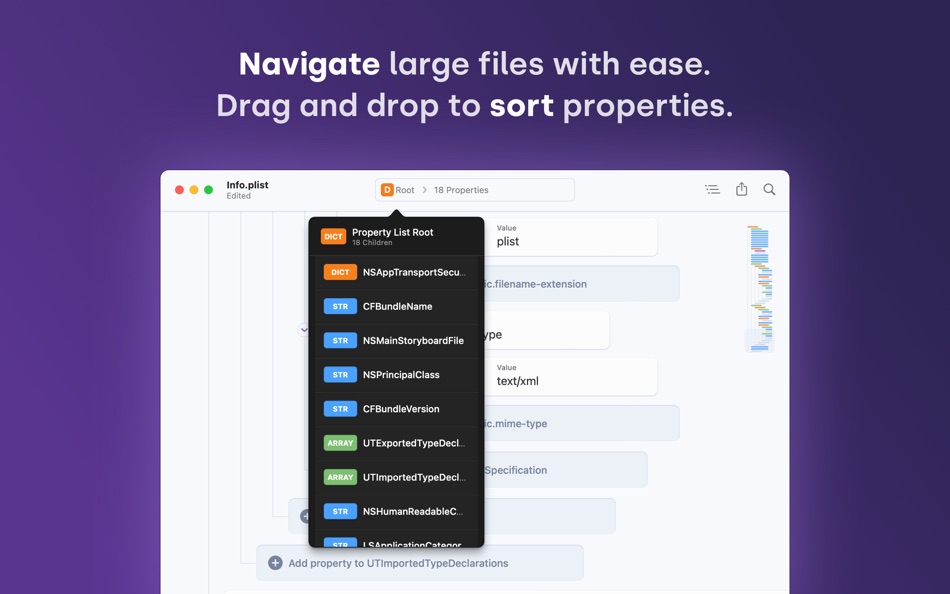
Minimap - XML Plists maintain their sort order across saves.
Navigator - A path navigator allows for quick jumps in between properties.
Universal Binary - Penguin works great on both Intel and Apple Silicon Macs.
Indentation - Tabs or Spaces? You decide! Penguin supports tabs or a variable number of spaces when it saves files to text.
Copy As - Copy segments of your plist as XML, JSON, Swift or Objective-C dictionaries.
Convert to Binary - Convert plists from XML to Binary and back again in place while retaining editing capability.
Date Editor - Select dates with a convenient date picker dropdown.
Hex Validator - For data types, a hex validator makes sure you've entered valid hexadecimal data.
Plist Linter - Penguin's plist linter validates your Plist on the fly. It's like spellcheck for your plist.
Smart Numbers - Penguin automatically chooses whether a number is an integer or floating point based on the input value.
Screenshots
Price History
- Today: Free
- Minimum: Free
- Maximum: $14.99
Track prices
Developer
- Triplane
- Platforms: macOS Apps (2)
- Lists: 2 + 1
- Points: 8 + 0 ¡
- Rankings: 0
- Reviews: 0
- Discounts: 0
- Videos: 0
- RSS: Subscribe


Rankings
0 ☹️
Lists

Reviews
Be the first to review 🌟
Additional Information
- Version: 2.0
- Category:
macOS Apps›Developer Tools - OS:
macOS,macOS 13.0 and up - Size:
1 Mb - Supported Languages:
English - Content Rating:
4+ - Mac App Store Rating:
0 - Updated:
- Release Date:
Contacts
- Website:
 https://getpenguin.app
«Penguin - Plist Editor» is a Developer Tools app for macOS, developed by «Triplane». It was first released on and last updated on . This app is currently free. This app has not yet received any ratings or reviews on AppAgg. It has been added to 2 public lists and 1 private lists created by users. AppAgg has tracked 6 confirmed points plus 0 indirect points for this app. Available languages: English. AppAgg continuously tracks the price history, ratings, and user feedback for «Penguin - Plist Editor». Subscribe to this app or follow its RSS feed to get notified about future discounts or updates.
Penguin - Plist Editor Short URL: Copied!- 🌟 Share
- Mac App Store
You may also like
-
- PLIST Editor
- macOS Apps: Developer Tools By: VDT LABS S.R.L.
- * $7.99
- Lists: 1 + 0 Rankings: 0 Reviews: 0
- Points: 3 + 0 Version: 1.62 PLIST Editor is a side-by-side tree & text editor for property list (plist) data. In a clean and easy to use interface, it allows you to quickly create, inspect, modify and save your ... ⥯
-
- Power Plist Editor
- macOS Apps: Developer Tools By: 基伟 徐
- $3.99
- Lists: 0 + 0 Rankings: 0 Reviews: 0
- Points: 0 + 0 Version: 1.6.0 Power Plist Editor is a powerful Plist editor supports both Binary and XML plist formats for developers. By Power Plist Editor, developers can easily view, explore and edit plist files ⥯
-
- Giraffe Plist Editor
- macOS Apps: Developer Tools By: Giorgio Maria Giannotta
- $0.99
- Lists: 0 + 0 Rankings: 0 Reviews: 0
- Points: 1 + 0 Version: 1.3 Giraffe Plist Editor is a fast and intuitive property list editor for macOS. Designed for developers, testers, and power users, it makes managing .plist files as easy as editing a ... ⥯
-
- Smart PList Editor for Mac OS X
- macOS Apps: Developer Tools By: iMakezAppz
- $2.99
- Lists: 0 + 0 Rankings: 0 Reviews: 0
- Points: 1 + 0 Version: 1.0.1 Smart PList Editor is an easy to use, lightweight and fast editor for property lists. Instead of manually editing plists in a text editor, or waiting for Xcode to boot up, simply use ... ⥯
-
- Plist Converter
- macOS Apps: Developer Tools By: App Tyrant Corp
- $0.99
- Lists: 0 + 1 Rankings: 0 Reviews: 0
- Points: 0 + 0 Version: 2.0.1 Plist Converter is the fastest and easiest way to convert plist files on the Mac. Convert a plist to and from the XML, JSON, and Binary plist formats with this GUI app. You can also ... ⥯
-
- Plist Extractor
- macOS Apps: Developer Tools By: hong chen
- Free
- Lists: 1 + 0 Rankings: 0 Reviews: 0
- Points: 1 + 0 Version: 1.2 This tool can extract png image files from sprite sheet(.pvr.ccz or .pvr or .png and plist). Make sure you have both the image and plist files in the same directory and open both the ... ⥯
-
- Cookie-Editor
- macOS Apps: Developer Tools By: Christophe Gagnier
- Free
- Lists: 4 + 1 Rankings: 0 Reviews: 0
- Points: 6 + 24 (3.3) Version: 1.13.0 Cookie-Editor is designed to have a simple to use interface that let you do most standard cookie operations. It is ideal for developing and testing web pages or even manual management ... ⥯
-
- HTML Editor
- macOS Apps: Developer Tools By: Intrepid
- Free
- Lists: 0 + 0 Rankings: 0 Reviews: 0
- Points: 5 + 639 (4.2) Version: 2.9 HTML Editor is a lightweight HTML editor complete with syntax highlighting, focused code completion suggestions and a live preview panel. With HTML Editor, you can open any existing ... ⥯
-
- Markdown Editor for Safari
- macOS Apps: Developer Tools By: Coffee & Fun LLC
- $2.99
- Lists: 0 + 0 Rankings: 0 Reviews: 0
- Points: 5 + 1 (5.0) Version: 1.3 Create and view markdown files easily from anywhere with our simple and easy, GitHub-flavored markdown editor. Say hello to your new favorite Markdown editor, designed to make your ... ⥯
-
- Xliff Editor
- macOS Apps: Developer Tools By: SweetP Productions, Inc.
- $19.99
- Lists: 0 + 2 Rankings: 0 Reviews: 0
- Points: 0 + 0 Version: 3.0 Xliff Editor - its fast to load, easy to use, and has a low memory footprint. Did we forget to mention Inline tag protection, Search & Replace, Regex search, Fuzzy search, intuitive ... ⥯
-
- Py Editor
- macOS Apps: Developer Tools By: Andromeda Corp LTD
- Free
- Lists: 1 + 0 Rankings: 0 Reviews: 0
- Points: 2 + 0 Version: 1.1 Introducing the ultimate Python editor for macOS! Our app offers a powerful and easy-to-use environment for coding in Python on your Mac, iPhone or iPad. Whether you're a beginner or ... ⥯
-
- Brackets JSON Editor
- macOS Apps: Developer Tools By: junichi nakamura
- $2.99
- Lists: 0 + 0 Rankings: 0 Reviews: 0
- Points: 0 + 0 Version: 1.4 Brackets JSON Editor is simple and easy-to-use JSON editor. You can edit the JSON data displayed in the outline. ⥯
-
- RESX Editor
- macOS Apps: Developer Tools By: Oebele Beetstra
- $1.99
- Lists: 0 + 0 Rankings: 0 Reviews: 0
- Points: 0 + 0 Version: 1.0 When you make use of Visual Studio for Mac to build multi-platform apps with Xamarin Forms, you can make them support multiple languages by adding so called RESX files. A RESX file is ... ⥯
-
- Eplist - convert data to plist
- macOS Apps: Developer Tools By: HuMinghua
- * Free
- Lists: 2 + 1 Rankings: 0 Reviews: 0
- Points: 9 + 0 Version: 2.0.1 Eplist for Excel is a lightweight conversion tool to help developers to improve development efficiency. You can convert your datas or configuration from excel(.xls and .xlsx) document ... ⥯