
| ผู้พัฒนา: | Shaun Hirst (18) | ||
| ราคา: | $0.99 | ||
| การจัดอันดับ: | 0 | ||
| ความเห็น: | 0 เขียนความเห็น | ||
| รายการ: | 0 + 0 | ||
| แต้มแล: | 1 + 0 ¡ | ||
| Mac App Store | |||
คำอธิบาย

The IP Address is updated frequently, the frequency can be adjusted to meet your needs.
The application also provides a quick and simple way to copy the address to the clipboard for convenient use.
Ad
ภาพหน้าจอ
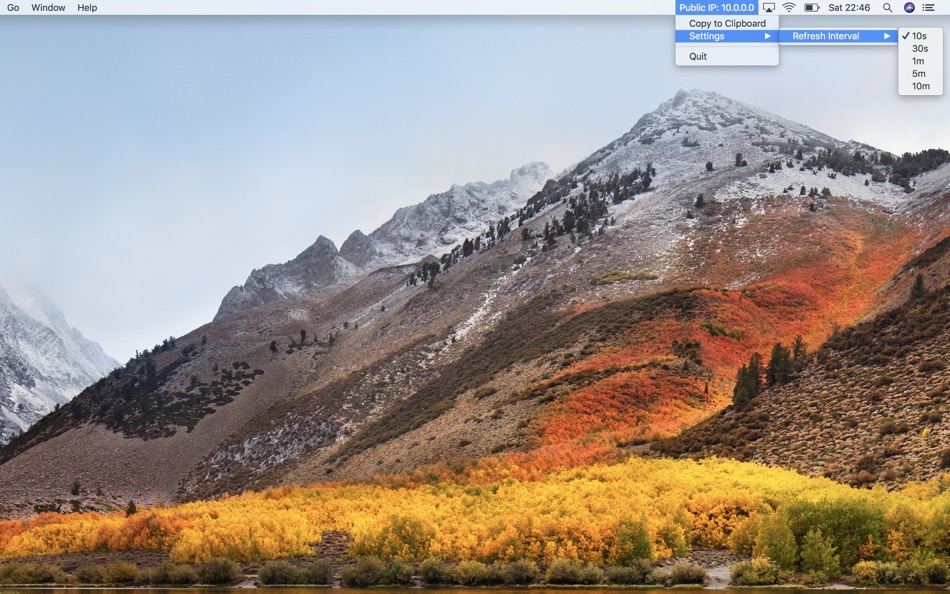
มีอะไรใหม่
- เวอร์ชัน: 1.6
- อัปเดต:
- Support for displaying ipv4 and ipv6 addresses
Support for macOS Sequoia
ราคา
- วันนี้: $0.99
- ต่ำสุด: $0.99
- มากที่สุด: $0.99
ติดตามราคา
Ad
ผู้พัฒนา
- Shaun Hirst
- แพลตฟอร์ม: macOS แอป (18)
- รายการ: 0 + 0
- แต้มแล: 3 + 0 ¡
- การจัดอันดับ: 0
- ความเห็น: 0
- ลดราคา: 0
- วิดีโอ: 0
- RSS: ติดตาม
แต้มแล
-

- 48 Czak
- +1

การจัดอันดับ
0 ☹️
รายการ
0 ☹️
- Public IP
ความเห็น
แสดงรีวิวเป็นคนแรกเลย 🌟
ข้อมูลเพิ่มเติม
- เวอร์ชัน: 1.6
- หมวดหมู่:
macOS แอป›เครื่องมือ - ระบบปฏิบัติการ:
macOS,macOS 11.5 และสูงกว่า - ขนาด:
186 Kb - ภาษาที่สนับสนุน:
English - การจัดประเภทเนื้อหา:
4+ - Mac App Store คะแนนโดย:
0 - อัปเดต:
- วันที่วางจำหน่าย:
Public IP URL แบบสั้น: คัดลอกแล้ว!- 🌟 แชร์
- Mac App Store
คุณอาจชอบ
-
- IP-Kit
- macOS แอป: เครื่องมือ โดย: Omar Ramirez
- ฟรี
- รายการ: 0 + 0 การจัดอันดับ: 0 ความเห็น: 0
- แต้มแล: 0 + 0 เวอร์ชัน: 1.0 Instant Network Information - Public IP: View and copy your public IP with one click - Local IP: Quick access to your local network IP - Hostname: Identify your computer on the network ⥯
-
- IP Friend
- macOS แอป: เครื่องมือ โดย: Maximilian Schmitt
- ฟรี
- รายการ: 0 + 0 การจัดอันดับ: 0 ความเห็น: 0
- แต้มแล: 3 + 0 เวอร์ชัน: 1.0 IP Friend lets you see and copy your local IP addresses from your macOS menubar. Hold down the OPTION-key to replace the hostname of a URL in your clipboard with the selected IP ... ⥯
-
- IP Buddy
- macOS แอป: เครื่องมือ โดย: Createful Ltd
- ฟรี
- รายการ: 0 + 1 การจัดอันดับ: 0 ความเห็น: 0
- แต้มแล: 7 + 0 เวอร์ชัน: 1.0.3 A really simple little menu bar app that provide a quick and convenient way to view the IP address for all current active network connections, LAN, Internet and VPN's and provide an ... ⥯
-
- IPeek - Locate any IP
- macOS แอป: เครื่องมือ โดย: Jose Antonio Neto Suarez
- $2.99
- รายการ: 0 + 0 การจัดอันดับ: 0 ความเห็น: 0
- แต้มแล: 0 + 0 เวอร์ชัน: 1.2.4 IPeek is the ultimate IP address and geolocation tool. Instantly view your IP details and search any other IP. Track locations, view geolocation on maps, and get insights on ISP, ... ⥯
-
- pylon IP Configurator
- macOS แอป: เครื่องมือ โดย: Basler AG
- ฟรี
- รายการ: 0 + 0 การจัดอันดับ: 0 ความเห็น: 0
- แต้มแล: 0 + 0 เวอร์ชัน: 13.1.0 pylon IP Configurator Easy Management of IP Addresses for Basler GigE Cameras The pylon IP Configurator is a powerful tool for manually configuring the IPv4 addresses of your connected ⥯
-
- A.4.One
- macOS แอป: เครื่องมือ โดย: Jorge Del Rio
- $0.99
- รายการ: 0 + 0 การจัดอันดับ: 0 ความเห็น: 0
- แต้มแล: 1 + 0 เวอร์ชัน: 4.0 All.4.One is a lightweight macOS quick note app designed for anyone who works with text writers, prompt engineers, students, professionals, and creators who need a fast, focused ... ⥯
-
- Termial
- macOS แอป: เครื่องมือ โดย: Virtual Vertex S.R.L.
- * ฟรี
- รายการ: 0 + 0 การจัดอันดับ: 0 ความเห็น: 0
- แต้มแล: 1 + 0 เวอร์ชัน: 1.2.0 Termial is a modern, AI-powered terminal application for developers, system administrators, and DevOps professionals who need to manage local and remote servers efficiently. AI Agent ... ⥯
-
- Network Kit
- macOS แอป: เครื่องมือ โดย: Fausto Ristagno
- $2.99
- รายการ: 1 + 1 การจัดอันดับ: 0 ความเห็น: 0
- แต้มแล: 8 + 0 เวอร์ชัน: 9.2.1 Keep under control your network with Network Kit, an user friendly set of network tools that will help you to analyze your LAN, and not only that. NETWORK INFO A complete and easy to ... ⥯
-
- Termius: SSH Client & Terminal
- macOS แอป: เครื่องมือ โดย: Termius Corporation
- * ฟรี
- รายการ: 2 + 2 การจัดอันดับ: 0 ความเห็น: 0
- แต้มแล: 6 + 0 เวอร์ชัน: 9.37.2 Termius is a modern SSH client designed for productivity and collaboration. Connect with one click from desktop and mobile no re-entering IP addresses, ports, and passwords. With a ... ⥯
-
- Sourcegraph for Safari
- macOS แอป: เครื่องมือ โดย: Sourcegraph
- ฟรี
- รายการ: 2 + 2 การจัดอันดับ: 0 ความเห็น: 0
- แต้มแล: 4 + 0 เวอร์ชัน: 1.24 The open-source Sourcegraph extension adds code navigation and code intelligence to GitHub, GitHub Enterprise, GitLab, Bitbucket Server, Phabricator, and Gerrit. Code intelligence on ... ⥯
- -100% ใหม่
- Engineer Tools
- macOS แอป: เครื่องมือ โดย: Nguyen Phuoc Huy Hoang
- ▼ * ฟรี
$29.99-100% - รายการ: 0 + 1 การจัดอันดับ: 0 ความเห็น: 0
- แต้มแล: 6 + 0 เวอร์ชัน: 1.7 Engineer Tools is a comprehensive suite of 15 essential utilities designed for engineers, developers, and technical professionals. This includes: 1. Robocops (Free Tools) Text ... ⥯
- -100% ใหม่
- Netutilus: Network Utility
- macOS แอป: เครื่องมือ โดย: Oleksandr Kozlovskyi
- ▼ ฟรี
$4.99-100% - รายการ: 0 + 1 การจัดอันดับ: 0 ความเห็น: 0
- แต้มแล: 6 + 0 เวอร์ชัน: 1.0.1 Netutilus brings back everything you loved about the classic macOS Network Utility and takes it further with modern design and powerful new features. 8 PROFESSIONAL NETWORK TOOLS - ... ⥯
-
- iTerminalSSH
- macOS แอป: เครื่องมือ โดย: Timm Kent
- $0.99
- รายการ: 0 + 1 การจัดอันดับ: 0 ความเห็น: 0
- แต้มแล: 10 + 0 เวอร์ชัน: 2.1.5 Simple SHH Terminal. Lets you save various Servers with login information, so that you can easily connect using just one click. Supports: * keyboard authentication * overview of ... ⥯
-
- RemoteTV
- macOS แอป: เครื่องมือ โดย: 利志 侯
- $0.99
- รายการ: 0 + 1 การจัดอันดับ: 0 ความเห็น: 0
- แต้มแล: 7 + 0 เวอร์ชัน: 1.6 - 使用方法 TV 设备开启ADB调试,Mac 链接到同一局域网,输入对应 TV设备IP链接控制,使用快捷键 Command+Y 打开遥控 - 功能 - 遥控方向以及确认返回返回主页 可以使用键盘上 下 左 右 回车 删除返回 按键快捷控制 - 音量调节( Command +/- ) - 安装APK ( Command + I ) - 发送文本到远程输入框 ⥯