
| 开发人员: | Andromeda Corp LTD (2) | ||
| 价格: | * 免费 | ||
| 排名: | 0 | ||
| 评价: | 0 我要评价 | ||
| 评论: | 0 发表评论 | ||
| 列表: | 1 + 0 | ||
| 积分: | 2 + 0 ¡ | ||
| Mac App Store | |||
说明

INSTANT PYTHON DEVELOPMENT
Start coding immediately with Python 3.11 built right into the app. No need to install Python, manage virtual environments, or configure paths. Everything works out of the box.
PRE-INSTALLED PACKAGES
We've included the most popular Python packages so you can start building real projects immediately:
- NumPy 2.3.5 for numerical computing and arrays
- Pandas 2.3.3 for data analysis and DataFrames
- Matplotlib 3.10.7 for data visualization
- Requests 2.32.5 for HTTP and API calls
- BeautifulSoup 4.14.2 for web scraping
- Pillow 12.0.0 for image processing
All packages are properly configured and code-signed for macOS.
PROFESSIONAL CODE EDITOR
Built on the industry-standard Ace editor with support for 150+ programming languages. Features include:
- Syntax highlighting for Python, JavaScript, HTML, CSS, Java, Swift, and 145+ more
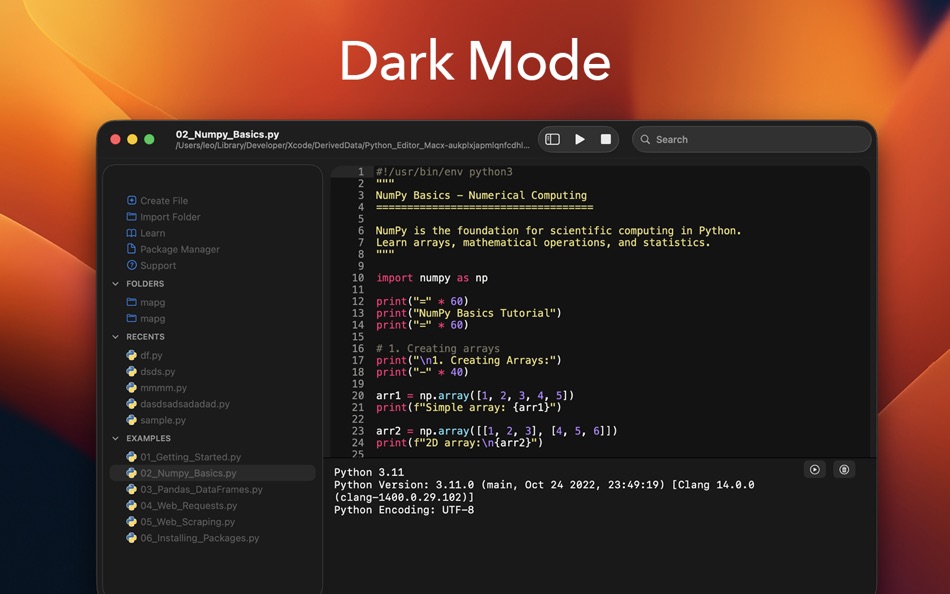
- Multiple color themes with automatic dark mode support
- Customizable fonts and sizes
- Line numbers and code folding
- Auto-completion and smart indentation
- Find and replace functionality
- Soft wrap and invisible character display
INTEGRATED PACKAGE MANAGER
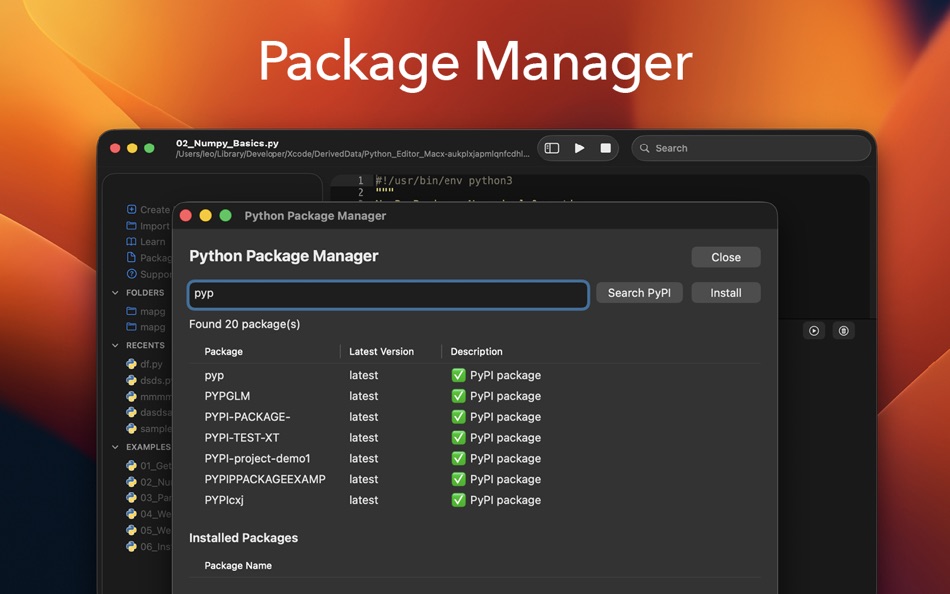
Install additional pure-Python packages directly from PyPI using the built-in Package Manager. Search thousands of packages and install them with a single click. No terminal required.
LEARN WITH BUILT-IN TUTORIALS
Six comprehensive tutorial files included with 800+ lines of example code:
1. Getting Started - Python fundamentals, variables, loops, and functions
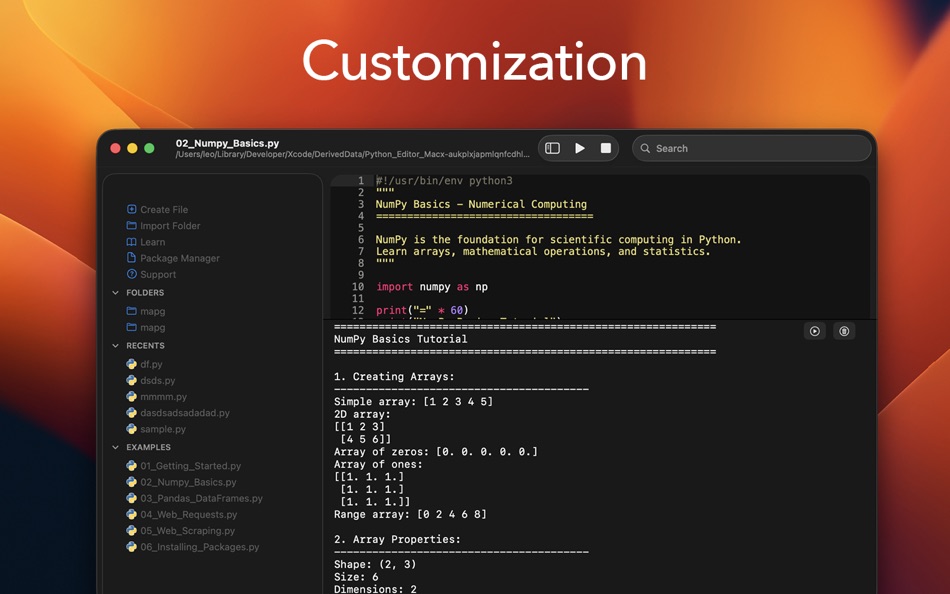
2. NumPy Basics - Arrays, mathematical operations, and statistics
3. Pandas DataFrames - Data manipulation, filtering, and CSV operations
4. Web Requests - HTTP calls, JSON APIs, and error handling
5. Web Scraping - BeautifulSoup fundamentals and HTML parsing
6. Installing Packages - Using pip and the Package Manager
THREE-PANEL LAYOUT
Left panel shows your files organized into sections: Actions for creating and importing files, Folders for your projects, Recents for quick access, and Examples for tutorials.
Center panel features the code editor on top and a Python console below for viewing output and errors.
Right panel provides live preview for Markdown, HTML, and SVG files.
SMART FILE MANAGEMENT
- Security-scoped bookmarks for reliable file access
- Import external folders into your workspace
- Recent files for quick access
- Auto-save option when switching documents
- QuickLook preview for images and PDFs
- Support for 150+ file formats
NATIVE macOS EXPERIENCE
Built with Swift and AppKit for optimal performance on both Apple Silicon and Intel Macs. Follows macOS design guidelines with proper sandbox compliance and Gatekeeper signing.
WHAT YOU CAN BUILD
Data Analysis - Work with CSV files, perform calculations, create visualizations
Web Development - Make API calls, parse HTML, build web scrapers
Automation - Write scripts to process files and automate tasks
Learning - Perfect for students and beginners with built-in tutorials
Prototyping - Quick scripts without heavy IDE overhead
RECENT IMPROVEMENTS
- Fixed critical file access issues on macOS Sequoia
- Improved dark mode text visibility
- Enhanced Package Manager with double-click installation
- Better keyboard shortcuts (ESC and Cmd+W to close windows)
- Improved security-scoped file bookmarks
- Auto-save preferences
After a 3-day free trial, a subscription unlocks the complete experience:
- Editor customization
- Beautiful themes
- Complete Python guidebook
- Python learning resources
Privacy Policy: https://www.iubenda.com/privacy-policy/85758827
Terms of Service: https://www.apple.com/legal/internet-services/itunes/dev/stdeula
Ad
屏幕截图

价格历史
-
* 提供应用内购商品 - 今天: 免费
- 最小值: 免费
- 最大值: 免费
可选
开发人员


排名 (0)
0 ☹️
列表 (1)
- Py Editor for Python
评价 (0)
抢先评价一下吧 🌟
其他信息
«Py Editor for Python». 平台: macOS. 类别: 软件开发工具. 开发商: «Andromeda Corp LTD». 首次发布: . 最后更新: . 目前价格: 免费. 该条目尚未在 AppAgg 上获得评分或评论。 列表: 公开: 1, 私密: 0. 追踪点: 已确认: 2, 间接: 0. 可用语言: Arabic, Chinese, Danish, Dutch, English, Finnish, French, German, Greek, Hebrew, Hindi, Italian, Japanese, Korean, Norwegian, Portuguese, Spanish, Swedish. AppAgg 会跟踪 «Py Editor for Python»的价格历史、评分和用户反馈。 关注未来折扣和更新: RSS. AppAgg 不托管应用程序或分发软件。 所有商标、徽标和屏幕截图均属于其各自所有者。
评论 (0)
成为第一个发表评论的人 🌟
Py Editor for Python 短网址: 已复制!- 🌟 分享
- Mac App Store
Ad
类似
-
- Python Runner
- macOS 应用: 软件开发工具 来自: 兰桂 吴
- $1.99
- 列表: 0 + 0 排名: 0 评价: 0
- 积分: 0 + 0 0 版本: 1.5.6 Write and run Python code instantly! Python Runner is a handy tool for learning Python or running Python script for daily tasks. Simply type Python code and press "Command-R" to run ... ⥯
-
- Python Playground: Live Coding
- macOS 应用: 软件开发工具 来自: Jacob Hauberg Hansen
- $8.99
- 列表: 0 + 0 排名: 0 评价: 0
- 积分: 0 + 0 0 版本: 1.18 Explore and experiment with Python and get instant results as you type. You can use Python Playground to quickly and conveniently try out ideas, learn things about Python or to simply ... ⥯
-
- Editor Usage for Cursor AI
- macOS 应用: 软件开发工具 来自: Inside Internet
- $3.99
- 列表: 0 + 0 排名: 0 评价: 0
- 积分: 0 + 0 0 版本: 1.3.2 Effortlessly track your Cursor AI editor usage with our powerful menubar app, designed to keep you informed and in control of your requests. Whether you re a heavy user or just want to ⥯
-
- Code Runner for Python
- macOS 应用: 软件开发工具 来自: Omer UCEL
- $0.99
- 列表: 0 + 1 排名: 0 评价: 0
- 积分: 3 + 0 0 版本: 4.0 Code Runner for Python is your personal Python sandbox, perfect for learning, experimenting, and quickly testing code snippets wherever you are. Ditch the complex server setup for ... ⥯
-
- WYSIWYG HTML Editor
- macOS 应用: 软件开发工具 来自: Wicher B Donga
- $22.99
- 列表: 0 + 0 排名: 5 (1) 评价: 0
- 积分: 0 + 0 0 版本: 26.1 WYSIWYG HTML Editor just got a major upgrade. You can now work seamlessly with: - HTML and CSS - JavaScript - React and JSX - Vue - Alpine - Markdown or any combination of these in a ... ⥯
-
- Run Python
- macOS 应用: 软件开发工具 来自: InSili.co
- $2.99
- 列表: 0 + 0 排名: 0 评价: 0
- 积分: 0 + 0 0 版本: 1.0 The easiest and coolest Click'n'Run way to test your Python scripts! == Spinoff of the popular Peppermint editor == - Click'n'Run instantly in the built-in console (user input ... ⥯
-
- Xliff Editor
- macOS 应用: 软件开发工具 来自: SweetP Productions, Inc.
- $19.99
- 列表: 0 + 2 排名: 0 评价: 0
- 积分: 0 + 0 0 版本: 3.3.2 Xliff Editor - its fast to load, easy to use, and has a low memory footprint. Did we forget to mention Inline tag protection, Search & Replace, Regex search, Fuzzy search, intuitive ... ⥯
- 新
- Bonsai JSON Editor
- macOS 应用: 软件开发工具 来自: Jerry COMBS
- $5.99
- 列表: 0 + 0 排名: 0 评价: 0
- 积分: 0 + 0 0 版本: 1.0 Bonsai is a native macOS JSON viewer, editor, and query tool built for developers who work with JSON every day. Open any JSON file and instantly explore it as an interactive, ... ⥯
-
- Brackets JSON Editor
- macOS 应用: 软件开发工具 来自: junichi nakamura
- $2.99
- 列表: 0 + 0 排名: 0 评价: 0
- 积分: 0 + 0 0 版本: 1.4 Brackets JSON Editor is simple and easy-to-use JSON editor. You can edit the JSON data displayed in the outline. ⥯
-
- JSON Editor for SSEM DEV
- macOS 应用: 软件开发工具 来自: DongSeop Kim
- 免费
- 列表: 0 + 0 排名: 0 评价: 0
- 积分: 0 + 0 0 版本: 1.0 JSON Editor is a web-based tool to view, edit, format, and validate JSON data. Features: Tree view and code view modes Syntax highlighting with Ace Editor JSON validation and ... ⥯
-
- RESX Editor
- macOS 应用: 软件开发工具 来自: Oebele Beetstra
- $1.99
- 列表: 0 + 0 排名: 0 评价: 0
- 积分: 0 + 0 0 版本: 1.0 When you make use of Visual Studio for Mac to build multi-platform apps with Xamarin Forms, you can make them support multiple languages by adding so called RESX files. A RESX file is ... ⥯
-
- EDI Viewer – Editor PDF Export
- macOS 应用: 软件开发工具 来自: Metin Karaduman
- $14.99
- 列表: 0 + 0 排名: 0 评价: 0
- 积分: 0 + 0 0 版本: 1.0 EDI Viewer Pro is a powerful Mac app for viewing, understanding, and exporting EDIFACT EDI documents in a clean, Notepad style editor experience. If you work with EDI daily in retail, ... ⥯
-
- PLIST Editor
- macOS 应用: 软件开发工具 来自: VDT LABS S.R.L.
- * $7.99
- 列表: 1 + 0 排名: 0 评价: 0
- 积分: 3 + 0 0 版本: 1.63 PLIST Editor is a side-by-side tree & text editor for property list (plist) data. In a clean and easy to use interface, it allows you to quickly create, inspect, modify and save your ... ⥯
-
- Penguin - Plist Editor
- macOS 应用: 软件开发工具 来自: Triplane
- * 免费
- 列表: 1 + 2 排名: 0 评价: 0
- 积分: 6 + 0 0 版本: 2.2 Looking for an easier way to edit plist files? Penguin lets you edit any plist file in a beautiful and easy to understand tree view. Drag, drop, expand, reorder and modify your plist ... ⥯