
| 개발자: | Verenes LLC (6) | ||
| 가격: | * 무료 | ||
| 순위: | 0 | ||
| 리뷰: | 0 리뷰 작성 | ||
| 목록: | 0 + 0 | ||
| 포인트: | 0 + 0 ¡ | ||
| Mac App Store | |||
기술

KEY FEATURES
Sprite Sheet Cutter
Automatically cut existing sprite sheets into individual frames with pixel-perfect precision. Adjust rows, columns, outer insets, gutters, and shrink parameters to match any sprite sheet layout. Export each frame as a separate PNG file with customizable naming.
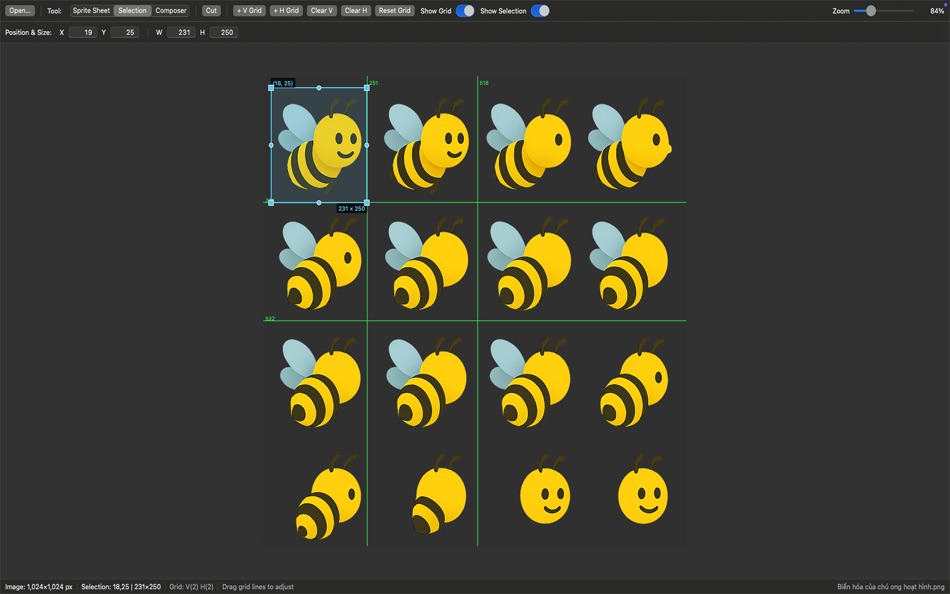
Selection Tool
Create precise selections on any image with an interactive grid system. Add custom vertical and horizontal grid lines to align your selections perfectly. Export selected regions as high-quality PNG files.
Image Composer
Build new sprite sheets by combining multiple images. Import various image formats, arrange them on a customizable canvas, and export as a unified sprite sheet. Features include drag-and-drop positioning, layer management, auto-arrangement, and grid snapping.
PROFESSIONAL WORKFLOW
- Drag and drop image loading
- Real-time preview with interactive visual feedback
- Zoom controls for detailed work
- Batch export capabilities
- Flexible parameter adjustment
- Grid-based alignment tools
PERFECT FOR
- Game developers working with animation frames
- Digital artists organizing sprite assets
- UI/UX designers managing icon sets
- Anyone working with tiled graphics
TRIAL AND PRICING
SpriteCut offers a full-featured 30-day free trial. After the trial period, a one-time Premium purchase unlocks lifetime access to all features with no subscription fees.
The intuitive interface makes complex sprite sheet operations simple while providing the precision that professionals demand. Whether you're cutting existing sprite sheets or creating new ones, SpriteCut streamlines your workflow and saves valuable time.
Download SpriteCut today and experience professional-grade sprite sheet tools designed for macOS.
Ad
스크린샷


새로운 기능
- 버전: 1.0
- 업데이트:
가격
-
* 인앱 구매 - 오늘: 무료
- 최소: 무료
- 최대: 무료
가격 추적
개발자
- Verenes LLC
- 플랫폼: iOS 앱 (4) macOS 앱 (2)
- 목록: 0 + 0
- 포인트: 0 + 2 ¡
- 순위: 0
- 리뷰: 0
- 할인: 0
- 동영상: 0
- RSS: 구독
Ad
포인트
0 ☹️
순위
0 ☹️
목록
0 ☹️
- SpriteCut
리뷰
첫 번째 리뷰를 남겨보세요 🌟
추가 정보
SpriteCut 단축 URL: 복사됨!- 🌟 공유하기
- Mac App Store
당신은 또한 같은 수 있습니다
-
- Sprite Packer
- macOS 앱: 개발자 도구 게시자: Accidental Fish
- 무료
- 목록: 0 + 0 순위: 0 리뷰: 0
- 포인트: 0 + 0 버전: 1.0 Simple and easy to use sprite and texture packing app: * Efficiently pack sprites and textures into a single image * Generates an accompanying JSON file with image positions and ... ⥯
-
- Sprite Master Web Free
- macOS 앱: 개발자 도구 게시자: Mobinodo
- 무료
- 목록: 0 + 0 순위: 0 리뷰: 0
- 포인트: 0 + 0 버전: 1.2 Sprite Master Web is a Spritesheet creation tool for Web Designers. It helps you to organize your sprites into one image file and reduces image requests from your server, so speed-up ... ⥯
-
- Sprite 1-2-3
- macOS 앱: 개발자 도구 게시자: Tomoyuki Okawa
- $0.99
- 목록: 0 + 0 순위: 0 리뷰: 0
- 포인트: 0 + 0 버전: 1.0.4 After developing the same game for two different development platforms (iOS and macOS), the lesson that I had learnt over this period is that you never want to create sprite images ... ⥯
-
- Atlas Lite
- macOS 앱: 개발자 도구 게시자: TTrGames
- 무료
- 목록: 0 + 0 순위: 0 리뷰: 0
- 포인트: 0 + 0 버전: 1.0 Atlas Lite is a streamlined and powerful utility that features an intuitive interface for easily generating sprite sheets (a.k.a. texture atlases). Besides designing your own sprites, ... ⥯
-
- Texture Extractor
- macOS 앱: 개발자 도구 게시자: 建红 杨
- 무료
- 목록: 0 + 0 순위: 0 리뷰: 0
- 포인트: 0 + 0 버전: 1.4.1 这款软件可以从Texture Packer的图集中导出各个Texture以便在您的游戏中使用。 您可以通过拖拽plist文件或atlas文件和对应的png图片文件到窗口的方式打开图集 也可以通过 Load Texture 按钮从Finder中选择。 选择文件时必须同时选择plist文件或atlas文件和对应的png文件。 ... ⥯
-
- AnyMP4 AVCHD Converter Player
- macOS 앱: 개발자 도구 게시자: AnyMP4 Studio
- * $17.99
- 목록: 0 + 1 순위: 0 리뷰: 0
- 포인트: 7 + 0 버전: 6.3.19 AnyMP4 AVCHD Converter lets you convert AVCHD video file MTS and M2TS to any popular video formats like MKV, MP4, MOV, M4V, AVI, MPEG, WMV, FLV, and WebM. Thus it becomes possible to ... ⥯
-
- Plist Extractor
- macOS 앱: 개발자 도구 게시자: hong chen
- 무료
- 목록: 0 + 1 순위: 0 리뷰: 0
- 포인트: 1 + 0 버전: 1.2 This tool can extract png image files from sprite sheet(.pvr.ccz or .pvr or .png and plist). Make sure you have both the image and plist files in the same directory and open both the ... ⥯
-
- TextPlus
- macOS 앱: 개발자 도구 게시자: Tuan Truong
- 무료
- 목록: 0 + 1 순위: 0 리뷰: 0
- 포인트: 5 + 0 버전: 1.6.0 TextPlus - Xcode Source Editor Extension. # Notice DO NOT install TextPlus unless you're Xcode user. # Enable extension: System Preferences -> Extensions -> Xcode Source Editor # ... ⥯
-
- ColorWell
- macOS 앱: 개발자 도구 게시자: SweetP Productions, Inc.
- $9.99
- 목록: 3 + 0 순위: 0 리뷰: 0
- 포인트: 1 + 0 버전: 8.1.5 A Beautiful and Intuitive Color Picker and Color Palette Generator - A necessary addition to any web/app developer's toolbox! It s super easy to generate unlimited Color Palettes with ... ⥯
-
- REtroAnimator
- macOS 앱: 개발자 도구 게시자: Clemens Unterkofler
- 무료
- 목록: 0 + 0 순위: 0 리뷰: 0
- 포인트: 0 + 0 버전: 1.0.1 REtroAnimator is a simple 2D sprite animation tool for working with spritesheets. ⥯
-
- PLIST Editor
- macOS 앱: 개발자 도구 게시자: VDT LABS S.R.L.
- * $7.99
- 목록: 1 + 0 순위: 0 리뷰: 0
- 포인트: 3 + 0 버전: 1.63 PLIST Editor is a side-by-side tree & text editor for property list (plist) data. In a clean and easy to use interface, it allows you to quickly create, inspect, modify and save your ... ⥯
-
- Localization Assistant
- macOS 앱: 개발자 도구 게시자: 波 宋
- $2.99
- 목록: 0 + 1 순위: 0 리뷰: 0
- 포인트: 0 + 0 버전: 3.3 Localization Assistant is a software development tool that helps you edit the Strings Files used for localization of your Xcode projects. Usage Description: 1. There are 3 ways to open ⥯
-
- Attributed String Creator
- macOS 앱: 개발자 도구 게시자: BRIDGETECH SOLUTIONS LIMITED
- 무료
- 목록: 0 + 1 순위: 0 리뷰: 0
- 포인트: 1 + 0 버전: 1.9.10 A TOP 5 DEVELOPER TOOL IN 39 COUNTRIES Attributed String Creator takes all of the work out of programming with NSAttributedStrings by automatically generating native Swift 5 or ... ⥯
-
- GroovyPoint
- macOS 앱: 개발자 도구 게시자: Ondrej Kvasnovsky
- $0.99
- 목록: 0 + 0 순위: 0 리뷰: 0
- 포인트: 0 + 0 버전: 1.0.4 GroovyPoint makes it simple to run Groovy code on your Mac. With GroovyPoint you can easily execute your Groovy examples and educate others or yourself. GroovyPoint is short cut ... ⥯