
Saved
Choose the name that will be shown in your Saved menu.
Done!
| Developer: | codeBuilder (2) | ||
| Price: | $24.99 | ||
| Rankings: | 0 | ||
| Comments: | 0 Add a comment | ||
| Lists: | 0 + 0 | ||
| Points: | 0 + 0 ¡ | ||
| Mac App Store | |||
Description

SQL Studio is a fast, thoughtfully designed database client created specifically for Microsoft SQL Server and Azure SQL on macOS. Version 2.0 introduces intelligent editing, integrated AI assistance, and powerful workflow enhancements that help you write, explore, and optimise SQL with clarity and speed.
Built as a fully native Mac application, SQL Studio combines macOS design with professional-grade database tooling.
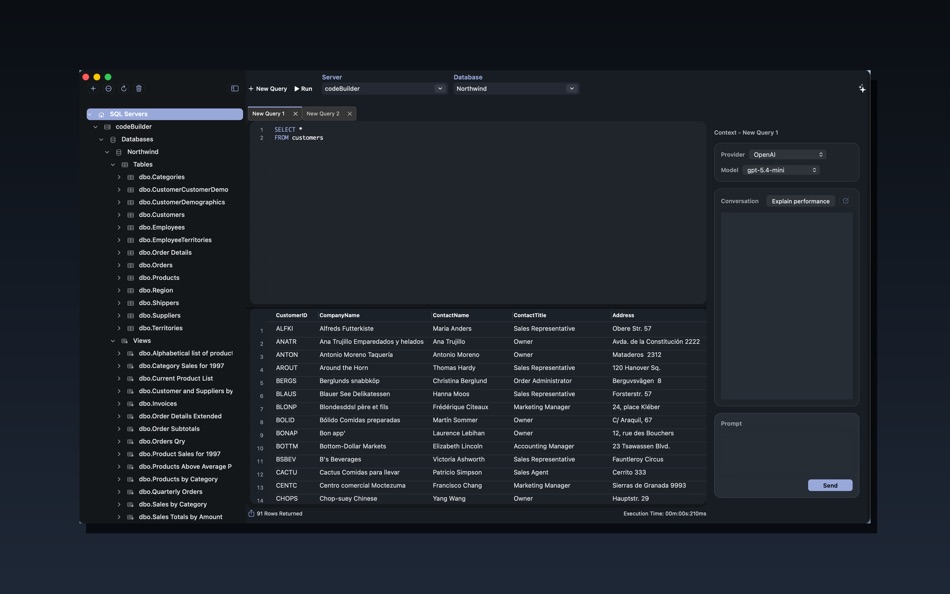
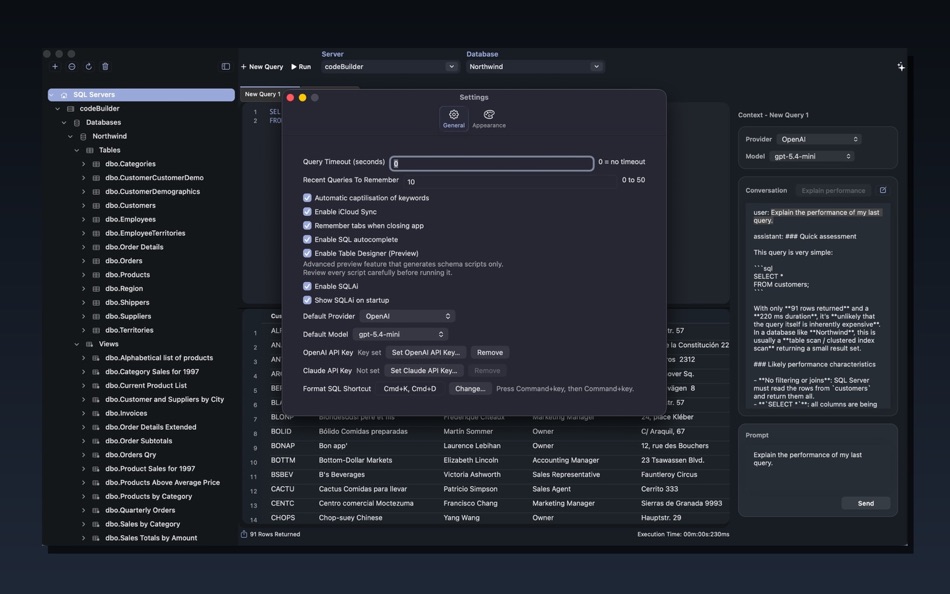
SQLAi — AI Assistance for SQL Server
SQL Studio 2.0 introduces SQLAi, an integrated assistant designed around real SQL Server workflows.
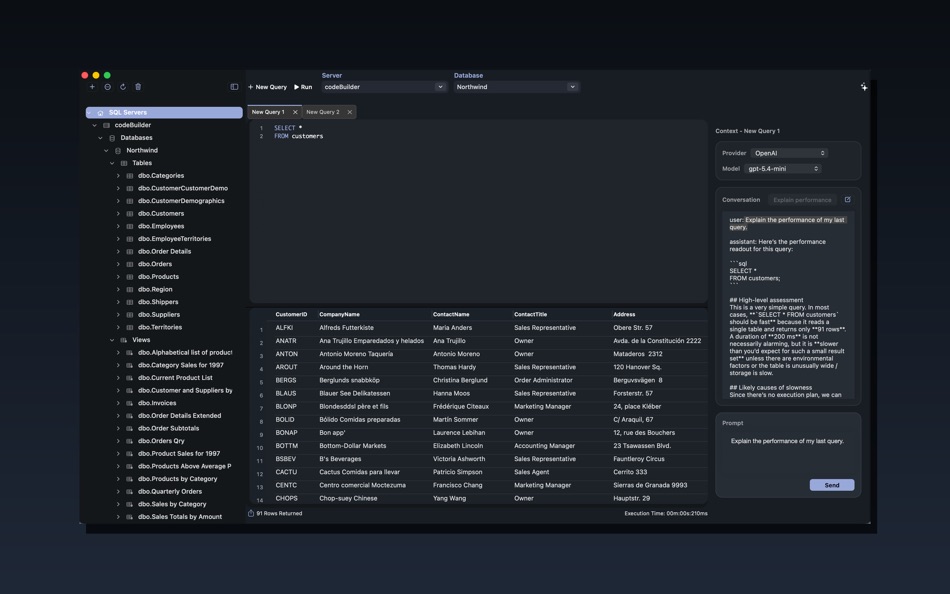
SQLAi works directly alongside your queries to help analyse intent, explain performance, and accelerate development without leaving the editor.
Key capabilities:
• Support for OpenAI and Claude models
• Streaming responses for real-time interaction
• Dedicated AI sidebar experience
• One-click Explain Performance
• Clear controls over when AI is active
Bring Your Own Key (BYOK):
SQL Studio does not provide or proxy AI access. You connect your own AI provider accounts using your own API keys, giving you full control over usage, costs, and data handling.
Intelligent SQL Autocomplete
A brand-new autocomplete engine built specifically for Microsoft SQL Server development.
• Context-aware suggestions within the query editor
• Schema-aware completion behaviour
• Fast, predictable suggestions designed for SQL workflows
• Focused assistance that stays out of your way while typing
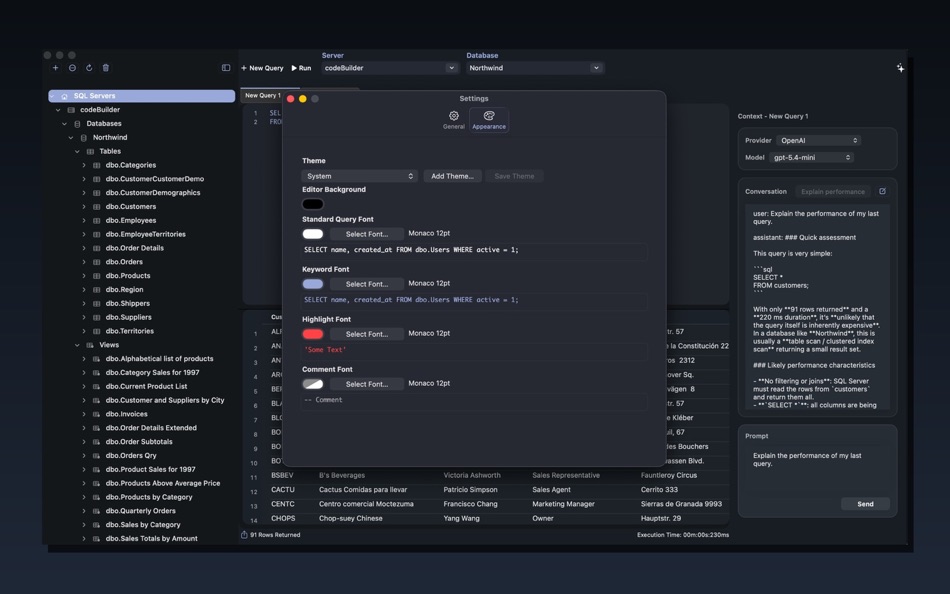
Theme Support
SQL Studio now adapts to your preferred working environment.
• Built-in theme support
• Refined SQL syntax highlighting
• Carefully tuned fonts and comment styling
• Designed for long development sessions
Designed for Everyday SQL Productivity
SQL Studio 2.0 enhances the complete query workflow.
Editing and Formatting:
• Consistent SQL formatting and alignment
• Selection-aware indentation
• Quick formatting shortcuts
Flexible Tab Workflow:
• Drag-and-drop tab reordering
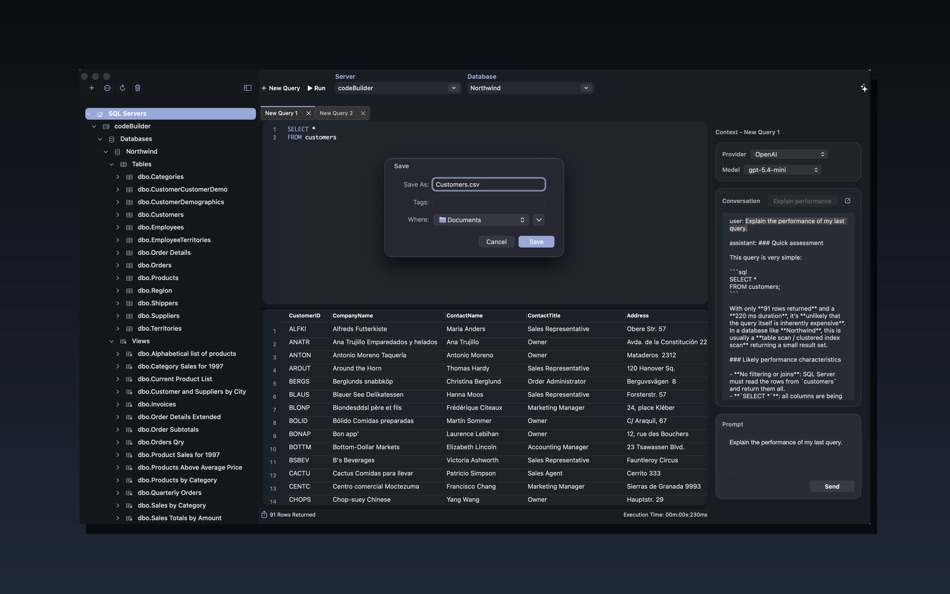
• Persistent workspaces between launches
• Open saved queries in dedicated tabs
• Streamlined tab management
Built for Modern SQL Server Environments
Designed for professional and cloud-connected deployments:
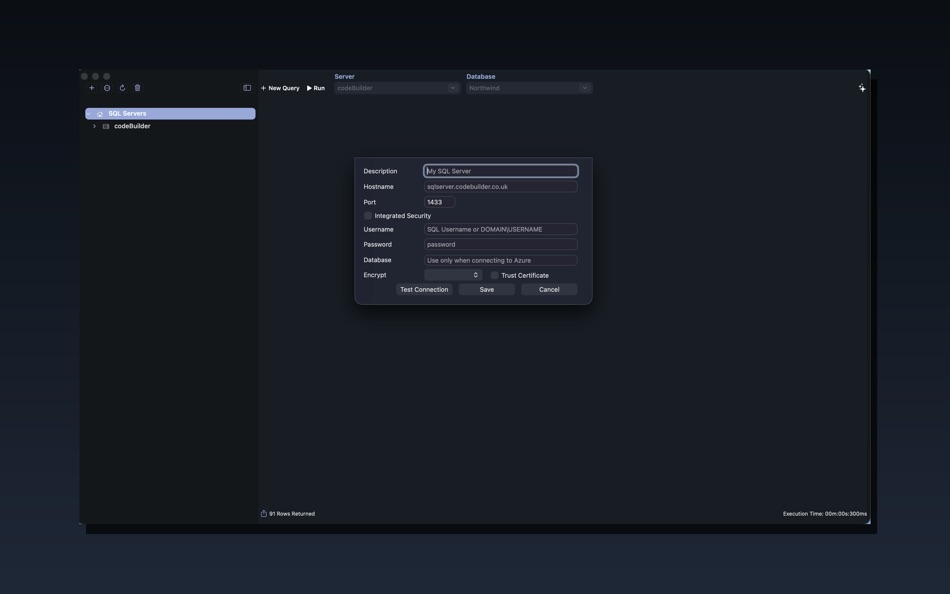
• Secure encrypted connections
• Flexible SQL Server trust configuration
• Integrated and Kerberos authentication support
• Efficient connection behaviour aligned with query execution
Fully compatible with:
• Microsoft SQL Server
• Azure SQL Database
• Azure SQL Managed Instance
Native macOS Experience
SQL Studio embraces macOS behaviours and ecosystem features:
• Fullscreen and split-view support
• iCloud settings sync across devices
• Refined toolbar and layout interactions
• Clean, distraction-free interface
Ad
Screenshots
Price History
- Current price: $24.99
- Minimum: $4.99
- Maximum: $24.99
Track prices
Additional Information
- Release Date:
- Category:
macOS Apps›Developer Tools - OS:
macOS,macOS 12.4 and up - Size:
4 Mb - Supported Languages:
English - Content Rating:
4+ - Mac App Store Rating:
0
Developer
- codeBuilder
- Platforms: iOS Games (1) macOS Apps (1)
- Lists: 0 + 0
- Points: 0 + 0 ¡
- Rankings: 0
- Comments: 0
- Deals: 0
- Videos: 0
- RSS: Subscribe
Lists (0)
0 ☹️
- SQL Studio
Points (0)
0 ☹️
Rankings (0)
0 ☹️
Comments (0)
Be the first to comment 🌟
«SQL Studio» is a Developer Tools app for macOS, developed by «codeBuilder». It was first released on and last updated on . The lowest historical price was $4.99 on , and the highest was $24.99 on . This app has not yet received any ratings on AppAgg. Available languages: English. AppAgg continuously tracks the price history, ratings, and user feedback for «SQL Studio». Subscribe to this app or follow its RSS feed to get notified about future deals or updates. AppAgg does not host applications or distribute software. All trademarks, logos and screenshots belong to their respective owners.
SQL Studio Short URL: Copied!- 🌟 Share
- Mac App Store
Similar
-
- SQL Formatter – Query Editor
- macOS Apps: Developer Tools By: Moca LLC
- $2.99
- Lists: 0 0 0
- Points: 0 Version: 1.0.0 SQL Formatter is a lightweight macOS tool that instantly transforms messy SQL into clean, readable queries. KEY FEATURES: One-click SQL formatting with real-time preview Syntax ... ⥯
-
- CoreData Studio: SQLite Editor
- macOS Apps: Developer Tools By: Momentarium LLC
- $4.99
- Lists: 0 0 0
- Points: 0 Version: 2.0 The Ultimate Developer Tool for CoreData and SwiftData. CoreData Studio is a professional SQLite viewer, editor, and database inspector built specifically for Apple developers. Stop ... ⥯
-
- String Studio
- macOS Apps: Developer Tools By: 阿卜杜热伊木 阿卜杜力木
- Free
- Lists: 0 0 0
- Points: 0 Version: 1.0.0 String Studio is a modern internationalization string management tool designed specifically for macOS, helping Apple developers efficiently manage multilingual localization files for ... ⥯
-
- Database Studio
- macOS Apps: Developer Tools By: 腾 崔
- $3.99
- Lists: 0 0 0
- Points: 0 Version: 1.5.0 Database Studio let you design your data schema in the UI with inline editing experience, and 1-click to generate source code for you to maximize your development productivity. In ... ⥯
-
- SQLPro Studio
- macOS Apps: Developer Tools By: Hankinsoft Development Inc
- * Free
- Lists: 2 + 2 0 0
- Points: 6 Version: 2026.50 SQLPro Studio is the premium database management tool for Postgres, MySQL, Microsoft SQL Server and Oracle databases. Some of the great features include: + Intellisense/SQL ... ⥯
-
- Valentina Studio
- macOS Apps: Developer Tools By: Paradigma Software
- * Free
- Lists: 0 + 1 0 0
- Points: 2 Version: 17.2 100% Free - The Best Database Management GUI for DuckDB, SQLite, MS SQL Server, MariaDB, MongoDB, MySQL, PostgreSQL and Valentina databases Valentina Studio brings you powerful, visual ⥯
-
- InsertSmith: TSV to SQL Insert
- macOS Apps: Developer Tools By: Jesse Benjamin
- $4.99
- Lists: 0 0 0
- Points: 0 Version: 1.0 What it does: Paste TSV data (from SSMS, Azure Data Studio, Excel, or any export), enter your destination table name, and get clean SQL INSERT statements with proper escaping, type ... ⥯
-
- Navicat 17 for SQL Server
- macOS Apps: Developer Tools By: PremiumSoft CyberTech Ltd.
- * Free
- Lists: 0 0 0
- Points: 1 Version: 17.3.10 Navicat for SQL Server offers a fully graphical approach to efficient database management. It enables quick creation, editing, and deletion of database objects, along with the ... ⥯
- New
- CSV Studio
- macOS Apps: Developer Tools By: Patrick Lindborg
- $4.99
- Lists: 0 0 0
- Points: 0 Version: 1.0 CSV Studio is a powerful yet focused data editor built exclusively for macOS. Whether you're cleaning up exported reports, preparing data for a database, or sharing tables with ... ⥯
-
- HY SQL Query
- macOS Apps: Developer Tools By: HY System CO. Limited
- Free
- Lists: 0 0 0
- Points: 0 Version: 1.6.1 This simple Tools is for connect Database system to submit SQL Query and export the Result set to Excel file The below Database System: Microsoft SQL Server Microsoft Azure SQL Server ... ⥯
-
- Master Coder - Terminal Studio
- macOS Apps: Developer Tools By: SECKIN SEFA DURASI
- $1.99
- Lists: 0 0 0
- Points: 0 Version: 4.0 Master Coder - Terminal Studio is the most powerful and customizable terminal application for macOS. Built for developers and designers who demand the best. KEY FEATURES: - Multi-Tab ... ⥯
-
- Localizer Studio
- macOS Apps: Developer Tools By: Mohamed Amine souiden
- * $1.99
- Lists: 0 + 1 0 0
- Points: 3 Version: 1.2 Localizer Studio is your powerful, developer-first tool for extracting, managing, and translating localization keys in Swift and SwiftUI projects. Designed to streamline the ... ⥯
-
- Particle Creator Studio
- macOS Apps: Developer Tools By: Fifth Battery, LLC
- * Free
- Lists: 0 + 1 0 0
- Points: 2 Version: 1.5 Transform your visual effects from ordinary to extraordinary with Particle Creator Studio. Built specifically for Cocos2d and Axmol developers but flexible enough to power any creative ⥯
-
- VibeCode Studio
- macOS Apps: Developer Tools By: Tomas Klinger
- $0.99
- Lists: 0 0 0
- Points: 0 Version: 1.01 # Supercharge Your AI Coding Workflow VibeCode Studio is the essential tool for Swift developers working with AI language models. In large codebases, pasting your entire project wastes ⥯