
已儲存
選擇要顯示在你的已儲存選單中的名稱。
完成!
| 開發人員: | codeBuilder (2) | ||
| 價錢: | $24.99 | ||
| 評價: | 770 白銀 | ||
| 排名: | 0 | ||
| 註釋: | 0 發表評論 | ||
| 清單: | 0 + 0 | ||
| 點數: | 0 + 0 ¡ | ||
| +1 點數 | |||
描述

SQL Studio is a fast, thoughtfully designed database client created specifically for Microsoft SQL Server and Azure SQL on macOS. Version 2.0 introduces intelligent editing, integrated AI assistance, and powerful workflow enhancements that help you write, explore, and optimise SQL with clarity and speed.
Built as a fully native Mac application, SQL Studio combines macOS design with professional-grade database tooling.
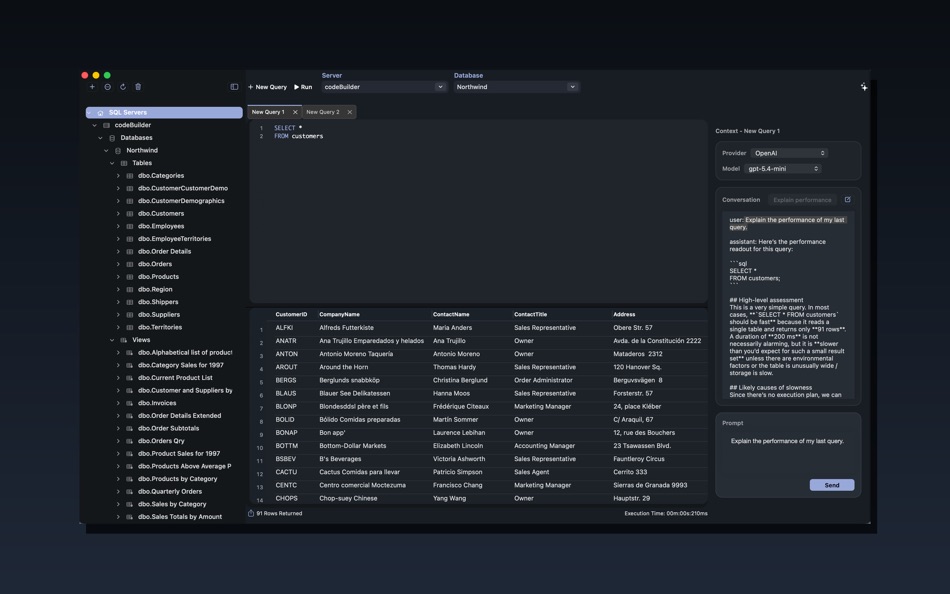
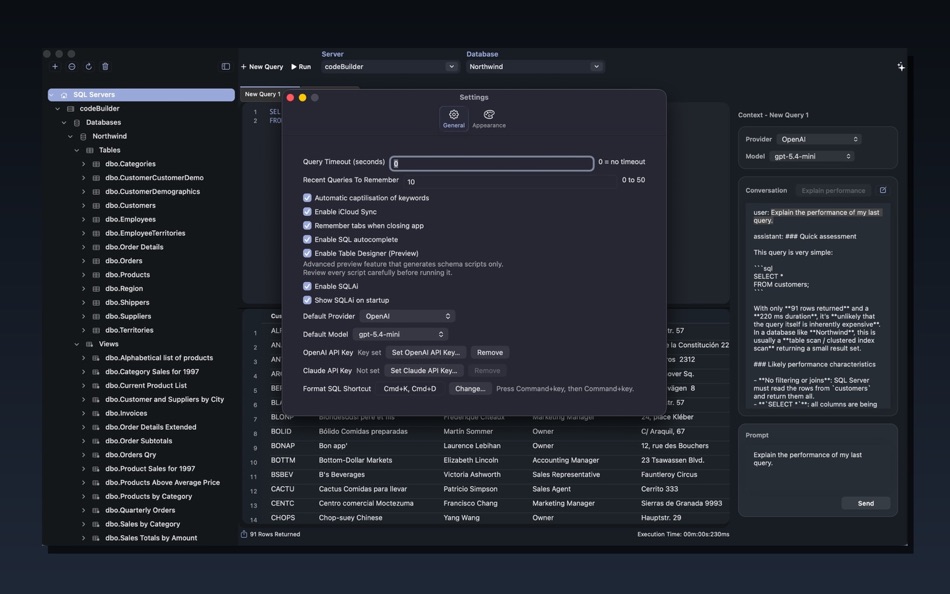
SQLAi — AI Assistance for SQL Server
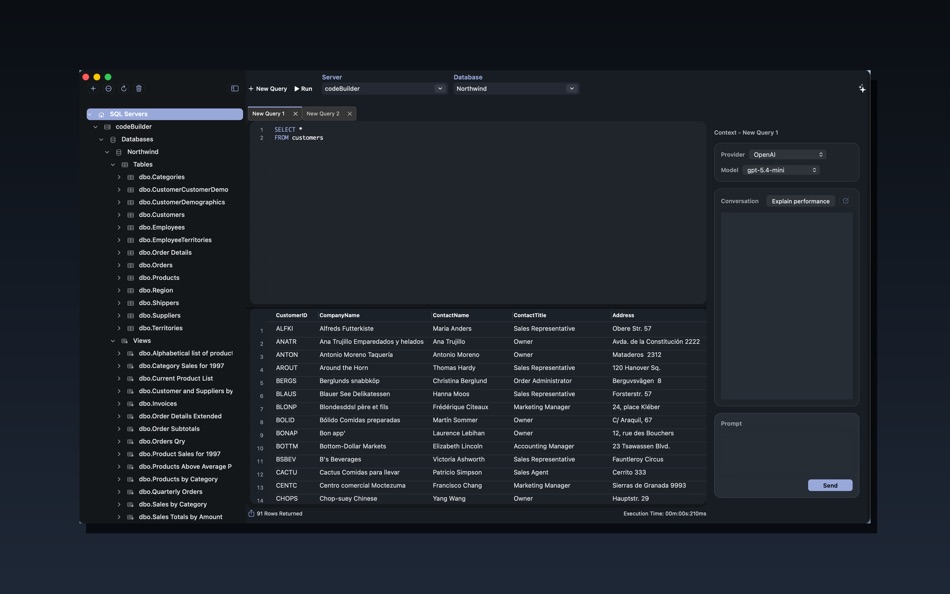
SQL Studio 2.0 introduces SQLAi, an integrated assistant designed around real SQL Server workflows.
SQLAi works directly alongside your queries to help analyse intent, explain performance, and accelerate development without leaving the editor.
Key capabilities:
• Support for OpenAI and Claude models
• Streaming responses for real-time interaction
• Dedicated AI sidebar experience
• One-click Explain Performance
• Clear controls over when AI is active
Bring Your Own Key (BYOK):
SQL Studio does not provide or proxy AI access. You connect your own AI provider accounts using your own API keys, giving you full control over usage, costs, and data handling.
Intelligent SQL Autocomplete
A brand-new autocomplete engine built specifically for Microsoft SQL Server development.
• Context-aware suggestions within the query editor
• Schema-aware completion behaviour
• Fast, predictable suggestions designed for SQL workflows
• Focused assistance that stays out of your way while typing
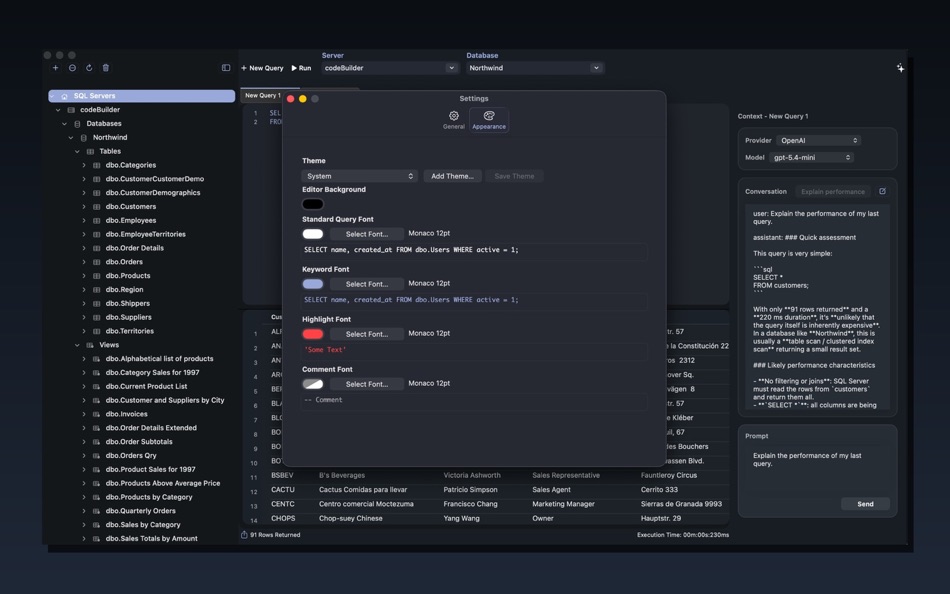
Theme Support
SQL Studio now adapts to your preferred working environment.
• Built-in theme support
• Refined SQL syntax highlighting
• Carefully tuned fonts and comment styling
• Designed for long development sessions
Designed for Everyday SQL Productivity
SQL Studio 2.0 enhances the complete query workflow.
Editing and Formatting:
• Consistent SQL formatting and alignment
• Selection-aware indentation
• Quick formatting shortcuts
Flexible Tab Workflow:
• Drag-and-drop tab reordering
• Persistent workspaces between launches
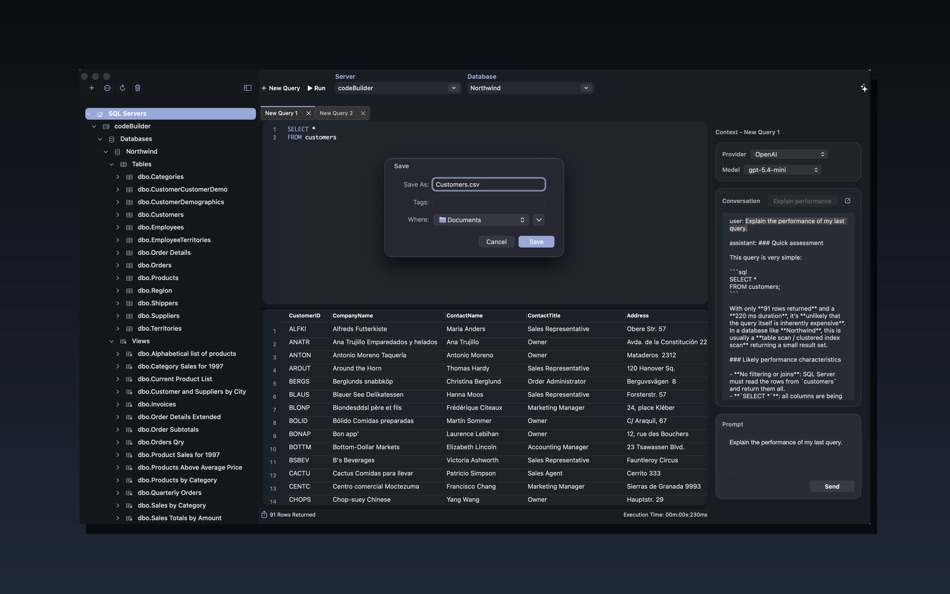
• Open saved queries in dedicated tabs
• Streamlined tab management
Built for Modern SQL Server Environments
Designed for professional and cloud-connected deployments:
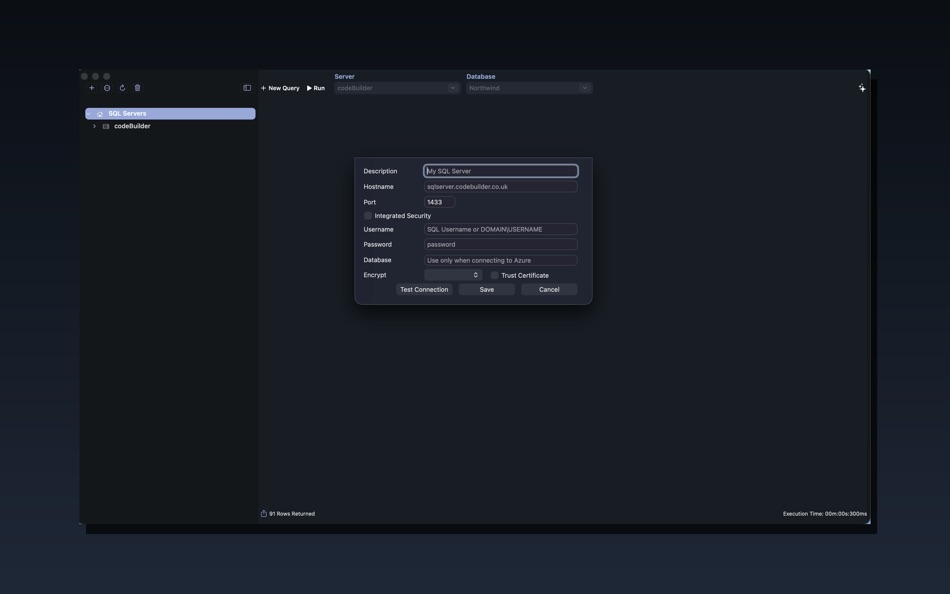
• Secure encrypted connections
• Flexible SQL Server trust configuration
• Integrated and Kerberos authentication support
• Efficient connection behaviour aligned with query execution
Fully compatible with:
• Microsoft SQL Server
• Azure SQL Database
• Azure SQL Managed Instance
Native macOS Experience
SQL Studio embraces macOS behaviours and ecosystem features:
• Fullscreen and split-view support
• iCloud settings sync across devices
• Refined toolbar and layout interactions
• Clean, distraction-free interface
螢幕擷取畫面
Ad
價格歷史
- 目前價格: $24.99
- 最小值: $4.99
- 最大值: $24.99
追蹤票價
AppAgg 評價
770
AppAgg 預估評價:
SQL Studio
770 白銀
評價越高,通常代表在 AppAgg 上的信號越強。
基於: 人氣 · 使用者評分 · 新鮮度 · 優惠 · 商店資料 · 社群活躍度
根據最新 AppAgg 資料每日重新計算。
縮短網址: 已複製!
其他資訊
- 發行日期:
- 類別 :
macOS 應用程式›工具 - OS:
macOS,macOS 12.4 以上版本 - 大小:
4 Mb - 支援的語言 :
English - 內容分級:
4+ - Mac App Store 評分:
0
開發人員
- codeBuilder
- 平台: iOS 遊戲 (1) macOS 應用程式 (1)
- 清單: 0 + 0
- 點數: 0 + 0 ¡
- 排名: 0
- 註釋: 0
- 折扣: 0
- 影片: 0
- RSS: 訂閱
清單 (0)
0
- SQL Studio
點數 (0)
0
排名 (0)
0
註釋 (0)
成為第一個發表評論的人
簡要
SQL Studio 縮短網址: 已複製!- 分享
- Mac App Store
«SQL Studio». 平台: macOS. 類別: 工具. 開發商: «codeBuilder». 首次發布: . 最後更新: . 目前價格: $24.99. 最低記錄價格: $4.99 (). 最高記錄價格: $24.99 (). 此項目尚未在 AppAgg 上獲得評分或評論。 可用語言: English. AppAgg 會追蹤 «SQL Studio»的價格歷史、評分和用戶回饋。 AppAgg 不託管應用程式或分發軟體。 所有商標、標誌和螢幕截圖均屬於其各自所有者。 關注未來折扣和更新: RSS
類似
-
- SQL Formatter – Query Editor
- macOS 應用程式: 工具 由: Moca LLC
- $2.99
- 清單: 0 0 0
- 點數: 0 + 0 560 · 青銅 版本: 1.0.2 SQL Formatter is a lightweight macOS tool that instantly transforms messy SQL into clean, readable queries. KEY FEATURES: One-click SQL formatting with real-time preview Syntax ...
-
- CoreData Studio: SQLite Editor
- macOS 應用程式: 工具 由: Momentarium LLC
- $4.99
- 清單: 0 0 0
- 點數: 0 + 0 1K · 白銀 版本: 2.0 The Ultimate Developer Tool for CoreData and SwiftData. CoreData Studio is a professional SQLite viewer, editor, and database inspector built specifically for Apple developers. Stop ...
-
- String Studio
- macOS 應用程式: 工具 由: 阿卜杜热伊木 阿卜杜力木
- 免費
- 清單: 0 0 0
- 點數: 0 + 0 580 · 青銅 版本: 1.0.0 String Studio is a modern internationalization string management tool designed specifically for macOS, helping Apple developers efficiently manage multilingual localization files for ...
-
- SQLPro Studio
- macOS 應用程式: 工具 由: Hankinsoft Development Inc
- * 免費
- 清單: 2 + 2 0 0
- 點數: 6 + 0 8K · 白金 版本: 2026.90 SQLPro Studio is the premium database management tool for Postgres, MySQL, Microsoft SQL Server and Oracle databases. Some of the great features include: + Intellisense/SQL ...
-
- Valentina Studio
- macOS 應用程式: 工具 由: Paradigma Software
- * 免費
- 清單: 0 + 1 0 0
- 點數: 2 + 0 5K · 白金 版本: 17.2 100% Free - The Best Database Management GUI for DuckDB, SQLite, MS SQL Server, MariaDB, MongoDB, MySQL, PostgreSQL and Valentina databases Valentina Studio brings you powerful, visual
-
- InsertSmith: TSV to SQL Insert
- macOS 應用程式: 工具 由: Jesse Benjamin
- $4.99
- 清單: 0 0 0
- 點數: 0 + 0 580 · 青銅 版本: 1.0 What it does: Paste TSV data (from SSMS, Azure Data Studio, Excel, or any export), enter your destination table name, and get clean SQL INSERT statements with proper escaping, type ...
-
- Navicat 17 for SQL Server
- macOS 應用程式: 工具 由: PremiumSoft CyberTech Ltd.
- * 免費
- 清單: 0 0 0
- 點數: 1 + 0 1K · 黃金 版本: 17.3.11 Navicat for SQL Server offers a fully graphical approach to efficient database management. It enables quick creation, editing, and deletion of database objects, along with the ...
- -60%
- CSV Studio
- macOS 應用程式: 工具 由: Patrick Lindborg
- ▼ $1.99
$4.99-60% - 清單: 0 0 0
- 點數: 0 + 0 590 · 青銅 版本: 1.0 CSV Studio is a powerful yet focused data editor built exclusively for macOS. Whether you're cleaning up exported reports, preparing data for a database, or sharing tables with ...
-
- HY SQL Query
- macOS 應用程式: 工具 由: HY System CO. Limited
- 免費
- 清單: 0 0 0
- 點數: 0 + 0 530 · 青銅 版本: 1.6.1 This simple Tools is for connect Database system to submit SQL Query and export the Result set to Excel file The below Database System: Microsoft SQL Server Microsoft Azure SQL Server ...
-
- Master Coder - Terminal Studio
- macOS 應用程式: 工具 由: SECKIN SEFA DURASI
- $1.99
- 清單: 0 0 0
- 點數: 0 + 0 590 · 青銅 版本: 4.0 Master Coder - Terminal Studio is the most powerful and customizable terminal application for macOS. Built for developers and designers who demand the best. KEY FEATURES: - Multi-Tab ...
- 全新
- AI Developer Studio
- macOS 應用程式: 工具 由: 22of8 GmbH
- $9.99
- 清單: 0 0 0
- 點數: 0 + 0 590 · 青銅 版本: 1.0 AI Developer Studio Create your Apple Intelligence foundation-model query in minutes * Experiment and try out your ideas: just by playing around, you ll get lots of inspiration for new
- -100%
- AppLaunch Wizard — ASO Studio
- macOS 應用程式: 工具 由: UNICGLOBAL ENGINEERING LTD
- ▼ * 免費
$19.99-100% - 清單: 0 + 1 0 0
- 點數: 5 + 0 7K · 白金 版本: 1.2.0 Transform your app publishing workflow with AppLaunch Wizard, the revolutionary AI-powered macOS studio that automates every aspect of App Store publishing and optimization. Stop ...
- -100%
- VibeCode Studio
- macOS 應用程式: 工具 由: Tomas Klinger
- ▼ 免費
$0.99-100% - 清單: 0 + 1 0 0
- 點數: 3 + 0 1K · 黃金 版本: 2.0 # Supercharge Your AI Coding Workflow VibeCode Studio is the essential tool for Swift developers working with AI language models. In large codebases, pasting your entire project wastes
-
- Localizer Studio
- macOS 應用程式: 工具 由: Mohamed Amine souiden
- * $1.99
- 清單: 0 + 1 0 0
- 點數: 3 + 0 1K · 黃金 版本: 1.2 Localizer Studio is your powerful, developer-first tool for extracting, managing, and translating localization keys in Swift and SwiftUI projects. Designed to streamline the ...