
| Entwickler: | Beijing Lucky Journey Technology Co., Ltd (4) | ||
| Preis: | Kostenlos | ||
| Klassifizierungen: | 0 | ||
| Rezensionen: | 0 Rezension schreiben | ||
| Listen: | 0 + 0 | ||
| Punkte: | 1 + 0 ¡ | ||
| Mac App Store | |||
Beschreibung

Whether performing deep maintenance at a Mac workstation or checking server status and handling urgent tasks via iPhone or iPad, SSHTool keeps your workflow seamless across devices.
【Core Features】
▸ SSH Terminal
• Native SSH terminal with smooth and stable command-line interaction
• Multi-session management for easy switching between servers
• Supports common terminal themes and color schemes for clarity
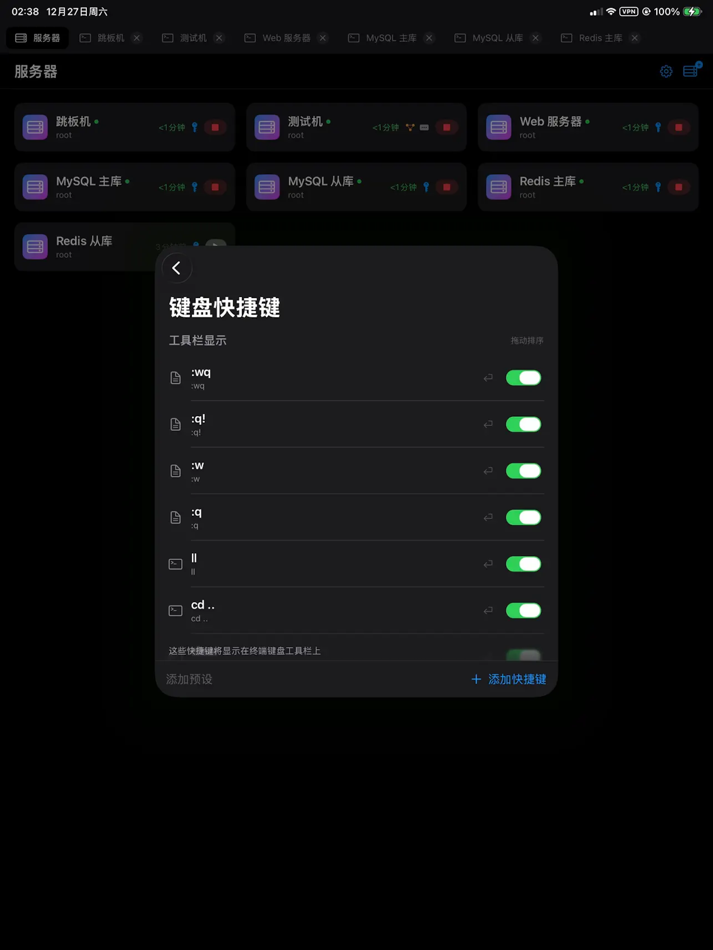
• Touch-optimized input on iPhone and iPad for efficient mobile use
▸ SFTP File Management
• Intuitive file browsing for quick remote directory viewing
• Upload, download, and basic file management supported
• Reliable transfer mechanism ensures stable file operations
• Larger file management view available on iPad
▸ Connection Management
• Unified server management with grouping and quick access
• Supports password and SSH key authentication
• Consistent connection configuration across devices
▸ Security
• All connection data stored locally with encryption
• Secure SSH key management — never uploaded or exposed
• App-level access protection against unauthorized use
▸ Cross-Platform Experience
• macOS: Native desktop experience for long-term maintenance and development
• iPhone / iPad: Access servers anytime, handle urgent tasks anywhere
• Unified design language and workflow to reduce learning cost
【Use Cases】
• Remote deployment, debugging, and maintenance for web developers
• Daily server administration for system operators
• Remote task execution and log viewing for data engineers
• Professionals needing mobile server access
SSHTool is built natively with Swift and deeply optimized for Apple platforms, delivering consistent, reliable, and high-performance SSH usage across devices, freeing server management from device constraints.
Screenshots



Neue Funktionen
- Version: 1.0.8
- Aktualisiert:
- 1. Added import for local keys and SSH config
2. More operational detail optimizations
Feel free to contact the developer via the in-app message board in Settings. Your ideas are highly valued.
Preis
- Heute: Kostenlos
- Mindestens: Kostenlos
- Maximale: Kostenlos
Preise beobachten
Entwickler
- Beijing Lucky Journey Technology Co., Ltd
- Plattformen: iOS Apps (1) macOS Apps (3)
- Listen: 0 + 0
- Punkte: 1 + 0 ¡
- Klassifizierungen: 0
- Rezensionen: 0
- Rabatte: 0
- Videos: 0
- RSS: Abonnieren
Punkte
-

- 1,106 眰恦(眰恦)
- +1

Klassifizierungen
0 ☹️
Listen
0 ☹️
- SSH&SFTP Tool
Rezensionen
Schreiben Sie die erste Bewertung 🌟
Weitere informationen
- Version: 1.0.8
- Kategorie:
macOS Apps›Entwickler-Tools - Betriebssysteme:
iPad,iPhone,macOS,macOS 17.0 oder höher - Größe:
12 Mb - Unterstützte Sprachen:
Chinese,English,Japanese,Korean - Altersfreigabe:
4+ - Mac App Store Bewertung:
0 - Aktualisiert:
- Veröffentlichungsdatum:
Kontakte
- Webseite:
 https://www.sshtool.com/
SSH&SFTP Tool Kurz-URL: Kopiert!- 🌟 Teilen
- Mac App Store
Das könnte Ihnen auch gefallen
-
- NaviTerm - SSH,SFTP,Tunnels
- macOS Apps: Entwickler-Tools Von: Wuhan Trivix Technology Co., Ltd
- Kostenlos
- Listen: 0 + 0 Klassifizierungen: 0 Rezensionen: 0
- Punkte: 0 + 0 Version: 2.6.0 NaviTerm - The professional SSH client designed to automate your server management. Featuring a powerful SSH terminal, SFTP file manager, port forwarding, automation tasks, and command ⥯
-
- PortX - SSH, SFTP Client
- macOS Apps: Entwickler-Tools Von: NetSarang Computer, Inc.
- Kostenlos
- Listen: 2 + 1 Klassifizierungen: 0 Rezensionen: 0
- Punkte: 6 + 17 (3.8) Version: 2.0.8 PortX Mobile brings the power of our desktop SSH Client to your mobile device (SFTP is currently available on the Desktop version only, but will be supported on Mobile soon). With a ... ⥯
-
- TermBean - SSH SFTP Client
- macOS Apps: Entwickler-Tools Von: 北京如电科技有限公司
- * Kostenlos
- Listen: 0 + 0 Klassifizierungen: 0 Rezensionen: 0
- Punkte: 2 + 4 (3.0) Version: 2.3.1 TermBean is a small, professional and free SSH client, developed natively for the Apple platform, with a low resource footprint, fast and smooth startup, security and simplicity to ... ⥯
-
- QuickDeploy: SSH SFTP with Ai
- macOS Apps: Entwickler-Tools Von: Lightning Network
- * Kostenlos
- Listen: 0 + 0 Klassifizierungen: 0 Rezensionen: 0
- Punkte: 0 + 0 Version: 11 Q: There are already so many tools on the market why do I still need this one? A: It s purpose-built to solve the one-to-many pain point: run commands across multiple servers with one ... ⥯
-
- SSH Client - Terminal, Telnet
- macOS Apps: Entwickler-Tools Von: Moon Technolabs Pvt Ltd
- Kostenlos
- Listen: 1 + 2 Klassifizierungen: 0 Rezensionen: 0
- Punkte: 5 + 393 (3.5) Version: 4.9.4 Here is one of the most intelligent & advanced SSH Client apps to manage and connect remote servers for your iOS and Mac devices About SSH Client: SSH Client is an on-the-go SSH-Telnet ⥯
-
- SSH Copy
- macOS Apps: Entwickler-Tools Von: Codinn Technologies
- $9.99
- Listen: 0 + 0 Klassifizierungen: 0 Rezensionen: 0
- Punkte: 0 + 0 Version: 17.03.1 SSH Copy is an intuitive SFTP (Secure File Transfer Protocol) client lets you manage remote files as in Finder. Notable Features: - Uploading / downloading your remote files or folders ⥯
-
- SSH Tunnel Menu
- macOS Apps: Entwickler-Tools Von: Henry Schober
- $0.99
- Listen: 0 + 0 Klassifizierungen: 0 Rezensionen: 0
- Punkte: 0 + 0 Version: 1.2 SSH Tunnel Menu simplifies the management of secure SSH tunnels directly from your macOS menu bar. Perfect for developers, system administrators, and anyone who regularly connects to ... ⥯
-
- SSH Key Wallet
- macOS Apps: Entwickler-Tools Von: Keisuke Chinone
- $1.49
- Listen: 0 + 0 Klassifizierungen: 0 Rezensionen: 0
- Punkte: 0 + 0 Version: 1.1 SSH Key Wallet is the easiest way to manage SSH encryption keys and SSH Config files in ~/.ssh/ based on OpenSSH. There is no need to use a terminal-based command line tool to manage ... ⥯
-
- SSH Proxy: Tunnel Forwarding
- macOS Apps: Entwickler-Tools Von: Shenyang Yuzu Technology Co., Ltd
- $0.99
- Listen: 0 + 0 Klassifizierungen: 0 Rezensionen: 0
- Punkte: 0 + 0 Version: 1.5 SSH Proxy is a macOS status bar application for port forwarding through SSH tunnels. Main Features: - Supports local and remote port forwarding. Local forwarding maps a remote server ... ⥯
-
- SSH VPN - Port Forwarding
- macOS Apps: Entwickler-Tools Von: Hexa Software
- * Kostenlos
- Listen: 0 + 0 Klassifizierungen: 0 Rezensionen: 0
- Punkte: 0 + 18 (3.4) Version: 2.6 SSH VPN is a VPN app that can tunnel SSH via DNS with UDP Gateway (UDPGW) support And Port Forwarding. Simple and Easy Tunneling VPN with our VPN Client App. Features: - Port ... ⥯
-
- SSH Client - Secure ShellFish
- macOS Apps: Entwickler-Tools Von: Anders Borum
- Kostenlos
- Listen: 4 + 2 Klassifizierungen: 0 Rezensionen: 0
- Punkte: 12 + 1,217 (4.8) Version: 2026.5 Lightning fast SSH terminal with remote file access. No other app fuses your SSH servers and iOS devices as well as Secure ShellFish. Tap Get and see for yourself. Terminal supports ... ⥯
-
- SSH Config Editor
- macOS Apps: Entwickler-Tools Von: Petr Hejkal
- $9.99
- Listen: 1 + 0 Klassifizierungen: 0 Rezensionen: 0
- Punkte: 1 + 0 Version: 2.6.10 Handy tool for manage your OpenSSH ssh client configuration file. You can add or edit identity files, port forwardings (with graphical preview) and any other ssh config option. ... ⥯
-
- termcc - SSH & SFTP Client
- macOS Apps: Entwickler-Tools Von: 云海 赵
- * Kostenlos
- Listen: 0 + 0 Klassifizierungen: 0 Rezensionen: 0
- Punkte: 1 + 0 Version: 4.1.0 专业版权益说明 购买专业版授权后 您将解锁 termcc 全部功能 可以获得无限制数量的SSH连接、服务器指标监控、以及享受未来termcc推出的全部专业版功能 专业版自动续费说明 订阅周期 1个月(连续包月产品)、1年(连续包年产品)。 订阅价格 连续包月产品 6元/月、连续包年产品 48元/年。 付款 用户确认订阅并付款后记入iTunes账户。 ... ⥯
-
- TxThinking SSH
- macOS Apps: Entwickler-Tools Von: TxThinking, Inc.
- $19.99
- Listen: 0 + 0 Klassifizierungen: 0 Rezensionen: 0
- Punkte: 0 + 3 (4.7) Version: 20240201.0.0 A SSH Terminal. [Just make a one-time purchase, and you can download it on your iPhone, iPad, and macOS devices!] - Manage multiple servers - Supports opening multiple SSH sessions ... ⥯