
| Udvikler: | Lyzer UG (haftungsbeschränkt) (1) | ||
| Pris: | * Gratis | ||
| Rangeringer: | 0 | ||
| Anmeldelser: | 0 Skriv en anmeldelse | ||
| Lister: | 0 + 0 | ||
| Point: | 1 + 0 ¡ | ||
| Mac App Store | |||
Beskrivelse

Features of Sw!ftalyzer:
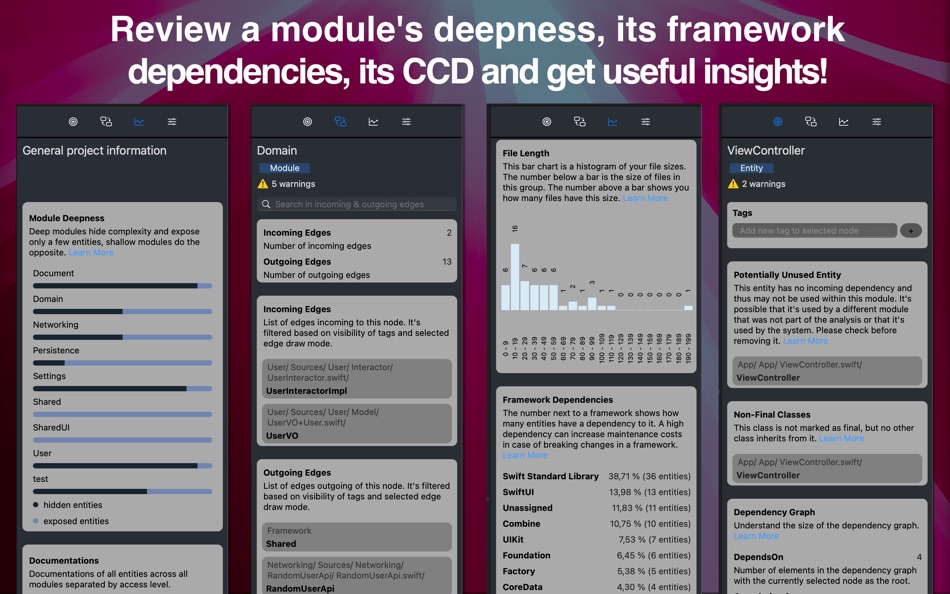
- Understand your project better with architecture metrics like Module Deepness, Instability, Framework Dependency and Cumulative Component Dependency.
- Find common problems in your project like unused classes and files that are shared between modules via shared target memberships.
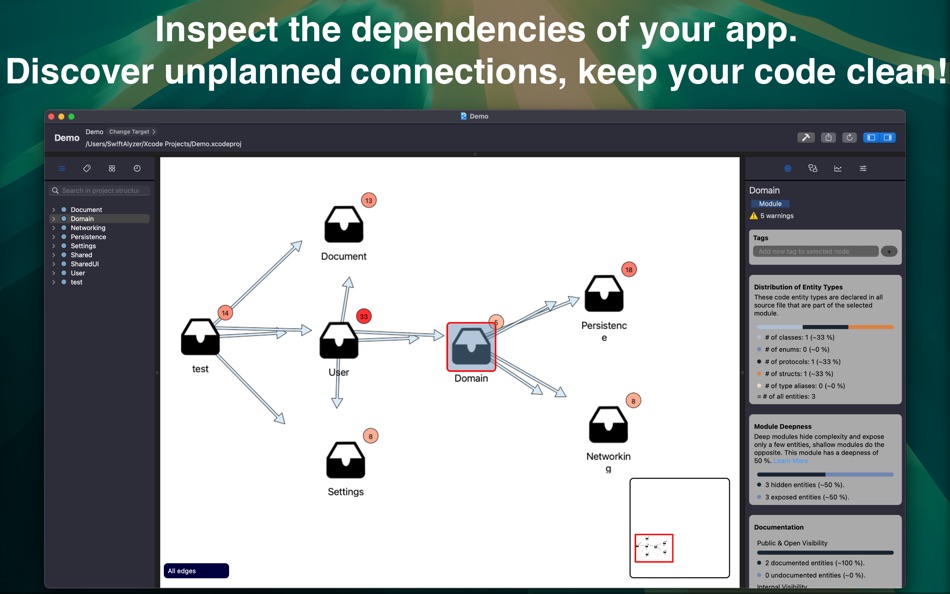
- See the connections between your classes, structs, protocols and enums in an interactive hierarchical dependency graph.
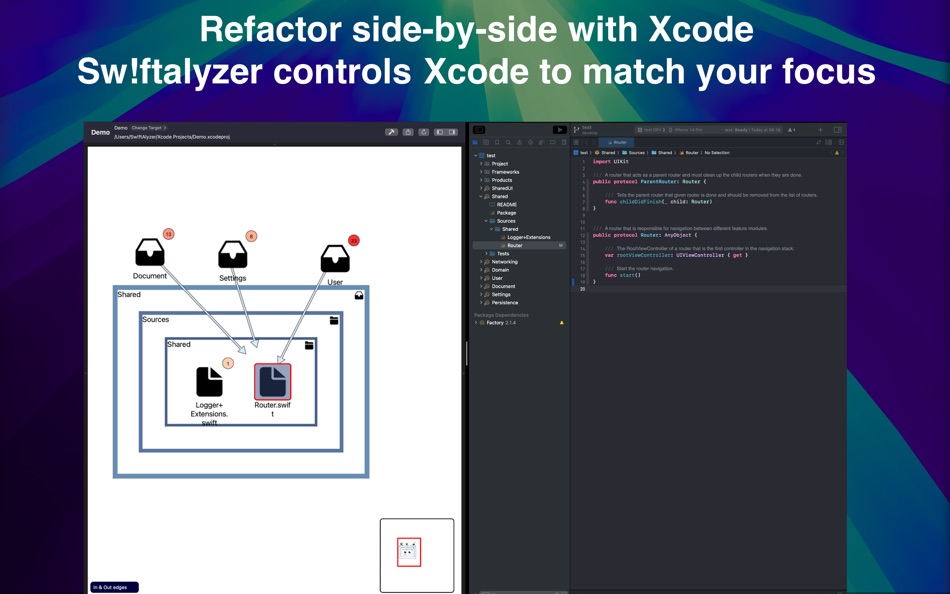
- Refactor side by side with Xcode. Sw!ftalyzer opens each file that you select in Xcode.
- Configure the graph with Tags, RegEx Filters and more to effectively navigate your project.
- Sw!ftalyzer runs in the sandbox without any network privileges so your source code stays with you.
To use Sw!ftalyzer, a paid subscription is needed.
Terms of Use: https://www.apple.com/legal/internet-services/itunes/dev/stdeula/
Privacy Policy: https://swiftalyzer.com/privacy-policy/
Ad
Skærmbilleder
Nyheder
- Version: 1.6.0
- Opdateret:
- Get detailed insights into the progress of metric and statistic calculations:
After your project is analyzed, additional information is calculated in the background, indicated by a banner. This banner now includes a "Show Progress" button, which displays which metrics and statistics are currently being calculated and how far along the process is.
Easily expand a module, group, or source file node and all its subnodes to view all entities at once:
The context menu shown when right-clicking a hierarchy node now includes an "Expand all subnodes" option. Instead of manually opening each node one by one, this option expands all nested nodes at once, making all entity nodes visible immediately.
Pris
-
* Indkøb i appen - I dag: Gratis
- Minimum: Gratis
- Maksimalt: Gratis
Overvåg priser
Ad
Udvikler
- Lyzer UG (haftungsbeschränkt)
- Platforme: macOS Apps (1)
- Lister: 0 + 0
- Point: 1 + 0 ¡
- Rangeringer: 0
- Anmeldelser: 0
- Rabatter: 0
- Videoer: 0
- RSS: Abonner
Point
-

- 724 Erin
- +1

Rangeringer
0 ☹️
Lister
0 ☹️
- Sw!ftalyzer
Anmeldelser
Vær den første til at gennemgå 🌟
Yderligere oplysninger
- Version: 1.6.0
- Kategori:
macOS Apps›Værktøjer - Operativsystem:
macOS,macOS 12.0 eller nyere - Størrelse:
13 Mb - Understøttet sprog:
English - Indholdsklassificering:
4+ - Mac App Store Bedømmelse:
0 - Opdateret:
- Udgivelsesdato:
Sw!ftalyzer Kort webadresse: Kopieret!- 🌟 Del
- Mac App Store
Du vil måske også kunne lide
-
- Crypto Web Extension
- macOS Apps: Produktivitet Ved: TESCO SW a.s.
- Gratis
- Lister: 0 + 0 Rangeringer: 0 Anmeldelser: 0
- Point: 1 + 0 Version: 26.3 The extension provides communication with client native application (https://download.tescosw.cz/crypto/), which does the cryptographic operations (digital signature, encryption) using ⥯
-
- SmartWorking - Desktop
- macOS Apps: Produktivitet Ved: Paul Demangeat
- Gratis
- Lister: 0 + 0 Rangeringer: 0 Anmeldelser: 0
- Point: 0 + 0 Version: 1.9 SmartWorking L application de productivité ultime 100% hors ligne pour macOS SmartWorking est l outil tout-en-un conçu pour transformer votre façon de travailler, d apprendre et de ... ⥯
-
- Shellcut - Open in Terminal
- macOS Apps: Værktøjer Ved: Leon Boettger
- Gratis
- Lister: 0 + 1 Rangeringer: 0 Anmeldelser: 0
- Point: 8 + 0 Version: 1.5 Shellcut lets you open a new Terminal window directly from Finder, with the working directory set to the folder currently displayed in the Finder window. Shellcut supports Apple's ... ⥯
-
- DWG Tools - View & Convert DWG
- macOS Apps: Grafik & Design Ved: 沦 彭
- * Gratis
- Lister: 1 + 0 Rangeringer: 0 Anmeldelser: 0
- Point: 0 + 0 Version: 6.1 DWG Tools is a tool kit which integrates the common functions of CAD. For example, view and print CAD files(free of .dxf and .dwg files within 300K), import other vector graphics, ... ⥯
-
- New Terminal Here
- macOS Apps: Værktøjer Ved: 兰桂 吴
- $1.99
- Lister: 0 + 0 Rangeringer: 0 Anmeldelser: 0
- Point: 1 + 0 Version: 1.4.2 New Terminal Here allows you to open the current Finder folder in Terminal / iTerm2 / Hyper / kitty / Warp / Ghostty via the right-click context menu / toolbar item. New Terminal Here ... ⥯
-
- Faster AI Speech Studio
- macOS Apps: Hjælpeprogrammer Ved: SCORPIOX, INC LIMITED
- $2.99
- Lister: 0 + 0 Rangeringer: 0 Anmeldelser: 0
- Point: 0 + 0 Version: 1.0 Unleash the sonic boom of Faster AI Speech Studio, the pinnacle of voice-over and cloning technology designed for hyper-speed audio production on Apple Silicon. Experience the power of ⥯