
| 개발자: | Quantum Quinn (2) | ||
| 가격: | 무료 | ||
| 순위: | 0 | ||
| 리뷰: | 0 리뷰 작성 | ||
| 목록: | 1 + 0 | ||
| 포인트: | 1 + 0 ¡ | ||
| Mac App Store | |||
기술

Features added to the editor:
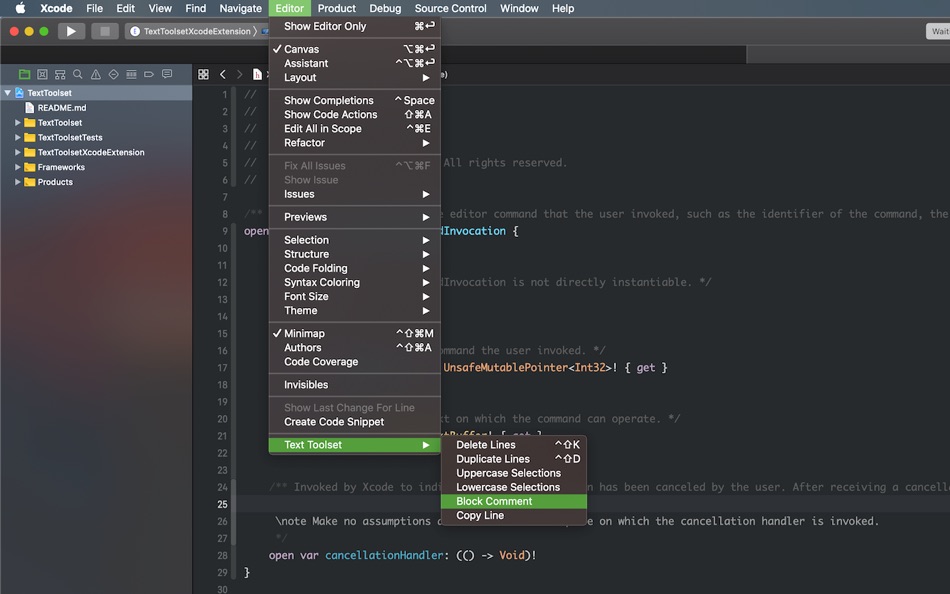
• Add Carets at Start of Selected Lines — Places a caret in front the first character on each selected line
• Toggle Block Comment — Wrap/unwrap selection with /* ... */
• Copy Line — Copy the current line without selecting
• Duplicate Lines — Duplicate the selected lines
• Delete Lines — Delete the current line or selected lines
• Remove Empty Lines — Strip blank lines from the selection
• Uppercase Selection — Convert selections to UPPERCASE
• Lowercase Selection — Convert selections to lowercase
• Prettify JSON — Format selected JSON with indentation
• Compact JSON — Minify selected JSON by removing whitespace
Suggested shortcuts (assign your own in Xcode):
- Toggle Block Comment: cmd+ctrl+/
- Duplicate Lines: ctrl+shift+D
- Delete Lines: ctrl+shift+K
Add your own keyboard shortcuts in Xcode > Settings > Key Bindings. Search for “Text Toolset”.
How to use:
In Xcode, place the cursor in a source editor.
Open Editor > Text Toolset and choose a command.
Enable the extension:
System Settings > Search “Extensions” > Xcode Source Editor and enable Text Toolset.
Compatibility:
- Xcode 15 or later
- Works with Swift, Objective‑C, C/C++, and other text-based files
Soli Deo gloria
스크린샷
새로운 기능
- 버전: 1.4
- 업데이트:
- - Add new tool: "Add Carets at Start of Selected Lines" - Which is a multi-line caret/cursor tool that inserts a caret in front the first character on each selected line
- Other minor enhancements
가격
- 오늘: 무료
- 최소: 무료
- 최대: 무료
가격 추적
개발자
- Quantum Quinn
- 플랫폼: macOS 앱 (2)
- 목록: 1 + 0
- 포인트: 2 + 0 ¡
- 순위: 0
- 리뷰: 0
- 할인: 0
- 동영상: 0
- RSS: 구독
포인트
-

- 3,040 바람처어럼
- +1

순위
0 ☹️

리뷰
첫 번째 리뷰를 남겨보세요 🌟
추가 정보
 https://www.quantumquinn.com/overview/text-toolset/Text Toolset 단축 URL: 복사됨!
- 🌟 공유하기
- Mac App Store
당신은 또한 같은 수 있습니다
-
- Text 2 HTML Converter
- macOS 앱: 개발자 도구 게시자: InSili.co
- $2.99
- 목록: 0 + 0 순위: 0 리뷰: 0
- 포인트: 0 + 0 버전: 1.2 Want to create an HTML page fast, from scratch, simply by giving the text you want to show up - without messing with HTML code at all? Then Text 2 HTML Converter is the right tool for ... ⥯
-
- Plane Text Formatter
- macOS 앱: 개발자 도구 게시자: Alex Taffe
- 무료
- 목록: 0 + 1 순위: 0 리뷰: 0
- 포인트: 0 + 0 버전: 1.1 Plane Text allows you to quickly and easily remove formatting from copied text. Additionally, the application will optionally simplify angled quotes to vertical quotes as well as ... ⥯
-
- Moped Text Editor
- macOS 앱: 개발자 도구 게시자: Roberto Machorro
- 무료
- 목록: 1 + 1 순위: 0 리뷰: 0
- 포인트: 4 + 0 버전: v1.9 If you come from the Windows world, you may be missing a small utility: Notepad, a simple but essential tool for editing plain text files. While macOS counts on its own built-in text ... ⥯
-
- do over — text permutations
- macOS 앱: 개발자 도구 게시자: Richard Koopmann
- $5.00
- 목록: 1 + 1 순위: 0 리뷰: 0
- 포인트: 1 + 1 (5.0) 버전: 2024.1.1 - Want to quickly and easily change the values and template text and see the results in realtime? do over can do that. - Want to use a different placeholder in the template? do over ... ⥯
-
- Speechable - Text to Voice
- macOS 앱: 개발자 도구 게시자: ChakMing Wong
- $4.99
- 목록: 0 + 1 순위: 0 리뷰: 0
- 포인트: 0 + 1 (2.0) 버전: 26.1 Introducing Speechable -- The most advanced Text to Voice Tool on the App Store. Features: - Support A.I. Writing Tools - Support Apple Audio - Support MP3, WAV, AAC, FLAC Export - ... ⥯
-
- OnyxNote - Fast text editor
- macOS 앱: 개발자 도구 게시자: ARTCOAST LLC
- $0.99
- 목록: 0 + 0 순위: 0 리뷰: 0
- 포인트: 1 + 0 버전: 1.0 OnyxNote is a fast, minimal text and code editor for macOS built for creators who want a clean, distraction-free writing and coding experience. Whether you re drafting notes, writing ... ⥯
-
- Focus Text
- macOS 앱: 개발자 도구 게시자: Robert Sable
- $0.99
- 목록: 0 + 0 순위: 0 리뷰: 0
- 포인트: 0 + 0 버전: 2.0.4 Focus Text is a lightweight plain text and Markdown editor for Mac and iPad - Edit directly from the Files app on iPad or the Finder on Mac - Live previews of Markdown in standard or ... ⥯
-
- Forma - Work with text
- macOS 앱: 개발자 도구 게시자: Johan Thorell
- * 무료
- 목록: 0 + 0 순위: 0 리뷰: 0
- 포인트: 0 + 0 버전: 1.0 Forma is a developer tool for formatting, parsing and transforming text using Javascript and Regular expressions. Scripting away repetitive tasks and refactor code in your project has ... ⥯
-
- TextLab 2
- macOS 앱: 개발자 도구 게시자: Ondrej Kvasnovsky
- $8.99
- 목록: 0 + 0 순위: 0 리뷰: 0
- 포인트: 1 + 0 버전: 1.0.13 TextLab allows you to format, clean, validate or transform JSON, XML, HTML, YAML, SQL, Markdown, CSV and many other content types. Supported features: SQL: - Format SQL - Prettify SQL ... ⥯
-
- HandyText Tool
- macOS 앱: 개발자 도구 게시자: Appose Studio Inc
- 무료
- 목록: 1 + 0 순위: 0 리뷰: 0
- 포인트: 2 + 0 버전: 1.2 Unlock the power of text manipulation with our intuitive and lightweight tool. Tailor your text effortlessly, whether you're a casual user or a seasoned pro. Key Features: Adaptable ... ⥯
-
- JSON Compare
- macOS 앱: 개발자 도구 게시자: Proxyman LLC
- $4.99
- 목록: 0 + 1 순위: 0 리뷰: 0
- 포인트: 0 + 0 버전: 1.6.0 Meet JSON Compare, a native macOS app that shows beautiful differences between 2 texts. - Native macOS app - Work OFFLINE - Built with developer mindset: Privacy-first, run locally. ... ⥯
-
- SnippetsLab
- macOS 앱: 개발자 도구 게시자: Renfei Song
- 무료
- 목록: 6 + 8 순위: 5 (1) 리뷰: 0
- 포인트: 13 + 0 버전: 2.6.3 Mac App Store Best of 2015 Featured in App Store editorial All Your Code, Brilliantly Organized , Keep Your Code at Your Fingertips and Welcome to the Mac App Store! Featured app in ... ⥯
-
- DevTools - Smarter coding
- macOS 앱: 개발자 도구 게시자: Anh Nguyen
- * 무료
- 목록: 2 + 3 순위: 0 리뷰: 0
- 포인트: 22 + 0 버전: 1.2.3 DevTools is an all-in-one offline application that provides developers with essential tools for daily tasks and ensures data security. The app has been trusted by over 15,000 ... ⥯
-
- Dush ( coding utilities )
- macOS 앱: 개발자 도구 게시자: 伟胜 林
- $0.99
- 목록: 0 + 2 순위: 0 리뷰: 0
- 포인트: 11 + 0 버전: 3.2 Dush provide Instant search and offline access tool for custom help file , provide toolset in Xcode editor. Features : 1.Quick search from Xcode editor and do not need to select text ... ⥯