
| Разработчик: | Paradigma Software (1) | ||
| Цена: | * Бесплатно | ||
| Рейтинги: | 0 | ||
| Отзывы: | 0 Написать отзыв | ||
| Списки: | 0 + 1 | ||
| Очки: | 2 + 0 ¡ | ||
| Mac App Store | |||
Описание

=== DuckDB, SQLite, MS SQL Server, MariaDB, MongoDB, MySQL, PostgreSQL and Valentina databases ===
Valentina Studio brings you powerful, visual editors for your data including:
* Schema Editor (tree view and column view) - create and modify all schema objects of supported databases: Tables, Views, Fields, Enums, Links, Constraints, Triggers, Indexes, Stored Procedures, and more.
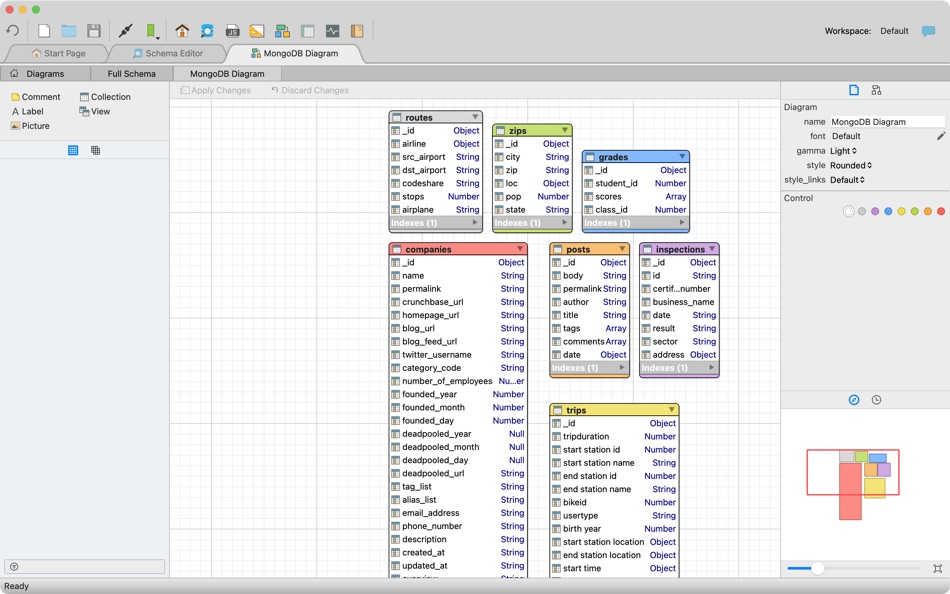
* Diagram Editor - design new diagrams or do reverse engineering, i.e., explore existing databases visually.
* Data Editor - easily browse table records in the grid, modify records, inline editing of values, sort, filter records and save favorite filters, preview images, hex editors for binary values, and more.
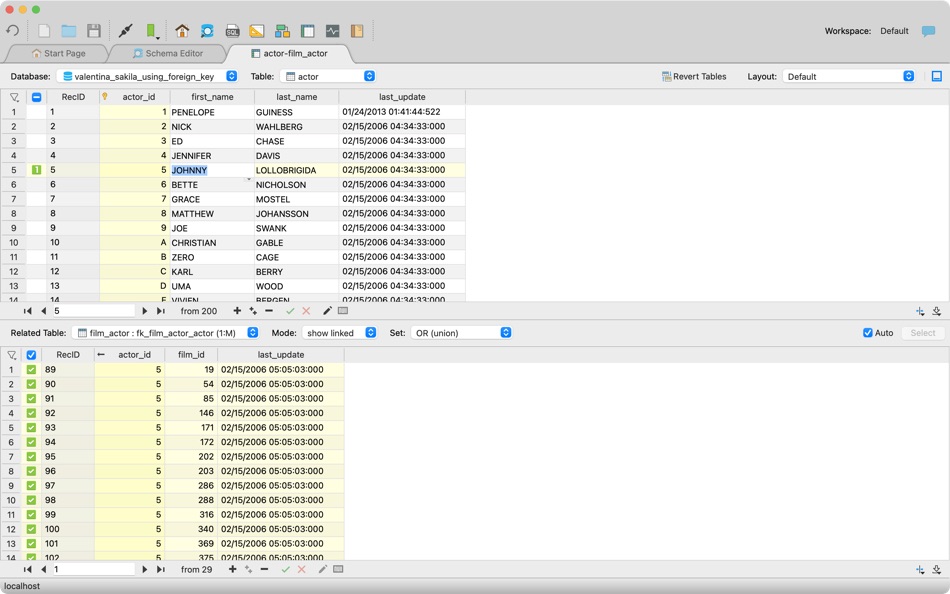
* Related Data Editor - easily learn and manage linked records of two tables, link/unlink records by a mouse click, perform set operations over linked records, and more.
* SQL Editor - with color syntax, auto-completion, recent and saved favorite queries, templates, console with error/warning reporting, and more.
* Query Editor - build SQL queries visually using just a few mouse clicks.
* Server Admin - where you can manage users, learn logs and other parameters of servers.
Open as many editors as you like at the same time for different databases/servers opened in tab-panels. You also get different DB-related utilities, including Import/Export, Dumps, Diagnose, Clone and Reindex, and more.
Valentina Studio uses iCloud to share bookmarks between your devices!
*** See also: Valentina Studio Pro ($199 only) ***
Get Valentina Studio Pro as an in-app purchase (pay only once) to get additional advanced pro-features such as:
* Report Editor - visual editor of Valentina Reports that can be saved into Valentina Project file (.vsp). Reports can use as datasource MS SQL, MySQL, PostgreSQL, SQLite, Valentina DB, ODBC.
* Form Editor - visual editor of Valentina Forms that can be saved into Valentina Project file (.vsp). Forms can use all supported databases as the datasource.
* Data Editor - enables 'go to parent record' function.
* Data Editor Layouts - save columns and their order as a named layout.
* Data Editor Multiple Update - update multiple records at once.
* Data Transfer - copy data between different databases.
* Diagram Editor - enables forward engineering - i.e., generation of SQL scripts for new/changed database objects.
* Dump Wizard - enables filter for tables to select them for a dump.
* Error Lookup - search for error description by its code.
* Keyboard Shortcuts - enables the ability to redefine the shortcuts and create own shortcut sets.
* Object Colors - enables marking objects with specific colors.
* Query Editor - enables the ability to copy the generated query.
* Schema Cache - save and reuse schema cache.
* Schema Editor - copy one or multiple schema objects using drag&drop mechanism.
* Schema Editor - expanding and collapsing the tree items with subitems using OPTION + click.
* Schema Snapshot - save and load schema in structured format.
* Source Control - develop database using any VCS.
* SQLDiff - find differences between two states of databases and generate SQL script to move between these states.
* SQL Search - search of schema objects.
* SQL Editor - integrated AI Chat with ASK and AGENT modes.
* SQL Editor - format SQL queries.
* SQL Editor - edit the result of SQL queries.
* SQL Editor - use bind parameters in SQL queries.
*** See also: Valentina Studio Single ($79.99 only) ***
Get Valentina Studio Single as an in-app purchase (pay only once) to get additional advanced pro-features for a single database engine, except for Valentina Project development (reports, forms, JavaScript) and AI functionality.
Скриншоты





Что нового
- Версия: 16.5
- Обновлено:
- === NEW ===
Valentina Studio introduces integrated AI Chat to enhance your SQL workflow.
[SQL Editor]
* AI Chat in SQL Editor
* Integrated AI chat inside the SQL Editor.
* AI can help explain queries, suggest improvements, generate SQL, and more.
* Easily add context to your question (current query, database schema, schema of specific tables/views mentioned in the query)
* Answers from the AI can be copied directly into your SQL or anywhere else.
* ASK and AGENT modes to work with AI.
* In the Agent mode, AI can modify (with confirmation ) the text of SQL Editor.
* In Agent Mode, AI has access to:
* SQL Editor — execute and modify queries
* Python engine of Valentina Studio
* Custom instructions via the “Remember…” command
* Each SQL Editor has own AI Chat with own context.
* Multiple Cursors support (Cmd+Shift+Up/Down to add cursor, Option+Click to insert cursor, Option+D for Find Next Occurrence).
* Information button showing available keyboard shortcuts.
[Data Editor]
* Improved layout settings dialog - rename layouts, select columns to display, and set their order.
* Information button showing available keyboard shortcuts.
[Schema Editor]
* Tabs with child lists in Tree mode.
* Button to toggle the property inspector.
[Query Editor]
* Directional arrows on connection lines between joined tables indicating parent table direction.
[Forms]
* TabWidget properties and methods exposed for scripting.
* Added ToolButton popupMode property (MenuButtonPopup, InstantPopup, DelayedPopup).
* ToolButton QMenu support.
[Valentina DB]
* External aggregation functions (C, Python, JS) as extensions.
* Aggregation User Defined Functions (UDF) in SQL, Python, JS.
* CREATE AGGREGATE and DROP AGGREGATE SQL statements.
* Any aggregation function may be used in window context.
* Added column MethodDeterministicLevel in GET/SHOW properties of calculated fields.
=== IMPROVEMENTS ===
[Valentina Studio]
* Updated PostgreSQL client libraries and dump utilities to version 18.0.
* Translated helpful tips for all available interface languages.
* HELP -> "Report issue" menu now selects "VStudio" project when opening Mantis web-page.
[Connection Dialog]
* Improved Valentina Server connection dialog - clearer labels for Embedded Server ("Signature" -> "Embedded Signature", placeholder "Optional" -> "Required for Embedded Server").
* Added tooltips for all controls.
[Valentina DB]
* All built-in and external aggregation functions can now be used in the WINDOW clause of SELECT statements.
* Performance improvements.
* Added diagnostics for table storage.
* Improved unclear deterministic level warning in Diagnose.
[Data Editor]
* Automatic layout saving upon modification.
* Reorganized layouts menu for improved usability.
=== FIXES ===
[Data Editor]
* Ensured the current table is selected in the table selector drop-down on macOS.
[Form Editor]
* Corrected the behavior of 'Stretched' and 'Title' options for TableView fields in forms.
* Fixed the setValue method of QSettings to correctly store values in forms.
[Schema Editor]
* Fixed sorting by column header click in tree mode.
* Preserved original field order as returned by the server when updating the fields list.
* Prevented collapsing of the property inspector panel.
* Fixed slow reading of fields in MySQL tables caused by the correlated query used for JSON support detection.
[Valentina DB]
* Fixed potential VarChar data corruption issue.
* Fixed weird result of aggr_func(distinct ...) - now correctly counts distinct values inside each group instead of producing new groups.
* Fixed deterministic level for skipped optional function argument (Const instead of Volatile).
* Fixed deterministic level for list_itemcount(), size(), IsNormalized() (Immutable instead of Volatile).
=== LIBRARY UPDATES ===
* DuckDB updated to 1.4.1
* PostgreSQL client libraries updated to 18.0
Цена
-
* Встроенные покупки - Сегодня: Бесплатно
- Минимум: Бесплатно
- Максимум: Бесплатно
Отслеживайте цены
Разработчик
- Paradigma Software
- Платформы: macOS Приложения (1)
- Списки: 0 + 1
- Очки: 2 + 0 ¡
- Рейтинги: 0
- Отзывы: 0
- Скидки: 0
- Видео: 0
- RSS: Подписаться
Очки
-

- 185 Brandon
- +1
-
- 10,874 Simon Chan
- +1


Рейтинги
0 ☹️
Списки
0 ☹️
- Valentina Studio
Отзывы
Ваш отзыв будет первым 🌟
Дополнительная информация
- Версия: 16.5
- Категория:
macOS Приложения›Инструменты разработчика - Операционные системы:
macOS,macOS 12.0.0 и выше - Размер:
147 Mb - Поддерживаемые языки:
English - Возрастные ограничения:
4+ - Mac App Store Рейтинг:
0 - Обновлено:
- Дата выпуска:
Valentina Studio Короткий URL: Скопировано!- 🌟 Поделиться
- Mac App Store
Вам также могут понравиться
-
- BookAuthor-Studio
- macOS Приложения: Инструменты разработчика От: Wicher B Donga
- $69.99
- Списки: 0 + 0 Рейтинги: 0 Отзывы: 0
- Очки: 0 + 0 Версия: 1.01 Unlock your full creative potential with BookAuthor Studio, the premier writing tool designed to transform your ideas into polished manuscripts in any language or genre. Leveraging ... ⥯
-
- CoreData Studio: SQLite Editor
- macOS Приложения: Инструменты разработчика От: Momentarium LLC
- $4.99
- Списки: 0 + 0 Рейтинги: 0 Отзывы: 0
- Очки: 0 + 0 Версия: 2.0 The Ultimate Developer Tool for CoreData and SwiftData. CoreData Studio is a professional SQLite viewer, editor, and database inspector built specifically for Apple developers. Stop ... ⥯
-
- Vendora Studio
- macOS Приложения: Инструменты разработчика От: Ahmed Chebbi
- Бесплатно
- Списки: 0 + 0 Рейтинги: 0 Отзывы: 0
- Очки: 0 + 0 Версия: 1.0 Vendora Studio transforms your iPad into a powerful SwiftUI design studio. Build beautiful interfaces visually using the VendoraHUB Design System, and generate production-ready code ... ⥯
-
- String Studio
- macOS Приложения: Инструменты разработчика От: 阿卜杜热伊木 阿卜杜力木
- Бесплатно
- Списки: 0 + 0 Рейтинги: 0 Отзывы: 0
- Очки: 0 + 0 Версия: 1.0.0 String Studio is a modern internationalization string management tool designed specifically for macOS, helping Apple developers efficiently manage multilingual localization files for ... ⥯
-
- Database Studio
- macOS Приложения: Инструменты разработчика От: 腾 崔
- $3.99
- Списки: 0 + 0 Рейтинги: 0 Отзывы: 0
- Очки: 0 + 0 Версия: 1.5.0 Database Studio let you design your data schema in the UI with inline editing experience, and 1-click to generate source code for you to maximize your development productivity. In ... ⥯
-
- SQLPro Studio
- macOS Приложения: Инструменты разработчика От: Hankinsoft Development Inc
- * Бесплатно
- Списки: 2 + 2 Рейтинги: 0 Отзывы: 0
- Очки: 6 + 0 Версия: 2026.07 SQLPro Studio is the premium database management tool for Postgres, MySQL, Microsoft SQL Server and Oracle databases. Some of the great features include: + Intellisense/SQL ... ⥯
-
- Snippets Studio
- macOS Приложения: Инструменты разработчика От: Jonathan Tsistinas
- Бесплатно
- Списки: 1 + 1 Рейтинги: 0 Отзывы: 0
- Очки: 2 + 4 (4.8) Версия: 2.3.1 Snippets Studio is an app where you can save code that you frequently use or want to reference later. You can create your own tags and languages to help organize your code and your ... ⥯
- -100%
- Iconic Asset Studio
- macOS Приложения: Инструменты разработчика От: Anton Belousov
- ▼ Бесплатно
$0.99-100% - Списки: 0 + 1 Рейтинги: 0 Отзывы: 0
- Очки: 2 + 0 Версия: 1.0.1 Iconic Asset Studio turns a single image into a complete, ready-to-use app icon set for your apps. Stop manually exporting dozens of sizes and focus on building your product instead. ... ⥯
-
- Particle Creator Studio
- macOS Приложения: Инструменты разработчика От: Fifth Battery, LLC
- * Бесплатно
- Списки: 0 + 1 Рейтинги: 0 Отзывы: 0
- Очки: 2 + 0 Версия: 1.5 Transform your visual effects from ordinary to extraordinary with Particle Creator Studio. Built specifically for Cocos2d and Axmol developers but flexible enough to power any creative ⥯
-
- Screenshot Studio - App Mockup
- macOS Приложения: Инструменты разработчика От: Sarun Wongpatcharapakorn
- Бесплатно
- Списки: 0 + 1 Рейтинги: 0 Отзывы: 0
- Очки: 1 + 11 (4.7) Версия: 1.19.1 Screenshot Studio is a tool for app developers looking for a quick and easy way to create screenshots for the App Store. Key Features: - Easy interface: Select the style you want from ... ⥯
-
- VibeCode Studio
- macOS Приложения: Инструменты разработчика От: Tomas Klinger
- Бесплатно
- Списки: 0 + 0 Рейтинги: 0 Отзывы: 0
- Очки: 0 + 0 Версия: 1.01 # Supercharge Your AI Coding Workflow VibeCode Studio is the essential tool for Swift developers working with AI language models. In large codebases, pasting your entire project wastes ⥯
-
- Gravio Studio
- macOS Приложения: Инструменты разработчика От: Asteria Technology Pte. Ltd.
- Бесплатно
- Списки: 0 + 0 Рейтинги: 0 Отзывы: 0
- Очки: 2 + 0 Версия: 6.2.1 This application is Gravio Studio, which is used to configure the Gravio server. You will still need to download and install the Gravio server on a device such as Mac, a Raspberry Pi, ... ⥯
-
- SQL Studio
- macOS Приложения: Инструменты разработчика От: codeBuilder
- $5.99
- Списки: 0 + 0 Рейтинги: 0 Отзывы: 0
- Очки: 0 + 0 Версия: 1.25 SQL Studio is the simplest way to access your Microsoft SQL Servers natively from your Mac. With SQL Studio you can:- - Attach to multiple servers - Authenticate with SQL or Windows ... ⥯
-
- Localizer Studio
- macOS Приложения: Инструменты разработчика От: Mohamed Amine souiden
- * $1.99
- Списки: 0 + 0 Рейтинги: 0 Отзывы: 0
- Очки: 0 + 0 Версия: 1.2 Localizer Studio is your powerful, developer-first tool for extracting, managing, and translating localization keys in Swift and SwiftUI projects. Designed to streamline the ... ⥯