
| ผู้พัฒนา: | Evan Jones (6) | ||
| ราคา: | * $1.99 | ||
| การจัดอันดับ: | 0 | ||
| ความเห็น: | 0 เขียนความเห็น | ||
| รายการ: | 0 + 0 | ||
| แต้มแล: | 0 + 0 ¡ | ||
| Mac App Store | |||
คำอธิบาย

Backly is a macOS app that makes it effortless to design stunning backgrounds for your images. Extend photos with smooth gradients, solid colors, or other images, then perfect the composition with subtle shadows and blur effects that blend everything naturally.
Whether you’re preparing marketing visuals, app screenshots, or polished mockups, Backly helps your images look professional and consistent. It includes 70 beautiful, high-quality background images you can use right away or customize to match your style.
Key Features
Built-In Background Library
Choose from 70 included backgrounds featuring gradients, textures, and artistic designs. Use them as-is or blend them with your own images for quick, professional results.
Custom Backgrounds
Extend any image with gradient, solid-color, or imported-image backgrounds that match your vision. Perfect for screenshots, product photos, or profile images.
Edge Blending
Blend foreground images seamlessly into their backgrounds with adjustable blur and fade for clean, natural-looking results.
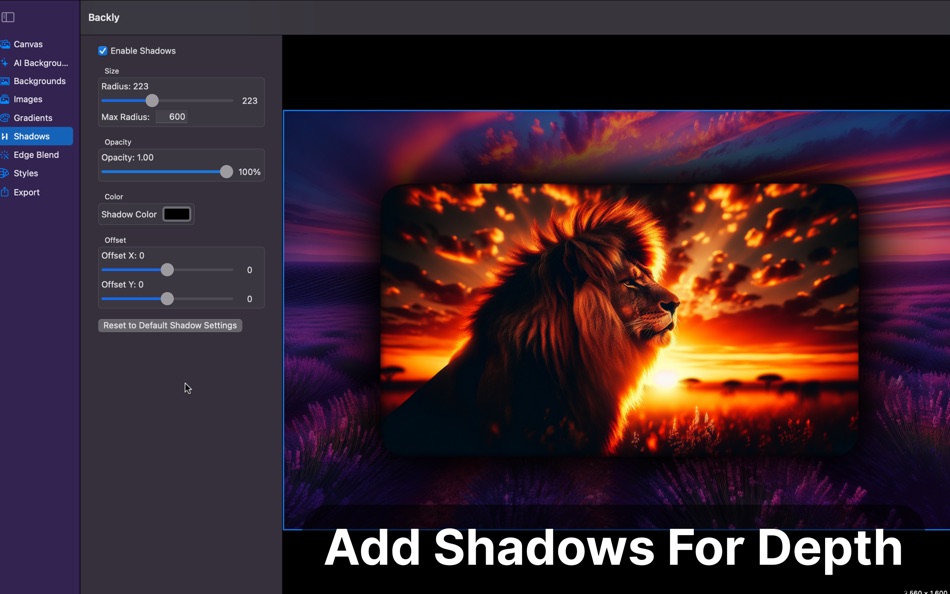
Shadow Effects
Add depth and realism with fully customizable shadows. Control blur, opacity, offset, and color to give your images the perfect finishing touch.
Custom Canvas Sizing
Choose from presets or define exact pixel dimensions for precise exports. Ideal for app assets, marketing visuals, and UI layouts.
Real-Time Preview
Every change updates instantly so you can fine-tune gradients, shadows, and edges with confidence.
Save and Reuse Projects
Keep your creative workflow organized. Save projects to revisit later or export high-quality images ready for any platform.
Designed for Creatives and Developers
Backly combines simplicity with power. Its clean macOS interface makes it easy for anyone to create professional-quality visuals without bulky design software.
Whether you're enhancing screenshots, designing app store images, or preparing backgrounds for presentations, Backly saves time and makes every image shine.
Built for macOS
Crafted with SwiftUI and Core Image, Backly delivers a smooth, native experience that fits right into macOS, including full support for Light and Dark Mode.
Terms of Use: https://www.apple.com/legal/internet-services/itunes/dev/stdeula/
Privacy Policy: https://swiftmage.github.io/AppSite/Backly/privacy.html
ภาพหน้าจอ




มีอะไรใหม่
- เวอร์ชัน: 2.1
- อัปเดต:
- - Made selecting the starting image easier with recent images and add from clipboard
- At any time you can right click the image and copy it
- Added new border section
ราคา
-
* การซื้อภายในแอพ - วันนี้: $1.99
- ต่ำสุด: $1.99
- มากที่สุด: $1.99
ติดตามราคา
ผู้พัฒนา
แต้มแล
0 ☹️
การจัดอันดับ
0 ☹️
รายการ
0 ☹️
ความเห็น
แสดงรีวิวเป็นคนแรกเลย 🌟
ข้อมูลเพิ่มเติม
- เวอร์ชัน: 2.1
- หมวดหมู่:
macOS แอป›กราฟิกและการออกแบบ - ระบบปฏิบัติการ:
macOS,macOS 14.6 และสูงกว่า - ขนาด:
281 Mb - ภาษาที่สนับสนุน:
English - การจัดประเภทเนื้อหา:
4+ - Mac App Store คะแนนโดย:
0 - อัปเดต:
- วันที่วางจำหน่าย:
รายชื่อติดต่อ
 https://swiftmage.github.io/AppSite/Backly/Backly_site.htmlBackly - Image Backgrounds URL แบบสั้น: คัดลอกแล้ว!
- 🌟 แชร์
- Mac App Store
คุณอาจชอบ
-
- Image mini
- macOS แอป: กราฟิกและการออกแบบ โดย: Kai Luo
- $2.99
- รายการ: 1 + 0 การจัดอันดับ: 0 ความเห็น: 0
- แต้มแล: 6 + 0 เวอร์ชัน: 2.0 Image mini is your lightweight, offline tool for fast and efficient image resizing, format conversion, and effect application all without compromising your original files. ⥯
-
- Image Writer
- macOS แอป: กราฟิกและการออกแบบ โดย: Yodesoft LLC
- * ฟรี
- รายการ: 0 + 1 การจัดอันดับ: 0 ความเห็น: 0
- แต้มแล: 1 + 0 เวอร์ชัน: 1.10.0 Image Writer provides internationalization and localization facilities to localize image content and export the final image in seconds at a time, save a lot of working time. This ... ⥯
-
- Image Playground
- macOS แอป: กราฟิกและการออกแบบ โดย: Yudai Yamane
- ฟรี
- รายการ: 0 + 0 การจัดอันดับ: 0 ความเห็น: 0
- แต้มแล: 0 + 13 (1.6) เวอร์ชัน: 0.1.1 Image Playgroundでは、あなたの画像に対してさまざまな操作をしながら楽しむことができます。 機械学習の機能を活用して、画像に何が写っているのかを予測したり、画像に対してフィルターをかけることができます。 今後実装予定の機能 ・画風変換機能 ・超解像度化機能 ⥯
-
- Image Converter -Photo Convert
- macOS แอป: กราฟิกและการออกแบบ โดย: 雅 田
- * ฟรี
- รายการ: 1 + 0 การจัดอันดับ: 0 ความเห็น: 0
- แต้มแล: 2 + 0 เวอร์ชัน: 1.2.4 This is an all-round image format conversion software that supports more than 100 formats. Supports professional camera formats, cell phone camera formats, and other common formats. ... ⥯
-
- Image Vectorizer
- macOS แอป: กราฟิกและการออกแบบ โดย: Icosasoft Software Inc.
- $4.99
- รายการ: 1 + 0 การจัดอันดับ: 0 ความเห็น: 0
- แต้มแล: 0 + 0 เวอร์ชัน: 1.6 CONVERT BITMAPS TO VECTOR GRAPHICS AT THE TOUCH OF A BUTTON How many times have you needed a vector graphic version of a logo or icon for a design you ve been working on? Image ... ⥯
-
- Image Editor - Photo Enhancer
- macOS แอป: กราฟิกและการออกแบบ โดย: Darain Fatima
- * ฟรี
- รายการ: 0 + 0 การจัดอันดับ: 0 ความเห็น: 0
- แต้มแล: 0 + 0 เวอร์ชัน: 1.1 Image Editor Photo Enhancer Edit, Enhance & Transform Your Photos All in One Powerful Mac App Image Editor Photo Enhancer gives you everything you need to turn ordinary images into ... ⥯
-
- Image Converter Star
- macOS แอป: กราฟิกและการออกแบบ โดย: 顺华 吕
- ฟรี
- รายการ: 2 + 1 การจัดอันดับ: 0 ความเห็น: 0
- แต้มแล: 1 + 0 เวอร์ชัน: 5.2.1 Image Converter Star is a straightforward OS X application designed to help you convert various image formats, such as: wdp to jpg. Image Converter Star comes with an intuitive ... ⥯
-
- Image Viewer Deluxe
- macOS แอป: กราฟิกและการออกแบบ โดย: Sergey Vdovenko
- ฟรี
- รายการ: 1 + 0 การจัดอันดับ: 0 ความเห็น: 0
- แต้มแล: 3 + 0 เวอร์ชัน: 1.3 Image Viewer Deluxe shows images from a directory. Drag and drop pictures or a folder to Image Viewer Deluxe to browse images. The application navigates either between selected files ... ⥯
-
- Image Slice - textures split cut automatic slicer
- macOS แอป: กราฟิกและการออกแบบ โดย: hui yao
- ฟรี
- รายการ: 0 + 0 การจัดอันดับ: 0 ความเห็น: 0
- แต้มแล: 0 + 0 เวอร์ชัน: 1.1 Image Slice is able to split a textures image file into image files automation. Image Slice need to import an image file only without any plist files. Image Slice needn t set any ... ⥯
-
- Image To Anime
- macOS แอป: กราฟิกและการออกแบบ โดย: Sugeng Riyanto
- ฟรี
- รายการ: 0 + 0 การจัดอันดับ: 0 ความเห็น: 0
- แต้มแล: 0 + 3 (2.7) เวอร์ชัน: 4.0 Turn photos into anime art instantly,Image to Anime transforms memories with vibrant colors, expressive characters, and dynamic backgrounds, Elevate your storytelling now. Main feature ⥯
-
- Image To Base64 Encoder
- macOS แอป: กราฟิกและการออกแบบ โดย: Martin Albrecht
- ฟรี
- รายการ: 1 + 0 การจัดอันดับ: 0 ความเห็น: 0
- แต้มแล: 3 + 0 เวอร์ชัน: 2.7.2 ImageToBase64 is a simple, secure, free-to-use image encoding utility that lets you convert your local image files to base64 code for use in HTML image tags, emails, etc. The program ... ⥯
-
- Image 2 Html
- macOS แอป: กราฟิกและการออกแบบ โดย: Max Schlee
- $1.99
- รายการ: 0 + 0 การจัดอันดับ: 0 ความเห็น: 0
- แต้มแล: 0 + 0 เวอร์ชัน: 1.23 Are you tired of dealing with the frustration of "invisible" pictures when trying to email them in HTML? Do you want to make sure your company logos, ads, and personalised backgrounds ... ⥯
-
- Image AI Lt - design ideas
- macOS แอป: กราฟิกและการออกแบบ โดย: Iaroslav Mironov
- ฟรี
- รายการ: 0 + 0 การจัดอันดับ: 0 ความเห็น: 0
- แต้มแล: 2 + 0 เวอร์ชัน: 1.9 Introducing Image AI: Unlock Your Creativity with Smart Prompting and Text-to-Image Magic! Image AI is a new text-to-image app that harnesses the power of artificial intelligence to ... ⥯
-
- Image to Icon
- macOS แอป: กราฟิกและการออกแบบ โดย: 方成 印
- $4.99
- รายการ: 1 + 0 การจัดอันดับ: 0 ความเห็น: 0
- แต้มแล: 0 + 0 เวอร์ชัน: 1.3 ON SALE FOR A LIMITED TIME: 40% OFF Image to icon is a practical application to create icons from images or images from icons. With Image to icon, you can convert image to icns, image ... ⥯