
| 개발자: | Fabio Jorge Conceicao Sousa (6) | ||
| 가격: | $1.99 | ||
| 순위: | 0 | ||
| 리뷰: | 0 리뷰 작성 | ||
| 목록: | 0 + 0 | ||
| 포인트: | 0 + 0 ¡ | ||
| Mac App Store | |||
기술

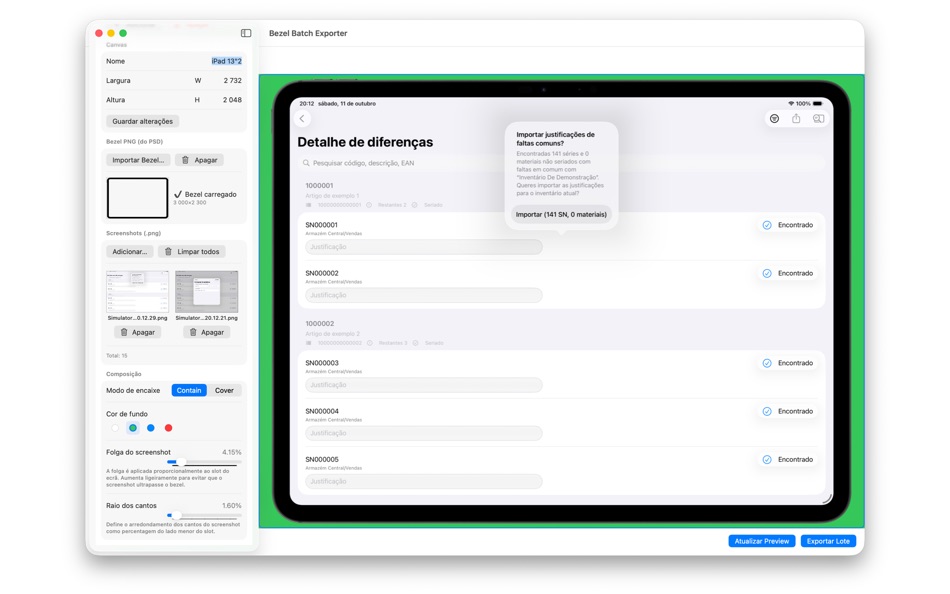
Em vez de ajustares manualmente cada imagem, basta configurares o primeiro print — posicionamento, escala e enquadramento — e a aplicação aplica automaticamente a mesma formatação a todos os restantes.
O resultado são capturas consistentes, bem alinhadas e com aspeto profissional em minutos.
Funcionalidades principais
• Ajusta uma vez, exporta todas: poupa tempo aplicando o mesmo enquadramento a múltiplas imagens.
• Compatível com molduras oficiais de dispositivos: basta descarregá-las e importar para a aplicação.
• Processamento em lote: exporta várias capturas de uma só vez.
• Interface intuitiva: arrasta, ajusta e exporta sem complicações.
• Fundo transparente ou sólido: ideal para submissões, apresentações ou portfólios.
• Alta qualidade: exportações nítidas e otimizadas para qualquer resolução.
Feita para developers
Criada para quem desenvolve aplicações e quer cumprir requisitos visuais de forma simples e rápida, sem ferramentas complexas de design.
Perfeita para quem trabalha sozinho, pequenas equipas ou qualquer pessoa que valorize consistência e tempo poupado.
Foca-te no código.
O Bezel Batch Exporter trata da parte visual — com precisão e rapidez.
Desenvolvida na Madeira, por alguém que também se cansou de alinhar capturas uma a uma.
스크린샷


새로운 기능
- 버전: 1.0
- 업데이트:
가격
- 오늘: $1.99
- 최소: $1.99
- 최대: $1.99
가격 추적
개발자
- Fabio Jorge Conceicao Sousa
- 플랫폼: iOS 앱 (5) macOS 앱 (1)
- 목록: 0 + 0
- 포인트: 1 + 0 ¡
- 순위: 0
- 리뷰: 0
- 할인: 0
- 동영상: 0
- RSS: 구독
포인트
0 ☹️
순위
0 ☹️
목록
0 ☹️
리뷰
첫 번째 리뷰를 남겨보세요 🌟
추가 정보
- 버전: 1.0
- 카테고리:
macOS 앱›그래픽 및 디자인 - 운영체제:
macOS,macOS 26.0 이상 - 크기:
3 Mb - 지원되는 언어:
Portuguese - 콘텐츠 등급:
4+ - Mac App Store 개의 평가:
0 - 업데이트:
- 출시일:
 https://fabiosousaapps.wordpress.com/?page_id=594Bezel Batch Exporter 단축 URL: 복사됨!
- 🌟 공유하기
- Mac App Store
당신은 또한 같은 수 있습니다
-
- Batch Crop Pictures
- macOS 앱: 그래픽 및 디자인 게시자: 军 龙
- * 무료
- 목록: 0 + 0 순위: 0 리뷰: 0
- 포인트: 0 + 0 버전: 2.0.1 "Batch Crop Pictures" is a professional tool software to solve the problem of cropping a large number of picture files. You can crop multiple pictures at once, and you can also crop ... ⥯
-
- Batch Image Converter
- macOS 앱: 그래픽 및 디자인 게시자: 方成 印
- $2.99
- 목록: 0 + 0 순위: 0 리뷰: 0
- 포인트: 0 + 0 버전: 1.5 Time Limited Special Offer (reg. $9.99 USD) Batch Image Converter is an application that allows you to convert one image format to another format in batches. Batch Image Converter can ... ⥯
-
- WebP image batch converter
- macOS 앱: 그래픽 및 디자인 게시자: Aliaksandr Melnikau
- $3.99
- 목록: 0 + 0 순위: 0 리뷰: 0
- 포인트: 0 + 0 버전: 3.0 WebP image batch converter - allows export to JPEG and JPEG2000 (with compression ratio setting), PNG, BMP, TIFF, GIF and PDF files; - can use multi-threading (multitasking), ... ⥯
-
- WebP Batch Image Converter
- macOS 앱: 그래픽 및 디자인 게시자: Rodrigo Dutra de Oliveira
- $9.99
- 목록: 0 + 0 순위: 0 리뷰: 0
- 포인트: 0 + 0 버전: 1.4 WebP Batch Image Converter allows you to: -> Convert your images between the major types: WebP, Heic, PNG, JPEG, TIFF, BMP... What's WebP? "WebP is a modern image format that provides ... ⥯
-
- Framify Device - Mockup Bezel
- macOS 앱: 그래픽 및 디자인 게시자: Alexander Tech
- * 무료
- 목록: 0 + 0 순위: 0 리뷰: 0
- 포인트: 0 + 0 버전: 1.0.8 Effortless Add Device Frames to your screenshots and movies - Generate mockups with bezels within seconds Framify Device is a powerful macOS, iOS and iPad app designed to streamline ... ⥯
-
- AI Batch Background Eraser
- macOS 앱: 그래픽 및 디자인 게시자: Ivan Blajic
- 무료
- 목록: 1 + 0 순위: 0 리뷰: 0
- 포인트: 0 + 0 버전: 1.0 Powered by one of the best AI engines in the world, this simple but powerful tool automatically detects and removes photo background. You can use it to easily make transparent images ... ⥯
-
- Reimager Batch Image Converter
- macOS 앱: 그래픽 및 디자인 게시자: Kevin Edwards
- $19.99
- 목록: 0 + 0 순위: 0 리뷰: 0
- 포인트: 0 + 0 버전: 1.1 What s New: 1.1 First public release! - Fast batch conversions with a simple, preset-driven workflow. - High-quality WEBP, JPEG, PNG, HEIC, JPEG XL and TIFF output (HEIC via Apple ... ⥯
-
- Images 2 JPEG - Batch convert
- macOS 앱: 그래픽 및 디자인 게시자: BraveCloud
- $6.99
- 목록: 0 + 0 순위: 0 리뷰: 0
- 포인트: 0 + 0 버전: 4.0 Turn whole sets of images into clean, ready to share JPEGs in seconds. Images 2 JPEG Batch convert is a focused, Mac native tool that does one thing exceptionally well: batch convert ... ⥯
-
- Edge Cutter - Batch image crop
- macOS 앱: 그래픽 및 디자인 게시자: 永康 李
- * 무료
- 목록: 0 + 0 순위: 0 리뷰: 0
- 포인트: 0 + 0 버전: 4.7.5 You can crop multiple images at once in just two steps: 1. Set the cropping margins, 2. Click the Save button. Batch Crop Images Easily. (Free) Convert Image Sequence to APNG. (Free) ... ⥯
-
- GSi Batch Image Resizer
- macOS 앱: 그래픽 및 디자인 게시자: Genuine Soundware
- 무료
- 목록: 0 + 0 순위: 0 리뷰: 0
- 포인트: 0 + 0 버전: 1.0.1 INTRODUCTION We know that there are hundreds of programs, even free ones, that can process images in batches, but we searched for a long time, we couldn't find one that could export ... ⥯
-
- LinBatch-Batch Image Editor
- macOS 앱: 그래픽 및 디자인 게시자: 侠光 邢
- 무료
- 목록: 0 + 0 순위: 0 리뷰: 0
- 포인트: 0 + 0 버전: 1.2 LinBatch can edit pictures and process pictures in batches. You can add text and picture watermarks in batches, change the size of pictures, crop pictures in batches, rename pictures, ... ⥯
-
- MA Ink Painting
- macOS 앱: 그래픽 및 디자인 게시자: QI ZHI XIONG
- 무료
- 목록: 0 + 0 순위: 0 리뷰: 0
- 포인트: 1 + 0 버전: 1.1.0 Batch to convert photos to ink paintings. How to use? 1. Drop photos or folders onto Import icon from toolbar 2.Ajust parameters 3.Click on color tile to change color and drag color ... ⥯
-
- CropResizePhotos
- macOS 앱: 그래픽 및 디자인 게시자: HumanSoftware
- $6.99
- 목록: 0 + 0 순위: 0 리뷰: 0
- 포인트: 0 + 0 버전: 4.1.0 Batch Crop and Resize of Multiple Photos in one click... Have your photo of the perfect ratio ready for Instagram Post or Stories, Facebook, Tumblr, Snapchat... With CropResizeControl ... ⥯
-
- Super Photo Upscaler - Waifu2x
- macOS 앱: 그래픽 및 디자인 게시자: 秀英 朱
- $9.99
- 목록: 2 + 2 순위: 0 리뷰: 0
- 포인트: 22 + 0 버전: 2.0.0 Powered by AI image upscaling technology, Super Photo Upscaler is an image enhancer which intelligently enlarges photos from low-resolution to high-resolution while maintaining clean ... ⥯