
| ผู้พัฒนา: | WPTRNPT LTD. (4) | ||
| ราคา: | ฟรี | ||
| การจัดอันดับ: | 0 | ||
| ความเห็น: | 0 เขียนความเห็น | ||
| รายการ: | 0 + 0 | ||
| แต้มแล: | 0 + 0 ¡ | ||
| Mac App Store | |||
คำอธิบาย

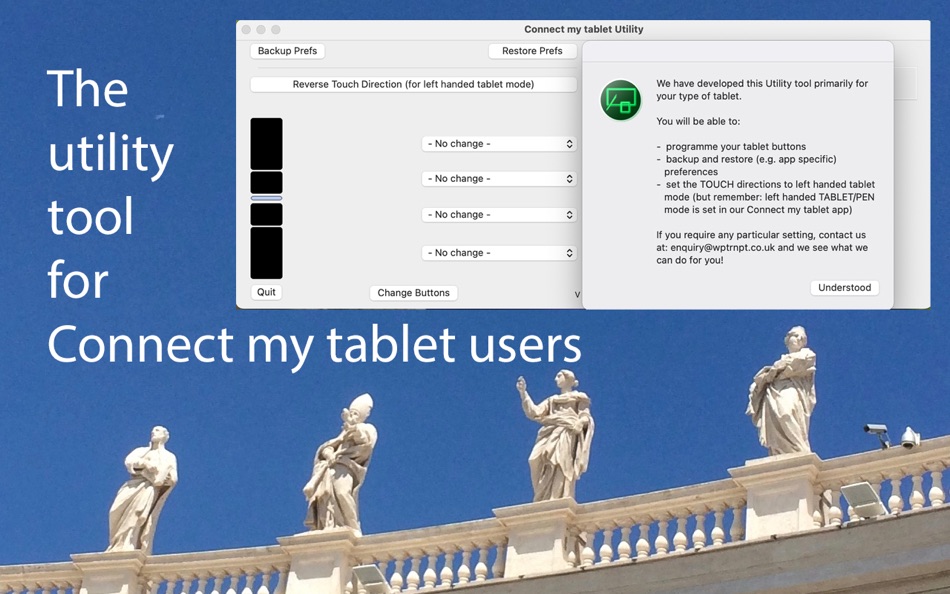
This version allows Bamboo CTH tablet users - that have connected their tablet with our Connect my tablet app:
- to change the settings of the tablet buttons
- to save and restore preferences
- to change the touch direction to left handed tablet mode.
If you have connected your Bamboo CTH tablet with older macOS versions, you will not need this utility tool. Connect my tablet will let you know how to change settings.
This version also allows users with Graphire 0, Graphire 2, Intuos 0, Intuos 2 and other Bamboo tablets to save and restore their tablet preference file.
If you have any question, please contact enquiry@wptrnpt.co.uk.
ภาพหน้าจอ
มีอะไรใหม่
- เวอร์ชัน: 1.9
- อัปเดต:
- V1.9 Users with Graphire 0, Graphire 2, Intuos 0, Intuos 2 and Bamboo tablets can now also save and restore their tablet preference file.
ราคา
- วันนี้: ฟรี
- ต่ำสุด: ฟรี
- มากที่สุด: ฟรี
ติดตามราคา
ผู้พัฒนา
- WPTRNPT LTD.
- แพลตฟอร์ม: iOS แอป (2) macOS แอป (2)
- รายการ: 0 + 0
- แต้มแล: 0 + 3 ¡
- การจัดอันดับ: 0
- ความเห็น: 0
- ลดราคา: 0
- วิดีโอ: 0
- RSS: ติดตาม
แต้มแล
0 ☹️
การจัดอันดับ
0 ☹️
รายการ
0 ☹️
ความเห็น
แสดงรีวิวเป็นคนแรกเลย 🌟
ข้อมูลเพิ่มเติม
- เวอร์ชัน: 1.9
- หมวดหมู่:
macOS แอป›กราฟิกและการออกแบบ - ระบบปฏิบัติการ:
macOS,macOS 10.13 และสูงกว่า - ขนาด:
1 Mb - ภาษาที่สนับสนุน:
English - การจัดประเภทเนื้อหา:
4+ - Mac App Store คะแนนโดย:
0 - อัปเดต:
- วันที่วางจำหน่าย:
CMT Utility URL แบบสั้น: คัดลอกแล้ว!- 🌟 แชร์
- Mac App Store
คุณอาจชอบ
-
- Connect my tablet
- macOS แอป: กราฟิกและการออกแบบ โดย: WPTRNPT LTD.
- $10.99
- รายการ: 0 + 0 การจัดอันดับ: 0 ความเห็น: 0
- แต้มแล: 0 + 0 เวอร์ชัน: 5.6 Connect my tablet is doing exactly that: It connects your Wacom (TM) tablet to your Mac and restores at least its critical functionality to be creative with Photoshop (TM) and other ... ⥯
-
- Font Studio
- macOS แอป: กราฟิกและการออกแบบ โดย: NERALAB SRL
- ฟรี
- รายการ: 3 + 1 การจัดอันดับ: 0 ความเห็น: 0
- แต้มแล: 4 + 0 เวอร์ชัน: 1.3.2 Choose fonts for your text as you have never done before. Insert text using keyboard, dropping it from other apps and customize the aspect of your text using the Style Editor Panel ... ⥯
-
- Float Spect
- macOS แอป: กราฟิกและการออกแบบ โดย: 超 孟
- * ฟรี
- รายการ: 0 + 0 การจัดอันดับ: 0 ความเห็น: 0
- แต้มแล: 4 + 0 เวอร์ชัน: 1.3.4 Introducing a versatile tool for Mac users the Semi-Transparent Overlay Utility. This tool is tailored for both designers and engineers, offering customizable window sizes and ... ⥯
-
- CDRViewer 4
- macOS แอป: กราฟิกและการออกแบบ โดย: Abdusodiq Saidov
- * ฟรี
- รายการ: 2 + 0 การจัดอันดับ: 0 ความเห็น: 0
- แต้มแล: 2 + 0 เวอร์ชัน: 4.1.1 Standalone Utility to Open and Convert CorelDRAW, Visio, PDF, EPS, PostScript, Adobe PSD, Ai, WordPerfect graphics and WordPerfect Documents. Tool to Load, Open, Read and Convert ... ⥯
-
- Image To Base64 Encoder
- macOS แอป: กราฟิกและการออกแบบ โดย: Martin Albrecht
- ฟรี
- รายการ: 1 + 0 การจัดอันดับ: 0 ความเห็น: 0
- แต้มแล: 3 + 0 เวอร์ชัน: 2.7.2 ImageToBase64 is a simple, secure, free-to-use image encoding utility that lets you convert your local image files to base64 code for use in HTML image tags, emails, etc. The program ... ⥯
-
- ESL Text Generator
- macOS แอป: กราฟิกและการออกแบบ โดย: Esclepius Software LLC
- ฟรี
- รายการ: 1 + 0 การจัดอันดับ: 0 ความเห็น: 0
- แต้มแล: 2 + 0 เวอร์ชัน: 1.7.1 ESL Text Generator is a simple utility app that generates placeholder text (sometimes called "blind text") of any length to use as a placeholder when creating print layouts, websites, ... ⥯
-
- #colorBar
- macOS แอป: กราฟิกและการออกแบบ โดย: James Amner
- $1.99
- รายการ: 0 + 0 การจัดอันดับ: 0 ความเห็น: 0
- แต้มแล: 0 + 0 เวอร์ชัน: 1.3 #colorBar is a simple utility for digital artists, web developers and anyone working with color digitally. #colorBar was created after I kept on recieving designs from clients and ... ⥯
-
- MyArtSlider
- macOS แอป: กราฟิกและการออกแบบ โดย: Pirate's Moon, Inc.
- $1.99
- รายการ: 0 + 0 การจัดอันดับ: 0 ความเห็น: 0
- แต้มแล: 0 + 0 เวอร์ชัน: 1.0 This application displays a directory of images using a scroll-bar, or frame-by-frame back-and-forth buttons. It is designed to be a utility application for both production and single ... ⥯
-
- iPlummet
- macOS แอป: กราฟิกและการออกแบบ โดย: James Derrick
- ฟรี
- รายการ: 0 + 1 การจัดอันดับ: 0 ความเห็น: 0
- แต้มแล: 0 + 0 เวอร์ชัน: 1.1 iPlummet is a simple utility for quickly ruling up a page to practise calligraphy on ⥯
-
- Stapled
- macOS แอป: กราฟิกและการออกแบบ โดย: DouWère, s.p.r.l.
- * ฟรี
- รายการ: 0 + 0 การจัดอันดับ: 0 ความเห็น: 0
- แต้มแล: 1 + 0 เวอร์ชัน: 2.5.1 Stapled is an original utility letting you share your artistic creations in their best quality, at locations previously reserved to photographs Give it a try ! It s free. Open any ... ⥯
-
- Pixel Accelerator
- macOS แอป: กราฟิกและการออกแบบ โดย: 涛 吴
- $4.99
- รายการ: 0 + 0 การจัดอันดับ: 0 ความเห็น: 0
- แต้มแล: 1 + 0 เวอร์ชัน: 1.4.1 # Introduction Pixel Accelerator is a smart PNG, JPG, JPEG, HEIC, HEIF image compression utility. This simple tool uses lossless compression techniques to reduce the file size of your ... ⥯
-
- Logo Maker - Design Creator *
- macOS แอป: กราฟิกและการออกแบบ โดย: ZipoApps
- * ฟรี
- รายการ: 0 + 0 การจัดอันดับ: 0 ความเห็น: 0
- แต้มแล: 0 + 304 (4.6) เวอร์ชัน: 1.6.1 A logo maker lets you design beautiful logos, which are essential for an organization s identity. Graphic design logo makers offer uniquely designed logo templates that allow you to ... ⥯
-
- Stitcher Pixel Art
- macOS แอป: กราฟิกและการออกแบบ โดย: Harry Shamansky
- ฟรี
- รายการ: 0 + 0 การจัดอันดับ: 0 ความเห็น: 0
- แต้มแล: 0 + 111 (4.0) เวอร์ชัน: 3.1 Simple utility for pixel art and cross-stitching patterns. Features include: Palette selection Eraser Drag or tap to draw Long press to fill Image trace Gridline toggle Export as image ⥯
-
- Resize Sense - Image Resizer
- macOS แอป: กราฟิกและการออกแบบ โดย: VeprIT
- $19.99
- รายการ: 0 + 0 การจัดอันดับ: 0 ความเห็น: 0
- แต้มแล: 0 + 0 เวอร์ชัน: 2.3.3 Eliminate hours of tedious work needed to resize, crop, straighten, rotate, flip, and rename many images! Edit IPTC and even EXIF metadata in multiple images at a time. Whether you ... ⥯