
| 개발자: | Tien Thinh Vu (34) | ||
| 가격: | 무료 | ||
| 순위: | 0 | ||
| 리뷰: | 0 리뷰 작성 | ||
| 목록: | 0 + 1 | ||
| 포인트: | 2 + 0 ¡ | ||
| Mac App Store | |||
기술

Highlights
+ Auto arrange layout or free layout
+ Can be used in many applications: Business, Education, Brainstorming, Project planning, Task lists, Summarizing
+ Support multi-languages: English, Deutsch, Français, 日本語, 한국어, Español, Português, Čeština, Dansk, Suomi, Italiano, Nederlands, Norsk, Polski, Русский, Svenska, ไทย, Türkçe, Tiếng Việt, 中文(中国), 中文(台灣)
+ Easy to use
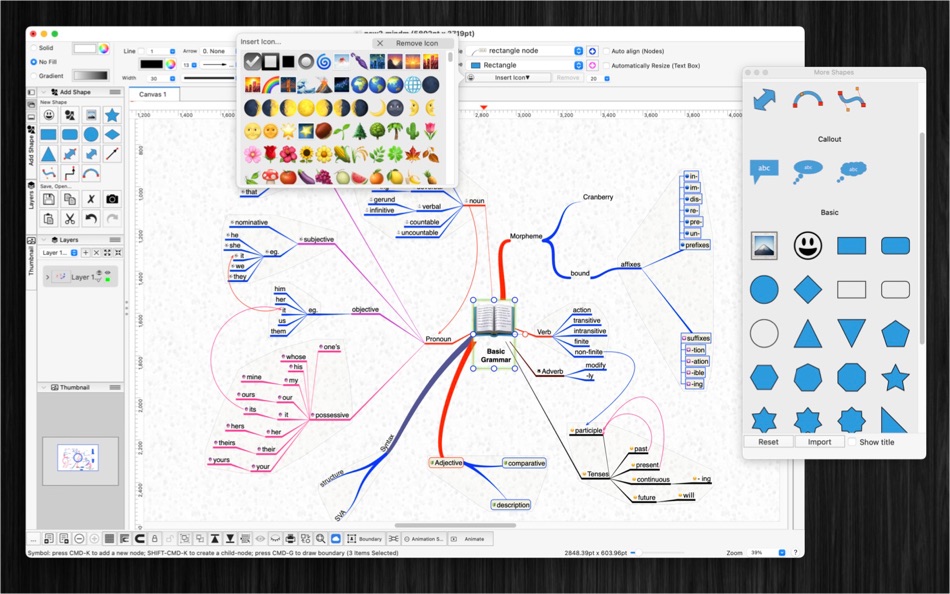
+ Add image file or colorful emoji symbols
+ Change and customize the appearance of shapes, nodes, topics.
The application could record knowledge, helping you in learning, brainstorming, memory, visual thinking, and problem solving.
- To create main-note: just double-clicking anywhere on the canvas and then typing
- To create child-notes: select a parent node then press key CMD-K
- To draw connection between notes: hold CONTROL key then draw connection or hold right mouse button then drag drop
- To add text to a connection: just press ENTER or SPACE or double-click on the connection line
FEATURES:
- Create new topic, node by press key CMD-K , or new child-node by key CMD-Shift-K
- Connect notes using right mouse with drag and drop
- Write notes anywhere on the virtual paper
- Support multi-canvas (multi-tabs) for each document
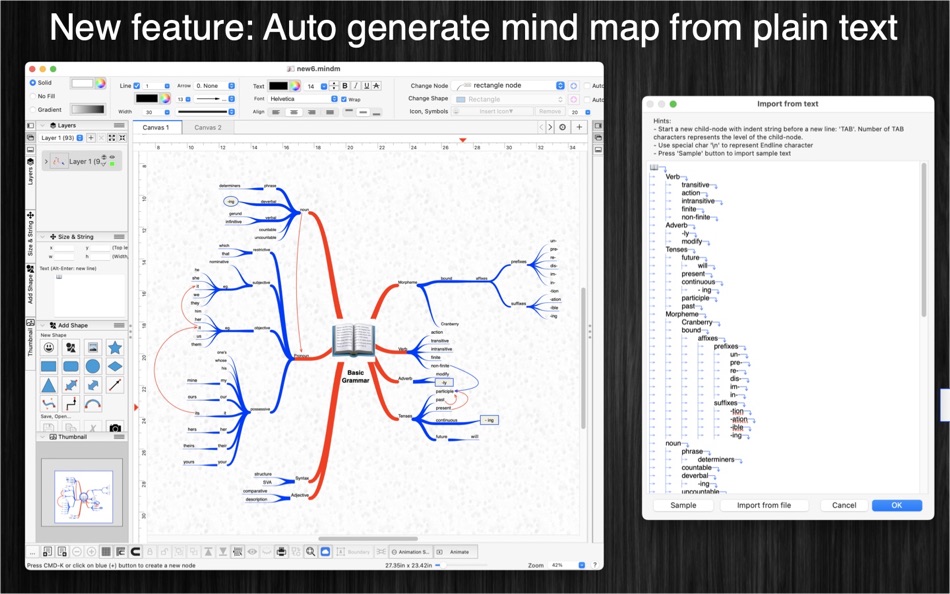
- Generate/Import mind map from plain text
- Export mind map to plain text
- Include 2000 beautiful Symbols
- Allow to insert image by drag image to the canvas
- Allow to Animate your drawing
- Move and arrange notes easily
- Support custom background
- OPEN/SAVE to “*.mindm” file so that you could load it later for editing
- Export to png, jpeg, tiff, pdf image file (shortcut key: CMD-E)
- Capture To Clipboard: Press "CMD-4” or click on Capture button
- Print supported (shortcut key: CMD-P)
- Unlimited Undo/Redo (shortcut key: CMD-Z / Shift-CMD-Z)
- Copy / Paste (shortcut key: CMD-C / CMD-V)
- Duplicate select items (shortcut key: CMD-D)
- Group / Ungroup Items (shortcut key: CMD-R / Shift-CMD-R)
- Lock/Unlock items position (shortcut key: CMD-L / Shift-CMD-L)
- Scale size of select items
- Snap to Grid
- Auto Align with another object when resize or move
- Change display order
- Customization color / Font / Size / Line Type
- Allow to Export image in 300dpi
- Allow user to select items then save them to template list to reuse later
SUPPORT
If you have any questions or feedback, you can contact us by email on vu.tienthinh@yahoo.com
Ad
스크린샷



새로운 기능
- 버전: 1.6
- 업데이트:
- - Support macOS 13 Ventura
- Support multi-canvas (multi-tabs) for each document
- Support tree-view of all objects (via "Layers" Inspector-view)
- Generate/Import mind map from plain text
- Export mind map to plain text
- Allow to change order of Inspector-views on left/right sides of document window
- Improve UI
- Fix bugs
Previous updates:
- Support Apple Silicon
- Allow to turn on/off setting: Auto resize shape base in input text
- Press and hold SPACE-BAR to maneuver/scroll around document
- Improve ColorWell UI
- Support multi-languages: English, Deutsch, Français, 日本語, 한국어, Español, Português, Čeština, Dansk, Suomi, Italiano, Nederlands, Norsk, Polski, Русский, Svenska, ไทย, Türkçe, Tiếng Việt, 中文(中国), 中文(台灣)
- Improve print dialog (add Detail controls to print dialog)
- Add Decimal Precision setting
- Add thumbnail view
- Add more arrow types (architectural ticks....)
- Support sync to iCloud
가격
- 오늘: 무료
- 최소: 무료
- 최대: 무료
가격 추적
Ad
개발자
포인트
-

- 3,028 바람처어럼
- +1
-
- 11,014 Simon Chan
- +1


순위
0 ☹️
목록
0 ☹️
- SimpleMindMap
리뷰
첫 번째 리뷰를 남겨보세요 🌟
추가 정보
- 버전: 1.6
- 카테고리:
macOS 앱›그래픽 및 디자인 - 운영체제:
macOS,macOS 10.11 이상 - 크기:
14 Mb - 지원되는 언어:
Chinese,Czech,Danish,Dutch,English,Finnish,French,German,Italian,Japanese,Korean,Norwegian,Polish,Portuguese,Russian,Spanish,Swedish,Thai,Turkish,Vietnamese - 콘텐츠 등급:
4+ - Mac App Store 개의 평가:
0 - 업데이트:
- 출시일:
 https://vutienthinh.wordpress.com/mac-utilities/#SimpleMindMapSimpleMindMap 단축 URL: 복사됨!
- 🌟 공유하기
- Mac App Store
당신은 또한 같은 수 있습니다
- 새로운
- Simple Image Tools
- macOS 앱: 그래픽 및 디자인 게시자: Khalid Akanbi
- $1.99
- 목록: 0 + 0 순위: 0 리뷰: 0
- 포인트: 0 + 0 버전: 1.0 Edit and convert your images completely offline. Simple Image Tools is a fast, offline suite for all your everyday image tasks. Convert, compress, resize, crop, rotate, or remove ... ⥯
- -100%
- Frames made simple
- macOS 앱: 그래픽 및 디자인 게시자: Humberto Prado Ballesteros
- ▼ 무료
$9.99-100% - 목록: 0 + 1 순위: 0 리뷰: 0
- 포인트: 5 + 0 버전: 1.1 Frames made simple automatically adds beautiful device frames to your screenshots with zero effort. Just drag and drop your screenshot and get a professionally framed image ready for ... ⥯
-
- Make It Simple! Adobe Illustrator Edition
- macOS 앱: 그래픽 및 디자인 게시자: ANTHONY PETER WALSH
- $2.99
- 목록: 0 + 0 순위: 0 리뷰: 0
- 포인트: 0 + 0 버전: 1.0 Adobe Illustrator is used by Professional Designers, Artists and computer users to create Vector Images. These images will then be used for company logos, promotional uses or even ... ⥯
-
- G-Code Simple Viewer
- macOS 앱: 그래픽 및 디자인 게시자: Victor Bovio
- $3.99
- 목록: 0 + 1 순위: 0 리뷰: 0
- 포인트: 0 + 0 버전: 1.0.3 G-Code Simple Viewer is a great light app to quickly view GCODE, CNC, CN, GC & NGC files Features: - Export to PDF, SVG, DXF, IGES - Load from a ZIP or RAR file one or multiple files. ... ⥯
-
- iPaintX - Simple paint app.
- macOS 앱: 그래픽 및 디자인 게시자: 海强 龙
- $4.99
- 목록: 0 + 0 순위: 0 리뷰: 0
- 포인트: 0 + 0 버전: 3.0 iPaintX is a Simple app paint. It can draw rectangle, ellipse, line, text, and so on. If you have any question please contact me with email - supremeone@sina.cn. ⥯
-
- Diagram
- macOS 앱: 그래픽 및 디자인 게시자: 元荃 李
- $11.99
- 목록: 1 + 0 순위: 0 리뷰: 0
- 포인트: 1 + 0 버전: 2.1 Diagram is a diagramming and mind mapping software. It has a very responsive and easy to use interface with the tools on the left hand column and the drawing on the right hand column. ... ⥯
-
- DiagramPainter
- macOS 앱: 그래픽 및 디자인 게시자: Ambiera
- 무료
- 목록: 1 + 0 순위: 0 리뷰: 0
- 포인트: 0 + 0 버전: 2.1 DiagramPainter is an editor for drawing professional looking flowchart diagrams, mind maps, organization charts, and other diagrams. The diagrams can be copied as image to the ... ⥯
-
- ClickCharts Diagram Flowchart
- macOS 앱: 그래픽 및 디자인 게시자: NCH Software
- * 무료
- 목록: 0 + 0 순위: 0 리뷰: 0
- 포인트: 2 + 0 버전: 9.50 Quickly create visual representations of a process or organization by making a diagram with ClickCharts Mac OSX. The most popular chart designs can be crafted within the program, ... ⥯
-
- Color Name Detector
- macOS 앱: 그래픽 및 디자인 게시자: Pavlo Liashenko
- $0.99
- 목록: 1 + 0 순위: 0 리뷰: 0
- 포인트: 0 + 0 버전: 1.0 Simple tool for detecting color names! - More than 3000 color names. - Retina ready color picker. - Keyboard controls. - Zoom x2 x4 x8 x16 x32. - Colors history. - Search by name and ... ⥯
-
- Smart GIF Maker
- macOS 앱: 그래픽 및 디자인 게시자: iMakezAppz
- 무료
- 목록: 0 + 0 순위: 0 리뷰: 0
- 포인트: 0 + 0 버전: 2.1.2 Simple and efficient application to facilitate making and modifying animated gifs! Makes it easy and fast to create gifs from images or videos. Simple UI Easily create new, or modify ... ⥯
-
- LabelSmith
- macOS 앱: 그래픽 및 디자인 게시자: Maurits Jozef Elzinga
- $9.99
- 목록: 0 + 0 순위: 0 리뷰: 0
- 포인트: 0 + 0 버전: 1.1.4 Simple Label Printing for Your Business Create professional product and shipping labels in minutes, not hours. LabelSmith is built for small business owners who need reliable labeling ... ⥯
-
- Art Master
- macOS 앱: 그래픽 및 디자인 게시자: Splash Colors
- * 무료
- 목록: 0 + 2 순위: 0 리뷰: 0
- 포인트: 34 + 0 버전: 3.1.1 Art Master Your All-in-One Image Viewer & Graphic Converter for Mac Fast Reliable Powerful Art Master is the easiest and fastest way to open, view, and convert images and graphics on ... ⥯
-
- Logo Art
- macOS 앱: 그래픽 및 디자인 게시자: Abdusodiq Saidov
- 무료
- 목록: 1 + 3 순위: 0 리뷰: 0
- 포인트: 29 + 0 버전: 1.0.6 Drag and Drop Logo and Graphic Design Vector Application. Logo Art is a beautifully designed easy to use vector drawing application to help you create inspiring vector logo graphics. ... ⥯
- -100%
- Photo Art Filters: DeepStyle
- macOS 앱: 그래픽 및 디자인 게시자: 秀英 朱
- ▼ 무료
$7.99-100% - 목록: 1 + 3 순위: 0 리뷰: 0
- 포인트: 28 + 0 버전: 1.0.2 * "Super PhotoCut" - A great photo background eraser. 50% OFF! Get it Now! DeepStyle is a cool revolutionary photo editor that combines neural networks and AI to make your digital art ... ⥯