
| Sviluppatore: | Takeshi Ogihara (9) | ||
| Prezzo: | Gratis | ||
| Classificazioni: | 0 | ||
| Recensioni: | 0 Scrivi una recensione | ||
| Listes: | 0 + 0 | ||
| Punti: | 0 + 0 ¡ | ||
| Mac App Store | |||
Descrizione

1. Image Formats
jpg, pdf, png, HEIC, gif, WebP, tiff, bmp, JPEG 2000(jp2, jpc, j2k), eps, svg, svgz, jbig(bie), pcx, pcd, pnm(ppm, pbm, pgm), xbm, mag, SUN Rasterfile, wbmp, TIFF Stacks
Others: Adobe Photoshop (psd), Adobe Illustrator (ai, as pdf).
2. Save as Formats
jpg, pdf, png, HEIC, gif, WebP, tiff, bmp, JPEG 2000(jp2, jpc, j2k), jbig(bie), pnm, xbm, or wbmp.
Vector images such as PDF can be converted into bitmap images such as jpg or png.
3. Scan Folder
You can automatically display the files in the specified folder. Images can be displayed full screen (i.e. as a slideshow), one image at a time, or two images side by side like a book. You can also mark certain files and move or delete them.
4. Scan Archives
You can also display each image file included in a ZIP archive or a RAR archive one by one in full-screen. Besides, you can extract marked images from the archive.
ToyViewer can read a RAR archive split into several files.
ToyViewer can also read comic book archive files in CBZ and CBR, because they are ZIP and RAR.
5. Full-Screen Mode
ToyViewer can display images in full-screen.
6. Image Operations
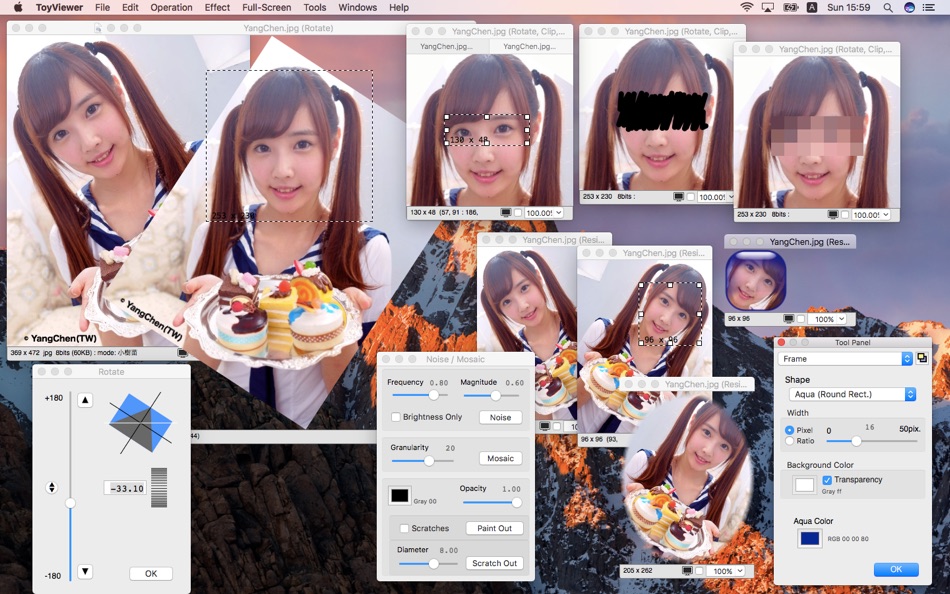
ToyViewer provides various image operations such as rotating and flipping an image, and selecting and cropping a part. In addition to enlargement and reduction, it is also possible to rasterize (to translate into bitmap) vector images.
7. Color Operations
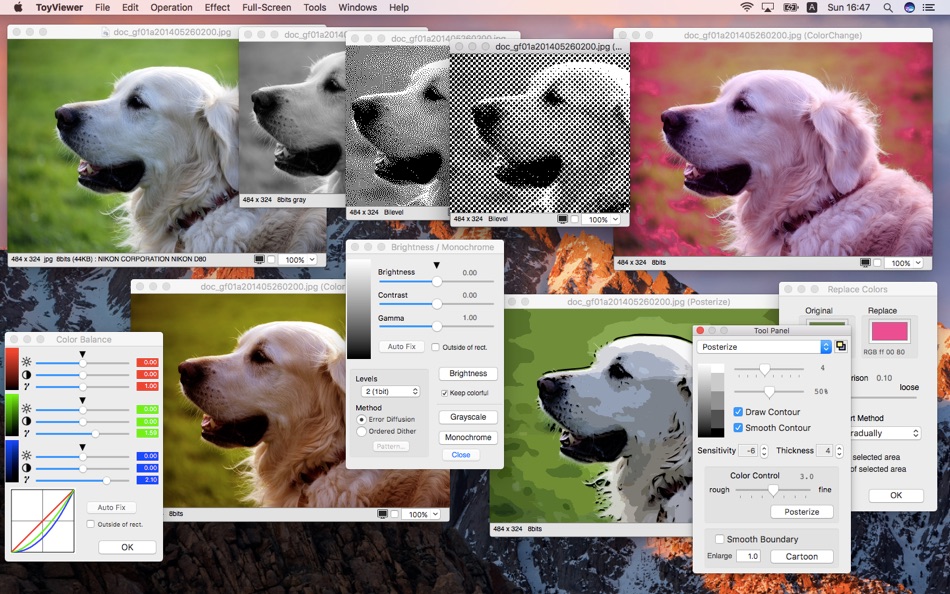
ToyViewer has the ability to adjust brightness, contrast, color tone of images. You can replace a specified color with other color or transparent color. You can also make images with palettes, monochrome images.
8. Effects
ToyViewer has some typical operations for images, such as enhancement, blur, mosaic, and so on. ToyViewer can also make Aqua-button-like images, make poster-like images, and provides more functions.
9. Custom Icon
ToyViewer can attach a custom icon to any file as well as newly saved image file.
10 Multi-Page Images
ToyViewer can display multiple pages / frames included in such as GIF animation or PDF one by one. Frames in a GIF or a TIFF Stack (TIFF file containing multiple frames) can be displayed as a simple animation.
11. Embedded Information
Color profiles embedded in image files can be replaced. Exif and GPS information are also displayed. You can save image files with/without Exif and GPS information.
12. Print
ToyViewer can print images. ToyViewer automatically shrinks an image to be printed on a sheet, or divides it into some pages.
Screenshot


Novità
- Versione: 5.8.0
- Aggiornata:
- Improved the full screen display (slideshow) of directories and archives. A slider has been added to the controller so that you can freely jump to any position. Moreover, you can now see the keyboard assignments for functions in Help. In addition, fixed the problems that WebP images are not displayed and that the marked files cannot be deleted.
Prezzo
- Oggi: Gratis
- Minimo: Gratis
- Massimo: Gratis
Monitora prezzi
Sviluppatore
- Takeshi Ogihara
- Piattaforme: iOS App (2) macOS App (7)
- Listes: 0 + 0
- Punti: 0 + 8 ¡
- Classificazioni: 5 (1)
- Recensioni: 0
- Sconti: 0
- Video: 0
- RSS: Sottoscrivi
Punti
0 ☹️
Classificazioni
0 ☹️
Listes
0 ☹️
Recensioni
Scrivi tu la prima recensione 🌟
Informazioni aggiuntive
ToyViewer URL breve: Copiato!- 🌟 Condividi
- Mac App Store
Ti potrebbero piacere anche
-
- Photo Info Viewer · View Exif
- macOS App: Grafica e design di: Xi'an 7kit Technology Co., Ltd.
- $0.99
- Listes: 1 + 0 Classificazioni: 0 Recensioni: 0
- Punti: 12 + 0 Versione: 26 Photo Info Viewer supports viewing the Exif (Exchangeable image file format) information of images. I. Exif Information Photo Info Viewer supports viewing the following Exif ... ⥯
-
- Image Viewer Deluxe
- macOS App: Grafica e design di: Sergey Vdovenko
- Gratis
- Listes: 1 + 0 Classificazioni: 0 Recensioni: 0
- Punti: 3 + 0 Versione: 1.3 Image Viewer Deluxe shows images from a directory. Drag and drop pictures or a folder to Image Viewer Deluxe to browse images. The application navigates either between selected files ... ⥯
-
- WMF Viewer - For WMF and EMF
- macOS App: Grafica e design di: Lun Peng
- $9.99
- Listes: 0 + 0 Classificazioni: 0 Recensioni: 0
- Punti: 0 + 0 Versione: 3.3 WMF Viewer is a tool for viewing and converting Windows Metafile. Its previous version is EMF Viewer. Support Versions: MS-WMF: Windows Metafile Format. MS-EMF: Enhanced Metafile ... ⥯
-
- Split Screen Viewer
- macOS App: Grafica e design di: Thomas Osthege
- $2.99
- Listes: 0 + 0 Classificazioni: 0 Recensioni: 0
- Punti: 1 + 0 Versione: 1.4 Sometimes you want to display images on the screen to compare them and/or decide which one suits best for a certain purpose. For example: You want to illustrate a flyer for a coffee ... ⥯
-
- G-Code Simple Viewer
- macOS App: Grafica e design di: Victor Bovio
- $3.99
- Listes: 0 + 1 Classificazioni: 0 Recensioni: 0
- Punti: 0 + 0 Versione: 1.0.3 G-Code Simple Viewer is a great light app to quickly view GCODE, CNC, CN, GC & NGC files Features: - Export to PDF, SVG, DXF, IGES - Load from a ZIP or RAR file one or multiple files. ... ⥯
-
- Picview - Image Viewer
- macOS App: Grafica e design di: 志泉 孔
- * Gratis
- Listes: 0 + 0 Classificazioni: 0 Recensioni: 0
- Punti: 2 + 0 Versione: 1.5.0 Picview works great with JPEG, HEIC, PSD, RAW, WEBP, PNG, GIF, and many other formats. Provides basic image processing, including flip and rotate, EXIF, and other information. Supports ⥯
-
- DWG Viewer 3
- macOS App: Grafica e design di: Microspot Ltd.
- $29.99
- Listes: 0 + 0 Classificazioni: 0 Recensioni: 0
- Punti: 0 + 0 Versione: 3.0.1 DWG Viewer is an easy to use app for viewing your AutoCAD DWG files and Microspot MacDraft documents on the Mac. Perfect for teams collaborating on projects. View files stored locally ... ⥯
-
- Visio File Viewer
- macOS App: Grafica e design di: 光建 张
- Gratis
- Listes: 0 + 0 Classificazioni: 0 Recensioni: 0
- Punti: 0 + 0 Versione: 1.1.2 Visio Viewer for Mac is a lightweight application specifically designed for macOS users, supporting direct opening and viewing of Microsoft Visio files (.vsdx format). Without the need ⥯
-
- CDR Viewer Plus
- macOS App: Grafica e design di: Foshan Ourfuture Technology Co.,Ltd.
- Gratis
- Listes: 0 + 0 Classificazioni: 0 Recensioni: 0
- Punti: 0 + 0 Versione: 1.2.1 Dear designers, Have you ever been frustrated by not being able to open higher-version CorelDraw files? Want to get detailed information about CDR files? Now, all of this is possible! ... ⥯
-
- ShapeFile Viewer
- macOS App: Grafica e design di: 颖淑 唐
- $2.99
- Listes: 0 + 0 Classificazioni: 0 Recensioni: 0
- Punti: 0 + 0 Versione: 2.0 This app can open shp file for view the data, you can set frame and fill color for display.and support empty fill color, custom color(frame and fill) . adjust layer relationship. ... ⥯
-
- LUT Viewer
- macOS App: Grafica e design di: Adrian Berisha
- $5.99
- Listes: 0 + 0 Classificazioni: 0 Recensioni: 0
- Punti: 0 + 0 Versione: 1.5 An easy and fast way to look at your images or videos with your LUTs (only cube files supported). Features: * Support for images and videos * Added LUTs and your selected favorites are ⥯
-
- TC Picture Viewer
- macOS App: Grafica e design di: TowmsChang
- $4.99
- Listes: 0 + 0 Classificazioni: 0 Recensioni: 0
- Punti: 0 + 0 Versione: 2.2 - File browsing: folder 1.The folders are displayed in a tree-like representation. 2.Press the right mouse button to pop up the function menu. 3.You can add folders and customize their ⥯
-
- ModelPlay-3D Model Viewer
- macOS App: Grafica e design di: 俊卿 吴
- * Gratis
- Listes: 0 + 0 Classificazioni: 0 Recensioni: 0
- Punti: 1 + 6 (3.5) Versione: 1.3.4 ModelPlay supports 3D model classification and viewing, 3D model import and export, and users can personalize each 3D model and save the settings. When using ModelPlay, users don't ... ⥯
-
- Moe's Image Viewer
- macOS App: Grafica e design di: Elliot Leonard
- $5.99
- Listes: 0 + 0 Classificazioni: 0 Recensioni: 0
- Punti: 0 + 0 Versione: 6.12 The Silicon Mirror is a gadget that operates like the mirrors inside a kaleidoscope. You can slide it over your own images to create symmetric tiles that seamlessly tile the plane. ⥯