
| Entwickler: | Nicholas Haddad (1) | ||
| Preis: | Kostenlos | ||
| Klassifizierungen: | 0 | ||
| Rezensionen: | 0 Rezension schreiben | ||
| Kommentare: | 0 Kommentar posten | ||
| Listen: | 0 + 1 | ||
| Punkte: | 8 + 0 ¡ | ||
| Mac App Store | |||
Beschreibung

Do you struggle to move and resize windows so that they don’t overlap?
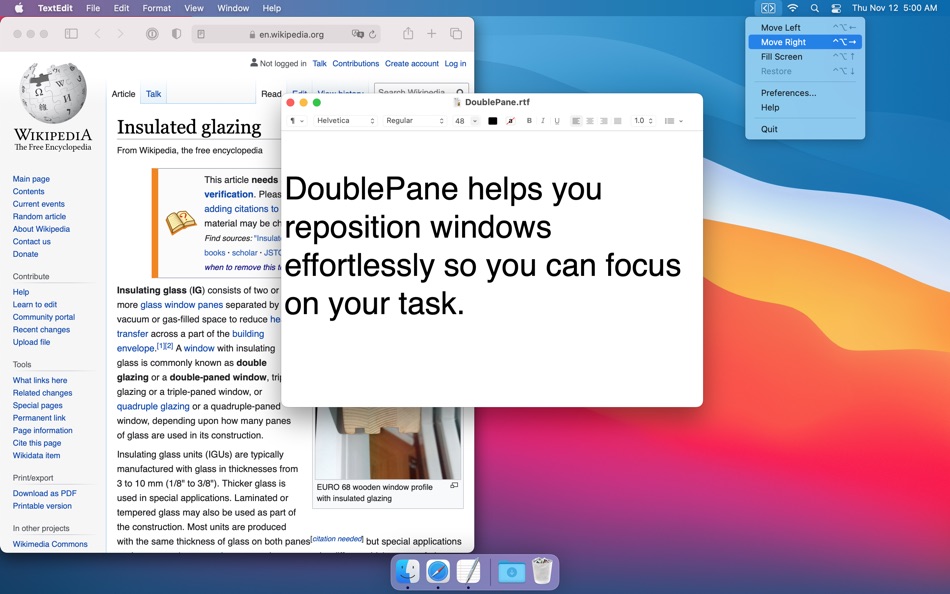
DoublePane effortlessly repositions application windows to maximize your screen space for easy side-by-side viewing.
With one click, DoublePane will place the current window to the left half of the screen. With a second click, DoublePane will move a second window to the right half of the screen. You no longer spend time sizing or repositioning open windows. You can layout your screen to maximize your productivity.
DoublePane’s side-by-side viewing allows you to easily:
* Edit two documents without spending time sizing or positioning them.
* Drag and drop files between two applications.
* Read an article on one half of the screen while taking notes on the other half.
DoublePane lets you position the current window through an onscreen menu or by using assignable keyboard shortcuts.
DoublePane will:
* Move a window to the left half of the screen
* Move a window to the right half of the screen
* Position a window to fill the entire screen
* Restore the original size and position of a window
Ad
Screenshots



Neue Funktionen
- Version: 1.8
- Aktualisiert:
- - Support for Mac OS Big Sur
- Support for Apple M1 based Macs
- Retina Support (yes finally!): Menubar icon is crisp and clean
- New application icon
Preisentwicklung
- Heute: Kostenlos
- Mindestens: Kostenlos
- Maximale: $9.99
Preise beobachten
Ad
Entwickler
- Nicholas Haddad
- Plattformen: macOS Apps (1)
- Listen: 0 + 1
- Punkte: 8 + 0 ¡
- Klassifizierungen: 0
- Rezensionen: 0
- Kommentare: 0
- Rabatte: 0
- Videos: 0
- RSS: Abonnieren
Punkte (8)
-

- 543 MichaelTheGeek
- +1
-
- 49 Naptonium
- +1
-
- 3,496 Dragon
- +1
-
- 1,154 Johonson
- +1
-
- 11,043 Simon Chan
- +1
-
- 2,344 Kras-s-savchiK
- +1


Klassifizierungen (0)
0 ☹️
Listen (0)
0 ☹️
- DoublePane
Rezensionen (0)
Schreiben Sie die erste Bewertung 🌟
Kommentare (0)
Seien Sie der Erste, der einen Kommentar abgibt 🌟
Weitere informationen
- Version: 1.8
- Kategorie:
macOS Apps›Produktivität - Betriebssysteme:
macOS,macOS 10.9 oder höher - Größe:
750 Kb - Unterstützte Sprachen:
English,French,German,Japanese,Norwegian,Swedish - Altersfreigabe:
4+ - Mac App Store Bewertung:
0 - Aktualisiert:
- Veröffentlichungsdatum:
Kontakte
- Webseite:
 https://5amcode.com
«DoublePane». Plattform: macOS. Kategorie: Produktivität. Entwickler: «Nicholas Haddad». Erste Veröffentlichung: . Letzte Aktualisierung: . Aktueller Preis: kostenlos. Dieser Titel hat noch keine Bewertungen oder Rezensionen auf AppAgg erhalten. Verfolgte Punkte: bestätigte 8, indirekte 0. Verfügbare Sprachen: English, French, German, Japanese, Norwegian, Swedish. AppAgg verfolgt den Preisverlauf, Bewertungen und Benutzerfeedback für «DoublePane». Verfolgen Sie zukünftige Rabatte und Updates über RSS. AppAgg hostet keine Anwendungen und vertreibt keine Software. Alle Marken, Logos und Screenshots gehören ihren jeweiligen Eigentümern.
DoublePane Kurz-URL: Kopiert!- 🌟 Teilen
- Mac App Store
Das könnte Ihnen auch gefallen
-
- Double Tap - Remap Shortcuts
- macOS Apps: Produktivität Von: Clement Rousseau
- Kostenlos
- Listen: 1 + 1 Klassifizierungen: 0 Rezensionen: 0
- Punkte: 5 + 0 Kommentare: 0 Version: 1.5 Tired of tiwsting and stretching your fingers to trigger your shortcuts? You feel like you are running out of shortcuts? Double Tap revolutionizes how you use shortcuts on macOS. With ... ⥯
-
- Body Double For Productivity
- macOS Apps: Produktivität Von: Philip Michael Solobay
- $9.99
- Listen: 0 + 0 Klassifizierungen: 0 Rezensionen: 0
- Punkte: 0 + 0 Kommentare: 0 Version: 1.0 Body Double For Productivity helps you stay focused and get more done by bringing the proven "body doubling" technique to your Mac. WHAT IS BODY DOUBLING? Body doubling is a ... ⥯
-
- Focoly - Your AI Body Double
- macOS Apps: Produktivität Von: 燿宇 何
- * Kostenlos
- Listen: 0 + 0 Klassifizierungen: 0 Rezensionen: 0
- Punkte: 0 + 0 Kommentare: 0 Version: 1.2 [ ! ! ] IMPORTANT REQUIREMENTS [ ! ! ] To ensure privacy, Focoly requires Apple Intelligence capabilities. You MUST have a Mac with Apple Silicon (M1 / M2 / M3 / M4 / M5) and run macOS ⥯
-
- zCommander - File Manager
- macOS Apps: Produktivität Von: woojooin
- $9.99
- Listen: 0 + 0 Klassifizierungen: 0 Rezensionen: 0
- Punkte: 6 + 0 Kommentare: 0 Version: 6.66 zCommander: The Ultimate File Management Solution for Mac Tired of searching for a Total Commander equivalent on your Mac? Look no further than zCommander! This powerful and intuitive ... ⥯
-
- Floating Clipboard
- macOS Apps: Produktivität Von: Ebey Tech LLC
- $1.99
- Listen: 1 + 1 Klassifizierungen: 0 Rezensionen: 0
- Punkte: 21 + 0 Kommentare: 0 Version: 1.0 Features: -Clipboard history. -Auto fetching of clipboard contents (optional). -Float Window above other apps & windows (optional). -Fast & fluid type-based filtering. -Inserted ... ⥯
-
- Notebooks – Write and Organize
- macOS Apps: Produktivität Von: Alfons Schmid
- $43.99
- Listen: 2 + 3 Klassifizierungen: 0 Rezensionen: 0
- Punkte: 10 + 0 Kommentare: 0 Version: 3.8.4 Notebooks is a comprehensive writing app with a powerful text and Markdown editor, which you can use as personal Wiki, Zettelkasten, file and document organizer, task manager, ... ⥯
-
- My Favorites
- macOS Apps: Produktivität Von: Wise Tech Labs Private Limited
- $4.99
- Listen: 0 + 3 Klassifizierungen: 0 Rezensionen: 0
- Punkte: 18 + 0 Kommentare: 0 Version: 2.3 Your Favorites at your Fingertips!! My Favorites is an incredibly handy app that allows you to bookmark your files, folders, web bookmarks, apps, text notes and color swatches that you ⥯
-
- QSpace
- macOS Apps: Produktivität Von: 文达 田
- * $12.99
- Listen: 3 + 1 Klassifizierungen: 0 Rezensionen: 0
- Punkte: 3 + 0 Kommentare: 0 Version: 6.1.3 QSpace is a clean and efficient Multi-Pane File Manager, also can connect to FTP, SFTP, WebDAV, Dropbox, OneDrive, Google Drive, Aliyun Drive, Baidu Netdisk, Amazon S3(and S3 ... ⥯
- -100%
- RibbonDiff
- macOS Apps: Produktivität Von: Rei Kitajima
- ▼ * Kostenlos
$3.99-100% - Listen: 0 + 1 Klassifizierungen: 0 Rezensionen: 0
- Punkte: 7 + 0 Kommentare: 0 Version: 3.2.1 Compare two versions of text and spot every change fast - perfect for code snippets, config files, logs, and document edits. RibbonDiff for macOS gives you a clean, Mac-native, ... ⥯
-
- Scapple
- macOS Apps: Produktivität Von: Literature & Latte
- $20.99
- Listen: 3 + 5 Klassifizierungen: 0 Rezensionen: 0
- Punkte: 3 + 0 Kommentare: 0 Version: 1.5.4 scapple: to work or shape roughly, without smoothing to a finish. - The Chambers Dictionary ROUGH IT OUT Ever scribbled ideas on a piece of paper and drawn lines between related ... ⥯
-
- Web Scraper
- macOS Apps: Produktivität Von: Mustafa Alpay
- $4.99
- Listen: 1 + 1 Klassifizierungen: 0 Rezensionen: 0
- Punkte: 4 + 0 Kommentare: 0 Version: 1.3.4 With Web Scraper for Chrome Browser, you can get data from the current webpage quickly by clicking on the data fields when you hover your mouse over the data fields on any webpage. ... ⥯
-
- EagleFiler
- macOS Apps: Produktivität Von: C-Command Software, LLC
- $69.99
- Listen: 0 + 1 Klassifizierungen: 0 Rezensionen: 0
- Punkte: 2 + 0 Kommentare: 0 Version: 1.9.19 Collect notes, e-mails, and Web pages on your Mac, and search them instantly. EagleFiler makes organizing and managing your information easy. It lets you archive and search mail, Web ... ⥯
-
- BetterSnapTool
- macOS Apps: Produktivität Von: folivora.AI GmbH
- * $1.99
- Listen: 3 + 5 Klassifizierungen: 0 Rezensionen: 0
- Punkte: 2 + 0 Kommentare: 0 Version: 1.9.12 BetterSnapTool allows you to easily manage your window positions and sizes by either dragging them to one of the screen's corners or to the top, left or right side of the screen. This ... ⥯
-
- Liquid
- macOS Apps: Produktivität Von: The Augmented Text Company LTD
- * Kostenlos
- Listen: 1 + 3 Klassifizierungen: 0 Rezensionen: 0
- Punkte: 8 + 0 Kommentare: 0 Version: 38 Work at the speed of thought by interacting with selected text instantly. MacUser: Revolutionary TUAW: One of those utilities that you can't live without once you start using it BBC: ... ⥯