
| Developer: | Jae-Seung Lee (10) | ||
| Price: | $0.99 | ||
| Rankings: | 0 | ||
| Reviews: | 0 Write a Review | ||
| Lists: | 0 + 1 | ||
| Points: | 1 + 0 ¡ | ||
| Mac App Store | |||
Description

Links
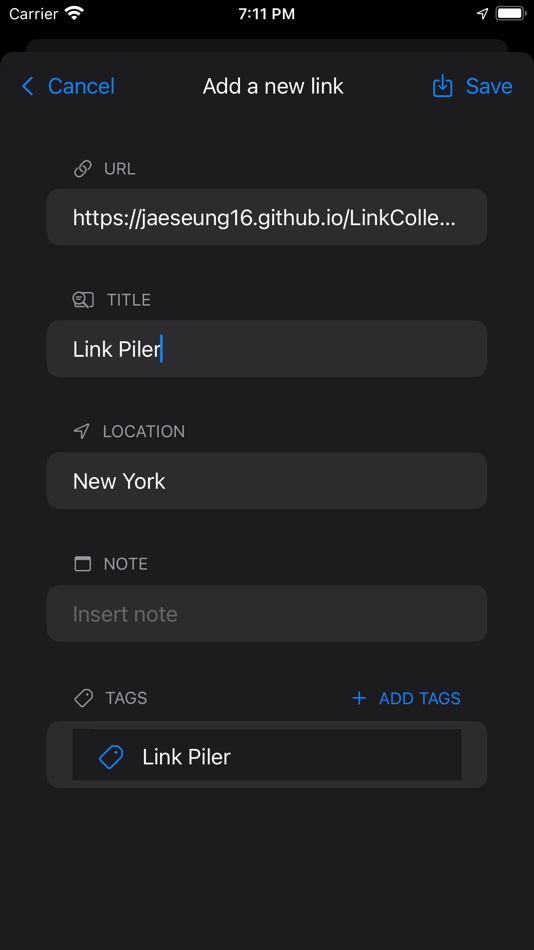
- Add a new link
1. Click + in the tool bar
2. Paste a URL into the text field below “URL” and hit ⏎. If possible, the “TITLE” and “LOCATION” will be populated.
3. One may add note and attach tags.
4. Click “Save”.
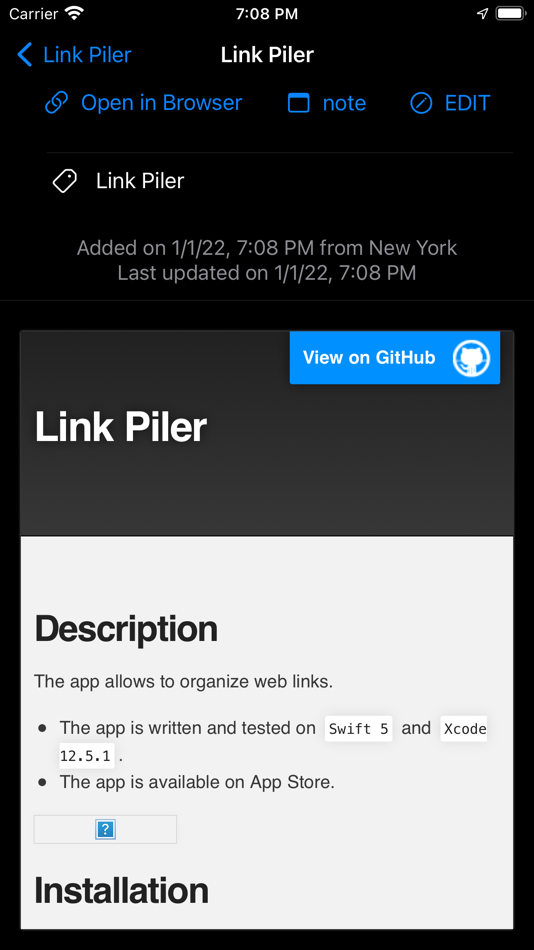
- Link detail view
1. Select a link from Links to open a detail view for the selected link
2. Click “Open in Browser" to open the link in a user’s default browser.
3. Click "note" to display the stored note.
4. Click "EDIT" to update title, note, and tags.
- Click "EDIT TAGS" to add/remove tags to/from the selected link or to create a new tag or to delete existing tags.
- Search links
1. Pull down a list of links to open the search field
2. Type some text to find links by title
- Filter links
1. Click the circle containing 3 lines in the tool bar
2. Choose dates to see links added between From and To.
3. Choose tags to see links associated with the selected tags.
- Share links
1. Click the Share button to generate a bookmark file from the displayed links
Tags
- Select a tag to see a list of links associated with the selected tag.
- Select a link to open in browser.
Share Extension
- If available, “Link Piler Share Extension” will appear among the share options. It may be found under “More”. Depending on devices and apps, some of URL, title, and location can be posted from the share extension. Note and tags can be edited in the main app.
Widget
- Widget present randomly chosen items. When clicked, the app will open and present the item displayed on Widget.
Screenshots






Price History
- Today: $0.99
- Minimum: $0.99
- Maximum: $0.99
Track prices
Developer
- Jae-Seung Lee
- Platforms: iOS Apps (5) macOS Apps (5)
- Lists: 0 + 1
- Points: 1 + 6 ¡
- Rankings: 0
- Reviews: 0
- Discounts: 0
- Videos: 0
- RSS: Subscribe
Points
-

- 2,097 Luciole
- +1

Rankings
0 ☹️
Lists
0 ☹️
Reviews
Be the first to review 🌟
Additional Information
- Version: 1.6
- Category:
macOS Apps›Productivity - OS:
iPad,iPhone,macOS,macOS 18.0 and up - Size:
4 Mb - Supported Languages:
English - Content Rating:
17+ - Mac App Store Rating:
0 - Updated:
- Release Date:
«Link Piler» is a Productivity app for macOS, developed by «Jae-Seung Lee». It was first released on and last updated on . The lowest historical price was $0.99, and the highest was $0.99. This app has not yet received any ratings or reviews on AppAgg. AppAgg has tracked 1 confirmed points plus 0 indirect points for this app. Available languages: English. AppAgg continuously tracks the price history, ratings, and user feedback for «Link Piler». Subscribe to this app or follow its RSS feed to get notified about future discounts or updates.
Link Piler Short URL: Copied!- 🌟 Share
- Mac App Store
You may also like
-
- Link Cluster
- macOS Apps: Productivity By: Daniel Witt
- * Free
- Lists: 1 + 3 Rankings: 0 Reviews: 0
- Points: 14 + 5 (4.0) Version: 2.3 Link Cluster is your go-to tool for collecting, organizing, finding links, and syncing them across Apple devices with iCloud. In today's digital age, the internet is teeming with ... ⥯
-
- Link Hunter
- macOS Apps: Productivity By: Xiang He
- Free
- Lists: 1 + 1 Rankings: 0 Reviews: 0
- Points: 5 + 0 Version: 1.0.2 Link Detector is a pasteboard monitoring tool that helps you detect & extract links in the pasteboard. This app help you enhanced your pasteboard without perception! Link Detector ... ⥯
-
- Link Copier – hover & copy
- macOS Apps: Productivity By: Oleh Kopyl
- $2.99
- Lists: 0 + 0 Rankings: 0 Reviews: 0
- Points: 0 + 0 Version: 1.0 Getting Started: 1. Open the app 2. Open Safari Extensions, enable Link Copier extension and press the "Always allow on every website" button 3. To copy any link just hover over it and ⥯
-
- Link - Connect Related Things
- macOS Apps: Productivity By: Poke Design
- Free
- Lists: 0 + 0 Rankings: 0 Reviews: 0
- Points: 3 + 1 (3.0) Version: 1.1.1 # Link is NOT a Note Taking App In many note-taking Apps, we have detailed records of various aspects of the content, which are scattered knowledge points, but in fact there is a ... ⥯
-
- Link Styler - Color Links
- macOS Apps: Productivity By: 家贺 万
- $2.99
- Lists: 0 + 0 Rankings: 0 Reviews: 0
- Points: 2 + 0 Version: 1.0.0 Tired of squinting to find links on a cluttered webpage? Take control of your browsing experience with Link Styler. Link Styler is a simple yet powerful Safari extension that lets you ... ⥯
-
- BioSprout: Link in Bio Creator
- macOS Apps: Productivity By: Andries Stephanus de Beer
- $0.99
- Lists: 0 + 0 Rankings: 0 Reviews: 0
- Points: 0 + 0 Version: 1.3 All of your links in one place. Add your social media accounts, websites, links, music, playlists, videos, podcasts, forms, goods, profiles, stores, restaurant menus, catalogs, live ... ⥯
-
- Bridges Link Formatting
- macOS Apps: Productivity By: Jonathan Ruiz
- Free
- Lists: 1 + 1 Rankings: 0 Reviews: 0
- Points: 14 + 0 Version: 2.0.3 Bridges is the best way to collect custom formatted links. Saving a link for your podcast, newsletter, or blog post has never been easier. If you ve ever had the task to collect links ... ⥯
- -50%
- OpenIn 4 Advanced Link Handler
- macOS Apps: Productivity By: Loshadki, LLC
- $5.99
$11.99-50% - Lists: 1 + 1 Rankings: 0 Reviews: 0
- Points: 7 + 0 Version: 4.3.5 - Are you using multiple browsers or Mail applications on your Mac? - Do you want to open links in a specific browser every time you click them? - Do you want to open links in a ... ⥯
-
- Linea Link
- macOS Apps: Productivity By: The Iconfactory
- Free
- Lists: 0 + 0 Rankings: 0 Reviews: 0
- Points: 5 + 0 Version: 4.3 Linea Link is the easiest way to get sketches drawn on your iPad or iPhone over to your macOS desktop. Using iCloud sync, all your Linea projects and sketches are instantly available ... ⥯
-
- Bookmark Link Menu - Coolbar
- macOS Apps: Productivity By: Khuong Pham
- * Free
- Lists: 1 + 0 Rankings: 0 Reviews: 0
- Points: 2 + 0 Version: 1.3.1 Coolbar is the perfect solution for anyone looking to simplify their workflow and stay organized on their Mac. With Coolbar, you can easily store and access all of your frequently used ⥯
-
- iFavs: link & file manager
- macOS Apps: Productivity By: HDH Analytics Inc.
- Free
- Lists: 1 + 1 Rankings: 0 Reviews: 0
- Points: 1 + 0 Version: 3.1.2 Can t find a file? Can t remember a website link? Hate fishing trough Google Docs? Want to stay organized? Then download iFavs today! iFavs allows you to easily open your websites, ... ⥯
-
- Openly a Link - Browser Picker
- macOS Apps: Productivity By: Fokusek Enterprise
- Free
- Lists: 0 + 0 Rankings: 0 Reviews: 0
- Points: 1 + 153 (4.7) Version: 2.0.2 Openly a Link - Browser Picker is the perfect choice if you want to fast open a web page in a different browser, such as Chrome, Safari, Firefox, Brave and even Edge or other browsers. ⥯
-
- Mudra Link
- macOS Apps: Productivity By: Wearable Devices Ltd
- Free
- Lists: 0 + 0 Rankings: 0 Reviews: 0
- Points: 1 + 0 Version: 1.0.196 Mudra Link Neural Gesture Control Transform how you interact with your devices using the revolutionary Mudra Link wristband. The device uses Bluetooth to empower you with Jedi-like ... ⥯
-
- Copy Link - Hover and Copy
- macOS Apps: Productivity By: 光明 胡
- Free
- Lists: 0 + 0 Rankings: 0 Reviews: 0
- Points: 0 + 0 Version: 1.2 Capture the information you need with ease! Introducing Copy Link, an innovative Safari extension for Mac that redefines your browsing experience. Tired of the cumbersome process of ... ⥯