
| ผู้พัฒนา: | 鑫 肇 (8) | ||
| ราคา: | * ฟรี | ||
| การจัดอันดับ: | 0 | ||
| ความเห็น: | 0 เขียนความเห็น | ||
| รายการ: | 0 + 0 | ||
| แต้มแล: | 0 + 0 ¡ | ||
| Mac App Store | |||
คำอธิบาย

Driven by my persistent pursuit of convenient operations, I poured my heart into developing this ingeniously crafted application. It's not an ordinary email client, but features a cleverly unique design - it can register itself as an email client and then, like a wise messenger, accurately forward mailto: links to the browser. This way, I can once again use my browser freely and naturally, just like before!
Let me introduce you to the delightful features of this application:
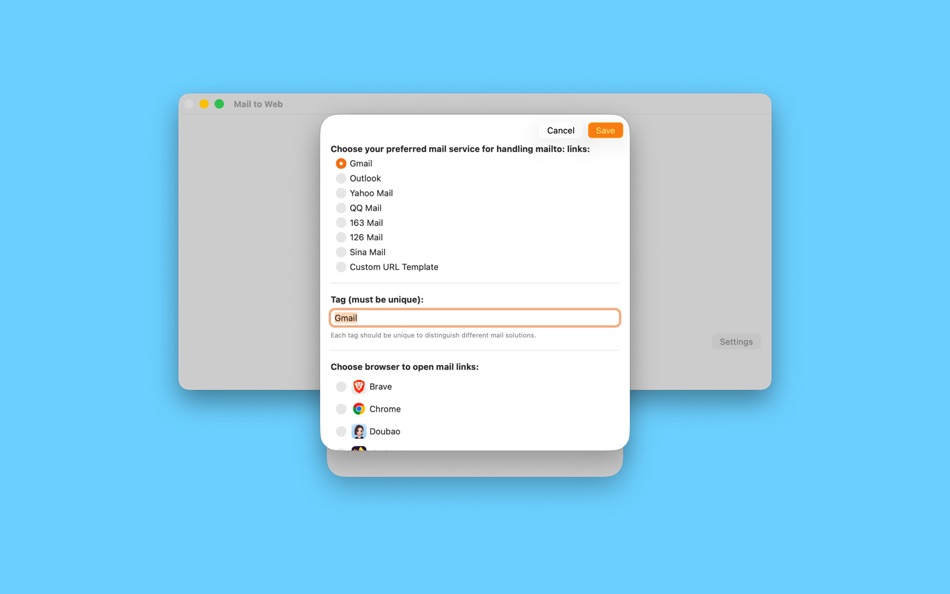
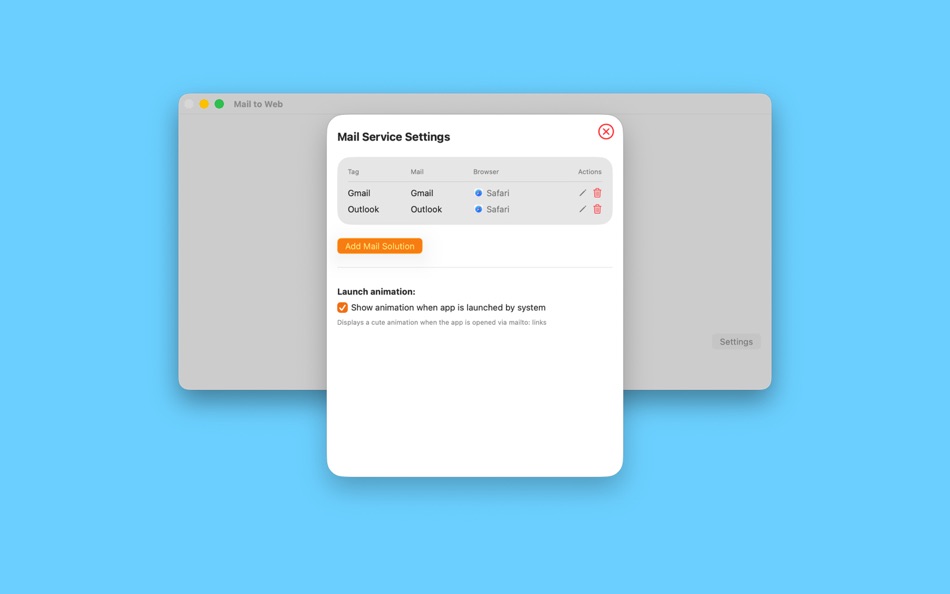
1. **Thoughtful Presets with Personal Expansion**: It comes pre-configured with common email services, including globally popular ones like Gmail and Outlook, as well as domestically favored services like QQ Mail. Moreover, it fully respects users' personalization needs, allowing them to easily add their own custom email services.
2. **One-Click Registration as Default**: With simple operations, it can successfully register and be set as the system's default email client, eliminating the need for cumbersome switching during use and enabling an efficient, convenient email experience in one step.
3. **Browser Freedom of Choice**: It gives users tremendous autonomy in browser selection. By default, it uses the system's default browser, but if you have a particular preference for another browser, you can easily specify it to satisfy your personal preferences.
4. **Smart Redirection with Content Preservation**: When users click on email composition links while browsing, something magical happens! The application automatically opens the browser and precisely navigates to the email composition page. What's even more thoughtful is that previously preset content - such as recipient information, email subject, and body text - is preserved intact, making your email composition process seamless and fluid.
Some of the functions mentioned above, such as customizing the email provider and opening links with a non-system default browser, require you to purchase the premium version of the app. The default downloaded free version only supports using the system’s built-in browser and the pre-set email provider. At the same time, the frequency of forwarding mailto: should not exceed three times a week.
http://www.apple.com/legal/itunes/appstore/dev/stdeula
ภาพหน้าจอ

มีอะไรใหม่
- เวอร์ชัน: 2.0.0
- อัปเดต:
- * Support adding multiple email accounts, and prompt the user to select one when composing an email.
* Optimize the registration process.
ราคา
-
* การซื้อภายในแอพ - วันนี้: ฟรี
- ต่ำสุด: ฟรี
- มากที่สุด: ฟรี
ติดตามราคา
ผู้พัฒนา
แต้มแล
0 ☹️
การจัดอันดับ
0 ☹️
รายการ
0 ☹️
ความเห็น
แสดงรีวิวเป็นคนแรกเลย 🌟
ข้อมูลเพิ่มเติม
- เวอร์ชัน: 2.0.0
- หมวดหมู่:
macOS แอป›ประสิทธิภาพการผลิต - ระบบปฏิบัติการ:
macOS,macOS 14.6 และสูงกว่า - ขนาด:
5 Mb - ภาษาที่สนับสนุน:
Chinese - การจัดประเภทเนื้อหา:
4+ - Mac App Store คะแนนโดย:
0 - อัปเดต:
- วันที่วางจำหน่าย:
Mail to Web URL แบบสั้น: คัดลอกแล้ว!- 🌟 แชร์
- Mac App Store
คุณอาจชอบ
-
- Mail+ App for Gmail
- macOS แอป: ประสิทธิภาพการผลิต โดย: HHH Technologies LLC
- * ฟรี
- รายการ: 0 + 1 การจัดอันดับ: 0 ความเห็น: 0
- แต้มแล: 2 + 0 เวอร์ชัน: 4.6 Mail+ App for Gmail is the ultimate email client for your Mac, providing a seamless and efficient Gmail experience. Whether managing multiple accounts or accessing your inbox quickly, ... ⥯
-
- Nimbus Web Clipper
- macOS แอป: ประสิทธิภาพการผลิต โดย: Nimbus Web Inc
- ฟรี
- รายการ: 2 + 0 การจัดอันดับ: 0 ความเห็น: 0
- แต้มแล: 1 + 0 เวอร์ชัน: 1.0.2 Web Clipper that works! The easiest way to clip text, pics, links, email and pdf from internet pages and save them. Here is a web clipper that works! Nimbus Web Clipper is the easiest ... ⥯
-
- Web Shield-Remove malicious cookies
- macOS แอป: ประสิทธิภาพการผลิต โดย: 妍 李
- $1.99
- รายการ: 0 + 0 การจัดอันดับ: 0 ความเห็น: 0
- แต้มแล: 0 + 0 เวอร์ชัน: 1.03 Web Shield check the trace of malicious websites and remove suspicious cookies to avoid users' data loss. Easy-to-use Graphical User Interface With Web Shield for Mac, you get a ... ⥯
-
- Web Confidential
- macOS แอป: ประสิทธิภาพการผลิต โดย: Alco Blom
- * ฟรี
- รายการ: 0 + 0 การจัดอันดับ: 0 ความเห็น: 0
- แต้มแล: 2 + 0 เวอร์ชัน: 5.5 Where do you keep your confidential data? Like most people these days, you've probably got a growing number of user IDs, passwords, registration keys, credit card numbers, PIN codes, ... ⥯
-
- Mail Signature for Mail App
- macOS แอป: ประสิทธิภาพการผลิต โดย: Stephan Fischer
- ฟรี
- รายการ: 1 + 0 การจัดอันดับ: 0 ความเห็น: 0
- แต้มแล: 1 + 0 เวอร์ชัน: 2.0.0 Easily create your professional signature for Apple Mail. The visual editor allows you to design signatures without any HTML knowledge. Formatting, links as well as images are just a ... ⥯
-
- Mail Hub - Email Client
- macOS แอป: ประสิทธิภาพการผลิต โดย: Wuxxu
- ฟรี
- รายการ: 0 + 0 การจัดอันดับ: 0 ความเห็น: 0
- แต้มแล: 0 + 0 เวอร์ชัน: 1.1 Mail Hub One Inbox for All Your Web Email Accounts Tired of constantly switching between email tabs and profiles? Mail Hub lets you manage multiple Gmail, iCloud, Outlook, Yahoo, and ... ⥯
-
- Mail Merge Pro
- macOS แอป: ประสิทธิภาพการผลิต โดย: Jyotsana Singh
- $29.99
- รายการ: 0 + 0 การจัดอันดับ: 0 ความเห็น: 0
- แต้มแล: 0 + 0 เวอร์ชัน: 1.2 Mail Merge Pro is an advanced and dynamic solution for sending personalized emails and creating personalized multiple documents dynamically after merging data from external sources ... ⥯
-
- Web Archives for Safari
- macOS แอป: ประสิทธิภาพการผลิต โดย: Armin Sebastian
- $5.99
- รายการ: 1 + 1 การจัดอันดับ: 0 ความเห็น: 0
- แต้มแล: 3 + 0 เวอร์ชัน: 7.2.0 Web Archives is a browser extension for Safari that enables you to find archived and cached versions of web pages on various search engines, such as the Wayback Machine and Archive is. ⥯
-
- Mail for Gmail
- macOS แอป: ประสิทธิภาพการผลิต โดย: Fokusek Enterprise
- * ฟรี
- รายการ: 0 + 0 การจัดอันดับ: 0 ความเห็น: 0
- แต้มแล: 0 + 0 เวอร์ชัน: 2.2.1 Mail for Gmail is one of the great choices when you want to have all of your Google Gmail or GSuite email accounts in a single application. Built with the latest and modern user ... ⥯
-
- Web Image Downloader
- macOS แอป: ประสิทธิภาพการผลิต โดย: 宇 赖
- ฟรี
- รายการ: 1 + 0 การจัดอันดับ: 0 ความเห็น: 0
- แต้มแล: 0 + 0 เวอร์ชัน: 3.18.082617 Web Image Downloader is Powerful image grabber software that can help you download all the pictures form webpages, just by entering its URL address. This makes it flexible enough to be ⥯
-
- Web Dumper
- macOS แอป: ประสิทธิภาพการผลิต โดย: Max Programming, S.L.
- $14.99
- รายการ: 0 + 0 การจัดอันดับ: 0 ความเห็น: 0
- แต้มแล: 3 + 0 เวอร์ชัน: 3.4.7 If you are viewing a Web site with your browser and you decide that you would like to make a copy of it on your hard drive, you have to manually save each page as you view it along ... ⥯
-
- Web Listener
- macOS แอป: ประสิทธิภาพการผลิต โดย: Zillion Digits LLC
- ฟรี
- รายการ: 0 + 0 การจัดอันดับ: 0 ความเห็น: 0
- แต้มแล: 3 + 1 (5.0) เวอร์ชัน: 1.07 Do you wish more of your favorite writers create their content in audio format? Do you spend a lot of time listening to audiobooks and podcasts? Then, Web Listener is the app for you! ... ⥯
-
- Mail+ for Gmail
- macOS แอป: ประสิทธิภาพการผลิต โดย: Rocky Sand Studio Ltd.
- * ฟรี
- รายการ: 0 + 2 การจัดอันดับ: 0 ความเห็น: 0
- แต้มแล: 4 + 0 เวอร์ชัน: 2.1 Enjoy all the advantages of accessing Gmail, separately from your browser. Highlighted features: - Easily access all your Gmail emails - Smooth and responsive look and feel - Badge ... ⥯
-
- Web Scraper
- macOS แอป: ประสิทธิภาพการผลิต โดย: Mustafa Alpay
- $4.99
- รายการ: 1 + 1 การจัดอันดับ: 0 ความเห็น: 0
- แต้มแล: 4 + 0 เวอร์ชัน: 1.3.4 With Web Scraper for Chrome Browser, you can get data from the current webpage quickly by clicking on the data fields when you hover your mouse over the data fields on any webpage. ... ⥯