
| Vývojář: | Jerry Lee (3) | ||
| Cena: | Zdarma | ||
| Hodnocení: | 0 | ||
| Recenze: | 0 Napsat recenzi | ||
| Komentáře: | 0 Přidat komentář | ||
| Seznamy: | 0 + 0 | ||
| Body: | 0 + 0 ¡ | ||
| Mac App Store | |||
Popis

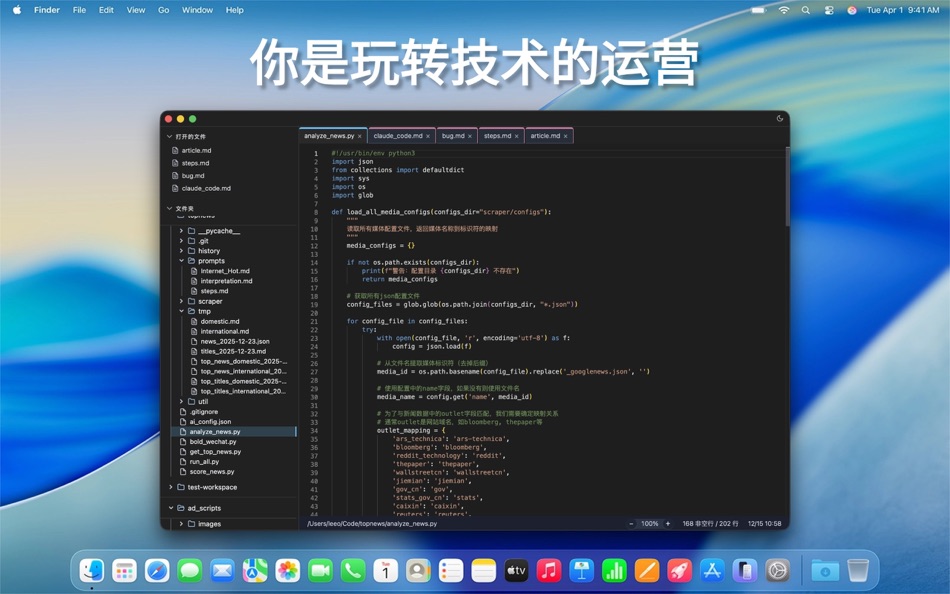
专为 macOS 打造的现代化 Markdown 编辑器,将简洁设计与强大功能完美结合。
## 核心功能
• 双栏界面 - 文件树与编辑区域并排显示
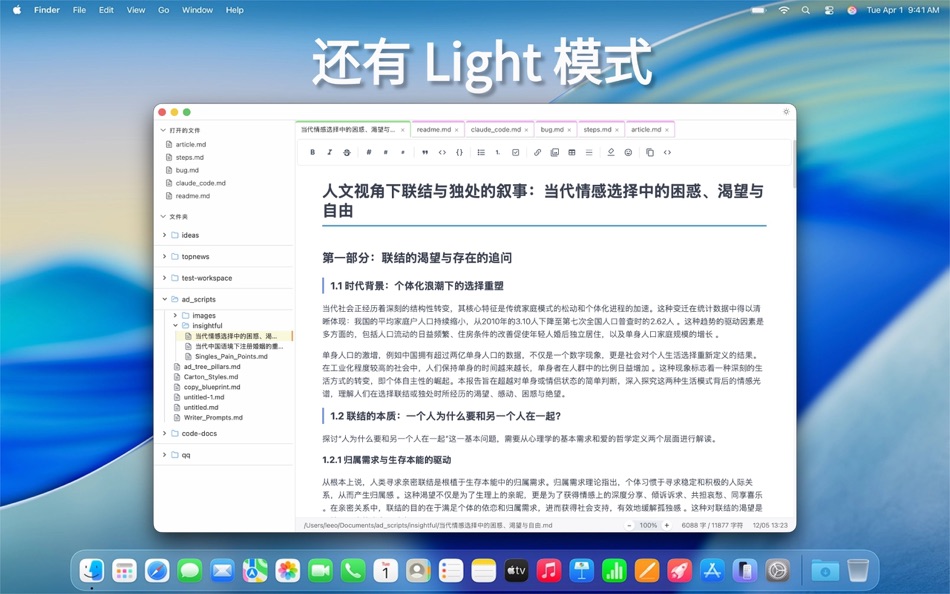
• 实时预览 - 编辑与预览模式一键切换
• 智能文件管理 - 支持文件夹结构浏览
• 语法高亮 - CodeMirror 6 驱动的编辑体验
• 代码高亮 - 支持数十种编程语言
• 截图功能 - 生成精美的代码片段图片
## 效率工具
• 丰富快捷键支持
• 自动保存与文件监听
• 全文搜索功能
• 文件拖拽支持
• 多标签页管理
## 设计理念
• 原生 macOS 设计语言
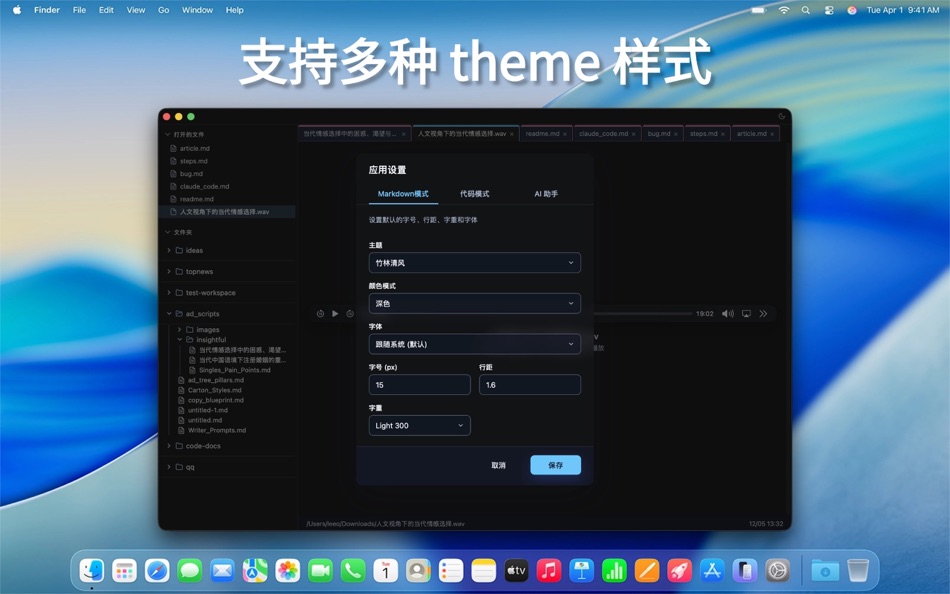
• 浅色/深色主题切换
• 可自定义字体和间距
• 专注写作的沉浸式体验
## 适用人群
开发者、技术写手、产品经理、学生、博客作者以及所有需要高效处理 Markdown 文档的用户。
让写作回归纯粹,让创作更加高效。
Ad
Snímky obrazovky



Novinky
- Verze: 1.5.45
- Aktualizováno:
- - 去掉了terminal 和 workflow 板块。由于安全问题无法执行。
- 做了部分的 UI 优化。
- 解决了导出卡片的一些样式问题。
Historie cen
- Dnes: Zdarma
- Minimální: Zdarma
- Maximální: Zdarma
Sledovat ceny
Ad
Vývojář
- Jerry Lee
- Platformy: Android Aplikace (1) iOS Aplikace (1) macOS Aplikace (1)
- Seznamy: 0 + 0
- Body: 0 + 4 ¡
- Hodnocení: 0
- Recenze: 0
- Komentáře: 0
- Slevy: 0
- Videa: 0
- RSS: Odebírat
Body (0)
0 ☹️
Hodnocení (0)
0 ☹️
Seznamy (0)
0 ☹️
- Mark2
Recenze (0)
Buďte první, kdo bude hodnotit 🌟
Komentáře (0)
Buďte první, kdo okomentuje 🌟
Další informace
- Verze: 1.5.45
- Kategorie:
macOS Aplikace›Produktivita - OS:
macOS,macOS 10.13 a vyšší - Velikost:
15 Mb - Podporovaný jazyk:
Chinese,English - Hodnocení obsahu:
4+ - Mac App Store Hodnocení:
0 - Aktualizováno:
- Datum vydání:
«Mark2». Platforma: macOS. Kategorie: Produktivita. Vývojář: «Jerry Lee». První vydání: . Poslední aktualizace: . Aktuální cena: zdarma. Tento titul zatím na AppAgg nezískal hodnocení ani recenze. Dostupné jazyky: Chinese, English. AppAgg sleduje historii cen, hodnocení a zpětnou vazbu od uživatelů «Mark2». Sledujte budoucí slevy a aktualizace prostřednictvím RSS. AppAgg nehostuje aplikace ani nedistribuuje software. Všechny ochranné známky, loga a snímky obrazovky patří jejich příslušným vlastníkům.
Mark2 Krátká adresa URL: Zkopírováno!- 🌟 Sdílet
- Mac App Store
Mohlo by se Vám také líbit
-
- Skitch - Snap. Mark up. Share.
- macOS Aplikace: Produktivita Podle: Skitch
- * Zdarma
- Seznamy: 0 + 0 Hodnocení: 0 Recenze: 0
- Body: 0 + 0 Komentáře: 0 Verze: 2.9 See something that sparks an idea? Use Skitch to snap it, mark it up, and send it on in an instant. Your bold ideas stand out even brighter with Skitch. People everywhere use Skitch to ⥯
-
- Rocket Calendar
- macOS Aplikace: Produktivita Podle: Mark Vitale
- Zdarma
- Seznamy: 0 + 0 Hodnocení: 0 Recenze: 0
- Body: 1 + 0 Komentáře: 0 Verze: 1.3 Rocket Calendar is a speedy, always-accessible calendar that lives in your menu bar. You can quickly check dates, navigate between months, and even copy the selected date to your ... ⥯
-
- This week
- macOS Aplikace: Produktivita Podle: Mark Cornelisse
- $0.99
- Seznamy: 0 + 0 Hodnocení: 0 Recenze: 0
- Body: 0 + 0 Komentáře: 0 Verze: 1.2.0 What week number is it? Do you always have that question? Don't look any further. The current week number of this year now sits in your menubar. So there is no need to look it up in ... ⥯
-
- scanSort
- macOS Aplikace: Produktivita Podle: Mark Butler
- $4.99
- Seznamy: 0 + 0 Hodnocení: 0 Recenze: 0
- Body: 0 + 0 Komentáře: 0 Verze: 1.0.10 scanSort makes scanning double sided documents with only a single sided scanner super easy. Scan the front sides of a documents pages into a PDF document file, turn the document over ... ⥯
-
- LifeTimes2
- macOS Aplikace: Produktivita Podle: Mark S. Wall
- $4.99
- Seznamy: 0 + 0 Hodnocení: 0 Recenze: 0
- Body: 0 + 0 Komentáře: 0 Verze: 1.4 (21) The full LifeTimes2 User Manual is in the Help System under the Help Menu LifeTimes2 is a complete rewrite of the original LifeTimes app in Swift. Create Daily Notes Use LifeTimes2 to ... ⥯
-
- Menu Bar Quick Calc
- macOS Aplikace: Produktivita Podle: Mark Huber
- $0.99
- Seznamy: 0 + 0 Hodnocení: 0 Recenze: 0
- Body: 0 + 0 Komentáře: 0 Verze: 1.0 Menu Bar Calculator is a lightweight, always-accessible calculator that lives in your Mac's menu bar. Perfect for quick calculations without interrupting your workflow. Features: ... ⥯
-
- PDF Expert – Edit, Sign PDFs
- macOS Aplikace: Produktivita Podle: Readdle Technologies Limited
- * $139.99
- Seznamy: 10 + 13 Hodnocení: 0 Recenze: 0
- Body: 6 + 0 Komentáře: 0 Verze: 3.11.1 It s fast and intuitive while effortlessly letting you complete any PDF task. Over 30 million people globally use PDF Expert apps. All the tools you need, done right. PDF Expert is the ⥯
-
- Scrivener 3
- macOS Aplikace: Produktivita Podle: Literature & Latte
- $59.99
- Seznamy: 3 + 11 Hodnocení: 0 Recenze: 0
- Body: 2 + 0 Komentáře: 0 Verze: 3.5.2 Typewriter. Corkboard. Scrapbook. Scrivener combines all the writing tools you need to craft your first draft, from nascent notion to final full stop. The biggest software advance for ... ⥯
-
- Floating Clipboard
- macOS Aplikace: Produktivita Podle: Ebey Tech LLC
- $1.99
- Seznamy: 1 + 1 Hodnocení: 0 Recenze: 0
- Body: 21 + 0 Komentáře: 0 Verze: 1.0 Features: -Clipboard history. -Auto fetching of clipboard contents (optional). -Float Window above other apps & windows (optional). -Fast & fluid type-based filtering. -Inserted ... ⥯
-
- My Favorites
- macOS Aplikace: Produktivita Podle: Wise Tech Labs Private Limited
- $4.99
- Seznamy: 0 + 3 Hodnocení: 0 Recenze: 0
- Body: 18 + 0 Komentáře: 0 Verze: 2.3 Your Favorites at your Fingertips!! My Favorites is an incredibly handy app that allows you to bookmark your files, folders, web bookmarks, apps, text notes and color swatches that you ⥯
-
- Pages 14.5
- macOS Aplikace: Produktivita Podle: Apple
- Zdarma
- Seznamy: 4 + 4 Hodnocení: 5 (1) Recenze: 0
- Body: 4 + 0 Komentáře: 0 Verze: 14.5 Create gorgeous documents in minutes with the Pages for Mac word processor. Start with an Apple-designed template to instantly create gorgeous reports, digital books, resumes, posters, ⥯
-
- iShot-ScreenShot Recording OCR
- macOS Aplikace: Produktivita Podle: 宁波上官科技有限公司
- * Zdarma
- Seznamy: 0 + 1 Hodnocení: 0 Recenze: 0
- Body: 8 + 0 Komentáře: 0 Verze: 2.6.5 [Native support for Apple M series and Intel chips] Screenshot/Long Screenshot/Shell Screenshot/Texture/Annotation/Color Picking/Screen Recording/Recording/OCR/Screenshot Translation ... ⥯
-
- PDF to Pages Free
- macOS Aplikace: Produktivita Podle: 科 姚
- * Zdarma
- Seznamy: 0 + 1 Hodnocení: 0 Recenze: 0
- Body: 7 + 0 Komentáře: 0 Verze: 3.1 Turns your PDF files into iWork Pages quickly and accurately. Work more effectively with PDF to Pages converter. PDF is good for sharing and achievement, but it s never an easy task to ⥯
-
- Microsoft OneNote
- macOS Aplikace: Produktivita Podle: Microsoft Corporation
- * Zdarma
- Seznamy: 2 + 3 Hodnocení: 5 (1) Recenze: 0
- Body: 3 + 0 Komentáře: 0 Verze: 16.106.3 Capture your thoughts, discoveries, and ideas in your very own digital notebook using OneNote for Mac. Now it is easier than ever capture your thoughts, add pictures or files, and ... ⥯