
| Udvikler: | Norbert Gutbrod (2) | ||
| Pris: | $4.99 | ||
| Rangeringer: | 0 | ||
| Anmeldelser: | 0 Skriv en anmeldelse | ||
| Lister: | 0 + 0 | ||
| Point: | 2 + 0 ¡ | ||
| Mac App Store | |||
Beskrivelse

POWERFUL MARKDOWN EDITOR
Write with confidence using our advanced editor featuring syntax highlighting, distraction-free mode for focused writing, and a toggleable live preview. Never lose work with automatic unsaved changes protection.
THEME DESIGNER
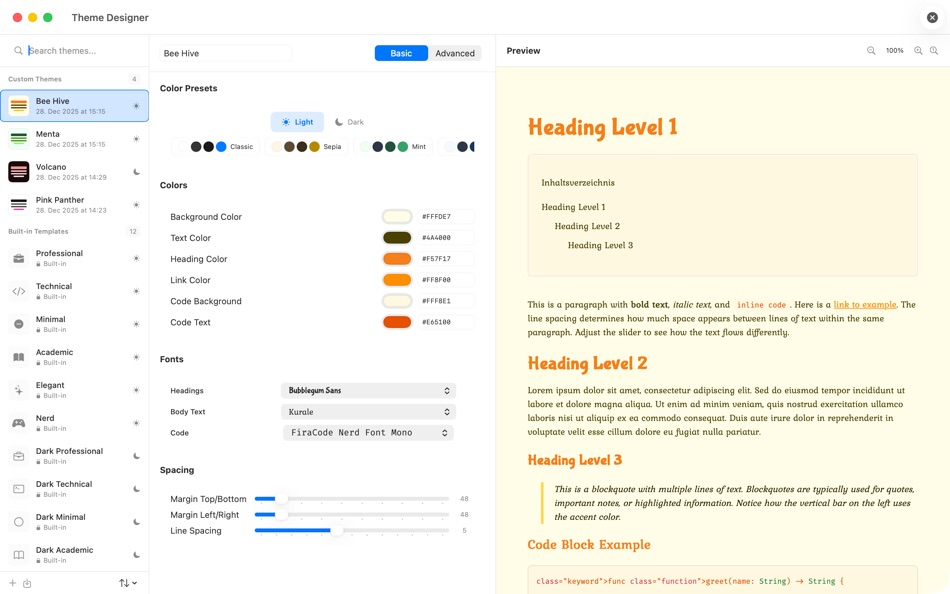
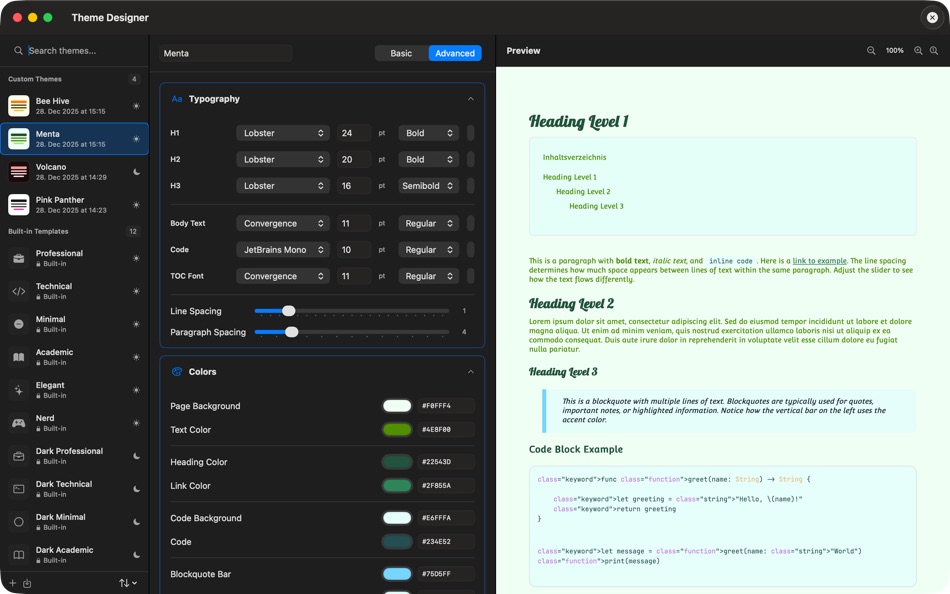
Create your own custom themes with our intuitive Theme Designer. Customize colors, typography, spacing, and decorations. Start from 12 built-in presets or design from scratch. Preview changes in real-time and export themes to share across devices.
PROFESSIONAL PDF EXPORT
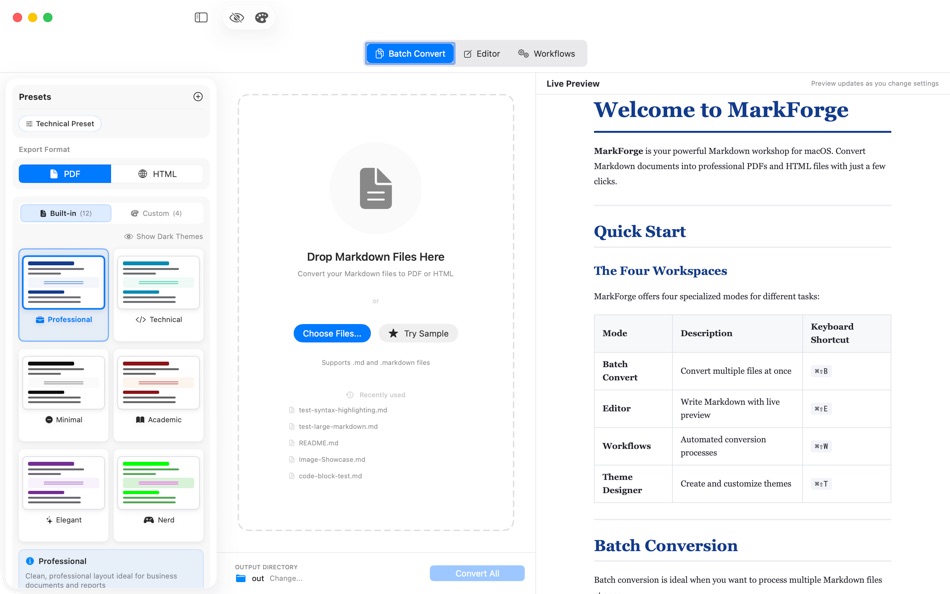
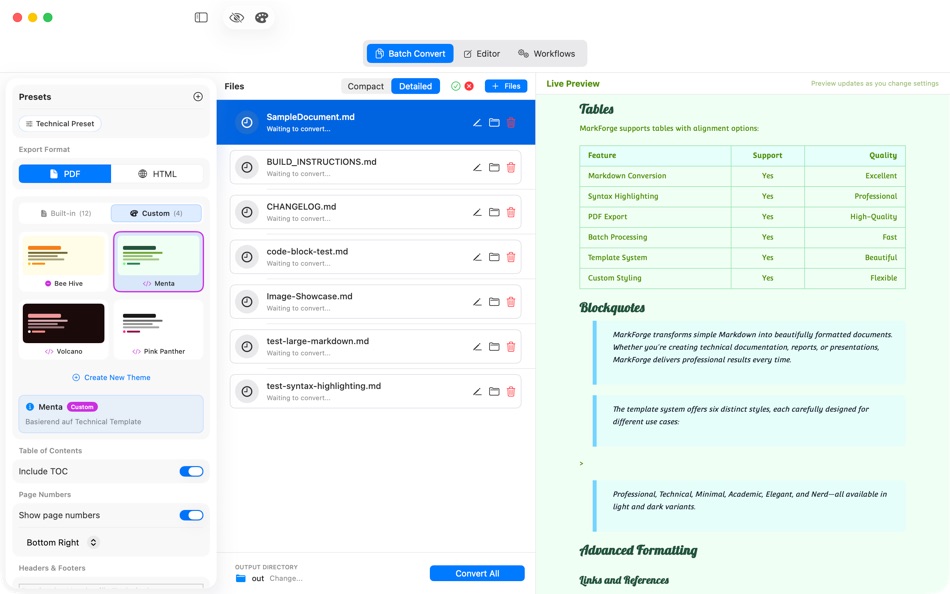
Choose from 12 beautifully designed templates or use your custom themes for unique documents. Tables span multiple pages correctly, code blocks include syntax highlighting for 20+ languages, and headers/footers with page numbers position exactly where they should.
BATCH PROCESSING
Convert multiple Markdown files at once with consistent formatting. Perfect for documentation, reports, or converting entire projects in seconds.
AUTOMATED WORKFLOWS
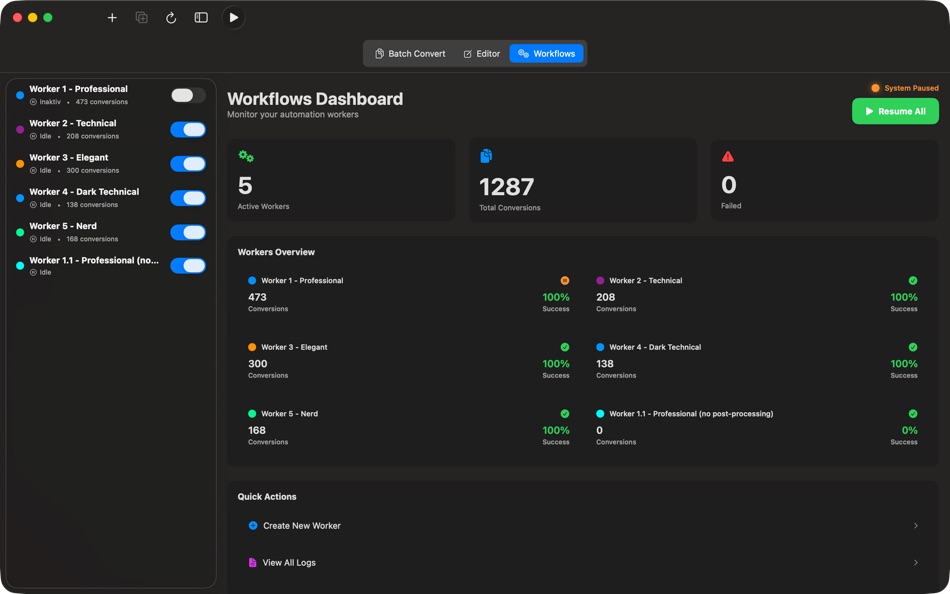
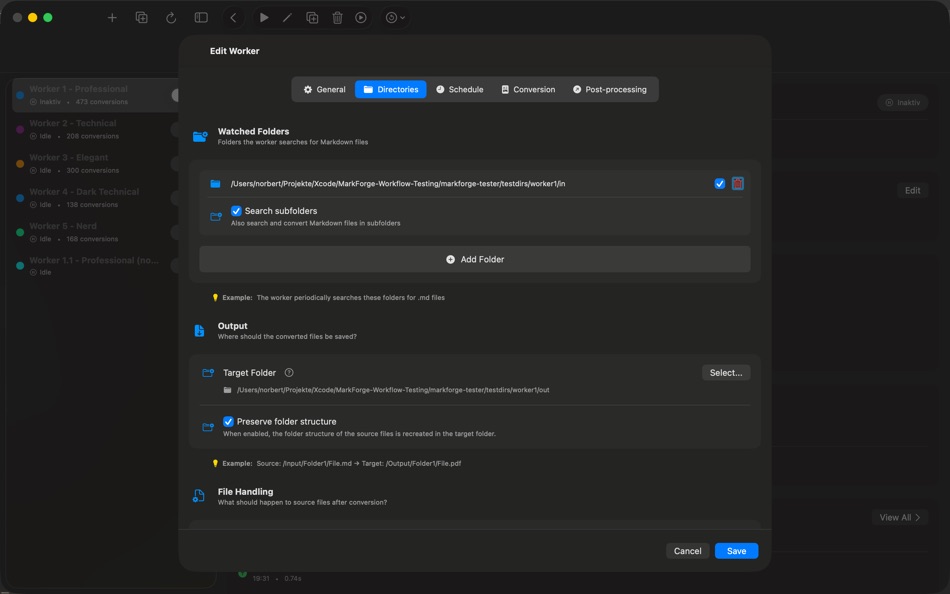
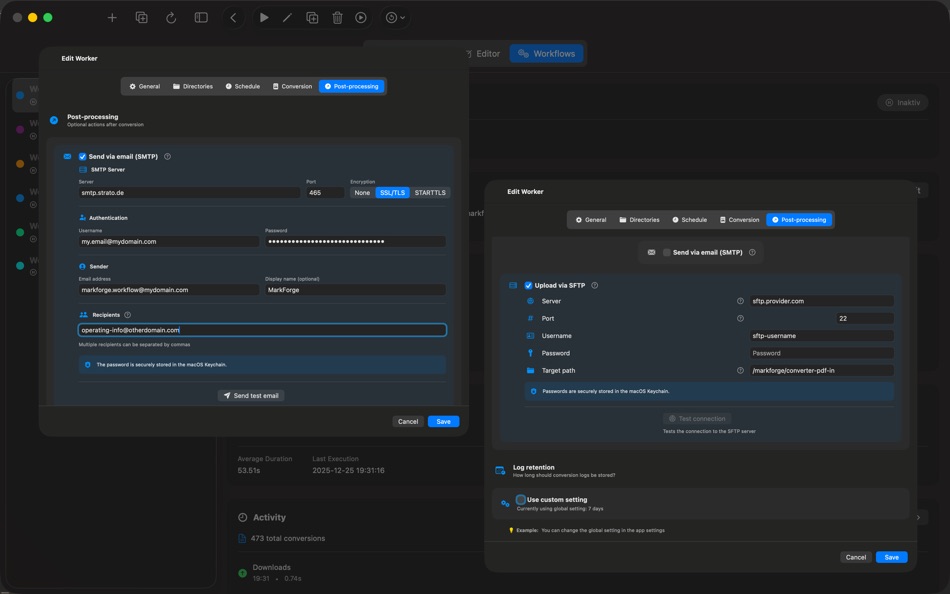
Set up powerful automation with folder watching – new files are detected and converted automatically. Create multiple workers with flexible scheduling for time-based or interval processing. Export results via email or SFTP, and track everything with detailed statistics and logs.
BUILT FOR PROFESSIONALS
Whether you're a developer creating documentation, a writer crafting articles, or a student preparing assignments – MarkForge delivers professional results every time.
HONEST PRICING
One-time purchase at €5.99 (50% off launch price). No subscriptions, no hidden costs, no account required. Buy once, yours forever.
PRIVACY FIRST
Completely offline – your documents never leave your Mac. Native macOS app built with Swift for optimal performance and battery life.
Download MarkForge today and experience the easiest way to create beautiful documents from Markdown.
Ad
Skærmbilleder



Nyheder
- Version: 1.3.0
- Opdateret:
- NEW: THEME DESIGNER
- Create custom themes with intuitive visual editor
- Customize colors: background, text, headings, links, accents
- Typography settings: fonts, sizes, line heights
- Layout options: margins, padding, indentation
- Decorations: borders, code block styling, blockquote bars
- 12 built-in presets as starting points
- Real-time live preview while editing
- Import/Export themes for sharing and backup
- Duplicate themes with one click
- Theme validation with helpful error messages
UI IMPROVEMENTS
- Hover buttons for quick duplicate/delete actions in theme list
- Theme Designer accessible via menu (⌘⇧T) and Welcome dialog
- Improved German localization
BUG FIXES
- Minor stability improvements
Pris
- I dag: $4.99
- Minimum: $4.99
- Maksimalt: $8.99
Overvåg priser
Ad
Udvikler
- Norbert Gutbrod
- Platforme: macOS Apps (2)
- Lister: 0 + 0
- Point: 3 + 0 ¡
- Rangeringer: 0
- Anmeldelser: 0
- Rabatter: 0
- Videoer: 0
- RSS: Abonner
Point
-

- 187 Attila Szucs
- +1
-
- 1,722 sam
- +1


Rangeringer
0 ☹️
Lister
0 ☹️
- MarkForge
Anmeldelser
Vær den første til at gennemgå 🌟
Yderligere oplysninger
- Version: 1.3.0
- Kategori:
macOS Apps›Produktivitet - Operativsystem:
macOS,macOS 15.0 eller nyere - Størrelse:
9 Mb - Understøttet sprog:
English,German - Indholdsklassificering:
4+ - Mac App Store Bedømmelse:
0 - Opdateret:
- Udgivelsesdato:
Kontaktpersoner
- Websted:
 https://markforge.de
MarkForge Kort webadresse: Kopieret!- 🌟 Del
- Mac App Store
Du vil måske også kunne lide
-
- Skitch - Snap. Mark up. Share.
- macOS Apps: Produktivitet Ved: Skitch
- * Gratis
- Lister: 0 + 0 Rangeringer: 0 Anmeldelser: 0
- Point: 0 + 0 Version: 2.9 See something that sparks an idea? Use Skitch to snap it, mark it up, and send it on in an instant. Your bold ideas stand out even brighter with Skitch. People everywhere use Skitch to ⥯
-
- Rocket Calendar
- macOS Apps: Produktivitet Ved: Mark Vitale
- Gratis
- Lister: 0 + 0 Rangeringer: 0 Anmeldelser: 0
- Point: 1 + 0 Version: 1.3 Rocket Calendar is a speedy, always-accessible calendar that lives in your menu bar. You can quickly check dates, navigate between months, and even copy the selected date to your ... ⥯
-
- This week
- macOS Apps: Produktivitet Ved: Mark Cornelisse
- $0.99
- Lister: 0 + 0 Rangeringer: 0 Anmeldelser: 0
- Point: 0 + 0 Version: 1.2.0 What week number is it? Do you always have that question? Don't look any further. The current week number of this year now sits in your menubar. So there is no need to look it up in ... ⥯
-
- scanSort
- macOS Apps: Produktivitet Ved: Mark Butler
- $4.99
- Lister: 0 + 0 Rangeringer: 0 Anmeldelser: 0
- Point: 0 + 0 Version: 1.0.10 scanSort makes scanning double sided documents with only a single sided scanner super easy. Scan the front sides of a documents pages into a PDF document file, turn the document over ... ⥯
-
- LifeTimes2
- macOS Apps: Produktivitet Ved: Mark S. Wall
- $4.99
- Lister: 0 + 0 Rangeringer: 0 Anmeldelser: 0
- Point: 0 + 0 Version: 1.4 (21) The full LifeTimes2 User Manual is in the Help System under the Help Menu LifeTimes2 is a complete rewrite of the original LifeTimes app in Swift. Create Daily Notes Use LifeTimes2 to ... ⥯
-
- Menu Bar Quick Calc
- macOS Apps: Produktivitet Ved: Mark Huber
- $0.99
- Lister: 0 + 0 Rangeringer: 0 Anmeldelser: 0
- Point: 0 + 0 Version: 1.0 Menu Bar Calculator is a lightweight, always-accessible calculator that lives in your Mac's menu bar. Perfect for quick calculations without interrupting your workflow. Features: ... ⥯
-
- PDF Expert – Edit, Sign PDFs
- macOS Apps: Produktivitet Ved: Readdle Technologies Limited
- * $139.99
- Lister: 10 + 13 Rangeringer: 0 Anmeldelser: 0
- Point: 6 + 0 Version: 3.11.1 It s fast and intuitive while effortlessly letting you complete any PDF task. Over 30 million people globally use PDF Expert apps. All the tools you need, done right. PDF Expert is the ⥯
-
- Scrivener 3
- macOS Apps: Produktivitet Ved: Literature & Latte
- $59.99
- Lister: 3 + 11 Rangeringer: 0 Anmeldelser: 0
- Point: 2 + 0 Version: 3.5.2 Typewriter. Corkboard. Scrapbook. Scrivener combines all the writing tools you need to craft your first draft, from nascent notion to final full stop. The biggest software advance for ... ⥯
-
- Floating Clipboard
- macOS Apps: Produktivitet Ved: Ebey Tech LLC
- $1.99
- Lister: 1 + 1 Rangeringer: 0 Anmeldelser: 0
- Point: 21 + 0 Version: 1.0 Features: -Clipboard history. -Auto fetching of clipboard contents (optional). -Float Window above other apps & windows (optional). -Fast & fluid type-based filtering. -Inserted ... ⥯
-
- My Favorites
- macOS Apps: Produktivitet Ved: Wise Tech Labs Private Limited
- $4.99
- Lister: 0 + 3 Rangeringer: 0 Anmeldelser: 0
- Point: 18 + 0 Version: 2.3 Your Favorites at your Fingertips!! My Favorites is an incredibly handy app that allows you to bookmark your files, folders, web bookmarks, apps, text notes and color swatches that you ⥯
-
- Pages 14.5
- macOS Apps: Produktivitet Ved: Apple
- Gratis
- Lister: 4 + 4 Rangeringer: 5 (1) Anmeldelser: 0
- Point: 4 + 0 Version: 14.5 Create gorgeous documents in minutes with the Pages for Mac word processor. Start with an Apple-designed template to instantly create gorgeous reports, digital books, resumes, posters, ⥯
-
- Microsoft OneNote
- macOS Apps: Produktivitet Ved: Microsoft Corporation
- * Gratis
- Lister: 2 + 3 Rangeringer: 5 (1) Anmeldelser: 0
- Point: 3 + 0 Version: 16.106.3 Capture your thoughts, discoveries, and ideas in your very own digital notebook using OneNote for Mac. Now it is easier than ever capture your thoughts, add pictures or files, and ... ⥯
-
- iShot-ScreenShot Recording OCR
- macOS Apps: Produktivitet Ved: 宁波上官科技有限公司
- * Gratis
- Lister: 0 + 1 Rangeringer: 0 Anmeldelser: 0
- Point: 8 + 0 Version: 2.6.5 [Native support for Apple M series and Intel chips] Screenshot/Long Screenshot/Shell Screenshot/Texture/Annotation/Color Picking/Screen Recording/Recording/OCR/Screenshot Translation ... ⥯
-
- PDF to Pages Free
- macOS Apps: Produktivitet Ved: 科 姚
- * Gratis
- Lister: 0 + 1 Rangeringer: 0 Anmeldelser: 0
- Point: 7 + 0 Version: 3.1 Turns your PDF files into iWork Pages quickly and accurately. Work more effectively with PDF to Pages converter. PDF is good for sharing and achievement, but it s never an easy task to ⥯