
| 개발자: | Oyvind Snekkestad (4) | ||
| 가격: | * 무료 | ||
| 순위: | 0 | ||
| 리뷰: | 0 리뷰 작성 | ||
| 댓글: | 0 댓글 게시 | ||
| 목록: | 0 + 0 | ||
| 포인트: | 0 + 0 ¡ | ||
| Mac App Store | |||
기술

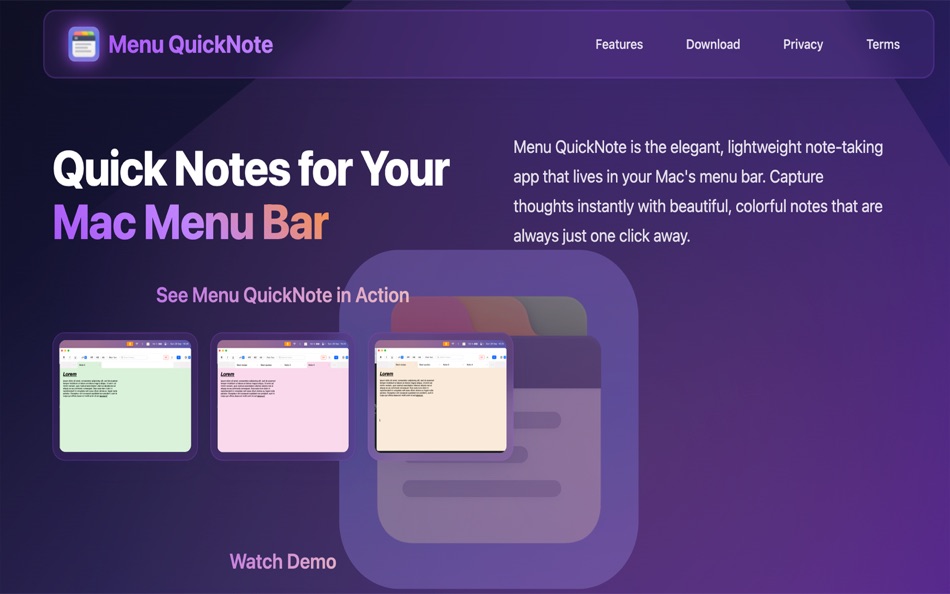
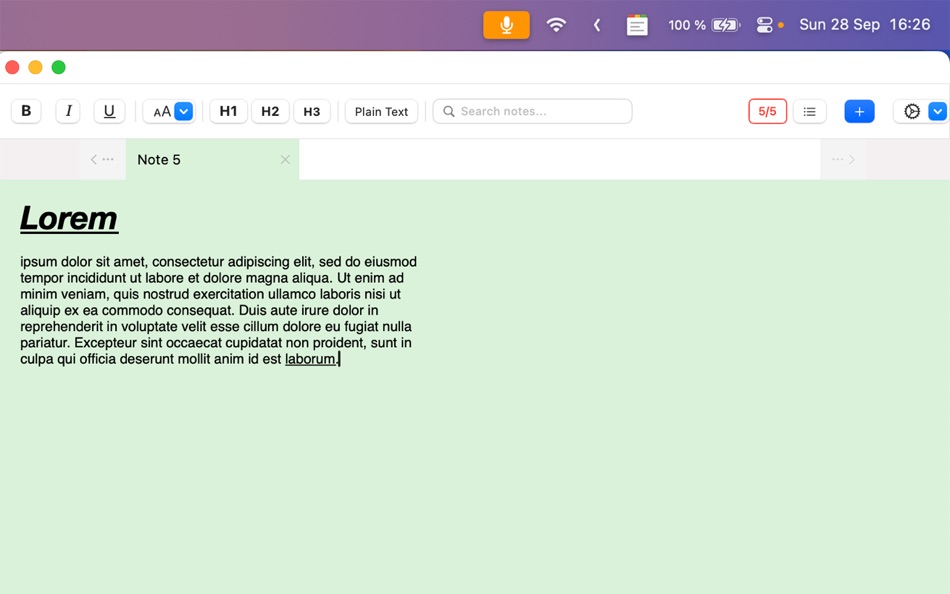
Transform your note-taking experience with Menu QuickNote, the elegant and lightweight app that puts beautiful, colorful notes right in your Mac's menu bar. Capture thoughts, ideas, and reminders instantly without disrupting your workflow.
BEAUTIFUL AND INTUITIVE
- Choose from 8 stunning pastel colors to organize and personalize your notes
- Clean, modern interface that feels native to macOS
- Rich text formatting with custom fonts, sizes, and styling options
- Switch seamlessly between rich text and plain text modes
INSTANT ACCESS
- Always available in your menu bar - no need to open separate windows
- One-click access to all your notes
- Quick note creation and editing
- Tabbed interface for easy navigation between multiple notes
PRIVACY FIRST
- All notes stored locally on your Mac using Core Data
- No cloud sync, no tracking, no data collection
- Complete privacy and control over your information
- Works entirely offline - no internet connection required
POWERFUL FEATURES
- Full keyboard shortcut support including Cmd+A, Cmd+C, Cmd+V, Cmd+X
- Multiple notes with organized tab system
- Import and export functionality with Premium upgrade
- Lightning-fast performance with minimal resource usage
- Runs securely in macOS sandbox environment
SIMPLE PRICING
Start free with up to 5 notes to try all features. When you're ready for more, upgrade to unlimited notes with a simple one-time purchase - no subscriptions, no recurring fees.
PERFECT FOR
- Quick meeting notes and reminders
- Code snippets and documentation
- Daily to-do lists and tasks
- Creative writing and brainstorming
- Research notes and references
- Any text you need instant access to
WHY CHOOSE MENU QUICKNOTE
Unlike complex note-taking apps, Menu QuickNote focuses on what matters most: quick, beautiful, and private note-taking that's always within
reach. No learning curve, no overwhelming features - just elegant simplicity that enhances your productivity.
SYSTEM REQUIREMENTS
- macOS 14.0 or later
- Apple Silicon or Intel processor
- 25 MB available storage space
Download Menu QuickNote today and discover the joy of effortless note-taking that respects your privacy and enhances your workflow.
Ad
스크린샷

가격 내역
-
* 인앱 구매 - 오늘: 무료
- 최소: 무료
- 최대: 무료
가격 추적
Ad
개발자
- Oyvind Snekkestad
- 플랫폼: iOS 앱 (1) macOS 앱 (3)
- 목록: 0 + 0
- 포인트: 0 + 0 ¡
- 순위: 0
- 리뷰: 0
- 댓글: 0
- 할인: 0
- 동영상: 0
- RSS: 구독
포인트 (0)
0 ☹️
순위 (0)
0 ☹️
목록 (0)
0 ☹️
- Menu QuickNote
리뷰 (0)
첫 번째 리뷰를 남겨보세요 🌟
댓글 (0)
가장 먼저 댓글을 남겨주세요 🌟
추가 정보
«Menu QuickNote». 플랫폼: macOS. 카테고리: 생산성. 개발자: «Oyvind Snekkestad». 첫 번째 릴리스: . 마지막 업데이트: . 현재 가격: 무료. 이 타이틀은 아직 AppAgg에서 평가나 리뷰를 받지 못했습니다. 사용 가능한 언어: English. AppAgg는 «Menu QuickNote»의 가격 기록, 평점 및 사용자 피드백을 추적합니다. 향후 할인 및 업데이트 받기: RSS에서 확인할 수 있습니다. AppAgg는 애플리케이션을 호스팅하거나 소프트웨어를 배포하지 않습니다. 모든 상표, 로고 및 스크린샷은 해당 소유자의 자산입니다.
Menu QuickNote 단축 URL: 복사됨!- 🌟 공유하기
- Mac App Store
당신은 또한 같은 수 있습니다
-
- Menu AI: Ask AI in menu bar.
- macOS 앱: 생산성 게시자: INII Co., Ltd.
- * 무료
- 목록: 0 + 0 순위: 0 리뷰: 0
- 포인트: 0 + 0 댓글: 0 버전: 1.2.0 Menu AI - Ask AI in menu bar. Menu AI is a powerful AI chat assistant that lives in your menu bar, providing instant access to both GPT and Claude AI capabilities. With its sleek and ... ⥯
-
- Menu Bar Quick Calc
- macOS 앱: 생산성 게시자: Mark Huber
- $0.99
- 목록: 0 + 0 순위: 0 리뷰: 0
- 포인트: 0 + 0 댓글: 0 버전: 1.0 Menu Bar Calculator is a lightweight, always-accessible calculator that lives in your Mac's menu bar. Perfect for quick calculations without interrupting your workflow. Features: ... ⥯
-
- QuickNote - Stickies in Menu
- macOS 앱: 생산성 게시자: Kauntey Suryawanshi
- * 무료
- 목록: 0 + 0 순위: 0 리뷰: 0
- 포인트: 10 + 0 댓글: 0 버전: 7.1.4 Quick Note is a clutter-free sticky-note utility that lets you quickly write a note with just one click or a shortcut. It's a fast and lightweight menu bar app that is optimized for ... ⥯
-
- Menu Bar Calendar
- macOS 앱: 생산성 게시자: Sindre Sorhus
- 무료
- 목록: 1 + 1 순위: 0 리뷰: 0
- 포인트: 4 + 0 댓글: 0 버전: 1.6.2 Quickly access a monthly calendar from your menu bar. You can click a date in the calendar to reveal it in the Calendar app or Google Calendar. The calendar displays dates and days in ... ⥯
-
- Menu Bar Timer
- macOS 앱: 생산성 게시자: Efe Ertugrul
- $0.99
- 목록: 0 + 0 순위: 0 리뷰: 0
- 포인트: 1 + 0 댓글: 0 버전: 2.4.5 Menu Bar Timer adds a Stopwatch or a Timer to your menu bar so you can keep track of time whatever you've been working on without an extra app icon on your dock. You can choose ... ⥯
-
- Menu bar Launcher
- macOS 앱: 생산성 게시자: Pawan Dixit
- $1.99
- 목록: 1 + 1 순위: 0 리뷰: 0
- 포인트: 1 + 0 댓글: 0 버전: 1.4 This is a simple menu bar utility to keep your frequent Files and Apps right into the menu bar so that you can quickly launch them when you want to work on them without locating then ... ⥯
-
- Menu Bar Reminder: Dojo
- macOS 앱: 생산성 게시자: Florian Schweizer
- 무료
- 목록: 0 + 1 순위: 0 리뷰: 0
- 포인트: 2 + 0 댓글: 0 버전: 1.1 Add a single reminder to your menu bar - always visible. You can enter any text that you'd like to have on the menu bar and it will be shown to you at all times. You can also activate ... ⥯
-
- Menu Mindmap
- macOS 앱: 생산성 게시자: Oyvind Snekkestad
- $1.99
- 목록: 0 + 0 순위: 0 리뷰: 0
- 포인트: 0 + 0 댓글: 0 버전: 1.0.2 Capture and organize ideas instantly from your Mac menu bar. Menu Mindmap keeps everything local on your machine, with a simple one-time purchase no subscriptions, no ads, no tracking. ⥯
-
- Menu Timers - High Precision
- macOS 앱: 생산성 게시자: DevStorm
- 무료
- 목록: 0 + 0 순위: 0 리뷰: 0
- 포인트: 1 + 0 댓글: 0 버전: 1.0 Time your important tasks straight from the menu bar with this utility app! With millisecond precision, any task can be precisely measured. Features always on screen. The app lives in ... ⥯
-
- Menu Bar Hub: work.bench
- macOS 앱: 생산성 게시자: Dimitri Giani
- * 무료
- 목록: 0 + 0 순위: 0 리뷰: 0
- 포인트: 0 + 0 댓글: 0 버전: 1.2 work.bench is the ultimate menu bar utility for macOS that revolutionizes your workflow. Designed exclusively for Mac with a beautiful notch-inspired interface, work.bench brings ... ⥯
-
- Menu Muncher
- macOS 앱: 생산성 게시자: 经纬 宛
- $1.99
- 목록: 0 + 0 순위: 0 리뷰: 0
- 포인트: 0 + 0 댓글: 0 버전: 1.5 Q: How should I use this software? A: After opening the software for the first time, two icons will be generated on the leftmost side of the status bar, please drag the word "吃" (hold ... ⥯
-
- Floating Memo :QuickNote
- macOS 앱: 생산성 게시자: Masaharu Tsukamoto
- $0.99
- 목록: 0 + 1 순위: 0 리뷰: 0
- 포인트: 4 + 0 댓글: 0 버전: 1.0.3 QuickNote is an application that is fixed to the forefront of the screen and allows you to quickly take notes at any time. ⥯
-
- Cool Menu
- macOS 앱: 생산성 게시자: SolutionShare Technologies Private Limited
- $3.99
- 목록: 1 + 0 순위: 0 리뷰: 0
- 포인트: 3 + 0 댓글: 0 버전: 1.57 Cool Menu is an assortment of 10 super useful features that are not available on macOS. Instead of multiple menubar apps for each feature wasting your menubar s precious real estate, ... ⥯
- -25%
- Notepad Menu Edition
- macOS 앱: 생산성 게시자: Solaz Dazen srl
- $2.99
$3.99-25% - 목록: 0 + 1 순위: 0 리뷰: 0
- 포인트: 3 + 0 댓글: 0 버전: 2.0 Write your ideas quickly without disturbing your window setup. Notepad Menu Edition allows you to jot down text fast anywhere, any time. Focus entirely on the text you write with the ... ⥯