
| ผู้พัฒนา: | Nicolo Rava (1) | ||
| ราคา: | $31.00 | ||
| การจัดอันดับ: | 0 | ||
| ความเห็น: | 0 เขียนความเห็น | ||
| รายการ: | 0 + 0 | ||
| แต้มแล: | 0 + 0 ¡ | ||
| Mac App Store | |||
คำอธิบาย

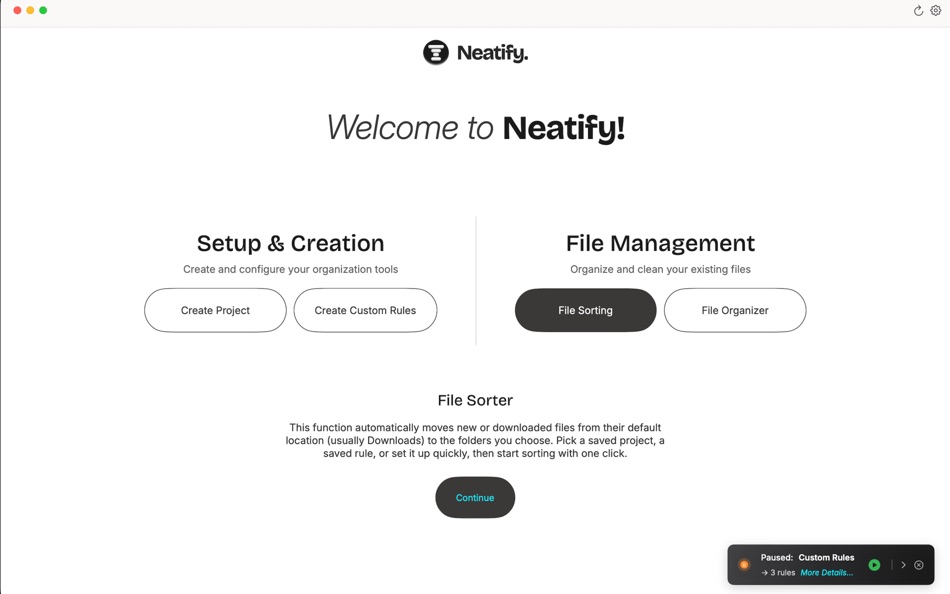
Automatically organize your Mac files without the learning curve. Perfect for students, freelancers, and anyone juggling multiple projects with messy downloads folders.
Automatic File Sorting Made Simple
Create sorting rules in seconds. Your images, PDFs, and documents automatically go to the right folders. No manual sorting. No decision fatigue. Set it once, organized forever.
Key Features:
- Project-based file organization with custom sorting rules
- Auto sort new files by type
- Save and reuse multiple sorting configurations
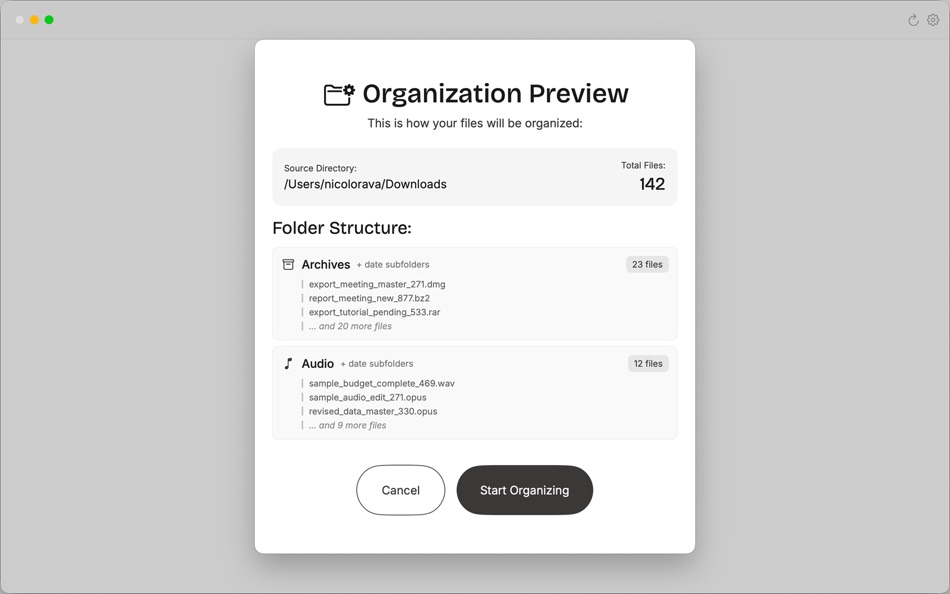
- Quick Organizer to clean up folders with hundreds of mixed files
- Menu bar control for instant access
- Launch at login for 24/7 file automation
Perfect For:
- Organizing messy downloads folders automatically
- Managing files across multiple projects
- Keeping desktop clean and organized
- Freelancers juggling client files
- Students managing class assignments
If you want simple file automation that just works, Neatify is your file organizer solution.
ภาพหน้าจอ



มีอะไรใหม่
- เวอร์ชัน: 1.1
- อัปเดต:
- Improved overall performance and stability.
Fixed a syncing issue where the tracker didn’t update correctly after creating a new project.
ราคา
- วันนี้: $31.00
- ต่ำสุด: $31.00
- มากที่สุด: $31.00
ติดตามราคา
ผู้พัฒนา
- Nicolo Rava
- แพลตฟอร์ม: macOS แอป (1)
- รายการ: 0 + 0
- แต้มแล: 0 + 0 ¡
- การจัดอันดับ: 0
- ความเห็น: 0
- ลดราคา: 0
- วิดีโอ: 0
- RSS: ติดตาม
แต้มแล
0 ☹️
การจัดอันดับ
0 ☹️
รายการ
0 ☹️
ความเห็น
แสดงรีวิวเป็นคนแรกเลย 🌟
ข้อมูลเพิ่มเติม
- เวอร์ชัน: 1.1
- หมวดหมู่:
macOS แอป›ประสิทธิภาพการผลิต - ระบบปฏิบัติการ:
macOS,macOS 14.0 และสูงกว่า - ขนาด:
2 Mb - ภาษาที่สนับสนุน:
English - การจัดประเภทเนื้อหา:
4+ - Mac App Store คะแนนโดย:
0 - อัปเดต:
- วันที่วางจำหน่าย:
Neatify App URL แบบสั้น: คัดลอกแล้ว!- 🌟 แชร์
- Mac App Store
คุณอาจชอบ
-
- Notability: Smarter AI Notes
- macOS แอป: ประสิทธิภาพการผลิต โดย: Ginger Labs
- * ฟรี
- รายการ: 30 + 19 การจัดอันดับ: 5 (2) ความเห็น: 0
- แต้มแล: 28 + 432,207 (4.8) เวอร์ชัน: 15.2.1 Notes that move you forward. The award-winning note-taking app loved by millions is free to download, simple to use, and powerful enough to support your everyday goals. Whether you re ... ⥯
-
- Goodnotes: AI Notes, Docs, PDF
- macOS แอป: ประสิทธิภาพการผลิต โดย: Goodnotes Limited
- ฟรี
- รายการ: 42 + 32 การจัดอันดับ: 0 ความเห็น: 0
- แต้มแล: 32 + 374,392 (4.7) เวอร์ชัน: 7.0.20 Goodnotes has always been the place to capture your ideas from quick notes to big plans. Now, it goes further. With powerful AI and new ways to capture information, Goodnotes helps you ⥯
-
- Structured - Daily Planner
- macOS แอป: ประสิทธิภาพการผลิต โดย: unorderly GmbH
- ฟรี
- รายการ: 4 + 2 การจัดอันดับ: 0 ความเห็น: 0
- แต้มแล: 5 + 149,746 (4.8) เวอร์ชัน: 4.3.12 Finally take control of your day. Plan with a clear visual timeline that brings your calendar, to-dos, routines, and habits together. Join over 1.5 million active planners who feel ... ⥯
-
- AI Chat Assistant – ChatNow
- macOS แอป: ประสิทธิภาพการผลิต โดย: tappz
- ฟรี
- รายการ: 0 + 0 การจัดอันดับ: 0 ความเห็น: 0
- แต้มแล: 5 + 122,340 (4.8) เวอร์ชัน: 5.4.0 ChatNow - Make AI Your Advantage Get more done with ChatNow, the #1 AI assistant designed for busy people. Write emails and reports, check facts, compare products, create images or ... ⥯
-
- Best VPN : Unlimited VPN Proxy
- macOS แอป: ประสิทธิภาพการผลิต โดย: VPN LLC US
- ฟรี
- รายการ: 4 + 1 การจัดอันดับ: 0 ความเห็น: 0
- แต้มแล: 14 + 121,879 (4.6) เวอร์ชัน: 4.042 Best VPN - Unlimited VPN Proxy: Your Privacy Companion Protect your privacy, secure your connection, and surf the internet freely with Best VPN. No sign ups. No logins. One tap to ... ⥯
-
- Calendars: Schedule Planner
- macOS แอป: ประสิทธิภาพการผลิต โดย: Readdle Technologies Limited
- ฟรี
- รายการ: 2 + 0 การจัดอันดับ: 0 ความเห็น: 0
- แต้มแล: 7 + 116,208 (4.7) เวอร์ชัน: 5.37.12 Calendars by Readdle is the all-in-one calendar, task manager, daily planner, and habit tracker seamlessly working across all your Apple devices: Mac, iPhone, iPad, and Apple Watch. ... ⥯
-
- Dashlane Password Manager
- macOS แอป: ประสิทธิภาพการผลิต โดย: Dashlane
- ฟรี
- รายการ: 1 + 1 การจัดอันดับ: 0 ความเห็น: 0
- แต้มแล: 3 + 100,630 (4.8) เวอร์ชัน: 6.2549.0 SECURE YOUR DAILY DIGITAL LIFE - Create a strong, unique password for every account - Share passwords and data securely (instead of over text or email) - Lock down sensitive info and ... ⥯
-
- iLovePDF - PDF Editor & Scan
- macOS แอป: ประสิทธิภาพการผลิต โดย: iLovePDF
- ฟรี
- รายการ: 1 + 0 การจัดอันดับ: 0 ความเห็น: 0
- แต้มแล: 1 + 45,897 (4.8) เวอร์ชัน: 3.12.5 Read, convert, annotate and sign PDF in just a few seconds with this handy document scanner and editor. Boost your productivity with every tool you need to work on the go. PHONE ... ⥯
-
- Authenticator App
- macOS แอป: ประสิทธิภาพการผลิต โดย: 2Stable
- ฟรี
- รายการ: 0 + 0 การจัดอันดับ: 0 ความเห็น: 0
- แต้มแล: 0 + 42,231 (4.6) เวอร์ชัน: 3.39.1 Authenticator App helps you keep your online accounts safe by giving you secure two-factor authentication codes for all your accounts. Key Features of the Authenticator App: - Secure & ⥯
-
- Form for Google Forms
- macOS แอป: ประสิทธิภาพการผลิต โดย: Amad Marwat
- ฟรี
- รายการ: 0 + 0 การจัดอันดับ: 0 ความเห็น: 0
- แต้มแล: 0 + 36,664 (4.8) เวอร์ชัน: 1.8.2 Create, edit, and manage all your Google forms on your iOS, iPhone, iPod or iPad with the free FormApp. With this app you can: Create new forms: Create new forms on your iOS device. ... ⥯
-
- Shapr 3D CAD modeling
- macOS แอป: ประสิทธิภาพการผลิต โดย: Shapr3D Zrt
- ฟรี
- รายการ: 2 + 1 การจัดอันดับ: 0 ความเห็น: 0
- แต้มแล: 7 + 32,340 (4.7) เวอร์ชัน: 5.1011 From design to manufacturing. Teams collaborate with more impact. Instinctive design meets multidevice capability and full interoperability for the ultimate 3D design workflow. All ... ⥯
-
- ScreenZen- Screen Time Control
- macOS แอป: ประสิทธิภาพการผลิต โดย: ScreenZen LLC
- ฟรี
- รายการ: 0 + 0 การจัดอันดับ: 0 ความเห็น: 0
- แต้มแล: 2 + 28,296 (4.8) เวอร์ชัน: 1.2.173 Multiple strategies to reduce your screentime 1. Delay before opening your app: A bit of time before choosing if you need to open your distracting app. You can have the wait time ... ⥯